


 Top Rated Course

We may not have the course you’re looking for. If you enquire or give us a call on +358 942454206 and speak to our training experts, we may still be able to help with your training requirements.
Adobe InDesign VS Microsoft Publisher: A Brief Comparison
The Knowledge Academy 23 January 2026Wondering about the differences between InDesign vs Publisher? Understanding the core features and in-depth understanding of both is highly crucial, amidst the corporate landscape. Read this blog to understand the differences between Adobe InDesign vs Microsoft Publisher while unraveling some of its key features and other key insights.

Training Outcomes Within Your Budget!
We ensure quality, budget-alignment, and timely delivery by our expert instructors.
Table of Contents
When it comes to desktop publishing software, users often compare Adobe InDesign vs Microsoft Publisher as both are popular software for this category. While both serve the purpose of creating visually appealing publications, there are distinct differences between Adobe InDesign and Microsoft Publisher.
According to Enlyft, Adobe InDesign has a market share of 49.66%, and Microsoft Publisher has a share of 17%. Both are popular software and have significant market shares. Further, read this blog to explore the major differences between Adobe InDesign vs Microsoft Publisher and understand which one is better suited for your needs.
Table of Contents
1) What is Adobe InDesign?
2) What is Microsoft Publisher?
3) Adobe InDesign vs Microsoft Publisher: Key Differences
a) Target audience and skill level
b) Typographic control
c) Layout complexity
d) Graphics and image editing
e) File compatibility and output
f) Cost and availability
4) Conclusion
What is Adobe InDesign?
When it comes to professional desktop publishing, Adobe InDesign has been considered the industry standard for a long. It was developed by Adobe Systems and remains one of the most powerful software. It allows designers to create and design various digital and print media forms. These include brochures, magazines, newspapers, flyers, and books.
Moreover, Adobe InDesign offers a comprehensive set of tools and features that enable designers to produce visually stunning layouts with utmost precision and great control. One of the key strengths of Adobe InDesign lies in its robust typographic capabilities, which are important when evaluating the pros and cons Adobe InDesign. It offers efficient and extensive control over text formatting, including some advanced features.
Key examples include character and paragraph styles, hyphenation and justification options, and support for OpenType fonts. With Adobe InDesign Interview Questions, designers can effortlessly craft intricate layouts by utilizing multiple columns, threaded text frames, seamless image placement, and the seamless integration of various visual elements.
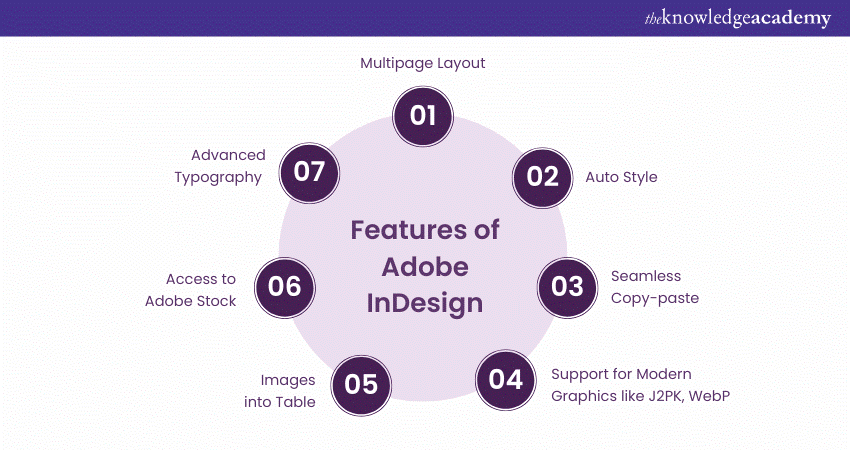
InDesign is also widely renowned for supporting long documents and multi-page publications. It can thoroughly manage large amounts of text and handle intricate page layouts, making it highly suitable for projects such as books, manuals, and catalogues.
The software also provides powerful features like automatic page numbering, table of contents generation, and cross-references, making it seamless to maintain consistency and manage changes throughout lengthy documents.

What is Microsoft Publisher?
Microsoft Publisher is a desktop publishing software program that was developed by Microsoft Corporation in 1991. It is specifically designed for users who want to have an accessible and user-friendly platform for creating various marketing materials. These include brochures, flyers, newsletters, and simple publications.
Microsoft Publisher also offers a range of tools that cater to the needs of small businesses, home users, and individuals who require basic desktop publishing capabilities. If we talk about its key advantages, the most prominent benefit stands as its ease of use or user-friendliness. The software provides interactive and intuitive drag-and-drop functionality, pre-designed templates, and a wide selection of built-in graphics, fonts, and colour schemes for its users.
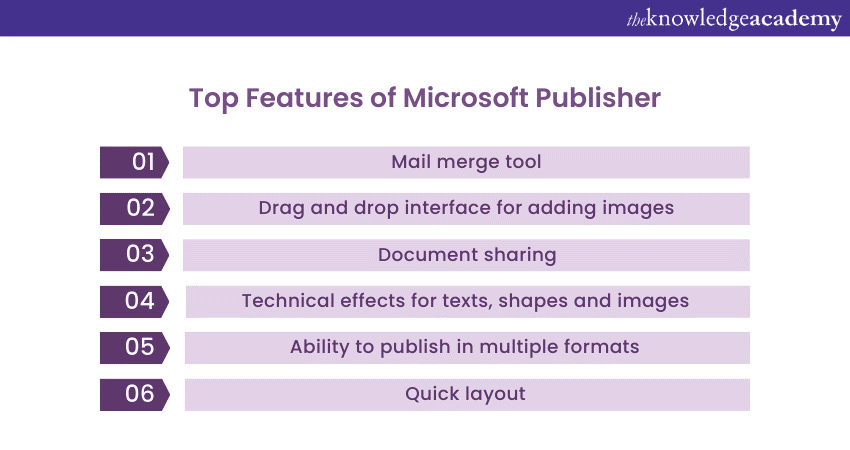
These features make it relatively simple for users who possess little to no design experience to create visually appealing documents without requiring extensive design skills or knowledge.
Microsoft Publisher also offers various design tools for customising layouts, adjusting font styles, and adding images and other visual elements to documents.
Furthermore, when we compare to Indesign, Publisher provides basic text formatting options and limited support for advanced typography. While Publisher may not have the same level of typographic precision as InDesign, it offers enough flexibility for most small-scale design projects.
Unlock your creativity with expert-led Adobe Training. Start mastering Adobe tools today and enhance your skills for the future!
Adobe InDesign vs Microsoft Publisher: Key Differences
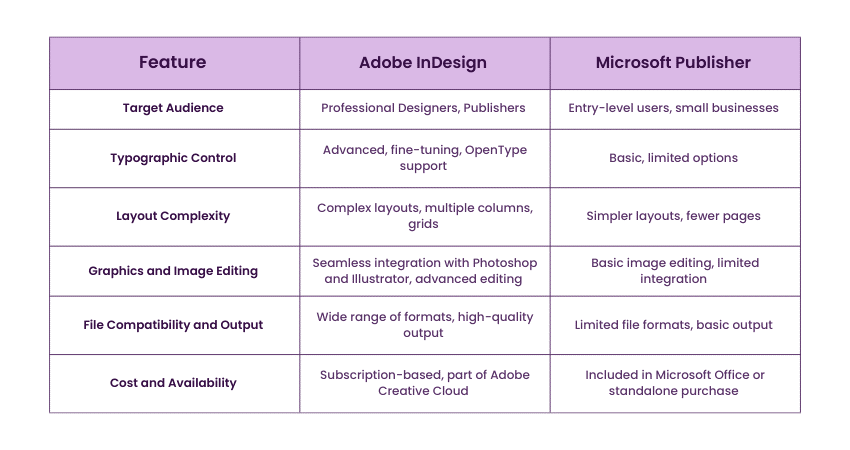
While both Adobe InDesign and Microsoft Publisher are among the prominent desktop publishing software programs, they differ severely in features, capabilities, and target audiences. Below described are the key differences between the two.
1) Target Audience and Skill Level
Adobe InDesign majorly targets professional Graphic Designers, Publishers, and production houses. It caters to those users who require advanced features and tools to create complex and visually stunning layouts. Furthermore, its extensive capabilities make it highly suitable for demanding design projects, including magazines, books, and high-end marketing materials.
On the other hand, Microsoft Publisher targets a more entry-level audience. It is designed to be user-friendly and accessible, which makes it popular choice for small businesses, home users, and individuals needing to create basic marketing materials.
2) Typographic Control
Adobe InDesign is renowned for its comprehensive typographic capabilities. Designers can easily fine-tune text formatting using advanced features such as character and paragraph styles, leading and tracking adjustments, and advanced kerning and tracking options. It also provides extensive support for OpenType fonts, which allows users to leverage a vast library of typographic choices.
In contrast, Microsoft Publisher offers more limited typographic control in comparison to InDesign. Although it provides basic text formatting options such as font selection, size adjustments, and basic paragraph formatting, it lacks the extensive range of advanced typographic features in InDesign.
Learn advanced typography and create stunning illustrations for web, print, video, and more with Adobe Illustrator Training- join now!
3) Layout Complexity
Adobe InDesign is efficient in managing complex layouts consisting of multiple columns, grids, and intricate page designs. It allows you to precisely control elements' positioning and alignment while enabling designers to create sophisticated and visually engaging publications.
Furthermore, its robust layout tools are suitable for projects ranging from magazines and books to manuals. It comprises key features, which include the ability to create master pages, manage text flow across multiple frames, and handle large documents.
Microsoft Publisher, on the other hand, although capable of handling some level of layout complexity, is better suited for simpler designs with fewer pages and less intricate arrangements. Moreover, it provides users with basic layout tools, including creating multiple columns, aligning objects, and adjusting margins and page sizes. For those interested in more advanced design capabilities, understanding key Adobe XD Interview Questions can provide valuable insights into digital design workflows and UI/UX principles.
However, unlike InDesign, Publisher's layout capabilities are more limited, and it may struggle to handle complex design requirements.
4) Graphics and Image Editing
Adobe InDesign is excellent in providing seamless integration with other Adobe Creative Cloud applications like Photoshop and Illustrator. This integration allows designers to import and manipulate graphics, images, and illustrations efficiently directly within their InDesign layouts.
On the other hand, Microsoft Publisher provides basic image editing tools, although it does not have the same level of integration or advanced image manipulation capabilities as InDesign. It also offers options for resizing and cropping images, adjusting brightness and contrast, and applying basic effects.
However, users may need to rely on external image editing software for more complex image editing tasks.
Induce your creative power into images—join our Photoshop Course now!
5) File Compatibility and Output
Adobe InDesign supports various types of file formats, which include industry-standard formats ranging from PDF and EPS to InDesign Document (INDD). It also offers robust export options for print and digital publications to ensure high-quality output. It is widely used in the printing industry, and its precise control over colour management, bleed settings, and preflight checks makes it a reliable choice for professional printing.
However, despite providing options for print and digital output, Microsoft Publisher is generally more limited in terms of file compatibility and export options. Publisher supports standard file formats like PDF, JPEG, and PNG, but it may encounter challenges when handling more complex file formats or specific printing requirements. In these cases, print management solutions can help streamline the process by offering better handling of diverse formats and ensuring compatibility with various printing needs.
6) Cost and Availability
Adobe InDesign runs as part of Adobe's Creative Cloud subscription model, which requires a monthly or annual fee. This subscription-based pricing is suitable for professional users and businesses with advanced design needs. In addition, the subscription model ensures that users receive regular updates and access to the latest features and improvements.
On the other hand, Microsoft Publisher is often included in Microsoft Office suites or available as a standalone purchase. This makes it more accessible and affordable for individual users or small businesses with basic design requirements.
Conclusion
We hope you understood the differences between Adobe InDesign vs Microsoft Publisher. When comparing Adobe InDesign vs Microsoft Publisher, it's crucial to understand your own specific needs and requirements. Adobe InDesign is widely considered as the industry standard for professional graphic designers, especially when you want to Add Fonts to Adobe InDesign and fully utilise its design capabilities. Microsoft Publisher, in comparison, is more user-friendly and suited for basic design needs.
Perfect every photography shot with our leading Lightroom Course- register now!
Frequently Asked Questions
Which Is Better for Professional Publishing: Adobe InDesign or Microsoft Publisher?

Both are equally better. It depends mainly on your individual applications. For professional publishing, Adobe InDesign is a suitable choice for its robust and user-friendly interface and features. If you are aiming for casual or small-scale publishing like flyers, invitations, and newsletters, Microsoft Publisher is a reliable option.
Can I use Templates in Both Adobe InDesign and Microsoft Publisher?
Yes, you can use templates in both Adobe InDesign and Microsoft Publisher. InDesign offers professional, customisable templates for complex designs, while Publisher provides simpler, pre-made templates for quick projects.
What are the Other Resources and Offers Provided by The Knowledge Academy?
The Knowledge Academy takes global learning to new heights, offering over 3,000+ online courses across 490+ locations in 190+ countries. This expansive reach ensures accessibility and convenience for learners worldwide.
Alongside our diverse Online Course Catalogue, encompassing 19 major categories, we go the extra mile by providing a plethora of free educational Online Resources like Blogs, eBooks, Interview Questions and Videos. Tailoring learning experiences further, professionals can unlock greater value through a wide range of special discounts, seasonal deals, and Exclusive Offers.
What is The Knowledge Pass, and How Does it Work?
The Knowledge Academy’s Knowledge Pass, a prepaid voucher, adds another layer of flexibility, allowing course bookings over a 12-month period. Join us on a journey where education knows no bounds.
What are the Related Courses and Blogs Provided by The Knowledge Academy?
The Knowledge Academy offers various Adobe Courses, including the InDesign Course, Adobe Creative Cloud Training, and Lightroom Course. These courses cater to different skill levels, providing comprehensive insights into 20+ Adobe XD Interview Questions and Answers.
Our Office Applications Blogs cover a range of topics related to Microsoft Office tools and productivity software, offering valuable resources, best practices, and industry insights. Whether you are a beginner or looking to advance your Office Applications skills, The Knowledge Academy's diverse courses and informative blogs have got you covered.

The Knowledge Academy


Global Training Provider
The Knowledge Academy is a world-leading provider of professional training courses, offering globally recognised qualifications across a wide range of subjects. With expert trainers, up-to-date course material, and flexible learning options, we aim to empower professionals and organisations to achieve their goals through continuous learning.

Upcoming Office Applications Resources Batches & Dates
Date
 Photoshop Course

 If you wish to make any changes to your course, please


