




We may not have the course you’re looking for. If you enquire or give us a call on +44 1344 203 999 and speak to our training experts, we may still be able to help with your training requirements.
Types of Operating Systems (OS): An Overview
ByLily TurnerLast updated on: 10 October 2026
Explore the diverse world of operating systems in this comprehensive blog. From batch and multiprogramming systems to multitasking and real-time operating systems, discover various OS types, their functionalities and applications in modern computing.
In This Blog
1. An operating system acts as the bridge between computer hardware, software and users.2. OS classifications differ according to how they process tasks, allocate resources and organise computing environments.3. Some systems prioritise efficient CPU and resource utilisation, while others focus on responsiveness or workload distribution.4. Operating system classifications can overlap, meaning one system may support characteristics of several OS types.5. Understanding these differences helps explain why different computing environments require different operating system designs.
An Operating System (OS) manages a computer system’s hardware and software resources and provides essential services that allow applications to run. It performs essential functions such as CPU scheduling, memory management and managing peripheral devices connected to the computer. As computing technology evolved, different types of operating systems emerged to address different processing, resource management and computing requirements.
Operating systems such as Windows, Android, macOS and Linux play an important role across desktop, mobile and other computing environments. These systems can be categorised based on their working methods, functionalities and use cases.
Different Types of Operating Systems
Operating systems have evolved for specific roles over time with the progress of technology. This evolution of operating systems has resulted in the creation of various types, each designed to address unique needs.
Operating systems can be classified in different ways based on how they process tasks, manage resources, organise computing environments and handle timing requirements. These classifications can overlap, so an operating system may fall into more than one category. Here are some common operating system types frequently used in real life:
Trainer’s Insight
Do not treat these OS types as mutually exclusive. A modern operating system can support several characteristics at once, such as multitasking and multiprocessing. Focus on what each classification describes rather than trying to place every OS into a single category.
1) Batch Operating System
Batch OS gets its name from processing multiple jobs that are grouped into batches. In early batch systems, operators grouped jobs with similar requirements into batches for processing. These jobs are collected and processed as batches with little or no direct user interaction during execution.
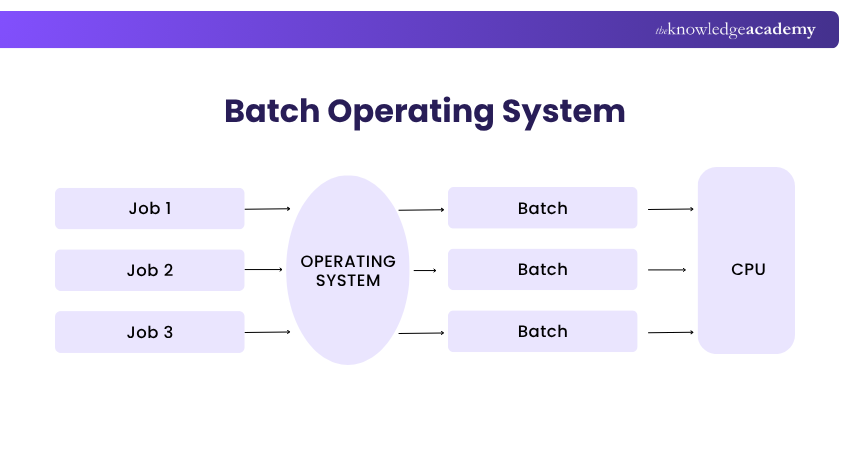
This kind of operating system, which processes tasks in batches, was widely used in early mainframe computing. Jobs that require execution are placed in a queue and processed according to the system’s scheduling policy, which may include First Come First Serve (FCFS). Batch OS was considered a great option for exceptionally time-consuming and lengthy tasks.
a) Benefits of Batch OS: Batch OS can efficiently process large volumes of similar or repetitive jobs with minimal user interaction. It allows multiple jobs to be queued and processed automatically without requiring continuous user intervention. Additionally, it simplifies the processing of large volumes of data and can improve overall resource utilisation.
b) Limitations of Batch OS: While Batch OS has its fair share of advantages, it also has limitations. One limitation of Batch OS is that a long-running job can delay subsequent jobs, particularly when a simple scheduling approach such as FCFS is used. This can increase the waiting time for other jobs in the queue.

2) Multiprogramming Operating System
Multiprogramming operating systems are often considered an extension of batch processing. This OS allows multiple programs to remain in memory while the CPU switches between them, helping to use system resources more efficiently. When one process is waiting for an I/O operation, the CPU can execute another ready process, helping to reduce CPU idle time.
a) Benefits of Multiprogramming OS: Multiprogramming systems improve resource utilisation by keeping multiple programs available for execution. When one process is waiting for I/O, the CPU can switch to another ready process, reducing idle time and potentially improving overall system throughput.
b) Limitations of Multiprogramming OS: Although multiprogramming can improve resource utilisation, managing multiple programs in memory requires effective CPU scheduling, memory management and resource allocation, which can increase system complexity.
Pro Tip
When distinguishing Multiprogramming from Multiprocessing, remember this: Multiprogramming keeps several programs ready so the CPU stays productive, while Multiprocessing uses multiple processors or cores to execute workloads.
3) Multiprocessing Operating System
A Multiprocessing operating system uses two or more processors or processing cores to execute tasks. This can improve processing capacity and allow workloads to be distributed across available processing resources.
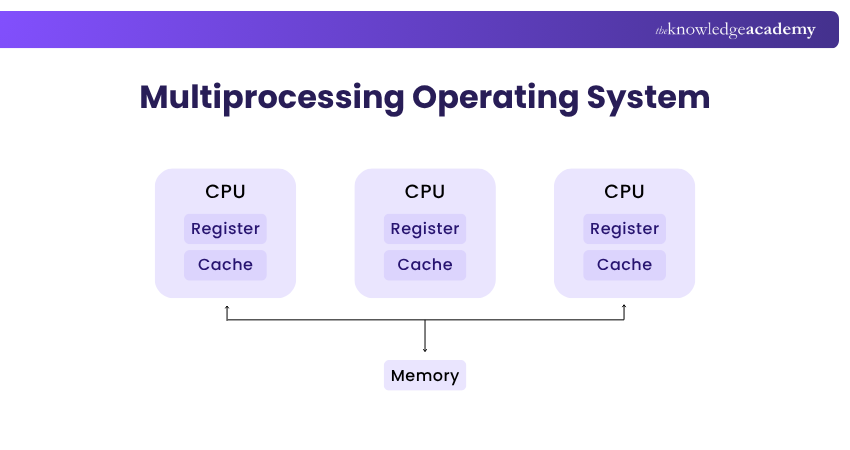
a) Benefits of Multiprocessing System: Multiprocessing systems can provide high throughput by allowing multiple processors or cores to execute workloads in parallel. Some multiprocessing systems can provide greater reliability because workloads may be redistributed if a processor fails, depending on the system architecture.
b) Limitations of Multiprocessing System: Using multiple processors can increase system complexity because the OS must coordinate workloads, memory access and communication across processing resources.
4) Multitasking Operating System
A Multitasking OS allows the processor to switch rapidly between multiple tasks, giving users the impression that several applications are running concurrently. Time-sharing applies a similar approach by allocating processor time among multiple tasks or users. Multitasking has become a standard capability of modern general-purpose operating systems, allowing users to work with multiple applications efficiently.
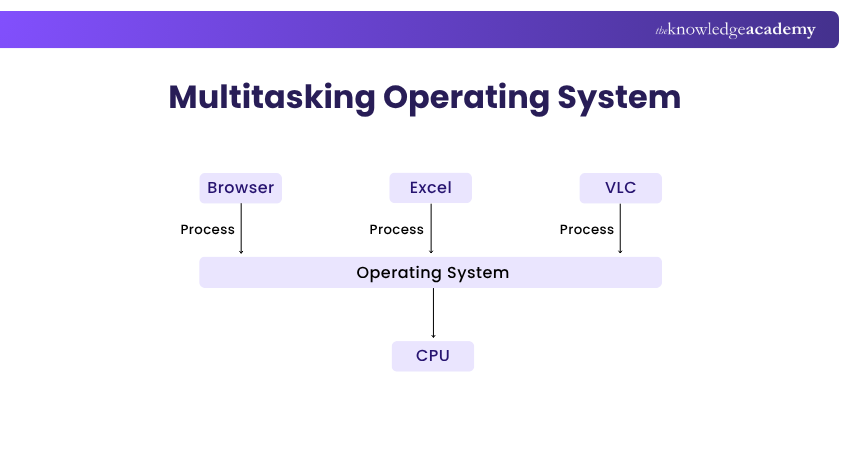
a) Benefits of Multitasking Operating System: Multitasking OS offers several benefits, including efficient allocation of processor time, reduced CPU idle time and improved responsiveness. It allows multiple applications and processes to share system resources efficiently, helping users perform several tasks within the same computing environment. Additionally, effective memory and resource management can help maintain responsiveness while multiple tasks are running.
b) Limitations of Multitasking Operating System: Managing many tasks simultaneously can increase CPU and memory demand, resource contention and scheduling complexity, which may reduce performance when system resources are limited.
Quick Check
Which concept allows a CPU to switch rapidly between multiple tasks to maintain responsiveness?A) Batch processingB) MultitaskingC) Distributed processingD) Real-time processingAnswer: B) Multitasking
Learn how to make a full-stack application using JavaScript MEAN Stack with our MEAN Stack Web Development Training – Join now!
5) Distributed Operating System
A Distributed OS coordinates multiple networked computers and manages their resources to provide a more unified computing environment. Distributed systems commonly use a loosely coupled architecture in which independent computers communicate and coordinate over a network.
A Distributed OS coordinates resources and workloads across multiple connected computers, allowing them to work together to perform tasks. This approach can support resource sharing, workload distribution and coordinated processing across multiple connected systems.
a) Benefits of Distributed Operating System: Depending on its design, a distributed system may continue operating when an individual node fails, which can improve fault tolerance and availability. Distributing workloads across multiple nodes can improve resource utilisation and performance for suitable workloads. Distributed systems can also support scalability by allowing additional computing nodes and resources to be added when needed.
b) Limitations of Distributed Operating System: Although distributed systems can be designed to tolerate individual node failures, network and communication failures can disrupt communication between nodes and reduce service availability or performance. Additionally, distributed environments can involve higher infrastructure and management costs, depending on their scale and complexity. The cost and complexity of managing communication, synchronisation and resource coordination across multiple nodes can make distributed operating environments challenging to design and maintain.
6) Network Operating System
A network operating system is designed to manage network services, users and shared resources across connected computers, and commonly runs on servers. These systems are designed to optimise network resources such as data, users, groups, applications and shared devices.
Unlike a distributed operating system that may present multiple computers as a more unified environment, a network operating system typically allows individual networked computers to retain their own identities while sharing resources and services.
Networked devices like servers, workstations, and printers are commonly managed using Network OS, as it centralises the overall process. This OS enables networked devices to share data, services and resources over a computer network. It streamlines the network administration tasks and ensures networked environments' secure and efficient operation.
a) Benefits of Network Operating System: A Network OS can centralise administration, user management, permissions and security controls, making shared network resources easier to manage from a common location. It can also support remote access to network resources when appropriate connectivity, permissions and security controls are configured.
b) Limitations of Network Operating System: A Network OS requires regular administration, maintenance and security updates to keep network services reliable and secure. Neglecting maintenance can lead to service disruptions, security vulnerabilities or reduced network performance. Setting up and maintaining a Network OS environment can also involve costs for server infrastructure, networking, licensing, administration and ongoing maintenance.
7) Real-time Operating System
A Real-time Operating System (RTOS) is designed to provide predictable responses to events and complete time-critical operations within defined timing constraints. These systems are used in environments where timing is critical, such as military, aircraft control, medical devices, robotics, and industrial automation.
Real-time OS is commonly used for time-sensitive tasks that require predictable responses and may be used in critical scenarios where strict timing requirements must be met. This system is classified into Soft and Hard Real-Time Systems. While both operate under timing constraints, Hard Real-time Systems require critical deadlines to be met, whereas Soft Real-time Systems can tolerate occasional missed deadlines with a reduction in service quality or performance.
a) Benefits of Real-time Operating Systems: Real-time operating systems provide predictable, low-latency responses and deterministic task scheduling, making them suitable for time-critical applications. They can prioritise critical tasks and respond to events within defined timing constraints.
b) Limitations of Real-time Operating Systems: Real-time operating systems are well suited to applications with strict timing requirements but may not be necessary for general-purpose computing. Real-time operating systems require careful task scheduling, resource management and timing analysis to ensure that critical timing requirements are met.
Understand front-end and back-end development with server-side programming with our Web Development Training – Join now!

Lily Turner transforms complex data concepts into structured resources for aspiring and established data professionals. Her writing demonstrates how analytical methods and emerging technologies can be used to investigate problems, generate insights and support informed decisions.
View Detail

 If you wish to make any changes to your course, please


