


 Top Rated Course

We may not have the course you’re looking for. If you enquire or give us a call on +43 720 115337 and speak to our training experts, we may still be able to help with your training requirements.
What is Virtualisation? Explained in Detail
The Knowledge Academy 04 March 2026Virtualisation is a technology that creates virtual versions of computing resources, such as servers, storage, networks, or operating systems. It enables multiple virtual environments on one system, enhancing efficiency, scalability, and resource use. Virtualisation boosts flexibility, cuts costs, and simplifies IT management.

Training Outcomes Within Your Budget!
We ensure quality, budget-alignment, and timely delivery by our expert instructors.
Table of Contents
One machine emulating many - That's the essence of Virtualisation. This technology turbocharges the modern digital landscape by creating virtual versions of physical resources such as servers, storage, and networks. This helps maximise efficiency, scalability, and cost savings. In this blog, we’ll explore What is Virtualisation in detail, covering everything from server Virtualisation to GPU Virtualisation. So, read on and learn how it's reshaping the relationship between business and technology.
Table of Contents
1) What is Virtualisation?
2) History of Virtualisation
3) Why is Virtualisation Important?
4) How Does Virtualisation Works?
5) Types of Virtualisation
6) How is Server Virtualisation Different From Containerisation?
7) Is Virtualisation Safe for PC?
8) Conclusion
What is Virtualisation?
Virtualisation is a core Cloud Computing technology that creates virtual versions of physical resources such as servers, storage, desktops, and networks. It enhances hardware utilisation, reduces costs, and improves operational efficiency.
By enabling server, desktop, storage, and network Virtualisation, businesses can achieve greater flexibility, scalability, and simplified management. This technology optimises IT infrastructure, enhancing efficiency, reducing costs, and transforming how businesses manage and deploy digital resources.
History of Virtualisation
Here's a brief history of Virtualisation:

Why is Virtualisation Important?
Virtualisation is a cornerstone of modern technology, offering multiple benefits. Here's why it's so important:
1) Cost Efficiency: Virtualisation reduces the need for physical hardware. This saves significant money on equipment, maintenance, and energy consumption.
2) Resource Optimisation: It allows for better utilisation of hardware resources by running multiple virtual environments on a single physical machine.
3) Scalability and Flexibility: Virtual Machines can be easily created, modified, or deleted based on demand. This makes scaling infrastructure much easier.
4) Disaster Recovery: Virtualisation simplifies the backup and recovery processes. VMs can be quickly restored or migrated in case of hardware failures.
5) Testing and Development: Developers can test any software in isolated virtual environments without impacting the main system.
6) Ease of Management: Virtual environments can be managed centrally. This streamlines administrative tasks and improves operational efficiency.
How Does Virtualisation Work?
Virtualisation is a transformative technology that operates on the fundamental principle of abstracting physical resources to create virtual instances, allowing for more efficient and flexible computing. At the heart of Virtualisation are Cloud instances or Virtual Machines (VMs) and hypervisors, both playing pivotal roles in reshaping the traditional concept of computing:
Cloud Instances or Virtual Machines

Cloud instances, also known as virtual Machines, are the cornerstone of Virtualisation. A Virtual Machine emulates a complete physical computer, including the Operating System, applications, and associated hardware. This emulation is achieved through the use of hypervisors, which act as a layer between the physical hardware and the Virtual Machines.
Each Virtual Machine operates independently on a shared physical server, creating the illusion of multiple isolated systems coexisting on the same hardware. This allows for significant resource consolidation, as a single server can host numerous Virtual Machines, each running its own unique set of applications and services.
Cloud instances provide several key advantages:
a) Resource Optimisation: Virtualisation allows for the efficient utilisation of physical resources by running numerous Virtual Machines on a single server. Such consolidation results in improved resource efficiency and reduced hardware costs.
b) Isolation and Security: Each Virtual Machine operates in its very own isolated environment, ensuring that applications and processes within one VM do not interfere with those in another. This isolation enhances security and stability, minimising the risk of vulnerabilities spreading across different instances.
c) Flexibility and Scalability: Cloud instances can be quickly provisioned or de-provisioned based on demand. This flexibility enables organisations to scale their computing resources up or down rapidly, responding dynamically to changing workloads.
Hypervisors
At the core of Virtualisation is the Hypervisor, known as a Virtual Machine Monitor (VMM). The hypervisor is designed to manage and allocate the physical attributes of a host machine to multiple Virtual Machines.
There are two types of hypervisors:
a) Type 1 Hypervisor (Bare-metal): This hypervisor operates directly on the hardware, eliminating the need for a host Operating System. With direct control over physical resources, it is typically more efficient than Type 2 hypervisors. Examples include Microsoft Hyper-V Server, KVM, VMware ESX vs. ESXi.
b) Type 2 Hypervisor (Hosted): This hypervisor works on top of a host Operating System and depends on it for Resource Management. While not as performance-optimised as Type 1 hypervisors, Type 2 hypervisors are more user-friendly and easier to set up. Examples include Oracle VirtualBox, VMware Workstation, and Parallels.
Learn how to implement serverless technology with AWS in our comprehensive Serverless Computing With Amazon Web Services Course – Sign up now!
Types of Virtualisation
Below are the 11 types of Virtualisation methods possible for users, ranging from server Virtualisation and network Virtualisation to Linux Virtualisation and Graphics Processing Units (GPU) Virtualisation. Let’s explore them in detail:
1) Server Virtualisation

Server Virtualisation is a transformative IT practice where a physical server gets partitioned into several virtual instances, each operating independently with its own dedicated resources, Operating System, and applications. Here are the key points to remember about server Virtualisation:
a) This kind of Virtualisation improves resource utilisation, reduces hardware costs, and simplifies management.
b) It can host multiple virtual servers on a single physical machine, optimising efficiency.
c) It adapts to varying workloads, enhances scalability, and improves data centre management.
d) It enables scalability, improves disaster recovery and streamlines IT operations.
e) Popular platforms include VMware vSphere, Microsoft Hyper-V, and KVM.
Master the concepts of Virtualisation and Hypervirtualisation through our Introduction to Virtualisation Technologies Course - Sign up now!
2) Network Virtualisation
Network Virtualisation is a revolutionary IT strategy that abstracts networking components, such as switches and routers, creating virtual networks independent of the physical infrastructure.
Remember these points:
a) This innovative approach simplifies Network Management and can adapt to diverse business needs.
b) It improves resource utilisation by isolating and segmenting virtual networks for greater efficiency and security.
c) It facilitates dynamic allocation through seamless configuration and adaptation to changes.
d) It makes sure there's a stable and secure virtual network environment.
e) Key examples of this include VMware NSX and Cisco ACI.
3) Storage Virtualisation
Storage Virtualisation is a groundbreaking technology that abstracts physical storage resources into a unified virtual layer. Consider these key points:
a) This method allows for centralised Storage Management. It improves data mobility and efficient space allocation.
b) It simplifies data management by decoupling logical and physical storage.
c) It reduces any chance of complexity by addressing challenges in heterogeneous storage environments.
d) It streamlines data access across enterprise storage systems.
e) Popular solutions include Dell EMC ViPR, IBM Spectrum Virtualise, and open-source Ceph.
4) Desktop Virtualisation
Desktop virtualisation is a transformative IT solution that extends virtualisation principles to end-user computing. Here are some key points to consider:
a) Virtual desktop instances allow access from different devices.
b) This approach centralises the Desktop Management process, making controlling and updating systems easier.
c) Users can access their virtual desktops remotely. This enables mobility and the convenience of the work-from-anywhere format.
d) Desktop Virtualisation reduces hardware dependency and makes sure software updates are streamlined.
e) It improves data security by centralising sensitive information instead of storing it on individual devices.
f) Technologies such as VMware Horizon, Citrix Virtual Apps and Desktops, and Microsoft Remote Desktop Services are prominent examples.
Understand system architecture with our Linux Fundamentals Course – Register now!
5) Data Virtualisation
Data Virtualisation is an innovative approach that integrates data from diverse sources, providing a unified view without physically moving or copying the data. Consider these points:
a) Cisco Data Virtualisation and Denodo are leading examples of this technology.
b) The Cisco Data Virtualisation suite provides real-time, unified data access.
c) Denodo’s platform connects different data sources seamlessly. This helps with real-time data access and analysis.
d) These solutions optimise the data access process, making sure that businesses can retrieve information efficiently.
e) Data Virtualisation accelerates the analytics process, allowing for faster insights.
f) It creates a more agile and efficient data infrastructure.
6) Application Virtualisation
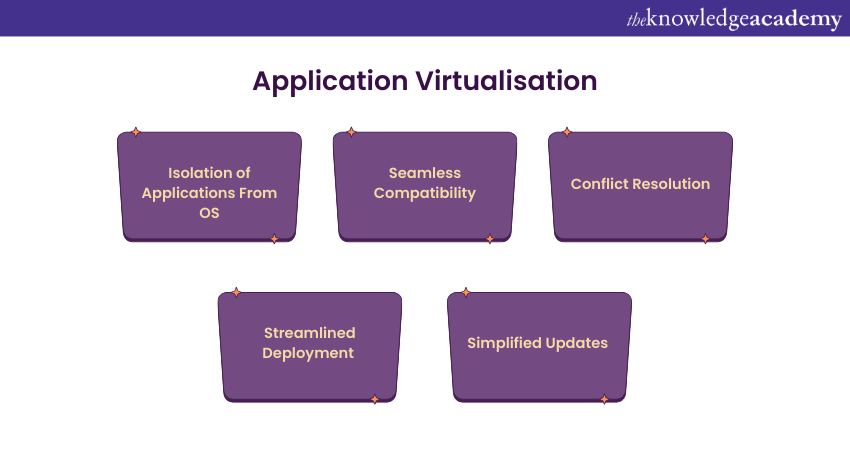
Application virtualisation is an advanced IT practice that isolates applications from the underlying Operating System (OS), enabling seamless compatibility and reducing conflicts. Consider these key points:
a) Applications run in isolated environments improve security and simplify the deployment process.
b) Application Virtualisation makes Software Management more efficient by streamlining the updates.
c) Microsoft App-V, VMware ThinApp, and Citrix Cloud are leading application Virtualisation solutions.
d) This technology enables efficient software deployment and compatibility across diverse environments.
e) By reducing deployment complexities, it improves flexibility and ensures consistent performance.
7) Data Centre Virtualisation
Data centre Virtualisation combines physical resources like servers, storage, and networks into virtual systems. This allows businesses to manage and optimise resources more efficiently.
Consider these key points:
a) VMware vCloud Suite and Microsoft Azure Stack are leading data centre Virtualisation solutions.
b) They provide a unified platform for managing virtualised resources.
c) Data centre Virtualisation streamlines all operations, making IT Management more efficient.
d) It reduces hardware costs by optimising the utilisation of resources.
e) This technology helps you achieve dynamic scaling, thus helping your business adapt to evolving business needs.
f) It forms the backbone of modern agile and scalable IT environments.
Learn to allocate processors and memory to a Virtual Machine by signing up for our Internet of Things IoT Systems and Applications Training now!
8) Linux Virtualisation
Linux Virtualisation refers to the practice of virtualising Linux-based Operating Systems on a single physical server. Here are the key points to consider:

a) Linux Virtualisation enables multiple Linux instances to run simultaneously.
b) It provides significant flexibility and allows organisations to adapt to varying workloads.
c) Kernel-based Virtual Machine (KVM) is a leading open-source solution that leverages the Linux kernel’s Virtualisation capabilities.
d) KVM supports multiple guest Operating Systems.
e) Linux Virtualisation benefits from its open-source nature, making it widely used in IT environments.
f) It's widely used in IT environments, particularly in supercomputing and enterprise infrastructure.
9) Cloud Virtualisation
Cloud Virtualisation forms the backbone of Cloud Computing, allowing for the creation and management of virtual resources in a Cloud environment. This approach includes virtualising servers, networks, and storage to deliver scalable, on-demand services. These are the key points to consider:

a) Cloud Virtualisation is essential for providers such as Microsoft Azure, AWS, and Google Cloud Platform.
b) It helps with dynamic provisioning and de-provisioning of resources.
c) As public Cloud adoption continues to grow, it reflects the increasing reliance on virtualised Cloud environments.
d) This technology accelerates innovation by offering scalable infrastructure for applications and services.
e) Cloud Virtualisation plays a key role in modern computing and drives digital transformation and business agility.
10) CPU Virtualisation
CPU Virtualisation involves creating virtual instances of a computer's central processing unit (CPU), allowing multiple Virtual Machines to share the same physical CPU while operating independently. Consider these key points:
a) Hypervisors such as VMware ESXi, KVM, and Hyper-V help with CPU Virtualisation for optimal resource use.
b) This technology allocates CPU resources quite efficiently, thus improving the server performance.
c) It improves overall resource utilisation and reduces hardware dependency.
d) CPU Virtualisation is essential for creating and managing Virtual Machines.
e) It supports server consolidation, which allows multiple OS instances on a single physical server.
f) This approach underpins diverse applications, from enterprise IT to Cloud Computing.
11) GPU Virtualisation

GPU Virtualisation extends Virtualisation principles to Graphics Processing Units (GPUs), allowing multiple Virtual Machines to share a single physical GPU. Consider these key points:
a) GPU Virtualisation is essential for graphics-intensive applications. This includes virtual desktops and high-performance computing.
b) Solutions like NVIDIA GRID and AMD MxGPU allow the efficient sharing of GPU resources in virtual environments.
c) This technology improves graphics performance and ensures smooth rendering and processing.
d) It helps with parallel processing and improves efficiency in compute-heavy tasks.
e) Industries such as Gaming, CAD, and Machine Learning benefit greatly from GPU Virtualisation.
How is Server Virtualisation Different From Containerisation?
Containerisation helps applications run smoothly on any physical or virtual system by packaging them with everything they need. Unlike server Virtualisation, which creates a full system, containers work like portable boxes, making it easy to move and run applications anywhere without changes.
Is Virtualisation Safe for PC?
Despite its benefits, Virtualisation is not without some challenges as far as a PC is concerned. The challenges include:
1) Security breach in a hybrid network
2) Legacy application support
3) Data loss
4) Ransomware and malware
5) VM sprawl
Conclusion
Virtualisation, across its diverse forms like server, network, and storage Virtualisation, transforms computing paradigms. Virtualisation is the linchpin of modern IT, from optimising resources to streamlining operations. So, understanding the concept of What is Virtualisation offers organisations insights into ways to maintain scalability, efficiency, and innovation. This is the key to reshaping the digital landscape for a dynamic future.
Gain insights about telemetry, object storage and shared file systems in our Linux OpenStack Administration Training - Sign up now!
Frequently Asked Questions
How is Virtualisation Different from Cloud Computing?

Virtualisation creates virtual versions of hardware like servers, storage, and networks. Cloud Computing uses Virtualisation, among other technologies, to deliver computing resources on demand as a service.
What is an Example of Desktop Virtualisation?
An example of desktop Virtualisation is VMware Horizon. Other popular examples include Citrix Virtual Apps and Desktops and Microsoft Azure Virtual Desktop.
What are the Other Resources and Offers Provided by The Knowledge Academy?
The Knowledge Academy takes global learning to new heights, offering over 3,000+ online courses across 490+ locations in 190+ countries. This expansive reach ensures accessibility and convenience for learners worldwide.
Alongside our diverse Online Course Catalogue, encompassing 17 major categories, we go the extra mile by providing a plethora of free educational Online Resources like Blogs, eBooks, Interview Questions and Videos. Tailoring learning experiences further, professionals can unlock greater value through a wide range of special discounts, seasonal deals, and Exclusive Offers.
What is The Knowledge Pass, and How Does it Work?
The Knowledge Academy’s Knowledge Pass, a prepaid voucher, adds another layer of flexibility, allowing course bookings over a 12-month period. Join us on a journey where education knows no bounds.
What are Related Courses and Blogs Provided by The Knowledge Academy?
The Knowledge Academy offers various Advanced Technologies Courses, including the Introduction to Virtualisation Technologies Course, Virtual Reality (VR) Training, and 5G Wireless Training. These courses cater to different skill levels, providing comprehensive insights into Top 10 Benefits of Virtualisation for Organisations.
Our Advanced Technology Blogs cover a range of topics related to Virtualisation, offering valuable resources, best practices, and industry insights. Whether you are a beginner or looking to advance your Virtualisation knowledge, The Knowledge Academy's diverse courses and informative blogs have got you covered.

The Knowledge Academy


Global Training Provider
The Knowledge Academy is a world-leading provider of professional training courses, offering globally recognised qualifications across a wide range of subjects. With expert trainers, up-to-date course material, and flexible learning options, we aim to empower professionals and organisations to achieve their goals through continuous learning.

Upcoming Data, Analytics & AI Resources Batches & Dates
Date
 Introduction to Virtualisation Technologies
Introduction to Virtualisation Technologies
Fri 10th Jul 2026
Introduction to Virtualisation Technologies
Fri 9th Oct 2026

 If you wish to make any changes to your course, please


