


 Top Rated Course

We may not have the course you’re looking for. If you enquire or give us a call on +27 800 780004 and speak to our training experts, we may still be able to help with your training requirements.
Web Acceleration: Definition, Types, and Benefits
The Knowledge Academy 22 April 2026Web Acceleration enhances website performance by optimising content delivery, minimising load times, and improving user experience with caching and compression. It ensures smoother browsing, faster access to data, and reduced bounce rates. By keeping sites reliable, it helps businesses stay competitive in this digital world.

Training Outcomes Within Your Budget!
We ensure quality, budget-alignment, and timely delivery by our expert instructors.
Table of Contents

Think of the internet as a busy highway. Millions of vehicles (data) rush to reach their destinations (users). Without the right system, traffic jams are inevitable. That’s where Web Acceleration acts like an express lane, cutting congestion, speeding delivery, and ensuring a smooth journey every time. It helps websites perform at their best, no matter how much traffic they handle.
This blog will take you through the world of Web Acceleration, exploring how it works, why it matters, and how it’s reshaping digital experiences for both businesses and individuals alike. Buckle up, it’s time to hit the fast lane of the internet!
Table of Contents
1) What is Web Acceleration?
2) Types of Web Acceleration
3) How Does Web Acceleration Work?
4) Web Acceleration Elements
5) Web Acceleration Benefits
6) Web Acceleration Best Practices
7) Conclusion
What is Web Acceleration?
Web Acceleration is the process of making websites load faster for users by improving how data is delivered over the internet. Instead of just relying on the server to send information, Web Acceleration uses special tools and techniques to reduce delays, speed up page loading, and create a smoother browsing experience.
When a user clicks on a website, their device requests data from a server. Without optimisation, this process can be slowed down by factors like large file sizes, long distances between the user and the server, or heavy traffic on the network.
Web Acceleration solves these problems by applying methods such as caching, compression, load balancing, and Content Delivery Networks (CDNs). In simple terms, it acts like a fast lane on the internet, and it makes sure that users get content quickly, reliably, and efficiently.

Types of Web Acceleration
Web Acceleration is achieved through different techniques; each designed to remove delays and make websites faster. Some of the most common and effective types include:
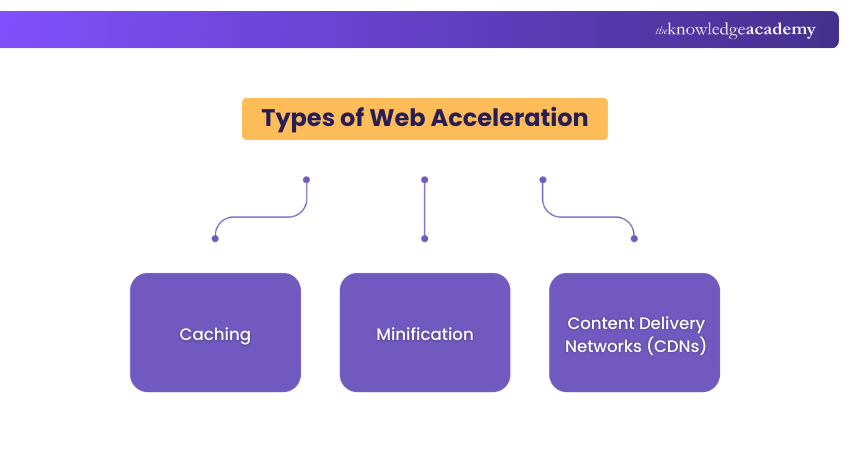
1) Caching
Caching speeds up websites by storing copies of frequently accessed content, such as web pages, images, or scripts, either on the user’s device or on nearby servers. This avoids repeated requests to the origin server, reducing load times and bandwidth use. It’s especially effective for high-traffic sites, ensuring faster, more reliable performance for returning visitors.
2) Minification
Minification improves performance by cleaning up website code. It removes unnecessary characters from HTML, CSS, and JavaScript files like extra spaces, line breaks, and comments. This reduces file sizes, allowing browsers to download and process content faster. It’s particularly important for mobile users with limited bandwidth, ensuring a smooth, lightweight browsing experience.
3) Content Delivery Networks (CDNs)
A CDN distributes website content across a network of global servers. Instead of every user connecting to the origin server, data is served from the closest location, reducing latency and improving load speed. CDNs also balance heavy traffic, reduce downtime risk, and provide consistent website performance worldwide.
How Does Web Acceleration Work?
Web Acceleration uses a combination of technologies and methods to reduce delays, shrink data size, and optimise how content is delivered to users. Below are the key techniques that make websites load faster and perform better:
1) Caching
Caching stores copies of frequently accessed content so it doesn’t need to be fetched from the origin server every time. This reduces load times and server strain and ensures faster responses.
Types Include:
a) Browser Caching: Saves static files like images, CSS, and JavaScript on a user’s device for faster repeat visits.
b) Server-side Caching: Stores pre-rendered pages or database outputs, reducing the need for repeated real-time processing.
c) Edge Caching: CDNs cache content on servers near users, cutting down long-distance data transfers.
Don’t just use technology - Master it with Introduction to Networking Training today!
2) Compression
Compression reduces the size of files before sending them over the internet and makes downloads quicker and saves bandwidth.
Common Compression Methods are:
a) GZIP: A lossless method widely used to shrink text-based files such as HTML, Cascading Style Sheets (CSS) and JavaScript by up to 70–90%.
b) Brotli: A modern algorithm with even better compression rates than GNU ZIP, reducing file sizes by an additional 15–20% for compatible browsers and servers.
3) Minification
Minification makes code leaner by removing unnecessary characters like spaces, comments, and line breaks without affecting how it works.
Types of Minification:
a) HTML Minification: Cleans out unused elements to cut file sizes by 10–20%.
b) CSS Minification: Shortens syntax, consolidates rules, and removes unused styles, reducing file sizes by 20–30%.
c) JavaScript Minification: Strips non-essential code and may obfuscate it, achieving reductions of 30–50%.
4) Image Optimisation
Images often make up the bulk of a webpage’s size. Optimising them ensures faster loading without sacrificing quality.
Key Techniques Include:
a) Format Selection: Using modern formats like WebP, which can be 25–35% smaller than Joint Photographic Experts Group (JPEG) or Joint Photographic Experts Group (PNG).
b) Resizing: Scaling images to fit display dimensions instead of loading oversized files.
c) Compression: Applying lossy or lossless compression to reduce size like cutting a 1MB JPEG down to 200KB.
5) Lazy Loading
Lazy loading prioritises what’s needed first and delays the rest until necessary.
Examples of Lazy Loading:
a) Images: Only load when they come into the user’s view, reducing initial load times by 20–50% on image-heavy pages.
b) Scripts: Non-critical JavaScript files load after the main content, avoiding render-blocking delays.
6) Protocol Optimisation
Modern communication protocols make data transfer more efficient and reduce delays.
Enhancements Include:
a) HyperText Transfer Protocol (HTTP)/2: Allows multiple requests and responses on a single connection, cutting latency by up to 30%.
b) HTTP/3 (QUIC): Eliminates head-of-line blocking and performs better on unstable networks, speeding loads by 10–15%.
c) TLS 1.3: Reduces connection setup time by streamlining the encryption handshake.
Start Optimising Your Web Servers - Join our NGINX Training today for better results!
7) Content Delivery Networks (CDNs)
CDNs distribute content across a global network of servers, ensuring users connect to the nearest server instead of a distant origin.
Functions of CDNs:
a) Geographic Optimisation: Routes traffic to the closest server, reducing latency.
b) Traffic Distribution: Balances loads across servers to avoid bottlenecks during high traffic.
c) Redundancy:Provides backup routes so content remains available even if one server fails.
Web Acceleration Elements
Web Acceleration is made up of several key elements that work together to improve site performance. Each one focuses on cutting delays, reducing heavy data, and ensuring smooth delivery of content. Here are some of them:
1) Data Reduction
Data reduction decreases the amount of information that needs to be transferred between server and browser.
a) Uses compression techniques like GZIP and Brotli to shrink file sizes.
b) Employs caching to avoid sending duplicate requests.
c) Improves performance for mobile users and low-bandwidth connections.
2) Image Refinement
Images often account for most of a page’s size, so refining them is crucial for speed.
a) Converts to modern formats such as WebP for smaller, high-quality files.
b) Resizes images to fit display dimensions and avoid oversized downloads.
c) Applies compression to reduce file sizes while maintaining visual quality.
3) Code Efficiency
Efficient coding ensures the website loads quickly and runs smoothly.
a) Minifies code by removing unnecessary spaces, comments, and characters.
b) Eliminates unused CSS and scripts, reducing unnecessary load.
c) Optimises JavaScript and CSS to prevent slow rendering and improve responsiveness.
Learn the basics of IT support with our IT Fundamentals Training – Join today!
Web Acceleration Benefits
Web Acceleration boosts website speed and reliability by reducing load times and optimising content delivery. It enhances user experience, increases engagement, and supports business growth.
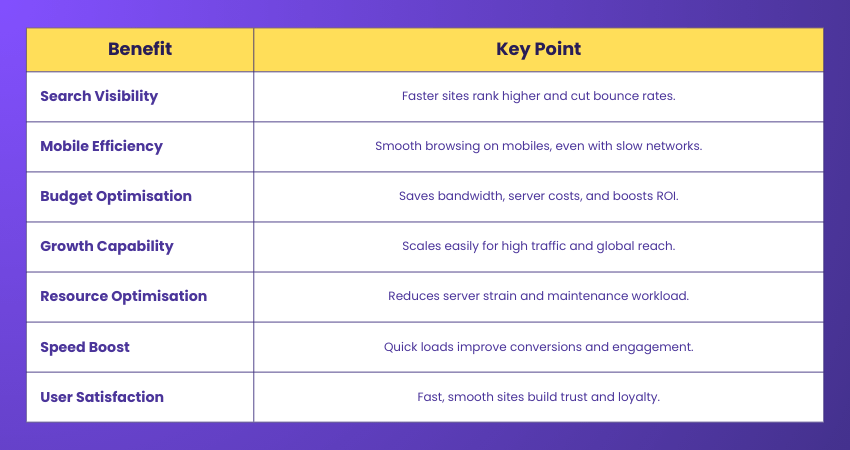
1) Search Visibility
Fast websites are favoured by search engines, leading to better rankings and visibility. Speed reduces bounce rates and keeps visitors engaged, which boosts SEO performance. The quicker a site loads, the more likely it is to appear higher in results, driving consistent organic traffic growth.
2) Mobile Efficiency
Web Acceleration ensures mobile users enjoy smooth browsing, even on slower networks. By reducing data usage and optimising content for smaller screens, it improves accessibility for users on limited plans.
3) Budget Optimisation
Optimised websites save money by cutting bandwidth and server costs. By reducing file sizes and streamlining requests, businesses need fewer resources to maintain performance. This efficiency prevents overspending on infrastructure and ensures better return on investment.
4) Growth Capability
Accelerated websites scale easily to handle more traffic and prevent downtime during peak periods. Whether during seasonal sales or global expansions, speed ensures reliability. Consistent performance builds user trust, supports international reach, and helps businesses grow.
5) Resource Optimisation
By reducing server strain, Web Acceleration makes infrastructure more efficient. It frees IT teams from constantly solving speed issues. Efficient resource use enhances stability, lowers maintenance needs, and keeps websites performing at their best with less effort from teams.
6) Speed Boost
The most immediate benefit is faster page loading. Quick sites reduce frustration, keep users engaged, and improve conversions. Speed is especially critical for e-commerce checkouts, live content, or time-sensitive services where every second matters.
7) User Satisfaction
When websites load quickly and run smoothly, users are happier. A positive browsing experience encourages visitors to stay longer, return frequently, and recommend the brand to others. This trust and satisfaction build loyalty, increase engagement, and directly contribute to higher customer retention rates.
Web Acceleration Best Practices
Following best practices ensures that Web Acceleration delivers consistent, long-term results. Two of the most important practices are hosting optimisation and performance tracking.
1) Hosting Optimisation
a) Choose reliable hosting providers with strong uptime and fast servers.
b) Use cloud-based or dedicated hosting to reduce latency and handle higher traffic.
c) Pair hosting with a CDN for global speed and availability.
d) Regularly review hosting performance to avoid server bottlenecks.
2) Performance Tracking
a) Use monitoring tools to track load times, server response, and user behaviour.
b) Detect bottlenecks early with real-time analysis.
c) Audit caching, compression, and image optimisation regularly.
d) Continuously refine strategies to sustain speed as traffic increases.
Conclusion
Web Acceleration makes the internet faster and smoother. It reduces waiting time, improves browsing, and helps businesses give users a better online experience. From streaming to shopping, it makes every activity quicker and easier. Picking the right web accelerator keeps websites efficient, reliable, and ready to meet the growing needs of today’s digital world.
Advance your career path by learning top IT advancements – Sign up for IT Support and Solution Training today
Frequently Asked Questions
What is a Web Acceleration Client?

A Web Acceleration client is a software or tool that speeds up access to websites by optimising data delivery. It reduces load times through caching, compression, and efficient routing, ensuring faster browsing, smoother streaming, and improved overall user experience.
How Long do Web Accelerators Last?
The lifespan of a Web Accelerator depends on technology, usage, and updates. Most last several years if regularly maintained. However, performance may decline as websites evolve, requiring upgrades or replacements to ensure fast, reliable browsing and continued compatibility.
What are the Other Resources and Offers Provided by The Knowledge Academy?
The Knowledge Academy takes global learning to new heights, offering over 3,000+ online courses across 490+ locations in 190+ countries. This expansive reach ensures accessibility and convenience for learners worldwide.
Alongside our diverse Online Course Catalogue, encompassing 17 major categories, we go the extra mile by providing a plethora of free educational Online Resources like Blogs, eBooks, Interview Questions and Videos. Tailoring learning experiences further, professionals can unlock greater value through a wide range of special discounts, seasonal deals, and Exclusive Offers.
What is The Knowledge Pass, and How Does it Work?
The Knowledge Academy’s Knowledge Pass, a prepaid voucher, adds another layer of flexibility, allowing course bookings over a 12-month period. Join us on a journey where education knows no bounds.
What are the Related Courses and Blogs Provided by The Knowledge Academy?
The Knowledge Academy offers various IT Support and Solution Training, including the Introduction to Networking Training, Boomi Training and the Samba Server Training. These courses cater to different skill levels, providing comprehensive insights into Web Hosting.
Our IT Infrastructure & Networking blogs cover a range of topics related to Web Acceleration, offering valuable resources, best practices, and industry insights. Whether you are a beginner or looking to advance your Networking skills, The Knowledge Academy's diverse courses and informative blogs have got you covered.

The Knowledge Academy


Global Training Provider
The Knowledge Academy is a world-leading provider of professional training courses, offering globally recognised qualifications across a wide range of subjects. With expert trainers, up-to-date course material, and flexible learning options, we aim to empower professionals and organisations to achieve their goals through continuous learning.

Upcoming IT Infrastructure & Networking Resources Batches & Dates
Date
 Nginx Web Server Administration Training
Nginx Web Server Administration Training
Fri 25th Sep 2026
Nginx Web Server Administration Training
Fri 4th Dec 2026

 If you wish to make any changes to your course, please


