


 Top Rated Course

We may not have the course you’re looking for. If you enquire or give us a call on 44 1344 203 999 and speak to our training experts, we may still be able to help with your training requirements.
How to Insert Data in SQL: The Beginners Guide
Lily Turner 15 July 2026It's important to learn how to use SQL's INSERT INTO statement to add data to tables, populate single or multiple columns, and handle NULL values effectively. Without the ability to insert data, databases would be static and useless for tracking changes. Effective data insertion helps ensure that the database remains current.

Training Outcomes Within Your Budget!
We ensure quality, budget-alignment, and timely delivery by our expert instructors.
Table of Contents

Are you just getting started with SQL and wondering how to add data to your tables? We've got you covered! Think of SQL as your digital filing system, and inserting data is like filling out the forms. Learning how to insert data in SQL is one of the first and most essential steps for anyone starting with databases. In this blog, we’ll walk you through the basics of inserting data in SQL, with simple examples and clear explanations to help you get started with confidence. So read on and bring your database to life!
Table of Contents
1) Introduction to SQL Data Insertion
2) Inserting Data Manually
3) Inserting Data Automatically
4) Basic Syntax of the INSERT Statement
5) Insert Data Into Multiple Columns
6) How do You Insert Existing Data in SQL?
7) How to Insert Data From Another Table in SQL?
8) Conclusion
Introduction to SQL Data Insertion
Structured Query Language (SQL) is used to manage and interact with databases. One of the most essential things you can do with SQL is insert new data into a table. This involves adding new rows to store information such as customer details, orders or test results. Data insertion is key in systems that constantly update, like online shops or hospitals.
In SQL, data is stored in tables, which are similar to spreadsheets. Each row can be a record, and each column holds a different type of information. To add data, you use the INSERT statement. This command instructs the database on where to place the new data, which columns to fill and what values to insert. Depending on your requirements, the command can be very simple or more complex, with multiple values to match.

Inserting Data Manually
The general syntax for inserting data in SQL looks like this:

To illustrate, you can run the following INSERT INTO statement to load the officeEmployees table with a single row of data:

Here are the points to remember:
1) This statement begins with the INSERT INTO keywords, followed by the table name where you want to insert the data.
2) Then you’ve got a list of the columns into which the statement will add data, wrapped in parentheses.
3) After the column list, there’s the VALUES keyword, followed by a set of values.
Inserting Data Automatically
When default values and auto-increment features are set up in a table, SQL can insert data with minimal input. This makes data entry quicker and reduces errors. Consider this example:

In this example, each new employee automatically gets a unique empID, and the role defaults to 'Staff' unless specified. So, only the name column needs to be inserted manually. Here’s the output you'd get after running the SQL statements:
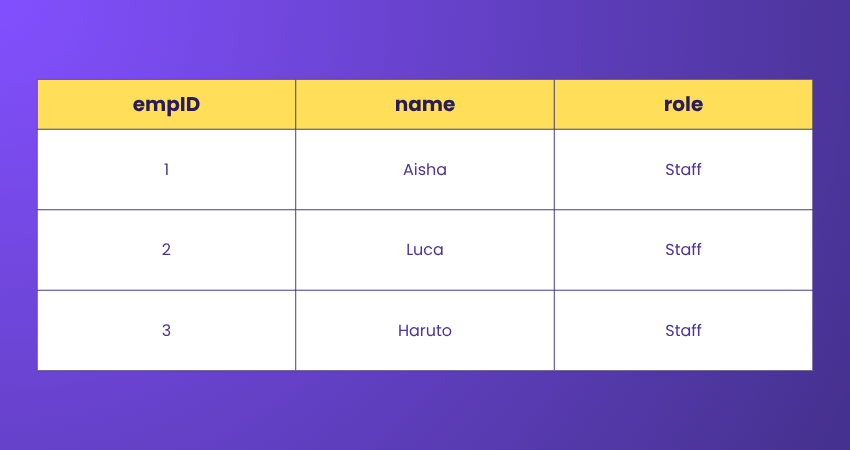
Here are the key points:
1) empID is auto-incremented which means it fills itself starting from 1.
2) role is set to 'Staff' by default, so even though we didn’t insert it manually, SQL fills it in.
3) Only the name column is provided in the INSERT query.
Level up on your skills in database performance optimisation and data integrity! Register for our PostgreSQL Administration Training now!
Basic Syntax of the INSERT Statement
The INSERT statement among the Basic Structure of SQL Queries looks like this:

1) table_name: This is the name of the table where you want to insert data.
2) column1, column2, …: These are the names of the columns in the table that you want to fill with data.
3) value1, value2, …: These are the values corresponding to the columns that you want to insert.
If you’re inserting values for all the columns of the table, you don’t need to specify the column names, but the values must be in the same order as the columns in the table.
Let's look into different methods to Insert Data in SQL:
Insert Data Into a Single Column
To insert data into a single column in SQL, you would use the INSERT INTO statement and specify only the column you want to fill with data. Here’s the basic syntax for inserting data into one column:

a) table_name: This is the name of the table where you want to insert data.
b) column_name: This is the name of the column in the table that you want to fill with data.
c) value: This is the value you want to insert into the specified column.
Transform raw data into powerful stories, the SQL way! Sign up for our comprehensive SQL Server Reporting Services (SSRS) Course now!
Insert Data Into Multiple Columns
To insert data into multiple columns in SQL, you use the INSERT INTO statement and specify the columns you want to fill with data, along with their corresponding values. Here’s how you do it:

Use the VALUES Clause
The VALUES clause in SQL is used to provide a set of values for each column when inserting data into a table. It’s part of the INSERT INTO statement and is essential for specifying the data that you want to add to the table. Here’s the basic syntax:

a) table_name: This is the name of the table where you want to insert data.
b) column1, column2, …: These are the names of the columns in the table that you want to fill with data.
c) value1, value2, …: These are the values corresponding to the columns that you want to insert.
The VALUES clause can also be used to insert numerous rows in a single statement by giving multiple sets of values, each set enclosed in parentheses and separated by commas:

This will insert three new rows into table_name. It’s a convenient way to add multiple rows of data efficiently.
Additionally, the VALUES clause can be used to create a derived table within a SELECT statement or as part of the USING clause in a MERGE statement. This allows for more complex operations, like combining data from multiple sources or performing conditional updates and inserts.
Insert Data Into Specific Columns
To insert data into specific columns of a table in SQL, you use the INSERT INTO statement with the specified column names and their corresponding values. Here’s the syntax:

a) table_name: This is the name of the table where you want to insert data.
b) column1, column2, …: These are the names of the columns you want to insert data into.
c) value1, value2, …: These are the values for the specified columns.
Insert Data Into Multiple Rows
In SQL, to insert data into multiple rows, you can incorporate the INSERT INTO statement with multiple sets of values. Here’s the general syntax for inserting multiple rows at once:

This allows you to insert data into specific columns for multiple rows. This allows you to insert data into specific columns for multiple rows. If you’re inserting values for every column in the table, you can avoid the column names and use:

Make sure the order of the values corresponds to the order of the columns in the table. This method is efficient and widely used for bulk data entry.
Insert Data with NULL Values
In SQL, inserting data with NULL values is straightforward. You use the keyword NULL to represent a missing or unknown value in a column. Here’s an example of how to insert rows with NULL values:

In this example, NULL is used without quotes to indicate that the value for that column should be set to NULL. It’s important to ensure that the columns you are inserting NULL into are defined to allow NULL values in your database schema.
Remember, NULL represents the absence of a value and is different from a zero value or a field that contains spaces. It’s used when the actual value is unknown or not applicable.
Dive into MySQL and start speaking the language of databases! Our Introduction to MySQL Course will show you how - Sign up now!
How do You Insert Existing Data in SQL?
To insert existing data into an SQL database, you typically use the INSERT INTO statement. The basic syntax is:

How to Insert Data in SQL From Another Table?
You can copy data from one table into another table through the INSERT INTO SELECT statement. This comes in handy when moving or replicating data from one table to another without manually typing all the data. Here's the syntax for inserting all columns from another table:

Conclusion
Mastering the art of data insertion in SQL is a crucial step towards effective Database Management. By understanding the syntax and concepts behind How to Insert Data in SQL INSERT statements, you can unlock the ability to add new data to your tables seamlessly. Whether you’re using SQL, SQL Server, or any other SQL-based platform, these skills remain invaluable.
Want to master the power behind the query? Sign up for our Advanced SQL Training and become a database pro!
Frequently Asked Questions
What is an SQL Server?

SQL Server is a widely-used Relational Database Management System created by Microsoft. It uses Transact-SQL, a variant of SQL, for database interactions. SQL Server supports various Data Management and Business Intelligence tools, and it’s available on Windows and Linux platforms.
What are the Features of the INSERT INTO Statement?
The INSERT INTO statement is a feature in SQL used to insert new records into a table. It can specify both column names and values, or just values if inserted into all columns. It also supports inserting multiple rows with one statement and auto-increment fields.

Lily Turner


Senior AI/ML Engineer and Data Science Author
Lily Turner is a data science professional with over 10 years of experience in artificial intelligence, machine learning, and big data analytics. Her work bridges academic research and industry innovation, with a focus on solving real-world problems using data-driven approaches. Lily’s content empowers aspiring data scientists to build practical, scalable models using the latest tools and techniques.
View Detail

 If you wish to make any changes to your course, please


