


 Top Rated Course

We may not have the course you’re looking for. If you enquire or give us a call on +61 1-800-150644 and speak to our training experts, we may still be able to help with your training requirements.
What is a Computer Worm: Types, Examples and Prevention
John Davies 25 February 2026A Computer Worm is a type of self-replicating malware designed to spread across devices without user interaction, often consuming bandwidth or corrupting data. This blog explores What is a Computer Worm, how worms differ from other malware, their history, impact on systems, and the best practices to defend against them.
Home
 Resources
IT Security & Data Protection
What is a Computer Worm: Types, Examples and Prevention
Resources
IT Security & Data Protection
What is a Computer Worm: Types, Examples and Prevention
Resources
IT Security & Data Protection
What is a Computer Worm: Types, Examples and Prevention

Training Outcomes Within Your Budget!
We ensure quality, budget-alignment, and timely delivery by our expert instructors.
Table of Contents

Computer Worms are silent, fast-moving threats that spread without asking for permission. One moment everything seems normal, and the next, systems slow down, files change, and networks become overloaded. Understanding What is a Computer Worm is key to protecting our digital world and gauging its frailties.
Essentially, unlike other malware, worms thrive on speed and invisibility. So a deeper insight into What is a Computer Worm is crucial for everyone, be it a casual internet surfer or a seasoned Cyber Security expert. This blog will help you out in that regard. So read on and learn practical ways to prevent worms before they cause widespread damage!
Table of Contents
1) Definition of a Computer Worm
2) How Does a Computer Worm Work?
3) Types of Computer Worm
4) Computer Worm Examples
5) How to Tell If Your Computer Has a Worm?
6) How to Remove a Computer Worm?
7) How to Prevent Computer Worm Infections?
8) What's the Difference Between a Worm and a Virus?
9) Conclusion
Definition of a Computer Worm
A Computer Worm is a type of malware that can self-replicate and spread from one system to another without user interaction once it has compromised a device. Worms commonly spread through network connections, such as the internet or local area networks, enabling rapid propagation across multiple systems.
Worms are often associated with Trojan Horse malware. A Trojan relies on deception and social engineering to trick users into executing malicious software, often by appearing legitimate. A worm is considered a form of Trojan because it typically uses similar deceptive techniques to gain initial access before spreading automatically.

How Does a Computer Worm Work?
A computer worm works by automatically spreading itself across networks without needing user interaction. It exploits security vulnerabilities in operating systems or software to replicate and infect other devices.
a) Self Replication: Creates copies of itself without attaching to a host file
b) Exploits Vulnerabilities: Targets security weaknesses in systems or networks
c) Spreads Automatically: Moves across devices through email, networks, or file sharing
d) Consumes System Resources: Slows down systems and networks by overloading them
e) Delivers Malicious Payloads: May install malware, steal data, or create backdoors
Types of Computer Worm
There are several types of adversarial Computer Worms; the following are some of the important types of Computer Worms:
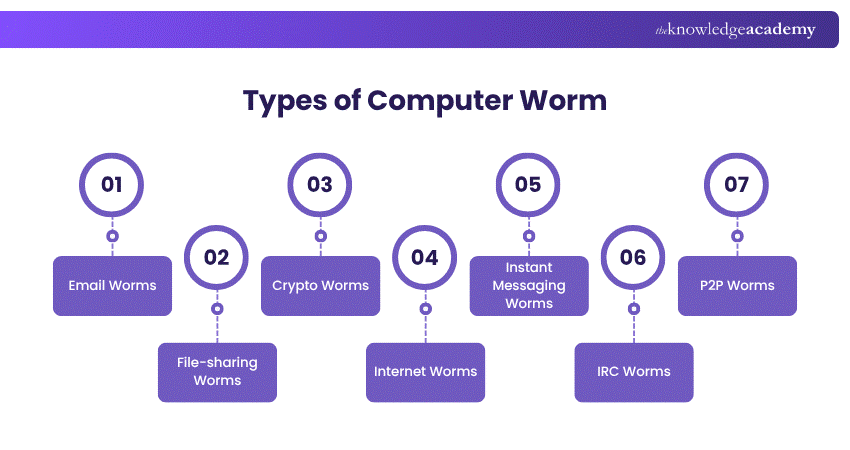
1) Email Worms
Also called mass-mailer worms, they propagate by sending copies of themselves (whether as email attachments or malicious links). Upon opening the file or clicking on the link, a worm will activate, and it will have access to contacts of the recipient to continue spreading.
2) File-sharing Worms
Since file-sharing worms allow infected users to hide behind the guise of real media files, they are shared in filesharing aids. Once the file is downloaded by a user, the worm turns the device into an evil server that may accumulate personal data or credentials to be used or sold.
3) Crypto Worms
Crypto worms are like ransomware. They spread through systems, encrypt files of users, and then request that decryption key be returned by payment, typically in cryptocurrency. These worms can lock down entire networks if not contained.
4) Internet Worms
This category of Computer Worms has the specific purpose of targeting widely used websites with weak Cyber Security measures. The goal of these worms is to infiltrate the website's system, which then allows them to spread to any computer that has accessed the site and infect them as well.
5) Instant Messaging Worms
The worms sent by Instant Messaging Worms exploit an instant messaging program and social media by spitting off impersonation links or files sent by a trusted source. They are usually filled with clickbait, making a user unintentionally infect himself or herself and share it with others.
6) IRC Worms
Internet Relay Chat (IRC) Worms spread into chat rooms or forums through the vulnerability of IRC clients. They transmit virulent links or move orders to the people and propagate at high-speed using real-time chats.
7) P2P Worms
P2P Worms take advantage of peer-to-peer file-sharing programs by assuming the form of desirable downloadable content. After being downloaded, they multiply through shared folders and also linked users, so infection becomes widespread even without the knowledge of the user.
Join our Computer Forensics Foundation Training and enhance the skills of digital investigation – sign up now!
Computer Worm Examples
The history of Computer Worms dates back over fifty years, with the inaugural worm, Creeper, emerging in 1971. Although not designed to be harmful, Creeper set the stage for subsequent impactful worm attacks. Here’s a refined overview of some notable worms:
1) Morris (1988)
Created by MIT student Robert Morris, this worm unintentionally overloaded 6,000 UNIplexed Information Computing System (UNIX), leading to crashes and damages up to £8 million.
2) Mydoom (2004)
Targeting Windows systems, Mydoom became one of the fastest-spreading worms, causing an estimated £30 billion in damages. It persists, accounting for a significant portion of malicious emails.
3) Storm Worm (2007)
Storm Worm was carried by emails with eye catching headlines like 230 killed as storm swept Europe which even fooled the user into clicking. After activation, it infected systems, making them a botnet to send spam and attack computers with millions of computers.
4) ILOVEYOU (2000)
ILOVEYOU was a love letter worm which made itself known as a love letter, also called the Love Bug. It hit more than 50 million devices within two weeks of its outbreak and resulted in clean-up and recovery costs which amount to about 12 billion pounds.
5) Conficker
Also referred to as Downup or Kido, Conficker exploited vulnerabilities in Microsoft Windows to spread rapidly. It infected millions of computers across more than 100 countries. It disrupted networks worldwide and demonstrated how unpatched systems can be compromised at a massive scale.
6) Code Red
Code Red was a widespread Computer Worm that emerged in 2001, infecting more than 300,000 systems. It targeted Microsoft IIS web servers and generated massive traffic from compromised machines, even overwhelming high-profile websites such as that of the White House.
Advance your career with our Digital Forensics Training – register today and dive into comprehensive modules and practical exercises.
How to Tell If Your Computer Has a Worm?
Several warning signs can indicate a worm infection, including unexpected loss of hard drive space and noticeable system slowdowns.
Common indicators of a Computer Worm include:
1) Reduced Hard Drive Space: Worms replicate themselves, consuming storage and causing space to fill up unexpectedly.
2) Slow System Performance: As worms use system resources to spread, devices may become sluggish or unresponsive.
3) Unexplained File Changes: New files may appear, or existing files may be altered or deleted without user action.
4) Firewall Alerts or Changes: Worms may disable firewalls or open unauthorised ports to create backdoors.
5) Abnormal System Behaviour: Applications may open or close on their own, or the system may behave unpredictably.

How to Remove a Computer Worm?
Organisations must have a clear incident response plan to address worm attacks, as worms can spread extremely quickly. Proper response planning enables faster action during an attack, helping to limit damage and speed up recovery. Take these steps to remove a Computer Worm:
1) Disconnect from the Internet: Immediately disconnect affected systems from the internet to prevent the worm from spreading or communicating with external sources.
2) Run a Full Antivirus Scan: Run a full antivirus scan using up-to-date security software to detect worm-related infections.
3) Remove or Quarantine Infected Files: Follow antivirus recommendations to delete or isolate malicious files and prevent further harm.
4) Run Additional Anti-malware Scan: Perform a secondary scan with an anti-malware tool to identify threats that may have been missed.
During the recovery process, organisations must take the following steps:
1) Contain the Threat: Isolate compromised systems to stop the worm from spreading to other devices or networks.
2) Assess the Impact: Identify all affected systems, user accounts, and data to understand the full extent of the infection.
3) Recover and Secure Systems: Remove the infection by eradicating the worm from affected devices, securing compromised user accounts, and restoring systems using clean, verified backups.
How to Prevent Computer Worm Infections?
Protecting your devices from Computer Worms involves combining reliable security tools with safe online behaviour. Here are some key measures to help prevent Computer Worms:
1) Use Reliable Security Software: Anti-malware and Cyber Security tools can detect, block, and remove worms, viruses, and Trojans, offering continuous protection.
2) Keep Systems and Applications Updated: Regular updates and patches close security gaps that worms commonly exploit.
3) Be Cautious With Unsolicited Emails: Avoid opening unexpected attachments or links, and scan files before downloading.
4) Avoid Clicking Pop-up Adverts: Pop-ups may contain malicious links that trigger worm downloads.
5) Download Only From Trusted Sources: Stick to reputable websites and platforms when downloading software or files to minimise exposure to malicious content.
Sign up for our comprehensive Cyber Security Risk Management Training and empower yourself with the knowledge to safeguard your digital assets.
What's the Difference Between a Worm and a Virus?
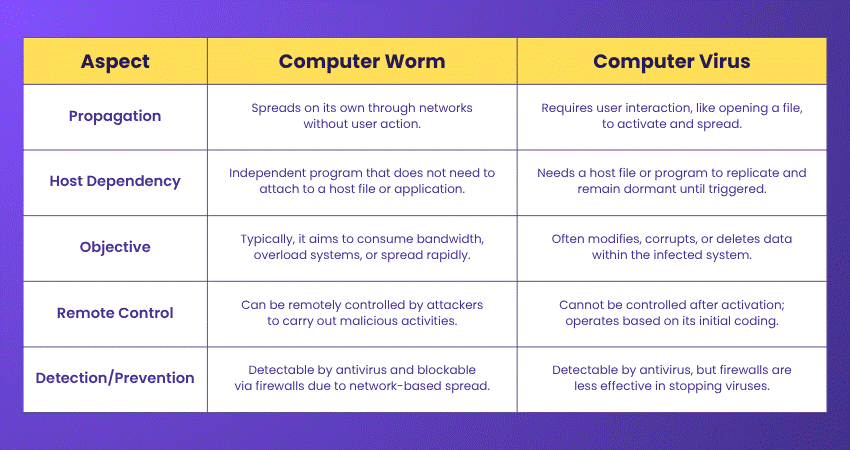
Although worms as well as viruses are kinds of malware, the most important distinction is how they propagate and act. A worm spreads on its own without the need of a host and user attention, unlike a virus. This makes worms more independent, and they could be quicker in creating widespread damage.
Conclusion
Computer Worms may be small in size, but their impact can be enormous. By understanding What is a Computer Worm, how they spread, recognising real-world examples, and applying strong prevention practices, individuals and organisations can stay one step ahead. In Cyber Security, awareness is your first defence against threats that move faster than you expect.
Master the techniques to thwart Cyber-attacks with our Malware Analysis Training – secure your spot now!
Frequently Asked Questions
Do Computer Worms Still Exist?

Yes, Computer Worms still exist and remain a serious threat. While Cyber Security has improved, hackers continue to create new worms that exploit system vulnerabilities. They spread through networks, emails, and USB drives, causing data breaches and system slowdowns. Staying updated and using security tools helps prevent infections.
Are Computer Worms Harmful?
Yes, Computer Worms can be very harmful. They spread quickly, consuming system resources and slowing down devices. Some worms steal sensitive data, disrupt networks, or install other malware. Others create security gaps that hackers can exploit. Preventing worms with strong Cyber Security measures is crucial to keeping your system safe.
What are the Other Resources and Offers Provided by The Knowledge Academy?
The Knowledge Academy takes global learning to new heights, offering over 3,000+ online courses across 490+ locations in 190+ countries. This expansive reach ensures accessibility and convenience for learners worldwide.
Alongside our diverse Online Course Catalogue, encompassing 17 major categories, we go the extra mile by providing a plethora of free educational Online Resources like Blogs, eBooks, Interview Questions and Videos. Tailoring learning experiences further, professionals can unlock greater value through a wide range of special discounts, seasonal deals, and Exclusive Offers.
What is The Knowledge Pass, and How Does it Work?
The Knowledge Academy’s Knowledge Pass, a prepaid voucher, adds another layer of flexibility, allowing course bookings over a 12-month period. Join us on a journey where education knows no bounds.
What are the Related Courses and Blogs Provided by The Knowledge Academy?
The Knowledge Academy offers various Cyber Security Trainings, including the Cyber Security Awareness Course, Cyber Security Risk Management Course, and Social Engineering Training. These courses cater to different skill levels, providing comprehensive insights into Internet Security.
Our IT Security & Data Protection Blogs cover a range of topics related to Computer Worms, offering valuable resources, best practices, and industry insights. Whether you are a beginner or looking to advance your IT Security & Data Protection skills, The Knowledge Academy's diverse courses and informative blogs have got you covered.

John Davies


Cyber Security Governance & Assurance Specialist
John Davies is a cybersecurity expert specialising in governance, risk management, and compliance. With over 15 years in the field, he has led enterprise-wide security programmes across finance, healthcare and public sector organisations. His content provides practical guidance on building secure environments, managing risk and aligning with regulatory frameworks.

Upcoming IT Security & Data Protection Resources Batches & Dates
Date
 Certified Cyber Security Professional (CCS-PRO)
Certified Cyber Security Professional (CCS-PRO)
Fri 28th Aug 2026
Certified Cyber Security Professional (CCS-PRO)
Fri 25th Sep 2026

 If you wish to make any changes to your course, please


