


 Top Rated Course

We may not have the course you’re looking for. If you enquire or give us a call on +44 1344 203999 and speak to our training experts, we may still be able to help with your training requirements.
What is a Virtual Server? Features and Benefits
The Knowledge Academy 16 July 2026A Virtual Server is a software-based system that emulates a physical server, running multiple independent environments on a single hardware unit. It enhances scalability, reduces hardware costs, and improves resource allocation by enabling multiple users or applications to share one physical server securely and efficiently.

Training Outcomes Within Your Budget!
We ensure quality, budget-alignment, and timely delivery by our expert instructors.
Table of Contents

Ever wondered how companies run multiple servers without filling up entire rooms with hardware? The answer lies in Virtual Servers. These servers are based on software, run on a single physical machine, and can handle everything from website hosting to software testing. Because they don’t require separate hardware for each server, they help save costs, improve efficiency, and make IT management much simpler.
No matter your business size, Virtual Servers give you the flexibility and control you need. In this blog, we’ll explore what Virtual Servers are, how they work, and why they’re such a valuable tool in today’s tech-driven world.
Table of Contents
1) What is a Virtual Server?
2) How Does a Virtual Server Work?
3) Advantages of Virtual Server
4) Drawbacks of a Virtual Server
5) Common Use Cases for Virtual Servers
6) Physical Server vs Virtual Server
7) Conclusion
What is a Virtual Server?
A Virtual Server is a software-based server that runs inside a physical server and works like a separate machine. It uses virtualisation technology to divide one powerful server into several smaller ones. Each Virtual Server has its own Operating System (OS) and resources like CPU and memory. You can run apps on it just like you would on a regular server. This helps save money and space since there’s no need to buy multiple physical servers.
Many businesses use Virtual Servers for web hosting, testing, and development. They’re easy to manage, flexible to scale, and quick to update. If one Virtual Server has a problem, it won’t affect the others. You can restart or change settings without touching the whole system. This makes Virtual Servers a smart and efficient way to manage IT needs.

How Does a Virtual Server Work?
Let us understand how Virtual Servers operate through different virtualisation techniques that determine how resources are divided, managed and isolated within a physical machine:

1) Full Virtualisation
This method uses a hypervisor to fully simulate physical hardware, and it allows unmodified guest Operating Systems to run independently. Each Virtual Server acts like it’s on a separate physical machine, which provides strong compatibility and security.
2) Paravirtualisation
In Paravirtualisation, the guest Operating System is coded to know that it is in a virtual environment. It talks directly to the hypervisor, which is better for performance than full virtualisation and cuts down overhead.
3) Containerisation (OS-Level Virtualisation)
Containerisation virtualises at the Operating System level. It allows multiple isolated applications to run within the same OS kernel using containers. This method is lightweight, fast, and highly scalable, making it ideal for modern cloud deployments and microservices.
Advantages of Virtual Server
Virtual Servers offer numerous benefits that help businesses save costs, improve efficiency, and enhance flexibility. Here are the key advantages that make Virtual Servers an essential part of modern IT infrastructure:
Budget-friendly Solution
a) Reduces costs by lowering the need for multiple physical servers
b) Saves money on equipment purchase, maintenance and electricity bills
c) Lowers expenses related to data centre space and cooling
Enhanced Usable Capacity
a) Dynamically allocates CPU, memory and storage based on needs
b) Prevents hardware underutilisation, which is common in traditional servers
c) Improves overall system efficiency by sharing resources effectively
Eco-friendly Technology
a) Lowers power use by combining workloads on fewer machines
b) Decreases physical hardware requirements by lowering electronic waste
c) Supports greener IT operations by minimising data centre carbon footprint
On-demand Resource Allocation
a) Scales resources up or down instantly during peak or low usage
b) Avoids the need for expensive hardware upgrades or reconfiguration
c) Ensures consistent application performance without downtime
Streamlined DevOps Processes
a) Enables rapid creation of test and development environments
b) Supports easy cloning and deployment of virtual machines
c) Enhances automation and collaboration between development and operations teams
Boosted Productivity
a) Simplifies IT Management with quick provisioning and updates
b) Reduces downtime by allowing users to work uninterrupted
c) Frees up IT staff to focus on important projects instead of fixing hardware problems
Simplified Disaster Recovery (DR)
a) Virtual machines can be backed up and restored quickly and efficiently
b) Cloning capabilities enable fast recovery from failures
c) Minimises downtime and ensures business continuity during disasters
Boost your Azure expertise with our Microsoft Azure Administrator AZ-104 Course Sign-up now!
Drawbacks of a Virtual Server
Despite their advantages, Virtual Servers have some drawbacks worth noting. Below are the challenges and risks associated with Virtual Server environments:
1) Potential Security Risks
Virtual environments can be vulnerable if not properly isolated or updated. A breach in one VM could potentially impact others, making strong access control, patch management, and network segmentation essential.
2) Risk of Single Point of Failure
If the host server or the hypervisor stops working, all the virtual machines on it can fail at once. This is why regular backups, failover systems, and backup servers are critical in virtual setups.
3) Uncontrolled Virtualisation Growth (Sprawl)
It’s easy to create too many virtual machines quickly, which can lead to uncontrolled growth. This sprawl strains resources, complicates maintenance, and creates compliance or security risks if not tracked and governed effectively.
4) High Resource Consumption
Running many virtual machines on one server can use up a lot of CPU, memory, and storage. Without proper Server Monitoring and optimisation, this may degrade performance and affect all the VMs on that server.
Common Use Cases for Virtual Servers
The following use cases show how Virtual Servers are used in real-life situations, from hosting web apps to supporting legacy systems and secure software development.

1) Hosting Web Applications
a) Provides isolated environments for different web apps
b) Offers better uptime and performance than shared hosting
c) Easily scales and moves based on changing traffic needs
2) Running Legacy or Incompatible Software
a) Supports outdated apps that don’t run on modern Operating System
b) Preserves critical software without costly redevelopment
c) Let's businesses upgrade slowly while still using older systems
3) Securely Managing Potential Malware
a) Acts as a safe sandbox for analysing suspicious files
b) Prevents malware from reaching the host system
c) Useful for security testing and research
4) Exploring and Testing New Operating Systems
a) Enables trying different OSs without risk to your device
b) Perfect for learning, experiments, or compatibility testing
c) Easily reset or remove if needed
5) Developing and Testing Software Applications
a) Simulates real-world environments for accurate testing
b) Reduces risk by isolating the test system from live data
c) Supports rapid deployment and rollback
Master dashboard setup – Take the Installing and Configuring Service Level Dashboard 50524A Training now!
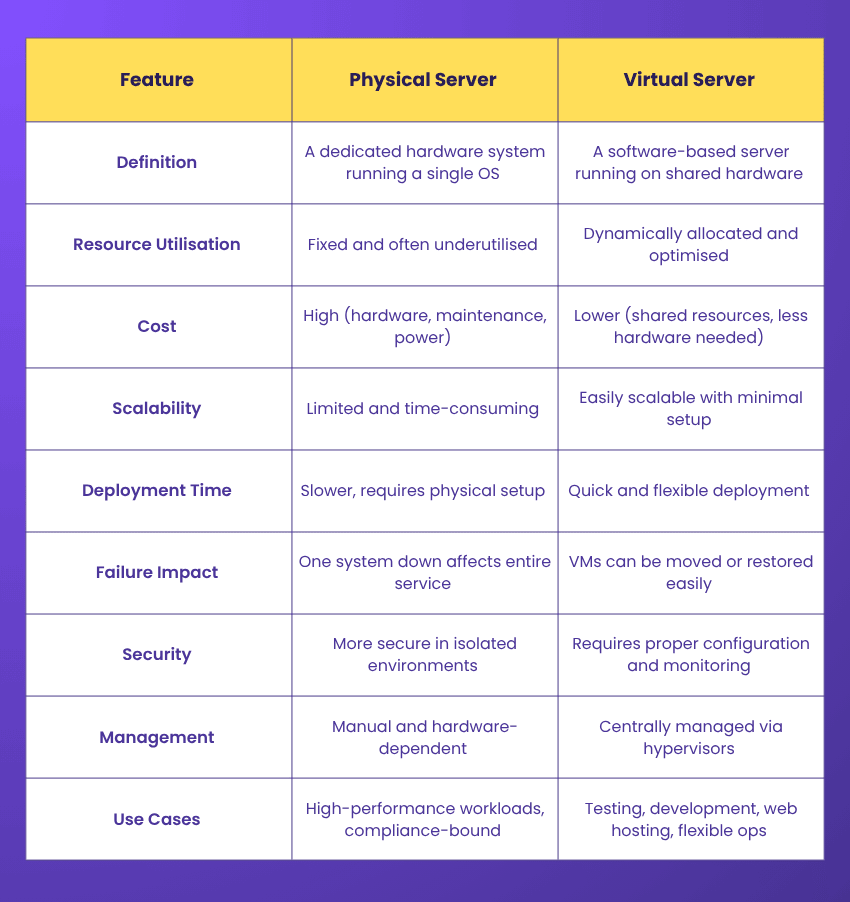
Physical Server vs Virtual Server
To better understand how Virtual Servers differ from traditional systems, here’s a comparison of key features between physical and Virtual Servers:
Conclusion
Virtual Servers have changed IT by offering smart, cost-effective, and flexible solutions. They help businesses fully use their hardware, simplify management, and speed up development. Whether for hosting, testing, or running older systems, Virtual Servers keep organisations fast, scalable, and ready for future challenges. Adopting Virtual Servers today can build a stronger, more efficient tomorrow.
Level up fast with Microsoft Azure Certification - interactive training built for real career outcomes!
Frequently Asked Questions
What is the Purpose of a Virtual Server?

A Virtual Server allows multiple independent server environments to run on a single physical server. Its purpose is to maximise hardware use, reduce costs, improve scalability, and provide isolated, flexible spaces to run applications and manage workloads efficiently.
What are the Three Types of Virtual Servers?
The three types of Virtual Servers:
1) Full Virtualisation
2) Paravirtualisation
3) Containerisation (OS-Level Virtualisation)

The Knowledge Academy


Global Training Provider
The Knowledge Academy is a world-leading provider of professional training courses, offering globally recognised qualifications across a wide range of subjects. With expert trainers, up-to-date course material, and flexible learning options, we aim to empower professionals and organisations to achieve their goals through continuous learning.


 If you wish to make any changes to your course, please


