


 Top Rated Course

We may not have the course you’re looking for. If you enquire or give us a call on +44 20 4538 6376 and speak to our training experts, we may still be able to help with your training requirements.
What is a Network Switch? Types, Functions and Uses
John Davies 18 April 2026A Network Switch connects devices within a LAN, intelligently forwarding data packets to ensure fast, secure, and reliable communication across networks. Sending data only to the intended device improves network efficiency. As a result, congestion is reduced, performance improves, and connectivity remains stable.

Training Outcomes Within Your Budget!
We ensure quality, budget-alignment, and timely delivery by our expert instructors.
Table of Contents
Take a moment to notice how many devices you share in your network every day. Your laptop, phone, printer, and even smart TV all connect and exchange data almost instantly without confusion or delay. This seamless flow is not an accident. A Network Switch works quietly in the background, directing data to the right device and keeping connections fast and reliable.
But what makes this possible, and why does it matter? In this blog, you will learn What is a Network Switch, how it works, and how it differs from a router. Let’s explore the technology that keeps modern networks running smoothly.
Table of Contents
1) What is a Network Switch?
2) Why are Network Switches Important?
3) How Does a Switch Work?
4) What Does a Network Switch Connect?
5) Types of Network Switches
6) What is the Difference Between a Switch and a Router?
7) Understanding Layer 2 and Layer 3 Switches
8) What is an Unmanaged Switch and a Managed Switch?
9) Where is a Network Switch Used?
10) Conclusion
What is a Network Switch?
A Network Switch (often called an Ethernet switch) is a networking device that links to different devices such as computers, printers, and access points within a Local Area Network (LAN). Its main role is to manage how data moves between these connected devices, so communication is fast, organised, and efficient.
It works by identifying the exact device that should receive the data and sending it only to that destination using Media Access Control (MAC) addresses. Unlike older hubs that broadcast data to all devices, a Network Switch forwards data only where it is needed, reducing congestion and improving overall network performance.

Why are Network Switches Important?
Network Switches enable fast, efficient, and secure communication within a LAN by managing data traffic for smooth and reliable performance.
Key reasons Network Switches are important:
1) Efficient Data Transmission:
Switches send data only to the device that needs it, instead of sending it to every device on the network. This reduces traffic and helps the network run faster and more smoothly.
2) Better Bandwidth Management:
They handle many data transfers at once and send each one to the right device, keeping the network running smoothly even when busy.
3) Improved Security:
Switches isolate devices within the network, limiting direct access between them unless permitted. This helps to reduce the risk of unauthorised access.
4) VLAN Support:
Switches allow networks to be divided into virtual segments called Virtual Local Area Networks (VLANs). This improves organisation, security, and network control.
5) Quality of Service (QoS):
Switches can prioritise important traffic such as video calls or voice communication. This ensures critical applications receive the bandwidth they need.
6) Scalability:
Networks can grow easily by adding more switches or ports. This allows organisations to expand without disrupting operations.
7) High Availability and Reliability:
Features like redundancy and link aggregation help maintain network uptime and reduce the impact of hardware failures.
8) Centralised Management:
Managed switches allow administrators to monitor, configure, and troubleshoot the network from one place, improving control and efficiency.
9) Network Segmentation:
Switches divide networks into smaller sections, improving performance, reducing broadcast traffic, and making issues easier to manage.
10) Power over Ethernet (PoE):
Some switches can supply power to devices like IP phones and security cameras through the network cable, simplifying installation and reducing wiring needs.
Secure your future with CCNP Security Training. Start now to develop advanced security skills and become a Cisco-certified security professional.
How Does a Switch Work?
A switch controls the flow of electricity or data, depending on how it is used. In electrical systems, it turns devices on or off by allowing or stopping the flow of electricity. In networking, a switch controls how data moves between devices connected to the same local network.
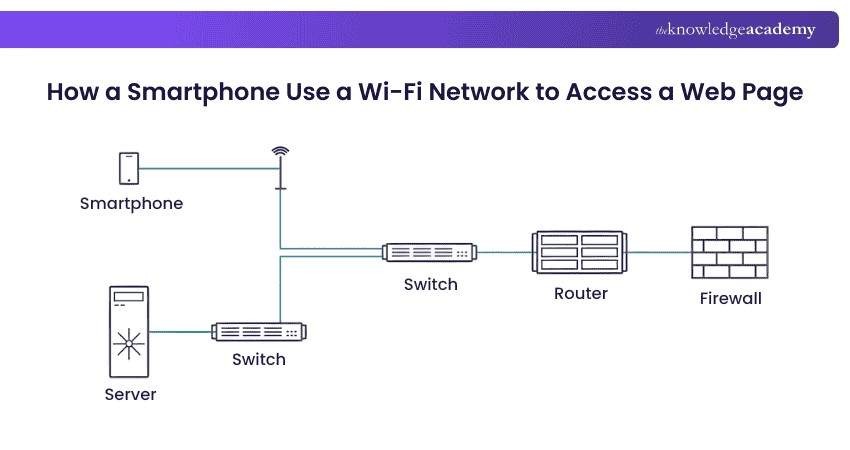
As shown in the image, when a smartphone connects to Wi-Fi and requests a web page, the data passes through a switch to the router. The router sends the request through the firewall to the Internet or server. When the response returns, the switch delivers it to the correct device, ensuring fast and organised communication.
What Does a Network Switch Connect?
A Network Switch connects devices like computers, printers, IP phones, and servers within a Local Area Network (LAN). It ensures these devices can exchange data quickly and securely.
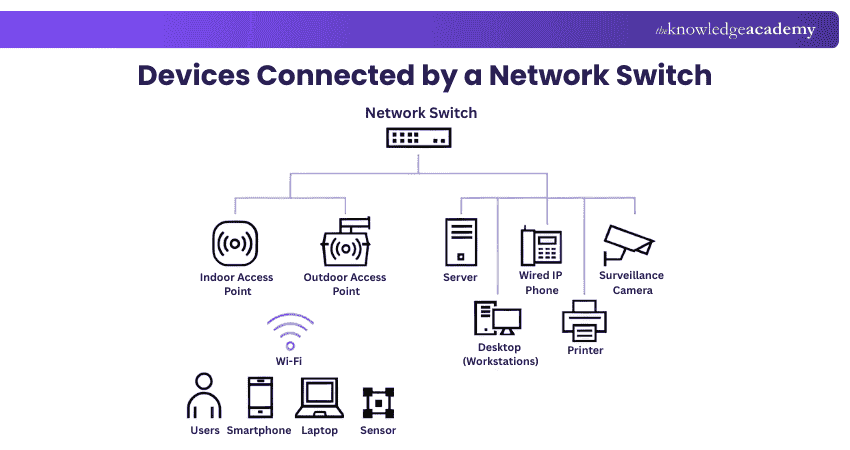
By creating a central point for data flow, switches enable seamless communication among devices on the same network. This connectivity is essential for business operations, file sharing, and Internet access within offices or data centres.
Types of Network Switches
Network Switches serve different roles, from connecting devices at the network edge to managing heavy traffic at the core or in data centres. Below are the main types and their functions:
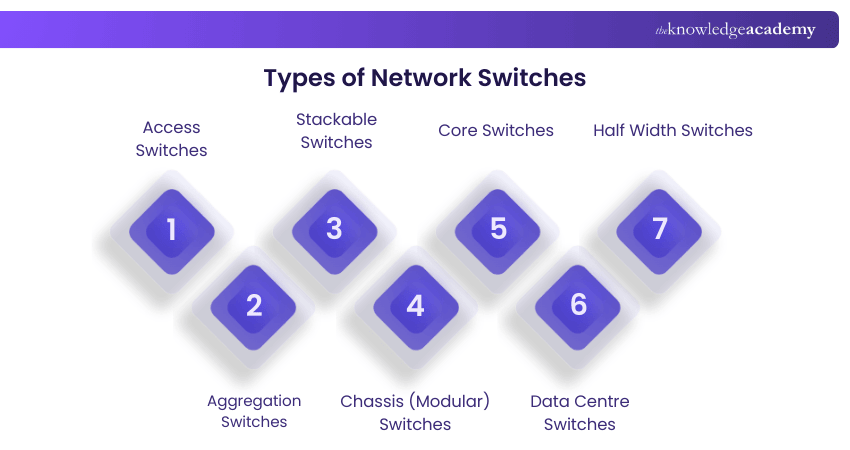
1) Access Switches: Access switches connect devices like computers, printers, IP phones, and Wi-Fi access points at the network edge, often supporting Power over Ethernet (PoE).
2) Aggregation Switches: Aggregation switches connect multiple access switches and combine their traffic, directing it efficiently toward the network core.
3) Stackable Switches: Stackable switches can be linked to function as one unit, increasing capacity and simplifying management.
4) Chassis (Modular) Switches: Chassis switches allow modules like ports and power supplies to be added or removed, offering flexibility and scalability.
5) Core Switches: Core switches sit at the network centre and manage high volumes of traffic between network layers and external networks.
6) Data Centre Switches: Data centre switches handle heavy server traffic and provide high performance and reliability.
7) Half Width Switches: Half width switches are compact and space-saving, ideal for small environments with limited rack space.
What is the Difference Between a Switch and a Router?
Routers send data between different networks and choose the best path for it to reach its destination. They connect local networks to wider networks, including the Internet, which makes them essential for Internet access and communication beyond a single network.
Switches, however, connect devices within the same local network. Homes and small offices mainly need routers for Internet connectivity, but larger offices and data centres rely on switches to connect many devices and manage internal network traffic efficiently.
Learn threat analysis, incident response, and security monitoring techniques through the CCNA Cybersecurity Operation Training – Join now!
Understanding Layer 2 and Layer 3 Switches
Network Switches operate at different OSI Layers, mainly Layer 2 and Layer 3, which affects how they forward data. The sections below explain each type briefly.
What is a Layer 2 Switch?
A Layer 2 switch operates at the Data Link Layer (OSI Layer 2) and forwards data using MAC addresses. It connects devices within the same local network, such as computers, printers, and servers, usually through Ethernet cables. Layer 2 switches are mainly used for internal communication within a LAN.
What is a Layer 3 Switch?
A Layer 3 switch works at the Network Layer (OSI Layer 3) and forwards data using IP addresses. In addition to basic switching, it can route traffic between different networks or VLANs. This makes Layer 3 switches suitable for larger or more complex networks that need faster routing and better Traffic Management.
What is an Unmanaged Switch and a Managed Switch?
An Unmanaged Switch is a simple device that extends the number of Ethernet ports on a local network, allowing more devices to connect and access the Internet. It automatically forwards data using MAC addresses and requires no setup or configuration.
A Managed Switch serves the same basic purpose but is built for larger, complex networks. It gives administrators control over traffic, including data prioritisation and VLAN creation for better Network Management.
Where is a Network Switch Used?
A Network Switch is used wherever multiple devices need to connect within the same local network. It is commonly found in homes, offices, schools, and data centres to link devices and manage internal data traffic. Switches ensure fast, efficient, and reliable communication between connected systems.
Conclusion
In essence, understanding What is a Network Switch helps organisations choose the right solution for building stable, efficient, and future-ready networks. By managing data flow effectively and supporting security, scalability, and performance, Network Switches form the backbone of modern LAN connectivity and ensure networks can meet growing digital demands with confidence.
Gain expertise in industry-leading networking devices, technologies and solutions through the Cisco Courses – Join now!
Frequently Asked Questions
What are the Advantages of Switch Deployments?

Switch deployments offer faster data transfer, reduced network congestion, and improved Bandwidth Management. They ensure secure, direct communication between devices, support VLANs, and scale easily to meet growing network demands in both business and enterprise environments.
What are the Main Functions of a Network Switch?
A Network Switch identifies MAC addresses, forwards data packets to specific devices, reduces unnecessary traffic, and enhances network performance. It enables seamless internal communication, maintains a MAC address table, and supports efficient data routing within Local Area Networks.
What are the Other Resources and Offers Provided by The Knowledge Academy?
The Knowledge Academy takes global learning to new heights, offering over 3,000+ online courses across 490+ locations in 190+ countries. This expansive reach ensures accessibility and convenience for learners worldwide.
Alongside our diverse Online Course Catalogue, encompassing 17 major categories, we go the extra mile by providing a plethora of free educational Online Resources like Blogs, eBooks, Interview Questions and Videos. Tailoring learning experiences further, professionals can unlock greater value through a wide range of special discounts, seasonal deals, and Exclusive Offers.
What is The Knowledge Pass, and How Does it Work?
The Knowledge Academy’s Knowledge Pass, a prepaid voucher, adds another layer of flexibility, allowing course bookings over a 12-month period. Join us on a journey where education knows no bounds.
What are the Related Courses and Blogs Provided by The Knowledge Academy?
The Knowledge Academy offers various Cisco Training, including the Cisco IOS Network Security Training, CCNP Security Training, and Cisco MPLS Training. These courses cater to different skill levels, providing comprehensive insights into What is a Router.
Our IT Infrastructure & Networking Blogs cover a range of topics related to Network Switch, offering valuable resources, best practices, and industry insights. Whether you are a beginner or looking to advance your IT Infrastructure & Networking skills, The Knowledge Academy's diverse courses and informative blogs have got you covered.

John Davies


Cyber Security Governance & Assurance Specialist
John Davies is a cybersecurity expert specialising in governance, risk management, and compliance. With over 15 years in the field, he has led enterprise-wide security programmes across finance, healthcare and public sector organisations. His content provides practical guidance on building secure environments, managing risk and aligning with regulatory frameworks.

Upcoming IT Infrastructure & Networking Resources Batches & Dates
Date
 CCNP Security Training
CCNP Security Training
Mon 27th Jul 2026
CCNP Security Training
Mon 2nd Nov 2026

 If you wish to make any changes to your course, please


