


 Top Rated Course


We may not have the course you’re looking for. If you enquire or give us a call on +44 20 4538 6376 and speak to our training experts, we may still be able to help with your training requirements.
Python While Loop: Introduction, Syntax & Example
The Knowledge Academy 15 July 2026A Python While Loop repeatedly executes a block of code as long as a specified condition is true, and stops only when the condition becomes false. It’s ideal for situations where the number of iterations isn’t known in advance, offering flexibility and control in handling dynamic, condition-driven tasks in programming.

Training Outcomes Within Your Budget!
We ensure quality, budget-alignment, and timely delivery by our expert instructors.
Table of Contents

Have you ever wondered how programs keep running tasks like monitoring downloads or checking system status without stopping? That’s where the Python While Loop comes in. It grabs attention with real-world use cases, builds interest through simplicity, and creates desire by offering control over repetitive tasks. With the right syntax and structure, learning how to use a Python While Loop can help you write smarter, condition-based code that responds dynamically.
Table of Contents
1) What is While Loop in Python?
2) Usage of While Loop in Python
3) Exploring Infinite while Loops
4) What is the Difference Between a while () Loop and a do while () Loop?
5) Common Errors in Using While LOOP
6) Conclusion
What is While Loop in Python?
A Python While Loop is a flow control statement that executes a block of code repeatedly as long as a given condition remains True. It is helpful where the number of iterations that are needed is not known, e.g., when waiting for proper user input or processing data until a given condition is satisfied.
The loop starts with the while keyword and a condition. The indented code block is executed again and again until the condition is False. To prevent infinite loops, the condition must be changed within the loop, typically by adjusting a variable that appears within the condition.

While Loop Syntax
a) expression: A condition that returns True or False.
b) statement(s): One or more indented lines of code that run repeatedly as long as the expression is True.
Example:

This example demonstrates a basic Python While Loop that increments a value until the condition becomes false.
While Loop Flowchart
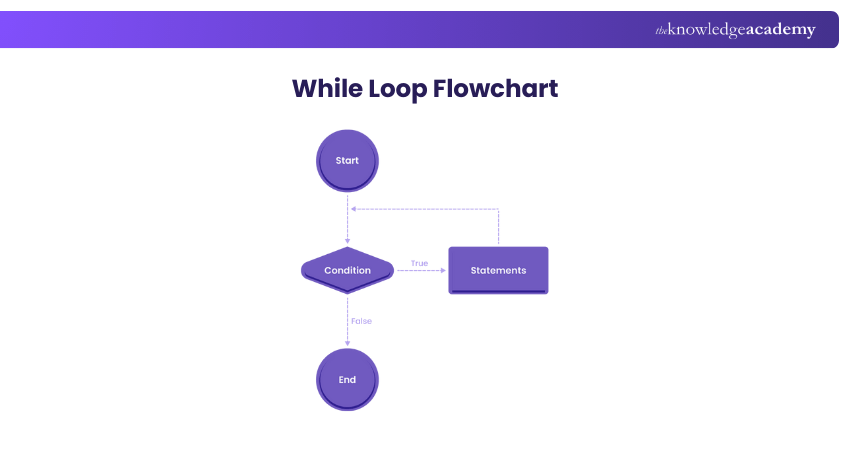
1) Start: The loop begins.
2) Condition: Checked before each iteration.
a) If true, execute the statements.
b) Then return to check the condition again.
3) If false, the loop exits at End.
4) This cycle continues until the condition becomes false.
Usage of While Loop in Python
The Python While Loop supports various control flow tools like continue, break, pass, and else to manage the loop's behaviour. The sections below explain how each of these enhances the way a While Loop works.
While Loop with Continue Statement
A Python While Loop with a continue statement keeps executing a code block as long as the specified condition remains true, skipping over the rest of the loop's body when the continue statement is encountered. When the continue statement comes up, it skips the rest of the code for current iteration and proceeds to the loop's next Iteration in Programming.
Here’s an example:
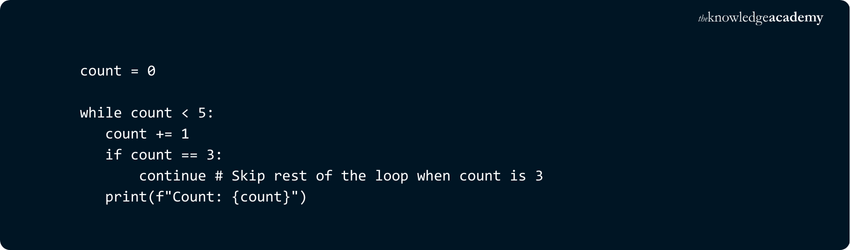
Here’s the output:

In this example, when count equals 3, the continue statement skips the print statement and moves to the next iteration of the loop.
Construct powerful script and object-oriented approaches by signing up for our Python Django Course now!
While Loop with Break Statement
A While Loop in Programming allows you to execute a code block as long as a specified condition is true. The break statement can be used within a While Loop to exit the loop immediately, even if the loop’s condition is still true.
Here’s an example:
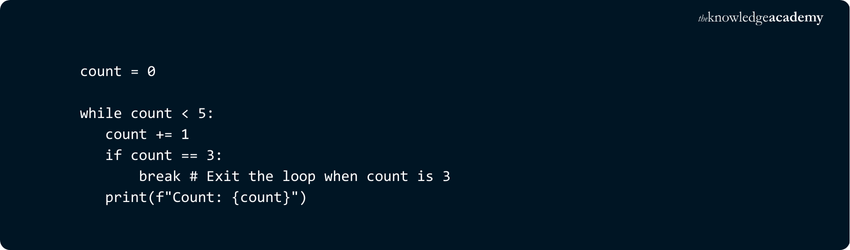
Here’s the output:

In this example, when count equals 3, the break statement terminates the loop entirely, and no further iterations are executed.
Enhance your skills with our comprehensive R Programming Course - join now!
While Loop with Pass Statement
A Python While Loop with a pass statement in Python is used when you want to create a loop that doesn't execute any action for certain iterations while maintaining the loop's structure. The pass statement serves as a placeholder, allowing the loop to continue running without doing anything during those iterations.
Here’s an example:

Here’s the output:

In this example, when count equals 2, the pass statement serves as a placeholder and does nothing. The loop continues executing as normal. The pass statement is often used as a placeholder for future code or to avoid syntax errors in empty blocks.
While Loop With Else
Python While Loop with an else block executes the else section only if the loop completes without encountering a break statement. It’s useful for running follow-up code after successful looping, such as confirming completion or handling cases when a search inside the loop doesn’t trigger early termination.
Here’s an example:

Here’s the output:

In this example, the loop runs while count is less than 5. Once the condition becomes false, the else block executes because the loop wasn't interrupted by a break statement. Let me know if you want an example with a break to show the difference.
Exploring Infinite While Loops
Sometimes, a While Loop may be written in a way that it doesn’t terminate on its own. This is called an infinite loop, although the term can be a bit misleading since the loop must eventually be stopped in some way.
Infinite loops can be either intentional or unintentional. Intentional infinite loops are useful in programs that need to run continuously, such as game engines, servers, GUI applications, or asynchronous event-driven code. These loops are designed to keep running until an external condition or user input stops them.
Unintentional infinite loops, however, usually result from logical errors in the code. This can happen when:
a) A condition variable is never updated
b) The loop condition is incorrect and never becomes false
In such cases, the loop continues running endlessly unless it is manually stopped or interrupted.
In the next sections, you will learn more about both types of infinite loops and how to manage them in your code. Let’s begin with unintentional infinite loops.
Unintentional Infinite Loops
These loops occur due to logic errors. If the loop condition never becomes false, the loop keeps running endlessly, which can cause your program to freeze or crash.
Here’s an example:

Here’s the output:

The variable count is never updated, so the condition count <= 5 always stays true. This causes the loop to run forever.
Intentional Infinite Loops
These loops are designed to run forever until a specific condition is met. They are commonly used in applications that need to wait for user input or external events.
Here’s an example:

Here’s the output:

The loop runs forever using while True, but includes a break statement to exit when the user types "exit".
Want to master PHP Programming and build dynamic websites? Join our PHP Course now!
What is the Difference Between a while () Loop and a do while () Loop?
Here are the main differences:
1) The While loop is considered an Entry Controlled Loop, whereas the Do While loop is an Exit Controlled Loop.
2) In While loop, the condition is assessed at the beginning, whereas in the Do While loop, the condition is checked at the end.
Take your first step towards Python with our Python Course, Sign-up Now!
Common Errors in Using While LOOP
Understanding how While Loops work in Python is important, but it's just as important to avoid common mistakes that can lead to errors or unexpected behaviour in your code.
1) Uninitialised Variable
This error happens when you use a variable in the loop condition without assigning it a value first. Python raises a NameError because it doesn’t recognise the variable.
Here is the Incorrect code,

Here is the output,

Here is the corrected code,

2) Omitting the Increment Line
If you forget to update the loop control variable inside the While Loop, the condition always stays true. This leads to an infinite loop and your program never exits on its own.
Here is the Incorrect code,

Here is the output,

Here is the corrected code,

3) Wrong Indentation
Incorrect indentation in a While Loop will cause an IndentationError. Python relies on proper spacing to determine which statements belong inside the loop block, so consistent indentation is essential.
Here is the Incorrect code,

Here is the output,

Here is the corrected code,

Conclusion
The Python While Loop is a useful tool for repetitive tasks when the number of iterations is unknown. By understanding its syntax, control flow, and potential pitfalls, you can effectively harness its power. Employ this tool judiciously to make your Python programs more versatile and responsive.
Understand core concepts like objects, inheritance, classes, and polymorphism in our comprehensive Object Oriented Programming Course - Sign up now!
Frequently Asked Questions
How Does a While Loop differ from a For Loop in Python?

A While Loop runs based on a condition and is ideal when the number of iterations is uncertain. In contrast, a for loop iterates over a sequence like a list or range, and is best used when the number of iterations is predefined or fixed.
What is a Strange Loop?
A strange loop refers to a situation where a function or operation appears to reference itself in a way that creates a loop recursively, but it doesn't follow the traditional recursive paradigm. This can lead to complex structures and self-referencing patterns.
Can I Use Functions Inside While Loops?
Yes, you can use functions inside While Loops. Functions help organise code, perform repeated tasks, and return values that can influence loop conditions. This makes your code cleaner, more efficient, and easier to debug, especially when complex operations are needed within each iteration of the loop

The Knowledge Academy


Global Training Provider
The Knowledge Academy is a world-leading provider of professional training courses, offering globally recognised qualifications across a wide range of subjects. With expert trainers, up-to-date course material, and flexible learning options, we aim to empower professionals and organisations to achieve their goals through continuous learning.


 If you wish to make any changes to your course, please


