


 Top Rated Course

We may not have the course you’re looking for. If you enquire or give us a call on +44 1344 203 999 and speak to our training experts, we may still be able to help with your training requirements.
What is Ubuntu? A Complete Guide
Lily Turner 23 April 2026Ubuntu, a free and open-source Operating System based on Linux, is fast, secure, and user-friendly, making it ideal for desktops, servers, and IoT devices. It offers regular updates, strong community support, and a wide range of software. With its flexibility and reliability, Ubuntu has become one of the most popular Linux-based systems.

Training Outcomes Within Your Budget!
We ensure quality, budget-alignment, and timely delivery by our expert instructors.
Table of Contents

Is your current Operating System slowing you down? It is not a single person's issue. Many users find their computers getting slower over time with constant updates, costly licences, and unnecessary background processes that make things worse. What if there is a way to bring your computer back to life, without spending a penny?
With Ubuntu, it is possible. But What is Ubuntu? It is an open-source Operating System that gives users complete control over their computers without the limitations of traditional systems. If you’re ready to take back control of your computer, it is time to give Ubuntu a try. In this blog, you can discover what Ubuntu is, its key features, installation steps, and why it might be the perfect replacement for your current system. Let's dive in!
Table of Contents
1) What is Ubuntu?
2) Why Use Ubuntu?
3) Key Features of Ubuntu
4) Common Use Cases of Ubuntu
5) How to Install Ubuntu on Your Device?
6) Benefits of Using Ubuntu
7) Drawbacks of Ubuntu
8) Ubuntu vs Linux: Understanding the Difference
9) Conclusion
What is Ubuntu?
Ubuntu is a free, open-source Operating System based on Linux, designed to make Linux simpler and more user-friendly for everyday computer users. You can perform daily tasks like browsing, writing documents, watching videos, and running software. It can be used on desktops, laptops, servers, and even Internet of Things (IoT) devices.
Even more, Ubuntu offers everything most users need, like a clean interface, built-in apps, strong security, and lots of free software. It makes computing easy, secure, and efficient for everyone, from beginners to professionals. It offers a smooth, user-friendly experience whether you’re using it for personal, educational, or professional purposes.
Why Use Ubuntu?
There are plenty of reasons why Ubuntu has become one of the most popular Operating Systems in the world. Let's check the reasons to choose it:
1) Easy to Use: Ubuntu has a friendly interface that feels familiar, even for beginners.
2) Free to Download: You don’t have to pay to use Ubuntu. Anyone can download it, change it, or share it freely.
3) Safe and Secure: It is less likely to get viruses or malware.
4) Fast and Stable: Ubuntu runs smoothly on both new and older computers.
5) Great Community: There are millions of users who share advice, fixes, and resources.
6) Regular Updates: Canonical releases new versions every six months, and long-term versions every two years for extra stability.
7) Used Everywhere: Ubuntu is one of the most popular Linux systems and is trusted by millions of people, from home users to large companies.
Key Features of Ubuntu
Now that you know What is Ubuntu and why to use it, below are its key features:

1) Free and Open Source
Ubuntu is completely free to download and use. Its open-source nature means anyone can see, change, or improve the code. This openness builds a strong global community that constantly enhances the system.
2) Consumer-pleasant
Ubuntu offers a clean, intuitive interface that’s easy to navigate, even for those new to Linux. Its design feels familiar to users of Windows or macOS, making the transition smooth and comfortable.
3) Software Selection
Ubuntu comes pre-installed with useful applications such as Firefox (web browser), LibreOffice (office suite), and Thunderbird (email client). The Ubuntu Software Centre also gives access to thousands of free and paid apps that can be installed with just a few clicks.
4) Regular System Updates
Canonical releases system updates for Ubuntu every six months, adding new features and security improvements. The Long-term Support (LTS) versions, released every two years, get important updates for several years, ensuring stability and reliability.
5) A Couple of Editions
Ubuntu comes in different versions for different needs:
1) Ubuntu Desktop for personal computers
2) Ubuntu Server for websites and applications
3) Ubuntu Core for IoT devices
4) Ubuntu Cloud for virtual environments
5) Lightweight versions like Xubuntu and Lubuntu for older machines
6) Broad Hardware Support
Ubuntu works well on most computers. It can be from older computers to modern laptops. It also automatically detects drivers for your hardware. It supports laptops, desktops, printers, and many peripherals without needing manual setup.
7) Strong Security Measures
Ubuntu is known for being safe and secure. It has built-in protection tools, automatic updates, and uses a permission system where you must approve major actions. You don’t normally run as the “root” user, which adds another layer of safety.
8) Highly Customisable
Ubuntu lets users change its look and feel. You can adjust themes, icons, and layouts or even install a different desktop environment like KDE or XFCE. You can change almost everything in Ubuntu and this gives full control over the User Experience.
9) Active Community Support
One of Ubuntu’s greatest strengths is its active and supportive global community. Whether you face a technical issue or want to learn something new, you can easily find help through different sources and official support channels.
Understand technology from the ground up with our IT Fundamentals Training – Register today!
Common Use Cases of Ubuntu
Ubuntu can be used for many things, from simple home tasks to big business systems. Here are some of its common use cases:

1) Personal Computing
Many people use Ubuntu every day for basic tasks like browsing the web, writing documents, watching videos, and using Social Media. It is lightweight and efficient. So, it is perfect for home or office computers.
2) Server Hosting
Ubuntu Server powers millions of websites, apps and cloud systems. It is reliable, fast, and easy to maintain. Companies and data centres use it to host everything from small blogs to large data centres.
3) Web Development
Developers use Ubuntu because it supports many Programming Languages and tools such as Apache, PHP, MySQL, JavaScript and Python. It is perfect for building, testing, and running web applications.
4) Contributing to Open Source
Ubuntu is an open-source tool, so anyone can help improve it. You can fix bugs, build software, or even create your own version of Ubuntu. Many Developers use it to learn more about coding and System Management.
5) Educational Purposes
Schools and universities use Ubuntu to teach Programming, Computer Science concepts and System Management. It is free, secure, and easy for students to experiment with without needing expensive licences.
6) Internet of Things (IoT)
Ubuntu Core, a lightweight version of Ubuntu, is designed specifically for IoT devices such as sensors, robots, and smart home systems. It provides a secure and stable operating system for devices that have limited hardware resources.
7) Linux Gaming
Gaming on Ubuntu has grown significantly in recent years. With support from platforms like Steam, and tools such as Proton and Wine, users can enjoy both Linux-compatible and many Windows-based games. Performance and compatibility have improved greatly, making Ubuntu a solid choice for casual and dedicated gamers alike.
Build the foundation of computer networks with our easy-to-follow Introduction to Networking Training – Join now!
How to Install Ubuntu on Your Device?
Now that you know the features and use cases of Ubuntu, let’s check how to install it on your device:
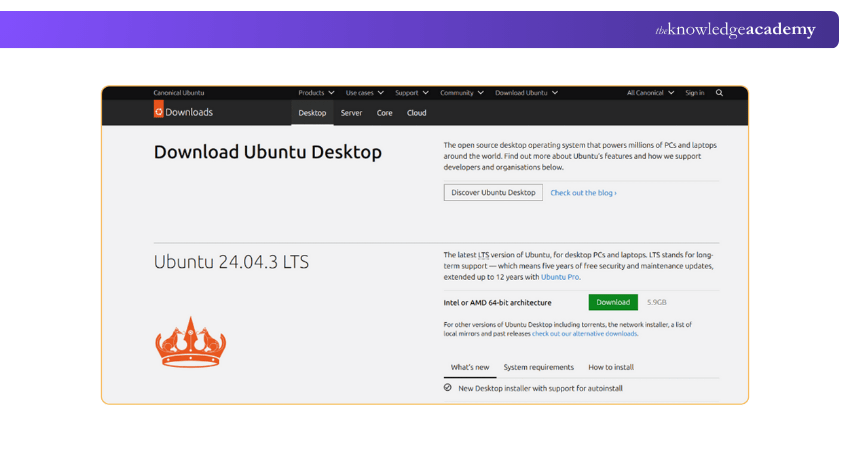
1) Downloading the Ubuntu ISO
You can download Ubuntu directly from the official Ubuntu website. You can choose the version you want and download the file. It contains everything needed to install Ubuntu. Save it on your computer.
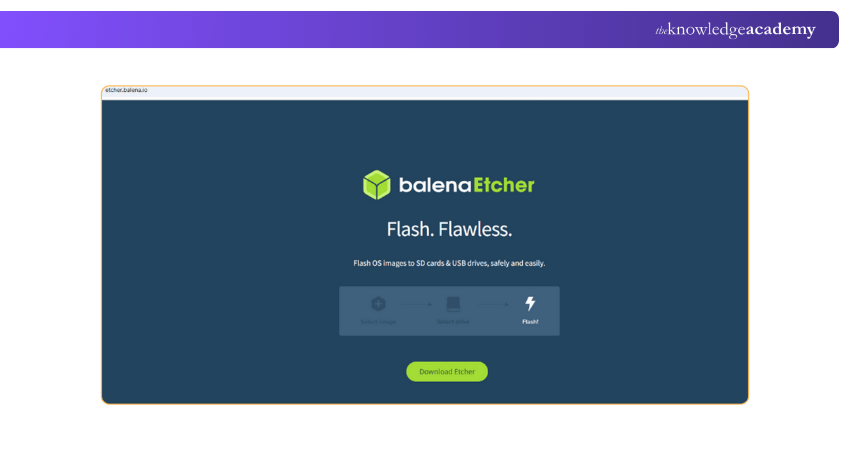
2) Setting up balenaEtcher
Download and install a free tool called balenaEtcher. It helps you put the Ubuntu installation file (ISO) onto a USB stick, so you can use it to install Ubuntu.
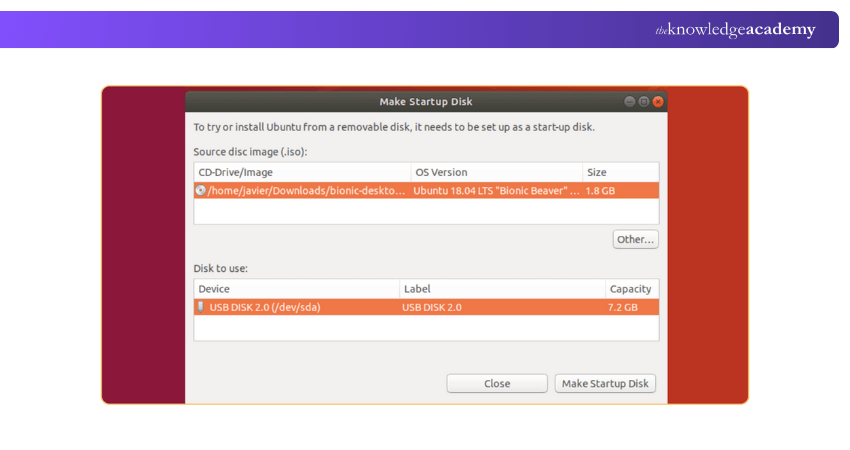
3) Creating a Bootable USB Drive
Once balenaEtcher is ready, insert a USB drive (at least 8 GB) into your computer. Make sure it doesn’t contain important data because it will be erased. Now, open balenaEtcher and follow these steps:
1) Click Select Image and choose the Ubuntu ISO file you downloaded
2) Click Select Target and pick your USB drive
3) Click Flash to begin creating your installation drive
When the process finishes, safely remove your USB stick. It is now ready to install Ubuntu.
4) Booting from Installation Media
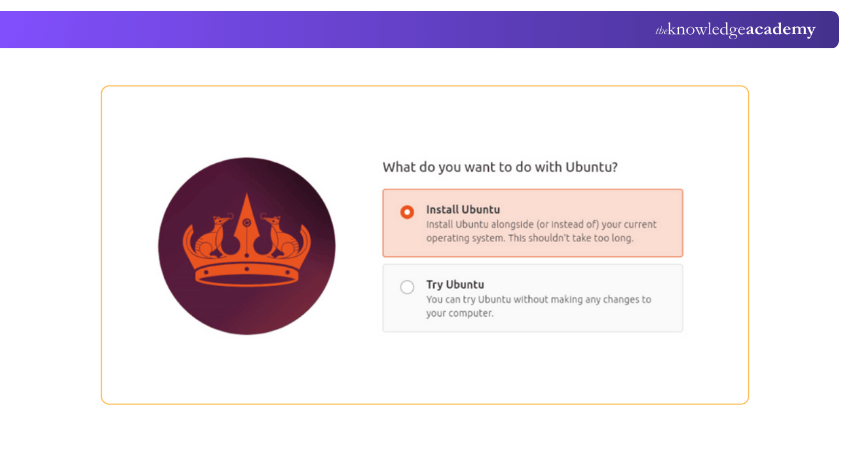
Restart your computer and open the boot menu (press F12, ESC, or another key depending on your system). Select your USB stick as the boot device. Ubuntu will start in “live mode,” allowing you to try Ubuntu before installing or go straight to Install Ubuntu.
5) Completing the Ubuntu Installation
Click Install Ubuntu and follow the steps on the screen. Pick your language, keyboard layout, installation type (Standard or Minimal), and location. When asked, choose to install Ubuntu alongside your current system or erase the disk and install fresh. After the installation finishes, restart the computer, remove the USB drive, and Ubuntu will start automatically.
Benefits of Using Ubuntu
When you know What is Ubuntu, you should not miss out knowing its benefits. So, here are the benefits of using Ubuntu:
1) Global OSS Support
1) Ubuntu is open for everyone to use, share and change freely
2) People all over the world work together to make it better every day
3) Problems are usually fixed quickly by the global community
4) You can trust Ubuntu because everything is open and transparent
5) Anyone can join and help improve Ubuntu by giving feedback or testing new features
Take control of modern web hosting with our NGINX Training – Sign up soon!
2) Free to Use With no Ads
1) Ubuntu is completely free to download and install from its official website
2) You don’t need to buy a licence or pay any monthly fees
3) There are no annoying ads or pop-up messages while using it
4) You get full access to all features without hidden costs
5) You also get free updates to keep your system safe and up to date
3) Desktop Option
1) Ubuntu looks clean and easy to use, even for beginners
2) It feels familiar if you’ve used Windows or macOS before
3) You can change colours, icons, and themes however you like
4) It supports many languages, so people everywhere can use it easily
5) You can do most tasks without learning complicated computer commands
4) Fast and Efficient
1) Ubuntu starts up quickly and runs smoothly
2) It works well even on old computers with low memory
3) You can run many apps at once without crashes
4) It doesn’t waste battery life on laptops
5) Background apps use less power and memory
5) Secure and Auto-update
1) Ubuntu is very safe and rarely gets viruses
2) It is more secure than many other Operating Systems
3) It has a built-in firewall (UFW) that protects your computer
4) Your files and data stay safe with strong privacy tools
5) Security bugs are fixed quickly by Canonical and the Ubuntu community
Drawbacks of Ubuntu
Although Ubuntu has many advantages, there are a few drawbacks you should know before switching.
1) Weak Hardware Detection
1) Some new or unusual devices might not work as soon as you plug them in
2) Ubuntu might not find the right drivers for some hardware
3) Ubuntu keeps improving, but some hardware still needs work
2) Doesn't Support all Software
1) Some popular apps made for Windows or macOS don’t work on Ubuntu
2) Many games and business tools are not made for Linux systems
3) You can use Wine to run Windows apps, but some may not run smoothly
3) Basic Command Line Interface Skills
1) Sometimes you’ll need to use the Terminal to do certain tasks
2) This can be a bit confusing if you’re used to only clicking icons
3) Most daily tasks can still be done without using the Terminal often
Ubuntu vs Linux: Understanding the Difference
While Linux is the core foundation that powers many Operating Systems, Ubuntu is one of the many versions built on top of it. In simple terms, Linux provides the base, and Ubuntu adds an easy-to-use interface, built-in tools, and regular updates to make it more user-friendly for everyday users. Now, let’s check how Ubuntu is different from Linux:

Conclusion
Ubuntu is more than just an Operating System. When you know exactly of What is Ubuntu, you can realise that it is a symbol of freedom, community, and innovation. It gives you the power to control your computer the way you want. If you want a reliable, fast, and user-friendly system, Ubuntu is one of the best choices to start your journey into the world of Linux.
Build real-world IT skills and solve problems like an expert with our IT Support and Solution Training – Explore now!
Frequently Asked Questions
What are the Requirements for Ubuntu?

For the latest desktop version, you will need:
1) 64-bit processor
2) 4 GB of RAM (8 GB is better)
3) 25 GB of free disk space
4) Internet connection for updates
Is Ubuntu Good for Everyday Use?
Yes. You can use Ubuntu for everything like browsing, emails, office work, watching videos, and even coding. It is stable, secure and easy for daily use.
What are the Other Resources and Offers Provided by The Knowledge Academy?
The Knowledge Academy takes global learning to new heights, offering over 3,000+ online courses across 490+ locations in 190+ countries. This expansive reach ensures accessibility and convenience for learners worldwide.
Alongside our diverse Online Course Catalogue, encompassing 17 major categories, we go the extra mile by providing a plethora of free educational Online Resources like Blogs, eBooks, Interview Questions and Videos. Tailoring learning experiences further, professionals can unlock greater value through a wide range of special discounts, seasonal deals, and Exclusive Offers.
What is The Knowledge Pass, and How Does it Work?
The Knowledge Academy’s Knowledge Pass, a prepaid voucher, adds another layer of flexibility, allowing course bookings over a 12-month period. Join us on a journey where education knows no bounds.
What are the Related Courses and Blogs Provided by The Knowledge Academy?
The Knowledge Academy offers various IT Support and Solution Training, including Ubuntu Linux Server Administration Training, IT Fundamentals Training and Apache Web Server Training. These courses cater to different skill levels, providing comprehensive insights into Samba Server.
Our IT Infrastructure & Networking Blogs cover a range of topics related to Ubuntu, offering valuable resources, best practices, and industry insights. Whether you are a beginner or looking to advance your Networking skills, The Knowledge Academy's diverse courses and informative blogs have got you covered.

Lily Turner


Senior AI/ML Engineer and Data Science Author
Lily Turner is a data science professional with over 10 years of experience in artificial intelligence, machine learning, and big data analytics. Her work bridges academic research and industry innovation, with a focus on solving real-world problems using data-driven approaches. Lily’s content empowers aspiring data scientists to build practical, scalable models using the latest tools and techniques.
View Detail
Upcoming IT Infrastructure & Networking Resources Batches & Dates
Date
 Ubuntu Linux Server Administration Training
Ubuntu Linux Server Administration Training
Fri 18th Sep 2026
Ubuntu Linux Server Administration Training
Fri 18th Dec 2026

 If you wish to make any changes to your course, please


