


 Top Rated Course

We may not have the course you’re looking for. If you enquire or give us a call on +64 98874342 and speak to our training experts, we may still be able to help with your training requirements.
11 Best Program Management Tools to Consider
The Knowledge Academy 05 June 2026Program Management Tools help organisations oversee projects, track progress, and align with strategic goals using software for efficient coordination. These tools improve collaboration, resource planning, and reporting across multiple projects. They also help teams manage risks, deadlines, and budgets for better business outcomes.

Training Outcomes Within Your Budget!
We ensure quality, budget-alignment, and timely delivery by our expert instructors.
Table of Contents
Have you ever felt overwhelmed managing multiple projects at once? You're not alone -many teams struggle to stay on top of timelines, resources, and shifting priorities. That’s where Program Management Tools step in to simplify the chaos. These smart tools bring structure, clarity, and coordination to your programmes.
From tracking tasks to aligning with big-picture goals, they keep everything flowing smoothly. In this blog, we will discuss what Program Management Tools are, their benefits, popular options, and how they can help you manage complex work with confidence and ease.
Table of Contents
1) What are Program Management Tools?
2) 11 Types of Program Management Tools
3) Benefits of Program Management Tools
4) What is the Best Project Management Tool for Developers and Why?
5) What are the Key Program Management Features?
6) Conclusion
What are Program Management Tools?
Program Management Tools are software that helps teams plan, organise, and manage multiple related projects. These tools make it easier to check progress, share updates, and keep everything running smoothly. They help teams stay on schedule, manage resources, and avoid problems before they grow.
For example, if a company working on several product launches at once. A Program Management Tool lets the team track each project, assign tasks, and see how everything connects. If one project gets delayed, the tool shows how it affects the others. This helps managers make better decisions and keep all projects on track together.

11 Types of Program Management Tools
Here are the top Program Management Tools:
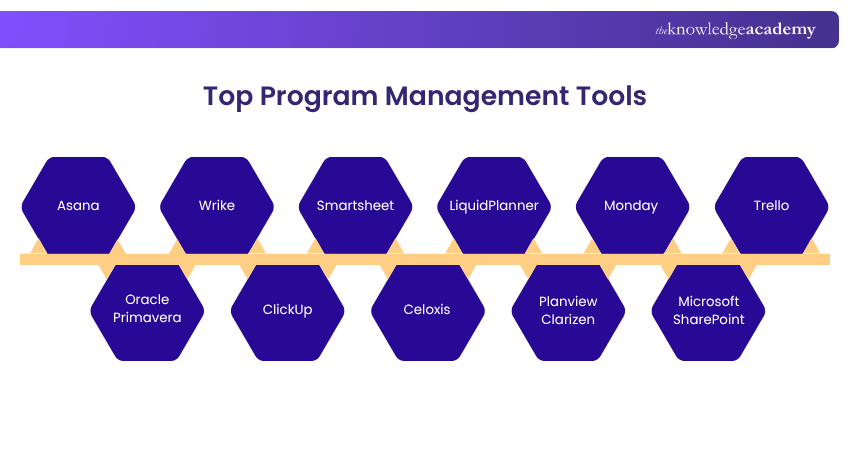
1) Asana
Asana is a popular tool that helps teams manage tasks, projects, and deadlines. It offers lists, boards, and calendars to view and plan work easily. Asana also allows file sharing, comments, and real-time updates to keep everyone in sync. It is user-friendly and supports both small and large teams. It also helps reduce delays and boost productivity.
a) Assign and track tasks in one place
b) Use boards and timelines for project planning
c) Share files, updates, and team comments easily
d) Improve visibility and workflow for all members
2) Oracle Primavera
It is built to manage big, complex projects across industries. It helps plan, schedule, and control multiple tasks and resources. With strong reporting tools, it helps track progress and manage risks. It's best suited for enterprise-level Project and Program Management. Primavera is trusted for accuracy and control.
a) Manage large-scale enterprise projects with ease
b) Track resources, timelines, and costs effectively
c) Spot delays and risks before they grow
d) Best for construction, energy, and large firms
3) Wrike
It is an easy-to-use tool that supports task creation, time tracking, and team collaboration. It allows teams to see project timelines and workflows clearly. Wrike's dashboard gives a real-time view of what's happening. It works well for both agile and traditional projects. It helps teams make faster and better decisions.
a) Create and assign tasks in one view
b) Use dashboards to track progress instantly
c) Share files, comments, and quick updates
d) Suitable for flexible and agile project teams
4) ClickUp
It is a flexible platform that lets teams manage tasks, docs, goals, and timelines. It offers different views like lists, boards, and calendars. Teams can assign roles, set deadlines, and collaborate easily. ClickUp helps reduce confusion and boosts productivity. Its all-in-one dashboard makes managing easier.
a) Set up tasks with custom team views
b) Collaborate with file sharing and comments
c) Track progress and deadlines in one place
d) Works for remote and office-based teams
Learn to streamline every sprint with confidence by joining the Jira Training today!
5) Smartsheet
Smartsheet looks like a spreadsheet but does much more. It helps manage tasks, projects, and team collaboration. You can attach files, set reminders, and automate updates. It’s easy to use and works well across different departments. It is ideal for planning and tracking.
a) Start quickly with pre-made project templates
b) Track real-time updates and project progress
c) Use reminders and alerts to stay informed
d) Suitable for HR, marketing, and operations
6) Celoxis
It is a complete project and Program Management Tool. It helps with planning, time tracking, and reporting. Teams can manage tasks, budgets, and client projects in one place. It also supportsGantt charts and custom dashboards. It works well for client-based project planning.
a) Manage many client projects from one tool
b) Plan timelines with smart Gantt charts
c) Track progress, budgets, and team time
d) Share updates and feedback with ease
7) LiquidPlanner
It focuses on smart scheduling and workload balancing. It updates project timelines automatically based on priorities. This helps teams handle changes without stress. It’s ideal for fast-moving and complex projects. It keeps schedules accurate and flexible.
a) Updates timelines based on task priority
b) Balances work across multiple team members
c) Shows delivery dates with time predictions
d) Adjusts to changes without major delays
8) Planview AdaptiveWork
It helps businesses manage programmes, resources, and portfolios. It gives a full view of all active projects. You can assign tasks, track updates, and align work with business goals. It’s designed for fast-growing teams. It supports full project lifecycle planning.
a) Aligns projects with big-picture business goals
b) Helps teams plan and track resources easily
c) Shares update and change in real-time
d) Works across departments and large portfolios
Build strong project skills and turn small projects into big successes with the Running Small Projects – Sign up now!
9) Monday
It is simple to use and highly visual. It uses boards, charts, and dashboards to manage tasks and timelines. Teams can collaborate, share files, and keep everything in one place. It works well for both creative and technical teams. It makes project updates clear and organised.
a) Use boards to plan tasks and timelines
b)Track progress through custom team dashboards
c) Share documents and comments for each task
d) Great for creative, remote, and mixed teams
10) Microsoft SharePoint
Microsoft SharePoint is a tool that helps teams share files and manage documents. It’s great for storing and organising project information. You can also create team sites and workflows. It works best for companies already using Microsoft tools. It supports secure and smooth document collaboration.
a) Store and share project files in folders
b) Create portals for teams and departments
c) Automate workflows to save team time
d) Connect with Microsoft tools like Excel
11) Trello
It is a simple tool based on boards, lists, and cards. It's great for organising tasks and seeing who’s doing what. You can drag cards around to change their status. It’s perfect for small teams and basic project tracking. It works well for fast and easy planning.
a) Drag-and-drop cards to track task stages
b) Assign team members and due dates easily
c) Share notes, files, and quick updates
d) Best for simple planning and small groups
Start your Introduction to Project Management Course today and build essential skills for successful project delivery.
Benefits of Program Management Tools
Here are the key benefits of using Program Management Tools in any organisation:
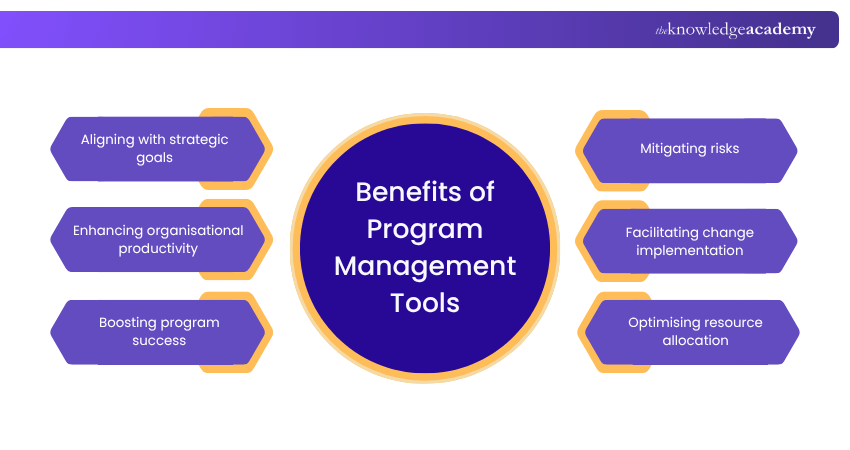
1) Aligning with Strategic Goals
It helps teams stay focused on the company’s big-picture goals. They make sure all projects within a programme support those main goals. This keeps efforts aligned and avoids wasted time on tasks that don’t matter. It also helps connect project outcomes with business growth. Leaders can easily track if work is helping the company move forward.
a) Connects each task to company objectives
b) Keeps teams working towards the same goal
c) Tracks progress against strategic plans
d) Ensures efforts support long-term business goals
2) Enhancing Organisational Productivity
These tools improve how teams work by saving time and reducing mistakes. They help organise tasks, set clear deadlines, and avoid confusion. With better planning, teams get more done with less stress. It also helps reduce meetings by showing clear updates. Everyone can focus on their work without waiting for instructions.
a) Helps teams manage work efficiently
b) Reduces delays and repeated work
c) Supports better task planning and delivery
d) Increases daily output with fewer interruptions
3) Boosting Program Success
Program Management Tools increase the chances of successful project delivery. They give real-time updates, track key results, and help managers spot problems early. This leads to better decisions and improved outcomes. They also keep everyone informed and make tracking easy. Projects can be completed on time with fewer last-minute surprises.
a) Tracks milestones and overall progress
b) Highlights issues before they grow
c) Supports clear communication across teams
d) Helps complete more projects on scheduled time
4) Mitigating Risks
By offering clear views of timelines, tasks, and resources, these tools help identify risks early. This allows teams to plan ahead and avoid problems. Managing risks becomes easier with organised information. It also helps teams prepare backup plans in advance. Managers can act quickly when something goes wrong.
a) Flags delays or resource gaps early
b) Helps create risk plans in advance
c) Reduces chances of project failure
d) Makes risk reporting simple and more accurate
5) Facilitating Change Implementation
Change is easier to manage with the right tool. Program Management software helps track changes, inform all teams, and update plans quickly. It keeps everyone informed and ready to adapt. It also reduces confusion when new plans are shared. Teams can adjust their tasks without stopping the whole project.
a) Tracks changes to timelines or tasks
b) Notifies teams of important updates
c) Makes adjustments smoother and faster
d) Helps teams accept and apply changes easily
6) Optimising Resource Allocation
These tools help managers assign the right people to the right tasks. They show who is available, who is overloaded, and where support is needed. This improves team balance and reduces burnout. It also ensures fair distribution of tasks. Teams can work more effectively without being overwhelmed.
a) Shows real-time team availability
b) Avoids overuse of certain employees
c) Matches skills to the right work
d) Improves overall use of people and tools
Boost your career with Project Risk Management Course and learn to manage uncertainties in complex projects effectively.
What is the Best Project Management Tool for Developers and Why?
Many developers prefer Jira because it supports coding workflows, bug tracking, and team collaboration. It also connects well with tools like GitHub and Bitbucket. This makes it easier to manage Software Development projects in one place.
What are the Key Program Management Features?
Key features include task tracking, goal setting, resource planning, reporting, and risk management. These features help teams stay organised and focused. They make it easier to run large programmes with multiple projects and teams. They also support better communication and collaboration across all levels of the organisation.
Conclusion
We hope this blog helped you understand what Program Management Tools are and why they matter. These tools support better planning, teamwork, and decision-making across multiple projects. From improving communication to managing risks, they make work smoother and more productive. With the right Program Management Tool, your team can stay organised, focused, and aligned with business goals.
Advance your skills with Project Management For Non-Project Managers Course and handle projects confidently in any role.
Frequently Asked Questions
Can Jira do Program Management?

Yes, Jira can be used for Program Management. It helps teams track tasks, manage workflows, and stay organised across multiple projects. With added features and plugins, Jira works well for both small and large teams.
What are the Four Types of Project Management?
The four common types of Project Management are Waterfall, Agile, Scrum, and Lean. Each one has its own way of planning and handling tasks. The best type depends on the project’s needs and the way your team works.
What are the Other Resources and Offers Provided by The Knowledge Academy?
The Knowledge Academy takes global learning to new heights, offering over 3,000+ online courses across 490+ locations in 190+ countries. This expansive reach ensures accessibility and convenience for learners worldwide.
Alongside our diverse Online Course Catalogue, encompassing 17 major categories, we go the extra mile by providing a plethora of free educational Online Resources like Blogs, eBooks, Interview Questions and Videos. Tailoring learning experiences further, professionals can unlock greater value through a wide range of special discounts, seasonal deals, and Exclusive Offers.
What is the Knowledge Pass, and how does it work?
The Knowledge Academy’s Knowledge Pass, a prepaid voucher, adds another layer of flexibility, allowing course bookings over a 12-month period. Join us on a journey where education knows no bounds.
What are Related Courses and Blogs Provided by The Knowledge Academy?
The Knowledge Academy offers various Project Management Courses, including the Jira Training, Running Small Projects Course, and Confluence Training. These courses cater to different skill levels, providing comprehensive insights into Critical Path Analysis (CPA).
Our Project Management Blogs cover a range of topics related to Program Management Tools, offering valuable resources, best practices, and industry insights. Whether you are a beginner or looking to advance your Project Management skills, The Knowledge Academy's diverse courses and informative blogs have got you covered.

The Knowledge Academy


Global Training Provider
The Knowledge Academy is a world-leading provider of professional training courses, offering globally recognised qualifications across a wide range of subjects. With expert trainers, up-to-date course material, and flexible learning options, we aim to empower professionals and organisations to achieve their goals through continuous learning.

Upcoming Project Management Resources Batches & Dates
Date
 PgM (Programme Management) Course
PgM (Programme Management) Course
Fri 24th Jul 2026
PgM (Programme Management) Course
Fri 27th Nov 2026

 If you wish to make any changes to your course, please


