


 Top Rated Course

We may not have the course you’re looking for. If you enquire or give us a call on +47 80010068 and speak to our training experts, we may still be able to help with your training requirements.
Top Microsoft Project Alternatives for Project Management in 2026
The Knowledge Academy 14 July 2026Microsoft Project Alternatives include Trello, Asana, Monday.com, Wrike, Smartsheet, Jira, ClickUp, plus free tools like ProjectLibre and OpenProject for teams. As project teams become more Agile, remote, and collaborative, modern alternatives offer simple interfaces, real-time updates, flexible methods, and stronger integrations.
Home
 Resources
Office Applications
Top Microsoft Project Alternatives for Project Management in 2026
Resources
Office Applications
Top Microsoft Project Alternatives for Project Management in 2026
Resources
Office Applications
Top Microsoft Project Alternatives for Project Management in 2026

Training Outcomes Within Your Budget!
We ensure quality, budget-alignment, and timely delivery by our expert instructors.
Table of Contents
Related Courses

Project Management has changed rapidly, and traditional tools no longer fit the way teams operate. While Microsoft Project has been a popular choice, its complexity, pricing, and learning curve require time to adapt. This is why organisations are actively exploring Microsoft Project Alternatives that offer flexibility, collaboration, and simplicity for modern project demands in 2026.
From Agile startups to large enterprises, teams require tools that support remote work, real-time updates, and rapid decision-making. In this blog, you will learn about Microsoft Project Alternatives and help you choose the right tool for successful Project Management in 2026. Keep reading to learn more!
Table of Contents
1) How Much Does Microsoft Project Cost?
2) Best Microsoft Project Alternatives to Use in 2026
3) Free Microsoft Project Alternatives
4) Choosing the Right Microsoft Project Alternative
5) What Big Companies Use Smartsheet?
6) Conclusion
How Much Does Microsoft Project Cost?
Microsoft Project offers several pricing plans to suit different business needs, ranging from small teams to large enterprises.
1) Subscription-based Plans
Microsoft’s subscription plans are hosted in the cloud and billed annually. This gives you access to ongoing updates, collaboration features, and integration with Microsoft 365 apps. It includes:
a) Planner Plan 1: Starts around £7.42 per user a month. This plan includes core project planning and task management features. Mostly suitable for small teams.
b) Planner and Project Plan 3: Around £22.27 per user a month. This plan adds more advanced project scheduling, resource management, roadmaps, and desktop client access.
c) Planner and Project Plan 5: About £40 per user a month. This is the highest tier of subscription, mostly suitable for large enterprises. It also includes enterprise resource planning, advanced portfolio management, and deeper analytics.

2) One-time Purchase Options
Microsoft Project also offers desktop versions that need to be bought once. These are suitable for teams that do not require continuous cloud updates. It includes:
a) Microsoft Project Standard 2024: It is a one-time purchase license for a single desktop. It typically costs around £504.02
b) Microsoft Project Professional 2024: A more advanced one-time license. It cost around £838.79. This includes collaboration tools, such as SharePoint and expanded reporting options.
While Microsoft Project is a powerful tool, its cost can be a barrier for many businesses, especially smaller teams or startups. This is where exploring Microsoft Project Alternatives becomes valuable. Many alternative tools offer comparable features, more flexibility, and often more affordable pricing models. Choosing the right solution can help you manage projects effectively without stretching your budget.
Best Microsoft Project Alternatives to Use in 2026
Now that you know why Microsoft Project Alternatives is a good idea, let's take a closer look at these alternatives' main characteristics and advantages. Below is the list of current Microsoft Project substitutes that are available on the market.
1) ClickUp
ClickUp is one of the most popular Microsoft Project Alternatives to use in 2026, known for its versatility, user-friendly design, and affordability. It offers an all-in-one workspace where teams can manage tasks, projects, documents, goals, and communication in one place.
1) Robust Task Management and Organisation: ClickUp allows users to easily create, assign, and track tasks.
2) Collaboration Eatures and Communication Tools: Users can leave comments, mention team members, and have discussions directly within tasks.
3) Project Tracking and Analytics: ClickUp enables teams to track project progress and performance through visual representations and analytics.
4) Customisation and Templates: Teams can create custom task statuses, fields, and workflows, tailoring ClickUp to align with their unique processes.
5) Integration Capabilities: The platform is integrated with various popular communication tools like Slack and Microsoft Teams.
6) Learning Curve and Onboarding: While ClickUp offers a rich set of features, the platform may have a learning curve for new users.
The following are some pros and cons of ClickUp:
Pros:
1) All-in-one platform for task management, time tracking, and goal setting.
2) Highly customisable views, workflows, and statuses.
3) Affordable pricing with both free and premium plans.
Cons:
1) Steep learning curve for new users due to feature richness.
2) Occasional performance issues, especially with large projects.
3) Mobile app offers limited functionality compared to desktop.
Register with our ClickUp Training today to simplify work, boost productivity, and manage projects effortlessly.
2) ProofHub
ProofHub is a reliable and easy-to-use option among the top Microsoft Project Alternatives in 2026. It offers a centralised platform for managing tasks, discussions, time tracking, and project planning without the complexity of traditional tools.
a) Project Planning and Scheduling: ProofHub enables users to create project plans, define tasks, set deadlines, and allocate resources.
b) Team Collaboration and Communication: ProofHub emphasises team collaboration and communication through features like discussions, and file sharing.
c) Task Management and Assignments: The users can create tasks, assign them to team members, set priorities, and track progress.
d) Document Management and Version Control: ProofHub offers document management capabilities, allowing users to store, organise, and share project-related documents.
e) Time Tracking and Reporting: This platform has built-in time tracking features to log the time spent on tasks.
The following are some pros and cons of ProofHub:
Pros:
1) All-in-one Project Management tool with tasks, discussions, time tracking, and notes.
2) Fixed, flat-rate pricing with no per-user charges, ideal for growing teams.
3) Simple and intuitive interface, making it easy for non-technical users.
Cons:
1) Limited integrations compared to other Project Management tools
2) Fewer advanced features for complex Project Management needs
3) Mobile app is less feature-rich than the desktop version
Master data, simplify analysis, and boost your career. Join our Microsoft Excel Course today and turn spreadsheets into success stories!
3) Asana
With its clear and user-friendly Project Management interface, Asana stands out as one of the most well-liked Microsoft Project Alternatives in 2026. It helps teams organise work, set priorities, and track progress effortlessly.
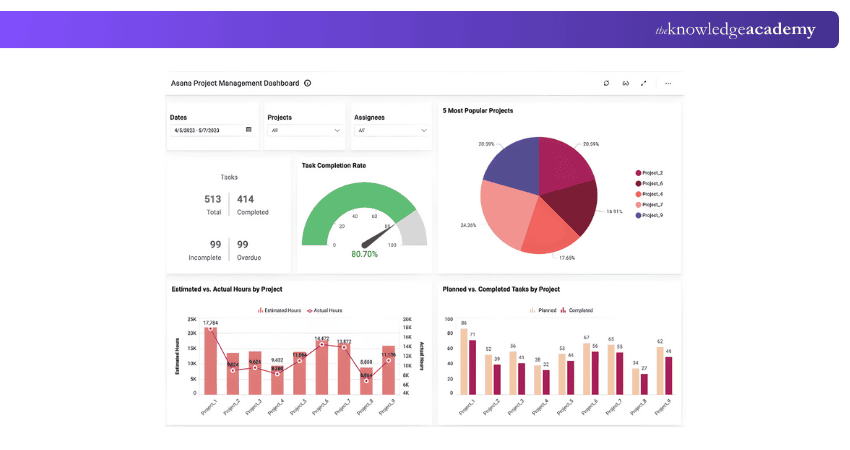
a) User-Friendly Interface and Task Management: Visually appealing layout with tasks, subtasks, Kanban boards, and calendar views.
b) Collaboration and Team Communication: Enables comments, tagging, and real-time updates for effective team communication.
c) Team Dashboards: Customisable dashboards for tracking progress, task status, and project analytics.
d) Integration Capabilities: Seamlessly integrates with tools like Slack, Google Drive, and more.
e) Automation: Automates repetitive tasks with custom rules and workflows.
The following are some pros and cons of Asana:
Pros:
1) Clean, user-friendly interface with visual task management.
2) Strong collaboration features including comments, tags, and notifications.
3) Robust integration with popular third-party tools.
Cons:
1) Limited advanced features for complex Project Management.
2) Can become overwhelming for large projects with many tasks.
3) Premium plans can be costly for small teams.
4) Monday.com
Teams can plan, organise, and monitor projects with the aid of Monday.com, a versatile Project Management tool with an easy-to-use interface.
a) Customisable Workflows: Allows task dependencies, custom columns, and automation to boost productivity.
b) Visual Task Management: Offers Kanban-style boards with drag-and-drop task management and tracking.
c) Collaboration and Communication: Enables comments, file sharing, and tagging for smooth team collaboration.
d) Integration Capabilities:Integrates seamlessly with popular apps for centralised Project Management.
e) Reporting and Analytics: Provides visual reports and insights to track progress and improve performance.
The following are some pros and cons of Monday.com:Pros:
1) Highly visual and intuitive interface with flexible project views.
2) Strong automation and customisation feature to streamline workflows.
3) Seamless integration with popular tools like Slack, Zoom, and Google Drive.
Cons:
1) Can be expensive for small teams or startups.
2) Some users may find the wide range of features overwhelming.
3) Limited advanced Project Management features for complex projects.
5) Smartsheet
Smartsheet is a leading cloud-based platform combining spreadsheet-like features with Project Management tools. It is a top choice among Microsoft Project Alternatives.
a) Spreadsheet-like Interface: Familiar spreadsheet-style layout for easy navigation and flexible Project Management.
b) Project Planning and Gantt Charts: Create interactive Gantt charts, define tasks, and manage timelines visually.
c) Collaboration and Communication: Share sheets, leave comments, and attach files for real-time team collaboration.
d) Workflow Automation: Automate tasks, notifications, and updates to save time and boost efficiency.
e) Resource Management and Reporting: Track resources and generate reports to monitor progress and team performance.
The following are some pros and cons of Smartsheet:
Pros:
1) Familiar spreadsheet-like interface for easy adoption and usability
2) Strong project planning with Gantt charts, automation, and Resource Management
3) Robust collaboration and reporting features for real-time insights
Cons:
1) Can be costly for small teams or individuals
2) Steeper learning curve for users unfamiliar with spreadsheets
3) Limited visual project views compared to some modern tools
6) Trello
Trello is a simple, visual Project Management tool that uses boards and cards to help teams organise and track tasks easily. As one of the popular Microsoft Project Alternatives, it offers a free plan for small teams and paid plans starting at £14 per user per month.
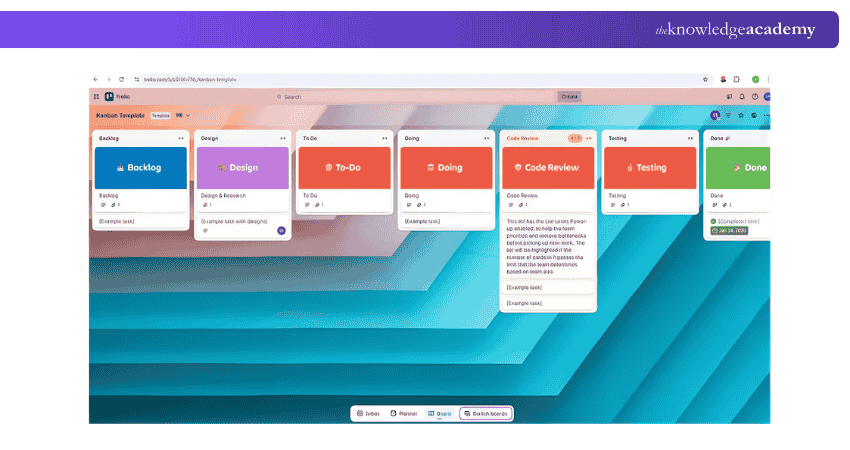
a) Board and Card System: Uses boards and cards to visually organise and track tasks across project stages.
b) Collaboration and Communication: Enables task assignment, comments, file sharing, and mentions for real-time teamwork.
c) Customisable Workflows: Allows users to tailor boards, columns, labels, and checklists to fit their processes.
d) Integration Capabilities: Connects with various third-party tools to centralise information and streamline workflows.
e) Mobile and Desktop Applications: Offers apps for all devices, keeping teams connected and updated on the move.
The following are some pros and cons of Trello:
Pros:
1) Simple, visual interface with easy drag-and-drop task management
2) Highly flexible and customisable for different project types
3) Generous free plan suitable for individuals and small teams
Cons:
1) Limited built-in reporting and analytics features
2) Not ideal for managing complex, large-scale projects
3) Can become cluttered with too many cards or boards
Join our Trello Training today and learn visual productivity with ease!
7) Wrike
Wrike is a robust Project Management solution that offers teams a centralised platform to plan, track, and collaborate on projects effectively. The tool is free for personal use and scales up to £20 per user per month for business plans with advanced features.
a) Advanced Task Management and Collaboration: Create, prioritise, and collaborate on tasks in real time.
b) Flexible Project Views and Dashboards: Switch between lists, boards, Gantt charts, and custom dashboards.
c) Automation and Workflow Automation: Automate tasks, updates, and workflows to save time.
d) Integration With Third-party Tools: Connect with Slack, Teams, Google Drive, and more.
e) Resource Management and Time Tracking: Manage resources, track time, and monitor workloads.
The following are some pros and cons of Wrike:
Pros:
1) Versatile project views including Gantt charts, boards, and lists.
2) Strong automation and workflow customisation to boost efficiency.
3) Robust collaboration with real-time updates and file sharing.
Cons:
1) Steeper learning curve for new users.
2) Can be expensive for smaller teams or startups.
3) Some features may feel complex for simple project needs.
Enhance project visibility, streamline workflows, and drive results. Join our Wrike Training today and unlock the full potential of your Project Management!
Maximise your productivity and collaboration with our Microsoft Teams Training - Join today!
8) Teamwork
Teamwork is a user-friendly Microsoft Project alternative offering advanced project planning, smooth integrations, and strong collaboration features. It’s free for up to five users, with premium plans starting from £16 per user per month.
a) Comprehensive Project Management Suite: Provides an all-in-one platform for project planning, collaboration, and execution.
b) Project Planning and Task Management: Helps create plans, define tasks, set milestones, and manage deadlines efficiently.
c) Communication and Collaboration Tools: Enables real-time discussions, file sharing, and tagging for smooth teamwork.
d) Time Tracking and Resource Management: Tracks time, manages resources, and monitors team workload effectively.
e) Reporting and Analytics: Generates insightful reports on progress, productivity, and project success.
The following are some pros and cons of Teamwork:
Pros:
1) Comprehensive project planning and task management features
2) Built-in time tracking and resource management tools
3) Strong collaboration with real-time communication and file sharing
Cons:
1) Can be expensive for larger teams
2) May feel overwhelming for simple project needs
3) Some advanced features require higher-tier plans
9) TeamGannt
TeamGantt is a user-friendly Project Management tool that focuses on simple and intuitive project planning and scheduling. As one of the practical Microsoft Project Alternatives, it offers a visual, interactive interface.
a) Interactive Gantt Charts: Create and update tasks directly on visual, drag-and-drop Gantt charts.
b) Collaborative Features: Assign tasks, add comments, and share files for real-time teamwork.
c) Project Templates: Use ready-made templates to quickly launch common project types.
d) Progress Tracking: Track task updates and get milestone notifications to stay on schedule.
e) Time Tracking: Log time spent on tasks to monitor productivity and manage costs.
f) Integration Capabilities: Integrates with tools like Slack and Google Drive for smoother workflows.
The following are some pros and cons of TeamGantt:
Pros:
1) Intuitive, interactive Gantt charts for easy project planning
2) Built-in time tracking and progress monitoring features
3) Simple collaboration with task assignment, comments, and file sharing
Cons:
1) Limited features for complex or large-scale projects
2) Can become costly for larger teams or businesses
3) Fewer integrations compared to some competitors
10) Zoho Project
Zoho Projects is a versatile Microsoft Project Alternative offering dynamic Kanban boards for efficient task organisation and visual Project Management. It enhances collaboration through a social feed for real-time updates and dedicated forums for in-depth discussions, helping teams stay connected.
a) User-friendly Interface: Easy-to-use design ensures smooth navigation for all user levels.
b) Customisation Capabilities: Allows teams to tailor workflows, boards, and views to their needs.
c) Integration With Third-party Apps: Seamlessly connects with popular tools for streamlined Project Management.
d) Mobile Accessibility: Dedicated mobile apps keep teams connected and productive on the go.
e) Collaborative Document Management: Enables document sharing, editing, and version control within projects.
The following are some pros and cons of the Zoho Project:
Pros:
1) Intuitive, user-friendly interface for easy Project Management
2) Highly customisable workflows, views, and Kanban boards
3) Strong integration with third-party apps and mobile accessibility
Cons:
1) Can feel overwhelming for very small or simple projects
2) Some advanced features are only available in higher-tier plans
3) Limited offline functionality
11) Jira
Jira is a widely used Microsoft Project Alternative known for its powerful Agile Project Management capabilities, particularly in software development and IT environments. Jira offers a free plan for small teams, with paid plans starting from approximately £6 per user per month, scaling up based on team size and advanced feature needs. Key features are:
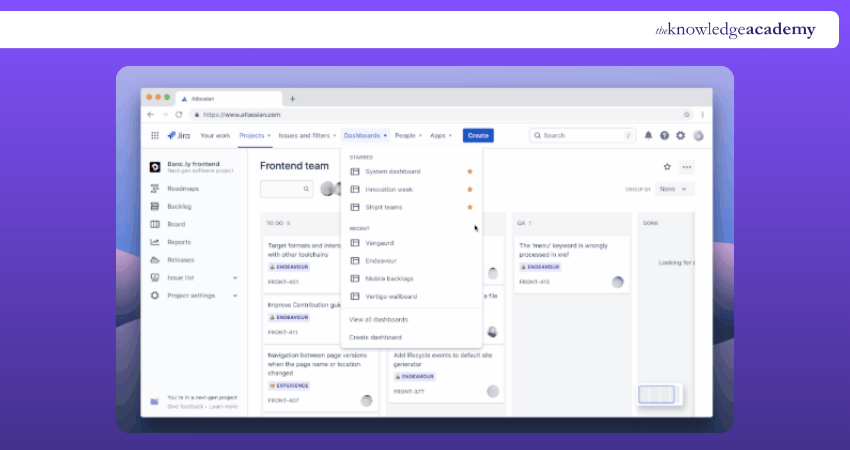
a) User-Friendly Dashboard: Provides an intuitive dashboard to view project status, assign tasks, and track progress.
b) Agile Boards and Methodologies: Supports Agile with customisable Scrum and Kanban boards for efficient workflows.
c) Advanced Issue and Bug Tracking: Enables quick logging, prioritisation, and resolution of issues and bugs.
d) Powerful Reporting and Analytics: Offers real-time reports, charts, and project metrics for informed decision-making.
e) Integration with Third-party Tools: Seamlessly connects with apps like Confluence, Slack, and Bitbucket.
Below are the pros and cons of Jira:
Pros:
1) Excellent for Agile Project Management with Scrum and Kanban boards
2) Powerful issue and bug tracking for software and IT teams
3) Strong reporting, analytics, and integration with popular development tools
Cons:
1) Steep learning curve for new users
2) Can be complex and overwhelming for non-technical teams
3) Some advanced features require higher-tier pricing plans
12) Basecamp
Among Microsoft Project Alternatives, Basecamp is a well-liked option, particularly for groups that prioritise ease of use and efficient communication. It is a user-friendly platform that integrates scheduling, file sharing, team chat, and task management. The key features include:
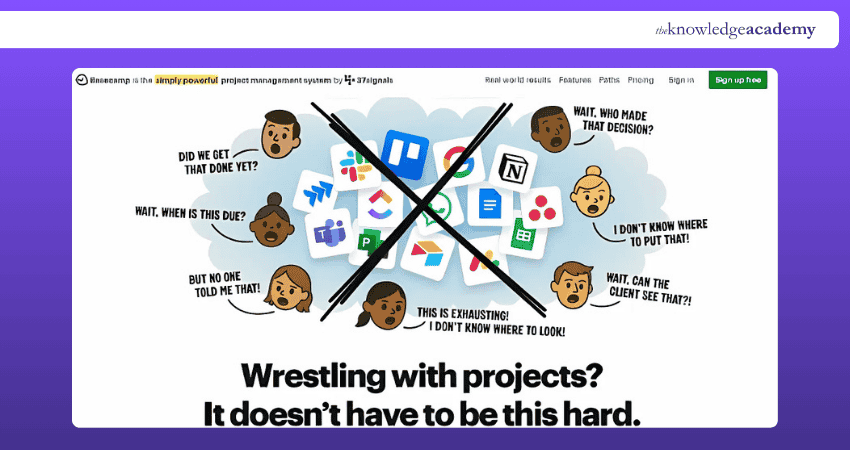
a) To-Do Lists: Create and manage task lists for any project. Easily assign tasks, set deadlines, and track progress.
b) Message Boards: Centralise all project discussions in one place. Keep conversations organised and accessible to the whole team.
c) Real-Time Group Chat (Campfire): Enable quick, informal team communication within projects. Reduces the need for constant emails.
d) Schedules: Plan and manage project timelines using built-in calendars. Set essential milestones and deadlines for the team.
e) File Storage & Sharing: Upload, store, and share documents directly within projects. Keep everything accessible in one secure location.
The pros and cons of Basecamp are as follows:
Pros:
1) Simple, intuitive interface ideal for beginners and small teams
2) Flat-rate pricing with unlimited users, making it cost-effective for larger teams
3) Strong team communication with built-in messaging, to-do lists, and file sharing
Cons:
1) Limited advanced Project Management features for complex projects
2) Minimal reporting and analytics capabilities
3) Less suitable for detailed task dependencies and resource management
Streamline teamwork, manage projects with ease, and boost productivity. Join our Basecamp Training today and take control of your Project Management success!
13) Notion
Notion is one of the most versatile Microsoft Project Alternatives, blending Project Management with notetaking, databases, and documentation. This makes it ideal for teams who want everything in one place. Key features include:
a) All-in-One Workspace: Manage tasks, notes, documents, and databases in one tool. Ideal for teams needing flexibility and centralisation.
b) Kanban Boards & Task Lists: Visualise projects with customisable kanban boards and to-do lists. Organise tasks to match your preferred workflow.
c) Knowledge Base & Wiki Creation: Store and share team knowledge easily. Build internal documentation and guides for ongoing reference.
d) Real-Time Collaboration: Multiple users can edit content simultaneously. Keep everyone aligned with live updates and changes.
e) Custom Templates & Automation: Create personalised templates to speed up work. Automate repetitive tasks for greater efficiency.
The pros and cons of Notion are as follows:
Pros:
1) Highly versatile for Project Management, note-taking, and documentation
2) Clean, customisable interface with flexible page and database structures
3) Affordable pricing with a generous free plan for individuals and small teams
Cons:
1) Limited built-in Project Management features compared to dedicated tools
2) Can feel overwhelming due to its open-ended flexibility
3) Offline functionality is limited and not always reliable
14) nTask
nTask stands out as an affordable and feature-rich solution among Microsoft Project Alternatives. It is designed to help small to mid-sized teams manage projects, tasks, risks, and timesheets. Its key features include:
a) Task & Project Management: Plan, create, and manage tasks and projects easily. Track progress with clear priorities and deadlines.
b) Time Tracking & Timesheets: Monitor how much time is spent on each task. Generate detailed timesheets for performance analysis.
c) Risk & Issue Management: Identify project risks and track potential issues. Minimise disruptions through early risk detection.
d) Meeting Management: Plan and document meetings directly within the platform. Share agendas, notes, and follow-ups with the team.
e) Collaboration Tools: Share files, leave comments, and communicate seamlessly. Keep everyone connected within one workspace.
The pros and cons of nTask are as follows:
Pros:
1) Easy-to-use with essential Project Management features
2) Affordable pricing with a free plan for small teams
3) Built-in time tracking, risk, and issue management
Cons:
1) Limited scalability for complex projects
2) Basic reporting and analytics
3) Fewer third-party integrations
15) Celoxis
Celoxis is a robust enterprise-level solution among Microsoft Project Alternatives, designed for large teams managing complex projects, portfolios, and resources. Pricing starts at £20 per user per month and offers on-premises deployment options. Ke features are:
a) Advanced Project & Resource Management: Plan, schedule, and manage projects, portfolios, and resources in one centralised platform.
b) Rich Reporting and Dashboards: Gain real-time insights with customisable dashboards and reports.
c) Time and Expense Tracking: Log time and expenses directly within the tool. Generate accurate timesheets for billing and performance analysis.
d) Portfolio Management: Manage multiple projects under a single portfolio view. Prioritise initiatives and align them with business goals.
e) Risk and Issue Management: Identify, assess, and manage risks and issues before they impact delivery. Keep projects on track with proactive problem-solving.
The pros and cons of Celoxis are as follows:
Pros:
1) Powerful for complex project and Resource Management
2) Advanced reporting and real-time dashboards
3) Cloud and on-premise deployment options
Cons:
1) Higher cost, starting from £20 per user per month
2) Steep learning curve for beginners
3) Too complex for simple project needs
Work smarter and boost productivity with the Microsoft 365 Course – Join now!
Free Microsoft Project Alternatives
Among the Alternatives to Microsoft Project, there are certain options that can be advantageous in multiple ways. Let’s check out some of those free options in the following points:
1) GanttProject
GanttProject is a well-established Microsoft Project Alternative that’s completely free to use and available for Windows, macOS, and Linux. Launched in 2003, it continues to receive updates, making it a trusted choice for simple yet effective Project Management.
Key Features:
1) Gantt Chart Planning: Visualise tasks and timelines easily
2) Task Dependencies: Link tasks with clear dependencies
3) Work Breakdown Structure (WBS): Break projects into smaller parts for better control
4) Offline Desktop Application: Download and manage projects without internet access
2) Agantty
Agantty is a user-friendly Microsoft Project Alternative designed for teams seeking a simple and visually appealing way to manage projects. Best of all, Agantty is completely free, making it ideal for small businesses, freelancers, and nonprofits.
Key Features:
1) Unlimited Projects and Tasks: No restrictions on the number of projects or tasks you can create.
2) Permission Control: Set user roles and control access to sensitive projects.
3) Export to PDF: Share project timelines easily with downloadable PDF exports.
4) Cloud-Based Access: Manage projects from anywhere without installation.
3) Ganttic
Ganttic is a powerful Microsoft Project Alternative focused on Resource Management and project scheduling. It’s designed for teams that need to manage people, equipment, and projects through an easy-to-use, visual interface. Ganttic offers both free trials and paid plans starting from approximately £20 per user per month.
Key Features:
1) Resource Planning: Allocate and manage resources across multiple projects with clarity.
2) Drag-and-Drop Scheduling: Create and adjust project schedules visually in real time.
3) Custom Reports and Dashboards: Generate tailored reports to track performance and resource utilisation.
Plan projects better and turn tasks into clear action plans with Microsoft Planner Training –now!
Choosing the Right Microsoft Project Alternative
Choosing the right Microsoft Project Alternative depends on how your team operates, the complexity of your projects, and the tools you already use. If you focus on Gantt-based planning, options like ProjectLibre work well.
If teams prefer simple Kanban boards, they can use Trello or all-in-one workflows with automation, and then ClickUp or Smartsheet offer flexibility. The key is to balance out the features, cost, ease of use, and integrations.
Some key factors to consider when choosing a Microsoft Project Alternative:
a) Complexity: Simple tools like Trello suit basic tracking, while GanttPRO handles complex dependencies and scheduling.
b) Cost: Free options, such as ProjectLibre, cover basic needs, while paid tools, such as ClickUP, offer advanced features.
c) Integration: Microsoft Planner works best with Microsoft 365, while Monday.com or ClickUp support third-party integrations.
d) Methodology: Agile and Kanban boards focus on flexibility and visual flow, while Waterfall relies on structured Gantt Charts and fixed timelines.
e) Team Size: Small teams prefer Trello or ZohoProjects, while large enterprises use Celoxis or Planisware for portfolio control.
What Big Companies Use Smartsheet?
Smartsheet is trusted by many large organisations across industries. Some well-known companies, such as Lucid Motors, Thermo Fisher Scientific, Sanofi, Cencora, Samsung, Stellantis, McLaren F1 Team, and Infosys, use Smartsheet. It improves visibility, coordination, and delivery across teams, making it a strong choice for large enterprises managing complex projects in 2026.
Conclusion
The Microsoft Project Alternatives offers a range of features and functionalities to meet diverse Project Management needs. Choosing the best alternative depends on factors such as ease of use, customisation options, collaboration capabilities, and integration possibilities. By evaluating these alternatives, businesses can find a Project Management solution that maximises efficiency and aligns with their requirements.
Gain in-depth knowledge and practical expertise in using Microsoft Project - Register for our Microsoft Project Training now!
Frequently Asked Questions
Which Microsoft Project Alternative can be used to create visually appealing project timelines for a job interview?

Smartsheet's user-friendly interface makes it easy to navigate, ensuring a seamless presentation of your project timeline. The real-time collaboration features facilitate dynamic discussions during the interview, highlighting your ability to adapt and communicate effectively.
Is Microsoft Project being replaced by Planner?
No, Microsoft Project isn’t being replaced by Planner, as each serves different needs. Project is designed for complex project and portfolio management, while Planner focuses on simple task collaboration.

The Knowledge Academy


Global Training Provider
The Knowledge Academy is a world-leading provider of professional training courses, offering globally recognised qualifications across a wide range of subjects. With expert trainers, up-to-date course material, and flexible learning options, we aim to empower professionals and organisations to achieve their goals through continuous learning.


 If you wish to make any changes to your course, please


