


 Top Rated Course


We may not have the course you’re looking for. If you enquire or give us a call on +31 208081674 and speak to our training experts, we may still be able to help with your training requirements.
What are Plugins and How Do They Work? Explained in Detail
Richard Harris 22 April 2026Plugins are software add-ons that enhance the functionality of a program or platform, allowing users to customise features without altering core code. They also improve performance, security and User Experience (UX) by adding the tools you need. As a result, Plugins make software more flexible and easier to tailor for different tasks.

Training Outcomes Within Your Budget!
We ensure quality, budget-alignment, and timely delivery by our expert instructors.
Table of Contents
Think about the last time your browser blocked an annoying pop-up or Grammarly fixed a mistake before you sent an important email. These small moments of ease happen because Plugins quietly improve your digital experience. When you understand What are Plugins, it becomes clear how they work in the background like helpful add-ons, making everyday tools smarter, smoother and more enjoyable.
In this blog, we’ll explore What are Plugins and how they enhance your digital world. We’ll also discover how they work, their types, and how to install and manage them. By the end, you’ll know exactly how Plugins can transform the way you use your favourite apps and browsers.
Table of Contents
1) What are Plugins?
2) How do Plugins Work?
3) Common Types of Plugins
4) How to Install and Manage Plugins?
5) Applications of Plugins
6) Benefits of Using Plugins
7) Best Practices for Plugin Development and Usage
8) Must-have Browser Plugins
9) Conclusion
What are Plugins?
Plugins are small software components that add new features or functions to an existing program or website, such as a browser or a Content Management System (CMS). They enhance what the main application can do without changing its core code, which makes the system easier to customise and more flexible for different needs.
With Plugins, users can quickly add useful tools to improve their experience. When you understand how Plugins work, it becomes clear how they can enable features like social media sharing buttons on a website or password managers in a browser. These tools expand functionality without requiring major changes to the primary software.

How do Plugins Work?
Plugins work by connecting to the main software through an Application Programming Interface (API) or other safe access points. These connections allow the Plugin to use parts of the host app without changing its core code. This lets Plugins add new tools and features while keeping the main program secure. The host software also provides rules so developers can build Plugins that work smoothly.
Here is a simple explanation of how they work:
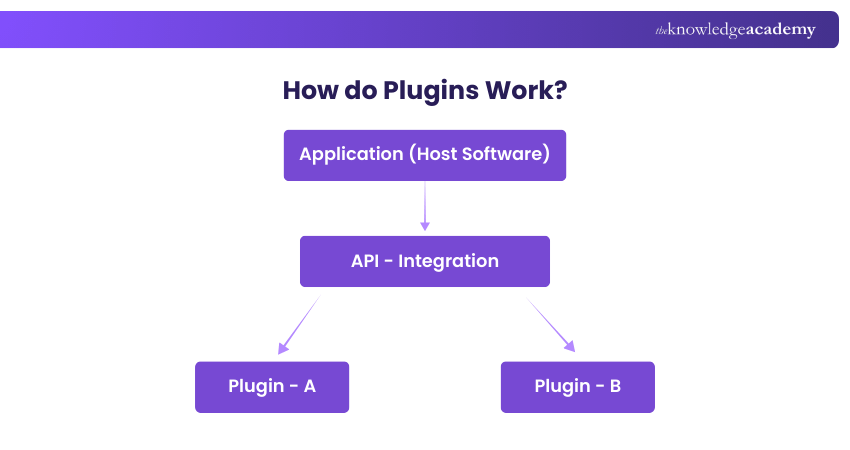
1) Host Application: The host software is the main program, offering key features and safe API entry points so Plugins can connect without changing the core code.
2) API or Integration Layer: The API acts as a bridge, giving Plugins the hooks and rules they need to access features and add functions safely.
3) Plugins: Plugins use the API to add features or connect services, and users can install many of them without affecting the main program.
Common Types of Plugins
Plugins come in many forms, and each type adds a different kind of feature or improvement to an application. Here are some of the most common types of Plugins used today:

1) Analytics Plugins
Analytics Plugins help track and analyse data. They show website traffic, user behaviour, click patterns and other important insights. These Plugins are useful for improving performance, understanding audiences and making better decisions.
2) Audio Plugins
An Audio Plugin is a small software tool that adds extra sound features to an app or digital platform. It can be used in music software, media players or other audio programs to add effects and improve the overall sound easily.
3) Social Media Plugins
Social Media Plugins connect websites or apps to social platforms. They add share buttons, display feeds, or enable login through services like Facebook or Google, making it easy for users to connect and share content.
4) Security Plugins
Security Plugins protect websites, browsers and apps by blocking malware, scanning for threats and preventing attacks. They warn users about unsafe sites, secure passwords and help keep online activity safe for everyday use.
5) Caching Plugins
Caching Plugins speed up websites and apps by saving temporary copies of data. When users return, pages load faster because the Plugin reuses the stored version. This is especially helpful for busy, high-traffic websites.
6) Video Plugins
Video Plugins help players support more video formats, offer better playback or add special effects. Some Plugins help video-editing software add new transitions or filters. For websites, video Plugins can help you embed videos easily or improve the video streaming experience.
Gain knowledge about how to design attractive templates for mobile applications. Join our Mobile App Development Training Using Flutter now!
How to Install and Manage Plugins?
Installing and managing Plugins is usually easy because most software includes a built-in Plugin or extension section. The process may look slightly different depending on the program, but the basic steps remain the same.
1) Installing Plugins
a) Open the application or browser you want to add the Plugin to
b) Go to the Plugins, extensions or add-ons menu
c) Search for the Plugin you need
d) Click the install or add button
e) Give any required permissions
f) Activate the Plugin if activation is required
2) Managing Plugins
a) Enable or Disable Plugins: Turn them on when needed or off if you do not want them running.
b) Update Plugins: Keep them updated to avoid errors and improve performance.
c) Change Settings: Some Plugins let you control how they work or what features they use.
d) Uninstall Plugins: Remove Plugins you no longer need to keep your system clean and fast.
Applications of Plugins
Plugins are used in many different types of software to add new features and improve the user experience. Here are some common places where Plugins are used:
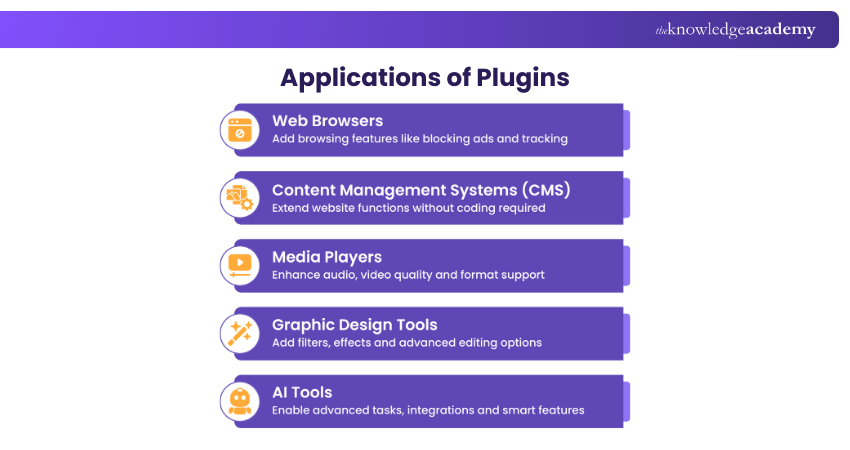
1) Web Browsers
In web browsers, Plugins are known as extensions. They add extra features such as ad blocking, grammar checking and safe browsing. Examples include Ad-blockers, Grammarly and VPN extensions. These tools help users browse the Internet with more control and better protection.
2) Content Management Systems (CMS)
In CMS platforms like WordPress, Plugins add new functions without needing any coding. They help with tasks such as improving SEO, adding Social Media buttons or creating contact forms. Examples include Yoast SEO, WooCommerce and social sharing Plugins. These tools make it easy to customise and enhance a website.
3) Media Players
In media players, Plugins add features that improve sound and video quality. They allow users to apply audio effects, add visualisations or support new file formats. Examples include Winamp DSP plug-ins and codec packs. These tools make audio and video playback more enjoyable and flexible.
4) Graphic Design Tools
In graphic design software, Plugins add creative tools and editing features. They help designers apply special effects, use new filters or work with advanced editing options. Examples include Plugins from Corel, Avenza and other design providers. These tools expand the range of design possibilities.
5) AI Tools
In AI tools, Plugins add advanced abilities that help the system perform more tasks. They can support browsing, file reading or connecting with other apps. Examples include ChatGPT Plugins for search, analysis or integrations. These tools make AI systems more helpful and powerful for users.
Understand Front-end and Back-end Development with server-side programming. Join our Web Development Training today!
Benefits of Using Plugins
Plugins let you add new features without altering the main program, making websites and apps more flexible, powerful and secure. Here are the key benefits:
1) Easy to Add Features: Plugins let you add useful tools in just a few clicks. You do not need to code or modify the core software.
2) Saves Time and Effort: They provide ready-made solutions, so you do not have to build complex features yourself. This makes the process faster and more efficient.
3) Customisation: Most Plugins can be adjusted to fit your needs. You can choose the features you want and shape the software according to your goals.
4) Better Performance: Some Plugins improve speed and loading time. Caching and optimisation Plugins help websites run smoothly and reduce the load on servers.
5) Enhanced Security: Security Plugins protect your website or app from threats. They scan for malware, block attacks and keep your data safe.
6) Cost-effective: Many Plugins are free or affordable. They help reduce development costs because you do not need custom coding for every feature.
7) Easy to Manage: Plugins are simple to install, update or remove. You can maintain your system without affecting the core program.
8) Expands Software Capabilities: Plugins allow the main software to do more, such as connecting to outside services, supporting new file types or adding advanced tools and functions.
9) Improved User Experience: Plugins add interactive features, smooth navigation and helpful tools that keep visitors engaged and improve overall satisfaction.
10) Better SEO: SEO Plugins help optimise your website for search engines. They improve content, boost page speed and increase your chances of ranking higher.
Best Practices for Plugin Development and Usage
Following best practices helps Plugins run smoothly, stay secure and remain easy to manage. Here are the key practices to follow:
1) Check Plugin Dependencies
Plugins often rely on certificates, libraries or external tools. Checking these ensures the Plugin is safe, trusted and unchanged. Verifying certificates protects against malware and builds user confidence.
2) Avoid Naming Conflicts and Duplications
Developers should use unique names for functions and variables. If names clash, the code can break or behave unpredictably. Avoiding conflicts keeps the system stable and prevents Plugin clashes.
3) Plan for Long-term Maintenance
Plugins need regular updates to stay secure and compatible. As APIs or host software change, developers must maintain the Plugin to fix bugs and keep it working smoothly over time with future versions.
4) Set Clear User Roles and Permissions
Plugins with sensitive features need defined roles and permissions. This ensures only authorised users have access to certain functions, improving security and preventing misuse across the application.
5) Validate and Clean Input Data
Plugins must validate and sanitise user input to prevent errors or attacks. Cleaning unsafe characters protects against threats like SQL injection and cross-site scripting and keeps the system stable.
6) Choose the Right Plugin Structure
A solid Plugin structure supports smooth integration, easy updates and scalability. A well-designed architecture prevents future issues and helps Plugins work well with the host software.
7) Test Plugins Before Use
Plugins should be tested on different devices and systems before going live. Testing finds bugs, compatibility issues and performance problems, ensuring the Plugin works safely and reliably in real-world use.
Learn cutting-edge technologies to build innovative mobile applications efficiently. Join our Mobile App Development Course now!
Must-have Browser Plugins
Here are some of the most useful and popular browser Plugins that many people use every day.
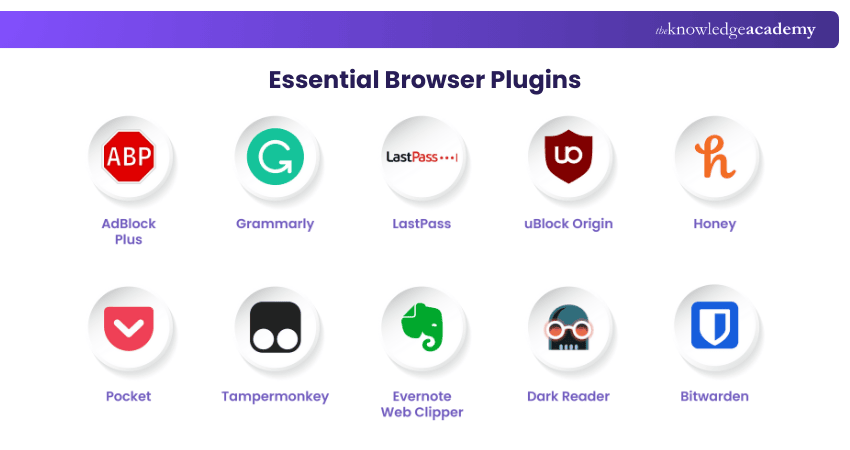
1) AdBlock Plus
What it Does: AdBlock Plus is a well-known ad blocker that removes annoying ads and pop-ups from websites. It also blocks trackers that collect your browsing data, giving you a cleaner and safer browsing experience.
How to Install: Go to the AdBlock Plus website, choose your browser and click “Install.” Follow the instructions to complete the setup.
2) Grammarly
What it Does: Grammarly is a writing tool that checks your spelling, grammar and punctuation as you type. It also suggests better word choices and helps improve your writing style.
How to Install: Visit the Grammarly website, create an account and download the browser extension.
3) LastPass
What it Does: LastPass is a password manager that safely stores your passwords and fills them in automatically. It can also create strong passwords to help keep your online accounts secure.
How to Install: Go to the LastPass website, sign up for an account and install the browser extension.
4) uBlock Origin
What it Does: uBlock Origin is a lightweight ad and tracker blocker. It loads pages quickly, uses very little memory and can be customised to block specific ads or scripts.
How to Install: Visit the uBlock Origin page and follow the installation steps for your browser.
5) Honey
What it Does: Honey automatically finds and applies coupon codes when you shop online. It can also compare prices from different stores to help you get the best deal.
How to Install: Go to the Honey website and download the extension for your browser.
6) Pocket
What it Does: Pocket lets you save articles, videos and webpages to read or watch later. It’s useful for saving content you want to revisit anytime.
How to Install: Visit the Pocket website, create an account and install the extension.
7) Tampermonkey
What it Does: Tampermonkey is a user script manager that allows you to add custom scripts to websites. This helps you change how websites work or add new features.
How to Install: Go to the Tampermonkey website and download the extension for your browser.
8) Evernote Web Clipper
What it Does: Evernote Web Clipper lets you save webpages, articles, screenshots and notes directly to your Evernote account. It’s helpful for organising and storing useful information.
How to Install: Visit the Evernote website, sign up and install the Web Clipper extension.
9) Dark Reader
What it Does: Dark Reader adds dark mode to websites, making them easier to view at night or in low light. It helps reduce eye strain by adjusting brightness and colours.
How to Install: Go to the Dark Reader website and download the browser extension.
10) Bitwarden
What it Does: Bitwarden is a free, open-source password manager that safely stores your passwords and fills them in for you. It also creates strong passwords to improve your online safety.
How to Install: Visit the Bitwarden website, create an account and install the browser extension.
Conclusion
In essence understanding What are Plugins? It helps you get more value from your software and websites. Plugins let you customise tools, improve security and add helpful features without changing the main program. They make your digital experience smoother, faster and more powerful. With the right Plugins, you can boost performance, increase productivity and create a better experience for every user.
Develop an app or website to your own specifications with our App & Web Development Training – Register today!
Frequently Asked Questions
What are Plugins on a Website?

Plugins on a website are small tools that add new features and improve how the site works. They can enhance security, speed, design, forms, SEO and many other functions. You install them on your website platform to expand its abilities without changing the main code.
Why do we Need Plugins?
We need Plugins to customise software and websites and add extra features without building everything from scratch. Plugins help improve performance, security, user experience and flexibility. They save time and make digital tools more useful.
What are the Other Resources and Offers Provided by The Knowledge Academy?
The Knowledge Academy takes global learning to new heights, offering over 3,000+ online courses across 490+ locations in 190+ countries. This expansive reach ensures accessibility and convenience for learners worldwide.
Alongside our diverse Online Course Catalogue, encompassing 19 major categories, we go the extra mile by providing a plethora of free educational Online Resources like Blogs, eBooks, Interview Questions and Videos. Tailoring learning experiences further, professionals can unlock greater value through a wide range of special discounts, seasonal deals, and Exclusive Offers.
What is The Knowledge Pass, and How Does it Work?
The Knowledge Academy’s Knowledge Pass, a prepaid voucher, adds another layer of flexibility, allowing course bookings over a 12-month period. Join us on a journey where education knows no bounds.
What are the Related Courses and Blogs Provided by The Knowledge Academy?
The Knowledge Academy offers various App & Web Development Training, including the WordPress Essentials Training, Mobile App Development Training Using Flutter, and the Web Development Training. These courses cater to different skill levels, providing comprehensive insights into Software Development Trends.
Our Programming & DevOps Blogs cover a range of topics related to Plugins, offering valuable resources, best practices, and industry insights. Whether you are a beginner or looking to advance your Programming & DevOps skills, The Knowledge Academy's diverse courses and informative blogs have got you covered.

Richard Harris


Senior Full Stack Developer and Technology Educator
Richard Harris is a highly experienced full-stack developer with deep expertise in both frontend and backend technologies. Over his 12-year career, he has built scalable web applications for startups, enterprises and government organisations. Richard’s writing combines technical depth with clear explanations, ideal for developers looking to grow in modern frameworks and tools.


 If you wish to make any changes to your course, please


