


 Top Rated Course

We may not have the course you’re looking for. If you enquire or give us a call on +31 208081674 and speak to our training experts, we may still be able to help with your training requirements.
What is Simple Network Management Protocol? Explained
Lily Turner 22 April 2026Simple Network Management Protocol (SNMP) is used to manage a network that allows network administrators to monitor and manage network devices. It helps track device performance, detect faults, and ensure smooth communication across the network. SNMP simplifies monitoring by collecting data from multiple devices efficiently.

Training Outcomes Within Your Budget!
We ensure quality, budget-alignment, and timely delivery by our expert instructors.
Table of Contents

Imagine running a big office where every computer, printer, and server needs to work perfectly, and you can see what is happening on each one from your desk. That is exactly what Simple Network Management Protocol (SNMP) does for your network. It acts like a smart assistant that keeps an eye on all your devices, spots issues early and ensures everything runs without a hitch.
In this blog, we will explore Simple Network Management Protocol; what it is, how it works and what it’s used for. We’ll also cover its key components, main commands and the pros and cons that make it essential for efficient Network Management.
Table of Contents
1) What is Simple Network Management Protocol (SNMP)?
2) What is SNMP Used for?
3) How Does SNMP Work?
4) Key Components of SNMP
5) The Five Basic SNMP Commands
6) Advantages of Simple Network Management Protocol (SNMP)
7) Disadvantages of Simple Network Management Protocol (SNMP)
8) Conclusion
What is Simple Network Management Protocol (SNMP)?
Simple Network Management Protocol (SNMP) is a standard way to manage and monitor devices on IP networks. It helps network administrators collect data from devices such as routers, switches, and servers and make changes when needed. SNMP works through a central manager and small agents on each device, which share information using the Management Information Base (MIB) database.
SNMP uses a request-and-response model where the manager collects data or receives alerts from device agents. This helps identify issues quickly and automate routine monitoring. Its lightweight design and broad support make it ideal for maintaining real-time visibility across networks.

What is SNMP Used for?
SNMP is mainly used for monitoring and managing networks. Here are the most common uses:

a) Device Monitoring: SNMP helps check if network devices like routers or switches are working properly
b) Performance Tracking: It collects data like bandwidth usage, CPU load and memory usage
c) Fault Detection: It alerts the manager when something goes wrong, such as a failed connection
d) Remote Control: Network Managers can restart or update devices without being physically there
e) Inventory Management: SNMP helps keep records of all connected devices in a network
How Does SNMP Work?
SNMP works by using a manager-agent model. Here is how it functions step by step:
a) Manager and Agents: The network has one central SNMP Manager, like a software application, and several SNMP agents, like those installed on each network device.
b) Information Sharing: Each agent collects information about its device, such as temperature, uptime, or traffic. It stores this data in a small database called the Management Information Base.
c) Communication: The SNMP Manager sends requests to the agents asking for specific data. The agent replies with the information from its MIB.
d) Monitoring: The manager displays all data in an easy-to-read format, like charts or alerts. If something goes wrong, the agent can send a message to the manager.
e) Actions: The Network Manager can use SNMP to make changes remotely, like restarting a device or updating settings.
Learn to import and export GNS3 projects quickly and efficiently with our GNS3 Training – Join today!
Key Components of SNMP
Simple Network Management Protocol has four key components that keep networks running efficiently. Here is a brief look at the main parts of SNMP components.
1) SNMP Agent
An SNMP agent is software that lives inside each network device. It collects and stores data about the device, like how fast it is working or if it is having any errors. When the manager asks for this data, the agent provides it. If a problem happens, it can also send alerts automatically.
2) Management Information Base (MIB)
The Management Information Base acts as a structured database that holds the information collected by the SNMP Agent. It organises device data so the SNMP Manager can easily access performance details, error logs or configuration information whenever needed.
3) SNMP Manager
The SNMP Manager is a central software program that talks to all agents in the network. It sends requests, collects responses and displays data in simple dashboards. You can think of it as the “control centre” that gives a full view of the network. If any device fails, the SNMP Manager quickly alerts the administrator.
4) SNMP-managed Network Nodes
These are the actual devices being monitored: routers, switches, firewalls, printers or computers. They are called network nodes because each one connects to the network. Each node runs an SNMP agent so it can communicate with the SNMP Manager.
The Five Basic SNMP Commands
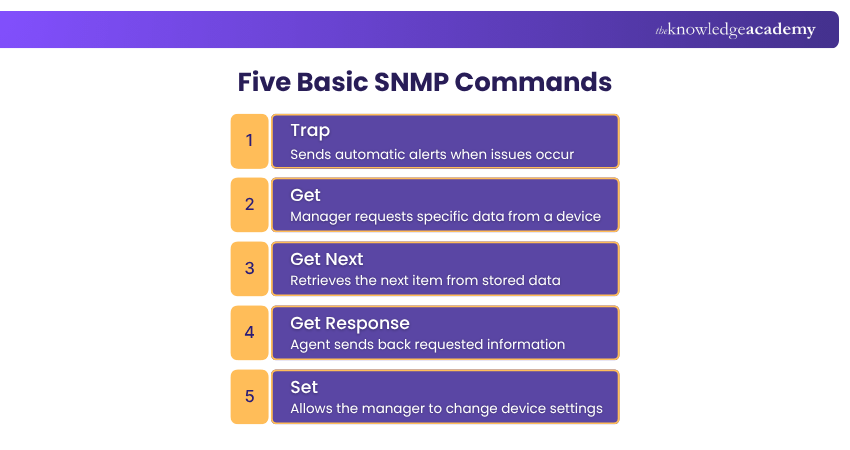
Simple Network Management Protocol uses a small set of core commands that make communication between the manager and the agents possible. Here are the five most important ones.
1) Trap
The Trap command is used by agents to send alerts to the SNMP Manager automatically. For example, if a printer runs out of ink or a router stops working, the agent sends a Trap message right away. This helps the manager know about problems instantly without checking manually.
2) Get
The Get command allows the manager to ask an agent for specific information. For example, it can request the CPU usage or the current network speed of a device. The agent then replies with the requested data from its MIB.
3) Get Next
The Get Next command helps the manager retrieve the next piece of information from the MIB. This is useful when the manager needs to read through a list of related data, like checking every port on a router one by one.
4) Get Response
The Get Response command is what the agent sends back to the manager after receiving a request. It contains the actual information that the manager asked for. For example, if the manager sends a Get command for memory usage, the Get Response will return the memory percentage used.
5) Set
The Set command allows the SNMP Manager to make changes to the device. For example, it can update configurations or restart the system remotely. This helps administrators manage networks from anywhere, saving time and effort.
Acquire the skills to design, configure, and troubleshoot network topologies with our Cisco Packet Tracer Course – Join now!
Advantages of Simple Network Management Protocol (SNMP)
Simple Network Management Protocol offers many benefits for both small and large networks. Here are some of the main advantages:
a) Easy to Use: SNMP is simple and supported by most network devices. You don’t need advanced technical skills to monitor devices.
b) Centralised Control: It allows administrators to view and manage the whole network from one central place.
c) Automatic Alerts: Simple Network Management Protocol can automatically send notifications when something goes wrong, saving time.
d) Scalability: It works for small local networks as well as large enterprise systems with thousands of devices.
e) Standard Protocol: Because SNMP follows global standards, it can be used with almost any hardware or software.
f) Reduces Downtime: By detecting problems early, Simple Network Management Protocol helps fix issues before they cause bigger failures.
g) Cost-effective: It is available in many free or open-source tools, so even small businesses can use it without big expenses.
Disadvantages of Simple Network Management Protocol (SNMP)
While Simple Network Management Protocol is helpful, it also has a few drawbacks:
a) Security Risks: Older SNMP versions (like SNMPv1 and v2) send data without encryption, which can expose sensitive information.
b) Limited Control: SNMP mainly focuses on monitoring. It can not always perform deep troubleshooting or advanced management tasks.
c) Complex Setup in Large Systems: Managing a very large number of devices might require extra configuration and maintenance.
d) Performance Impact: Too many SNMP messages or traps can slow down network performance if not managed properly.
e) Compatibility Issues: Some older devices may not fully support new SNMP versions, creating connection issues.
Conclusion
Simple Network Management Protocol is like the heartbeat of a network; quietly keeping everything alive and connected. It helps administrators track, manage, and fix devices with ease, ensuring smooth performance across every corner of the system. While simple in design, SNMP remains one of the most powerful and dependable tools in modern Network Management.
Learn networking fundamentals, IP connectivity, security, and automation basics with our CCNA Training – Join today!
Frequently Asked Questions
What is an Example of SNMP?

An example of Simple Network Management Protocol use is in a company’s network where the administrator uses SNMP monitoring software to check router traffic or CPU usage. If the router goes offline, the SNMP agent immediately sends a Trap message to the manager, allowing the issue to be fixed quickly.
Is SNMP a Security Risk?
Simple Network Management Protocol itself is not a direct threat, but older versions (like SNMPv1 or v2) do not encrypt data, which means information can be read by attackers. Newer versions like SNMPv3 are safer because they use encryption and authentication to protect network data.
What are the Other Resources and Offers Provided by The Knowledge Academy?
The Knowledge Academy takes global learning to new heights, offering over 3,000+ online courses across 490+ locations in 190+ countries. This expansive reach ensures accessibility and convenience for learners worldwide.
Alongside our diverse Online Course Catalogue, encompassing 17 major categories, we go the extra mile by providing a plethora of free educational Online Resources like Blogs, eBooks, Interview Questions and Videos. Tailoring learning experiences further, professionals can unlock greater value through a wide range of special discounts, seasonal deals, and Exclusive Offers.
What is The Knowledge Pass, and How Does it Work?
The Knowledge Academy’s Knowledge Pass, a prepaid voucher, adds another layer of flexibility, allowing course bookings over a 12-month period. Join us on a journey where education knows no bounds.
What are the Related Courses and Blogs Provided by The Knowledge Academy?
The Knowledge Academy offers various CCNA Training, including the CCNA Certification, GNS3 Training, and the Cisco Packet Tracer Course. These courses cater to different skill levels, providing comprehensive insights into Modem vs Router.
Our IT Infrastructure & Networking Blogs cover a range of topics related to SNMP, offering valuable resources, best practices, and industry insights. Whether you are a beginner or looking to advance your IT Infrastructure & Networking skills, The Knowledge Academy's diverse courses and informative blogs have got you covered.

Lily Turner


Senior AI/ML Engineer and Data Science Author
Lily Turner is a data science professional with over 10 years of experience in artificial intelligence, machine learning, and big data analytics. Her work bridges academic research and industry innovation, with a focus on solving real-world problems using data-driven approaches. Lily’s content empowers aspiring data scientists to build practical, scalable models using the latest tools and techniques.
View Detail
Upcoming IT Infrastructure & Networking Resources Batches & Dates
Date
 CCNA Certification
CCNA Certification
Mon 10th Aug 2026
CCNA Certification
Mon 21st Sep 2026
CCNA Certification
Mon 26th Oct 2026
CCNA Certification
Mon 21st Dec 2026

 If you wish to make any changes to your course, please


