


 Top Rated Course

We may not have the course you’re looking for. If you enquire or give us a call on +44 1344 203 999 and speak to our training experts, we may still be able to help with your training requirements.
What is AutoCAD? A Complete Guide to Features, Uses and Careers
The Knowledge Academy 24 November 2025AutoCAD is a powerful CAD software by Autodesk that enables professionals to create precise 2D drawings and detailed 3D models with advanced drafting tools. AutoCAD is a widely recognised and industry-standard tool for Architects, Engineers, and other professionals involved in the field of design and construction.

Training Outcomes Within Your Budget!
We ensure quality, budget-alignment, and timely delivery by our expert instructors.
Table of Contents

Have you ever wondered how skyscrapers are planned, machines are perfected, or interiors are mapped with such precision? Behind these creations lies AutoCAD, the digital drafting powerhouse that has transformed design across industries. From engineering marvels to everyday structures, it has become the trusted tool for professionals who demand accuracy and innovation.
By mastering AutoCAD, you not only sharpen your design skills but also unlock exciting career opportunities across fields. In this blog, we will explore What is AutoCAD, its key features, practical applications, and how learning it can shape your journey toward a successful career in design.
Table of Contents
1) What is AutoCAD?
2) Features and Capabilities of AutoCAD
3) Benefits of Using AutoCAD
4) How AutoCAD Works?
5) Applications of AutoCAD
6) AutoCAD Career Opportunities
7) Alternatives of AutoCAD
8) Is AutoCAD Subscription Available for Individual Users?
9) Can I use AutoCAD on Multiple Computers?
10) Conclusion
What is AutoCAD?
AutoCAD is a design software created by Autodesk that helps people make and edit both 2D and 3D digital designs. Instead of drawing by hand, you can use the software to create precise designs much faster and with less effort. Your work can be saved and stored in the cloud, so it’s easy to access whenever you need it.
The software also comes with useful features like quick editing, reusable design blocks for faster production, and extremely accurate measurements down to fractions. Once your design is ready, it can be used for 3D printing, creating prototypes, or even as the base for real-world projects like buildings or manufactured parts.

Features and Capabilities of AutoCAD
The best way to learn about AutoCAD is to use it, but here’s a quick overview of its main features:
a) 2D Drafting and Drawing Tools: Create accurate floor plans, sections, and elevations.
b) 3D Modelling: Build and refine 3D objects using shape and modelling tools.
c) Layer Management: Organise elements, control visibility, and manage properties easily.
d) Dimensions and Annotations: Add measurements, notes, and text for clarity.
e) Blocks and Symbols: Use reusable elements to save time and effort.
f) Rendering and Visualisation: Apply textures, lighting, and materials for realistic design views.
g) Plotting and Printing: Produce scaled physical copies of your designs.
h) Collaboration Tools: Share and access projects seamlessly through cloud integration.
i) File Compatibility: Work with multiple formats such as DWG, DXF, and DWF.
Master 3DS Max and animate your creative vision with ease. Sign up for our 3DS Max Course now!
Benefits of Using AutoCAD
This software serves as a powerful tool that enhances productivity, accuracy, and creativity. So, let's explore some of the key benefits of using AutoCAD:
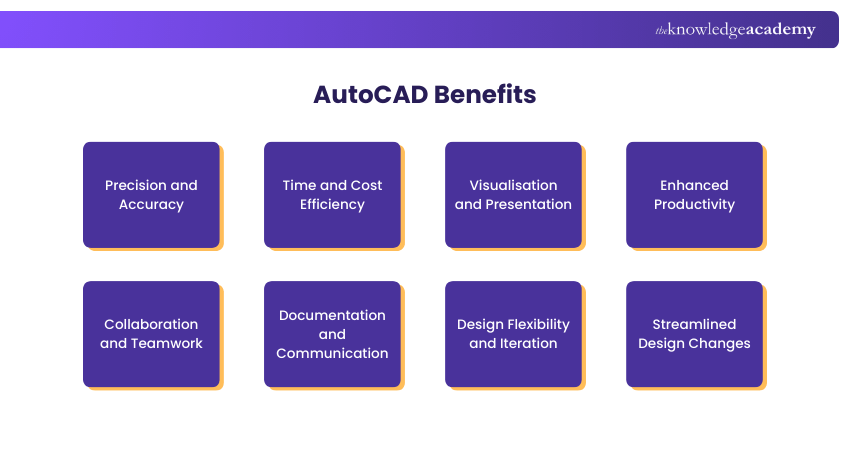
1) Precision and Accuracy
The software is renowned for its ability to deliver precise and accurate designs. Its various tools and features enable professionals to create drawings and models precisely. As a result, AutoCAD ensures that measurements, dimensions, and annotations are accurate, minimising errors and rework.
2) Time and Cost Efficiency
AutoCAD streamlines the design process, resulting in significant time and cost savings. The software automates repetitive tasks, such as drawing standard shapes or applying consistent dimensions, reducing the time required for manual drafting.
Further, its efficiency allows professionals to complete projects faster, enabling them to take on more work or allocate resources to other essential tasks.
3) Visualisation and Presentation
With its 3D modelling capabilities, AutoCAD enables professionals to create realistic visualisations of their designs. This feature is particularly valuable for Architects and Product Designers, as it allows clients and stakeholders to visualise the result accurately.
Additionally, its visual capabilities also enhance presentations. As a result, this enables professionals to communicate design concepts and ideas effectively.
4) Enhanced Productivity
AutoCAD also offers a comprehensive set of tools and functionalities that enhance productivity. It offers customisable workspaces, shortcut keys, and personalised tool palettes. They allow professionals to tailor it to their specific needs.
As a result, Designers can optimise their workflow and minimise unnecessary steps. Additionally, the software's efficiency enables professionals to complete tasks more quickly, improving overall productivity.
5) Collaboration and Teamwork
Using this dynamic software named AutoCAD, multiple users can work on the same project simultaneously. It also helps them make real-time edits and share feedback.
This collaborative environment fosters effective communication and reduces errors due to miscommunication. Furthermore, it promotes teamwork among professionals working on a shared design project.
6) Documentation and Communication
AutoCAD's annotation and documentation features facilitate clear and effective communication. Professionals can add dimensions, text, and annotations directly to their drawings. This ensures that design intent and technical specifications are clearly communicated.
Further, its documentation capabilities help professionals generate accurate construction documentation. As a result, Designers can ensure clarity and reduce ambiguity during the construction phase.
7) Design Flexibility and Iteration
Its parametric capabilities allow users to apply constraints and relationships to elements within the design. This feature enables quick modifications and updates, facilitating the exploration of different design options and iterations without starting from scratch.
8) Streamlined Design Changes
AutoCAD also simplifies the process of making design changes. If a modification is required, professionals can easily edit their drawings or models, and the software automatically updates related elements.
This streamlined design change process saves time, reduces errors, and ensures that all parts of the design remain consistent.
How AutoCAD Works?
AutoCAD gives you a digital workspace where you can create, edit, and manage 2D and 3D designs. The workspace includes toolbars, menus, and panels that provide access to its many features. You can start by drawing shapes and lines, then refine your designs using tools to move, resize or adjust elements. For 3D work, you can also view your models from different angles.
The software uses a layer system, making it easier to organise and edit complex projects without affecting the whole design. Once finished, your work can be saved, exported in various formats, or printed. AutoCAD primarily runs as a desktop application for Windows and Mac, but it’s also available as a web version and mobile apps for iOS and Android.
From contours to construction, Civil 3D is your ideal toolkit for transforming landscapes. Sign up for our Civil 3D Training now!
Applications of AutoCAD
After you have understood What is AutoCAD, it’s time to look at the applications of this software. It finds applications across various industries and professional domains. Its versatile tools and capabilities, including those used for creating a Layout in AutoCAD, make it a go-to software for professionals seeking accurate and detailed designs. The following are some of the key areas where this software is extensively used
1) Architecture
Architects use AutoCAD to create detailed floor plans, sections and elevations of buildings. The software allows them to:
1) Visualise and refine their design ideas
2) Make informed decisions regarding materials
3) Examine dimensions
4) Generate construction documentation
2) Engineering
The software is widely used in Engineering disciplines such as civil, mechanical, electrical, and structural Engineering. Engineers leverage the software to do the following activities:
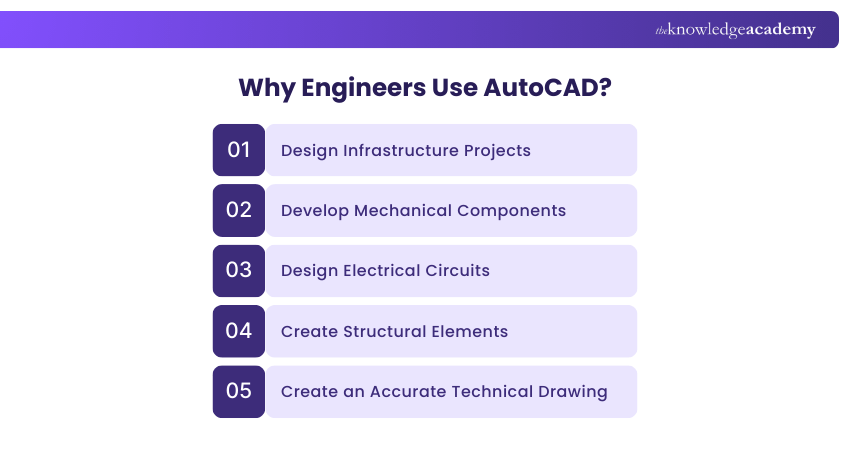
This helps the Engineers analyse and construct their designs in a better way.
3) Construction
In construction, contractors and builders use the software to:
a) Interpret architectural and Engineering plans accurately
b) Create construction drawings, including site plans, floor plans
c) Develop detailed construction documentation
Further, it aids in coordination among different trades, quantity estimation, and visualisation of the final built structure.

4) Manufacturing
AutoCAD is widely adopted by manufacturers used to perform the following activities:
a) Design and prototype products
b) Create detailed 3D models of components
c) Simulate assembly processes
Additionally, its capabilities facilitate precision in manufacturing and support efficient collaboration between design and production teams.
5) Product Design
AutoCAD allows Product Designers to transform their design concepts into detailed and accurate drawings. With its 3D modelling capabilities, Designers can perform the following activities:
a) Create realistic prototypes
b) Test different design iterations
c) Visualise the product from multiple perspectives
As a result, this software aids them in ensuring the proper fit, form, and function of the designed products.
6) Interior Design
It is also utilised in the field of Interior Design to perform the following activities:
a) Create detailed layouts
b) Furniture arrangements and spatial plans
c) Visualise design concepts
d) Incorporate accurate measurements
e) Communicate effectively
7) Urban Planning
Urban planners utilise the software to create master plans for cities and urban areas. The software helps them visualise and analyse different scenarios, plan transportation networks, allocate land for various purposes, and generate detailed urban design proposals.
8) Landscape Design
AutoCAD is also significant in landscape design, allowing Designers to create detailed site plans, hardscape and softscape designs, and irrigation plans. Further, its tools assist in visualising the design elements, analysing site conditions, and generating construction documents.
AutoCAD’s applications extend beyond these industries, finding use in areas such as exhibition design, stage set design, electrical and plumbing systems design, surveying, and much more. Its versatility and extensive capabilities make it a preferred choice for professionals seeking precise and detailed designs across various domains.
Learn how to work with hatch patterns and scales. Join our AutoCAD LT Training today!
AutoCAD Career Opportunities
Familiarising, understanding and working with AutoCAD opens up multiple career opportunities across various industries. Here are some potential career paths that you can pursue with this software:
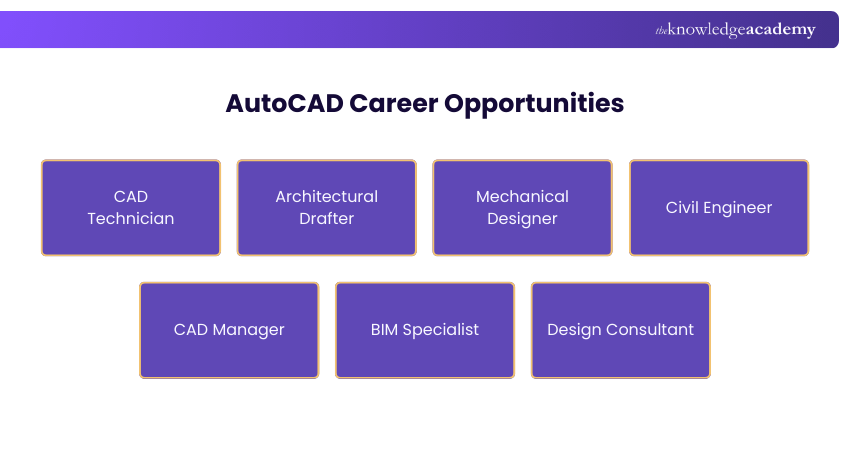
1) CAD Technician
AutoCAD-certified CAD Technicians are vital in the architecture, engineering, construction, and manufacturing industries. They assist Engineers and Designers in creating technical drawings, models, and documentation using this software.
2) Architectural Drafter
In collaboration with Architects and design teams, these professionals use this software to create detailed drawings, including floor plans, elevations, and construction documents.
3) Mechanical Designer
AutoCAD-certified Mechanical Designers specialise in creating detailed mechanical and Engineering drawings for machinery, equipment, and product components. They work closely with Engineers to translate design concepts into precise technical drawings.
4) Civil Engineer
AutoCAD certification can pave the way for a career in Civil Engineering. Civil Engineers use the software to design infrastructure projects such as roads, bridges, and buildings. Using the software, they also create detailed site plans, grading plans, and utility layouts.
5) CAD Manager
CAD managers oversee the implementation and utilisation of CAD systems within organisations. Further, they ensure proper software configuration, provide training to users, and manage CAD standards.
6) BIM Specialist
Building Information Modelling (BIM) Specialists utilise AutoCAD and other software to create 3D models and manage data for construction projects. Familiarity with this software can contribute to a career as a BIM Specialist, which is crucial in collaborative design and coordination, and is often featured in AutoCAD Interview Questions for those seeking roles in the field.
7) Design Consultant
Design Consultants work with clients from various industries, providing expert guidance and solutions for their design needs. Using and understanding AutoCAD enhances its credibility and expertise in offering design consultancy services.
Design smarter circuits, faster. Sign up for our AutoCAD Electrical Training and power up your Engineering skills today!
Alternatives of AutoCAD
Here are some of the best AutoCAD Alternatives you can consider for your design requirements:
Paid Alternatives
1) Draftsight: The product has been available since 2011. With DWG files and DXF standard, it functions similarly to AutoCAD. Moreover, Draftsight offers everlasting licences at a lower cost than Autodesk software.
2) MicroStation: Another CAD application with an emphasis on engineering and architecture that uses 2D and 3D modelling is called MicroStation. Considering that it was released in the early days of 1987, it is among the oldest programmes without taking into account AutoCAD.
3) CoreICAD: CorelCAD is the computer programme used for computer graphics that is closely related to the popular graphic design programme CorelDRAW. With compatibility for all major CAD programmes, it has all the features that are standard within CAD.
4) SketchUp: One of the most widely used CAD programmes and one of the simplest to use, according to Architects. It is particularly well-liked for architecture, interior and urban design.

Free Alternatives
1) QCAD: The 2D design programme QCAD is available for free and is primarily used for creating technical drawings and plans for structures, interiors, schemes, and mechanical components. The software comes in some paid versions even though it is free.
2) LibreCAD: LibreCAD depends on the user group and is available for Linux, Mac, and Windows Operating Systems. It began out as a QCAD project for computer-aided manufacturing, or CAM, which is a type of technology used with CNC machines.
3) FreeCAD: Compared to plans and architecture, FreeCAD is more suited for Engineering and design tasks. However, the application can be customised to meet the specific requirements of each user and expanded to include more features.
4) Blender: One of the most popular free 3D modelling choices is Blender, which has a robust animation, visualisation, and lighting component. This is currently one of the most widely used open-source choices, increasing in popularity since the release of the latest version.
Is AutoCAD Subscription Available for Individual Users?
Yes, AutoCAD provides different subscription plans to individuals. Customers can pick between monthly, annual or multi-year subscriptions and the AutoCAD pricing varies depending on subscription plan and version. For instance, the standard AutoCAD subscription will cost more than AutoCAD LT, but it will provide you with more features. Autodesk Flex is another option for users who need occasional access to AutoCAD.
Can I Use AutoCAD on Multiple Computers?
Yes, you can install AutoCAD on up to three devices, such as a desktop, laptop, or another computer, but only one device can be used at a time. If you try to run it on more than one device simultaneously, AutoCAD will display a “Device Limit Reached” warning and require you to close one session before continuing.
Conclusion
For any aspiring designer, understanding What is AutoCAD is vital because it continues to be a cornerstone in design, engineering and architecture. Its versatility and career potential make it a valuable skill for professionals worldwide. Whether you’re starting out or advancing your expertise, learning AutoCAD can help you stay ahead in today’s technology-driven design landscape.
From sketch to tangible structure, our AutoCAD Training will help you master the tools that assures design excellence - Sign up now!
Frequently Asked Questions
Is the AutoCAD Free?

Yes. Educators and students can receive free one-year educational access to Autodesk products and services. It'll be renewable for as long as they remain eligible.
Can I run AutoCAD on My Phone?
Yes, you can use AutoCAD on your phone through the official mobile app or web version. It allows you to work with DWG files, utilise basic drafting tools, and access designs offline. The app comes with desktop subscriptions or can be purchased separately.
What are the other resources and offers provided by The Knowledge Academy?
The Knowledge Academy takes global learning to new heights, offering over 3,000+ online courses across 490+ locations in 190+ countries. This expansive reach ensures accessibility and convenience for learners worldwide.
Alongside our diverse Online Course Catalogue, encompassing 19 major categories, we go the extra mile by providing a plethora of free educational Online Resources like Blogs, eBooks, Interview Questions and Videos. Tailoring learning experiences further, professionals can unlock greater value through a wide range of special discounts, seasonal deals, and Exclusive Offers.
What is the Knowledge Pass, and how Does it Work?
The Knowledge Academy’s Knowledge Pass, a prepaid voucher, adds another layer of flexibility, allowing course bookings over a 12-month period. Join us on a journey where education knows no bounds.
What are the Related Courses and Blogs Provided by The Knowledge Academy?
The Knowledge Academy offers various AutoCAD Courses, including AutoCAD Course, AutoCAD Electrical Training, AutoCAD LT Training, Autodesk Alias Training and the Civil 3D Training. These courses cater to different skill levels, providing comprehensive insights into Parametric Modelling.
Our Office Applications Blogs cover a range of topics related to AutoCAD, offering valuable resources, best practices, and industry insights. Whether you are a beginner or looking to advance your AutoCAD skills, The Knowledge Academy's diverse courses and informative blogs have you covered.

The Knowledge Academy


Global Training Provider
The Knowledge Academy is a world-leading provider of professional training courses, offering globally recognised qualifications across a wide range of subjects. With expert trainers, up-to-date course material, and flexible learning options, we aim to empower professionals and organisations to achieve their goals through continuous learning.

Upcoming Office Applications Resources Batches & Dates
Date
 AutoCAD Course

 If you wish to make any changes to your course, please


