


 Top Rated Course

We may not have the course you’re looking for. If you enquire or give us a call on +800 312616 and speak to our training experts, we may still be able to help with your training requirements.
Top 15 Android Developer Skills for Building High-Quality Apps
Richard Harris 07 February 2026Creating mobile apps requires a blend of programming expertise, design knowledge, and problem-solving. For Android Developers, mastering languages like Java, along with Android SDK and UX/UI design, is crucial. In this blog, we’ll explore the essential Android Developer Skills required to build robust, user-friendly applications.

Training Outcomes Within Your Budget!
We ensure quality, budget-alignment, and timely delivery by our expert instructors.
Table of Contents
Android, an open-source mobile Operating System developed by Google and built on Linux, has emerged as a leading platform over the last decade. As technology rapidly advances, Android Developers play a crucial role in shaping the digital landscape and driving innovations in mobile applications. Mastering essential Android Developer Skills is vital for success in this competitive field.
The expectations for Android Developers have increased considerably. They need a wide range of technical and non-technical skills while following best practices. Proficiency in modern programming languages is essential, as is the ability to create scalable, secure, and efficient applications. In this blog, we will delve into the essential Android Developer Skills that can elevate your Mobile App Development journey.
Table of Contents
1) Skills Required to Become an Android Developer
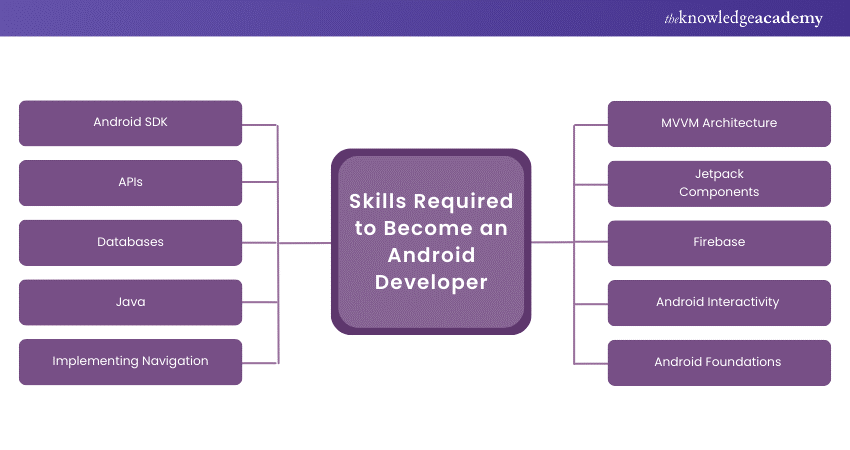
a) Android SDK
b) APIs
c) Databases
d) Java
e) Implementing Navigation
f) MVVM Architecture
g) Jetpack Components
h) Firebase
i) Android Interactivity
j) Android Foundations
2) How to Improve Android Developer Skills?
3) Conclusion
Skills Required to Become an Android Developer
Developing high-quality Android apps requires a well-rounded skill set that goes beyond just writing code. An Android Developer must be proficient in various areas, from understanding core frameworks to integrating external APIs and managing databases. Mastering these skills is also crucial for excelling in Android Interview Questions. In this section, we’ll explore the essential skills every Android Developer should hone to create functional, engaging, and efficient mobile applications.
1) Android SDK
The Android Software Development Kit, commonly referred to as SDK, is the backbone for developing Android apps. It will provide Developers with libraries, tools, and APIs needed to create apps that can run on their Android devices. A Developer's proficiency in using Android SDK is necessary since it provides access to a device's hardware and its system features. Whether a user wishes to tap sensors, manage the camera, or develop user interfaces, Android SDK is where it all starts. However, for those who no longer require these advanced features, it's a good idea to disable developer options in android to ensure your device runs more smoothly and remains secure.
The SDK contains additional tools, including Android Debug Bridge and Android Virtual Device, which are all important in developing and testing apps. Using them ensures hassle-free procedures and enhanced app performance.

2) APIs
Application Programming Interfaces (APIs) enable applications to communicate with other services and systems. In modern app development, APIs play a crucial role, as they allow your app to integrate third-party features such as maps, social media, and payment gateways. For instance, using the Google Maps API can enhance your app by incorporating location-based services, while social media APIs simplify user login. Similarly, turning on NFC on Android can enable seamless payment processing and data transfer through NFC-enabled APIs.
Knowing how to work with RESTful APIs is very important for Android Developers, since in the process of working with the Android platform, this obtains data from servers, and even sends data as well, thereby creating more dynamics and excitement that a user would otherwise not have experienced.
3) Databases
For almost all applications, data management is a vital function. This will enable your app to store and retrieve information efficiently by knowing how to work with databases. SQLite is the default database in an Android app. The Developer should still be familiar with a cloud-based option like Firebase Real-time Database.
With this knowledge of handling big data, optimizing database queries, and ensuring data security, you can ensure that your users have a seamless experience. Proper data storage and retrieval enhance app performance, especially when dealing with real-time or large-scale applications. Additionally, managing storage efficiently, such as deleting downloads on Android phones, can contribute to smoother app functionality.
4) Java
Java is the core programming language used in Android Development. Moreover, it is an important part of the learning curve in Android Development because Java powers most of your Android applications. You can write code that interacts with the Android system in very efficient ways, so memory management and handling user input are a few of the flexibility you will need to build advanced Android applications.
Mastering Java also involves adopting Object-Oriented Programming (OOP) principles, which are at the heart of writing good, scalable and maintainable code. Because a big Developer community surrounds Java, finding resources and support if you get stuck on a problem is easy.
Master Java and unlock endless possibilities! Join our Java Programming Course today and start building robust, scalable applications!
5) Implementing Navigation
Navigation through the application is one of the major components of UX. Bad navigation leads to frustration and ultimately bad reviews or abandonment of the app. With the use of tools such as the Navigation component of Jetpack, intuitive and smooth navigation means that the user moves easily between different types of screens and the features within the app.
Navigation patterns, including bottom navigation, swipe views, and drawer layouts, are learned by the Developers to make the applications easily navigated and used, so that users have a great experience altogether.
6) MVVM Architecture
It is the Model-View-View Model, an architectural pattern for handling app components better. It isolates the business logic of an app from its user interface so that the code becomes organised, scalable, and easier to test.
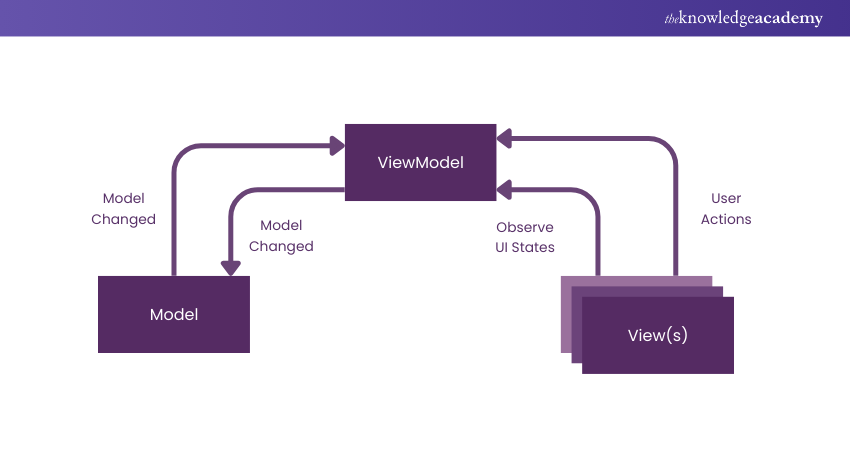
The MVVM architecture reduces duplicated code, facilitates better testing, and makes sure your app's UI is always reactive to data changes, which ensures an overall great performance. By mastering this pattern, you can produce clean, maintainable codebases.
Customize Your Android Device – Learn How to Change Location on Android and enjoy location-based features!
7) Jetpack Components
Jetpack is essentially a package of libraries that accelerates and makes Android Development faster and easier. The many components will help to reduce boilerplate code and let Developers work much more on the unique features of an app. Some of the very basic Jetpack libraries are LiveData, ViewModel, Room, and Navigation.
The mastery of Jetpack Components accelerates development and stabilises the application while making the apps more efficient. For instance, the complexity involved with the database is lessened through the Room library. LiveData and ViewModel make updating UI much more responsive and efficient. If you're aiming for a UI developer role, reviewing UI Developer Interview Questions can give you deeper insights into the skills and knowledge expected in modern app development.
8) Firebase
Firebase is quite a powerful platform that provides loads of backend services in Android applications. It included features like real-time database, authentication, cloud messaging, and analytics. Once you master Firebase, it can dramatically lessen your workload on the backend so you would focus more on the front end of things.

For instance, the Firebase Real-time Database makes storing and syncing data quite straightforward, and Firebase Authentication simplifies the user sign-in process. With such integration with Google Cloud services, Firebase is the platform every Android Developer needs to create feature-rich applications with little effort, but it also greatly enhances Backend Developer Skills by providing serverless backend solutions.
Ensure you're ready for your Firebase interview by exploring our Firebase Interview Questions and Answers. Start preparing now!
9) Android Interactivity
Interactivity is at the heart of Android apps. Knowing how to manage touch events, gestures, and other user interactions is something important in building dynamic and engaging apps. Android's event-handling system lets Developers detect these gestures - or swipes, taps, and pinches - and build intuitive and effective user interfaces easily.
Focusing on Android interactivity means ensuring that an application has an engaging feel. Which in turn means it's easier to make things inside the app fun to use and fun to navigate.
10) Android Foundations
For Android Development, understanding how apps work under the hood is essential, along with key concepts like activities, Fragments in Android, services, and broadcast receivers. They make up any Android application's support system relating to UI, background work, and inter-component communication.
The mastery of these basics gives you the comfort of building scalable and reliable applications despite the complexity of requirements.
11) Dependency Injections
Dependency injection simplifies the process of creating and managing dependencies within your application. As a result, the code becomes cleaner and even more modular because of these injections. Dagger and Hilt are two widely used Android frameworks which you can use for dependency injection in your applications. They automatically reduce the boilerplate code and ensure that app components can be easily tested and maintained.
Dependency injection streamlines app development and increases code reusability to handle large codebases much more easily.
12)C++
While Java is the primary language for Android Development, some apps require performance-intensive features like gaming or real-time data processing. In such cases, C++ comes into play. C++ allows you to write high-performance code that interacts with native Android libraries through the Android NDK (Native Development Kit).
Mastering C++ gives you the flexibility to build apps that require heavy computing power or work directly with hardware components, making it an invaluable skill for Android Developers working on performance-critical applications.
13) UI and UX
User Interface (UI) and User Experience (UX) are the cornerstones of a successful app. No matter how powerful your app is, if the UI is clunky or the UX isn’t smooth, users will abandon it. Android Developers must work closely with designers to ensure that apps are intuitive and easy to use.
Mastering UX Design Principles alongside UI/UX design principles ensures that you can build apps that not only work well but also look great and are easy for users to navigate.
Unlock your design potential! Dive into our UX/UI Design Course and learn the skills to create captivating User Experiences!
14) JSON
JavaScript Object Notation (JSON) is a lightweight data format for exchanging data between servers and applications. It's important to understand how to parse and manipulate JSON data while working with APIs for any Android Developer.
JSON is the key technology to enable your apps to talk to the backend services and make real-time requests and fetch information. JSON is the ubiquitous-use technology across all apps which depend on external sources of data, and this skill can be termed as quintessential for modern Android Development.
15) Client Service
Unlock the Full Potential of Your Car with Android Auto. Read our blog to learn more!
Other than technical skills, Android Developers require a heavy set of communication and service skills. Sustained success would depend on the efficiency of working with clients, knowing their needs, and delivering against expectations. Technical matters need to be explained in non-technical language, and the Developer needs to maintain open and updated communication regarding the project lifecycle.
It is a requirement to have good relations with the clients to have a smooth collaboration and potential repeat business with a positive referral from them. So, it is very important as a soft skill.
Boost your chances of success—prepare with our curated Mobile App Developer Interview Questions!
How to Improve Android Developer Skills?
Practice consistently as an Android Developer, learn continuously, and keep up with the latest tools and frameworks to upgrade your skills. With the competitive Android Developer Salary, staying updated in this rapidly changing technology environment requires proactive efforts to maintain your expertise and relevance in the field. Here are a few ways you can improve your skills:
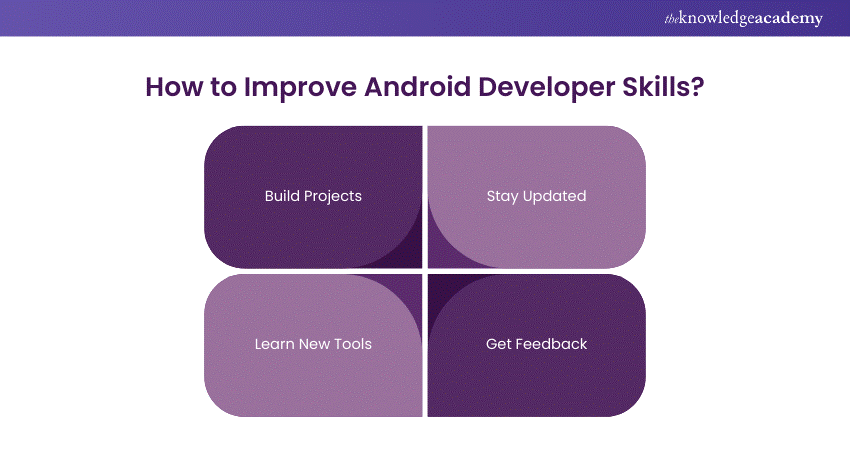
1) Build Projects:
It will help you practice by working on actual-world projects. Diverse projects will face various challenges and help you improve your problem-solving abilities and reinforce the technical knowledge you have. Each project can be a valuable addition to your portfolio. You can use it to showcase your skills to potential employers or clients.
2.) Stay Updated:
Keeping yourself updated is possible through online forums, such as Android Developer communities and blogs that present the new releases as well as best practices. Participate in webinars or, better still, attend local meetups to gain insight on the topics concerning the latest trends and tools. Staying updated not only applies to new practices but also opens you to other professionals within the field.
3) Learn New Tools:
Discover new libraries and frameworks to streamline your development process. Familiarity with tools such as Jetpack Compose or Retrofit will enhance the productivity of one's life and ensure that complexities become easy. Learning and adaptation to new technologies will have a major impact on how you deliver high-quality apps very efficiently.
4) Get Feedback:
Work with peers or join forums where you can share code and get constructive feedback. Collaborating in communities not only strengthens coding skills but can also address common frustrations—like how to Stop Pop-Up Ads on Android Phone—by exchanging practical solutions. Constructive criticism fosters growth, encouraging the mindset towards continuous development.
Code Your Dreams! Join our Mobile App Development Training and start building innovative apps that make a difference
Conclusion
Building high-quality Android apps requires mastering a diverse set of skills, from technical to soft skills. Android Interview Questions often focus on how each of these Android Developer Skills plays a crucial role in creating apps that are not only functional but also user-friendly and performant. By continuously improving and adapting to new technologies, you can ensure that your apps stay ahead of the curve and offer exceptional experiences to users.
Unlock Your Developer Potential! Dive into our Android App Development Course and start building amazing apps today. Join now!
Frequently Asked Questions
Does an Android Developer Need Coding?

Yes, an Android Developer needs coding skills to create functional applications. Proficiency in languages like Java and Kotlin is essential for writing the logic that drives an app's features. Coding enables Developers to interact with the Android SDK, APIs, and databases, ensuring seamless performance and User Experience.
What is the Best Language for Android?
The best languages for Android Development are Java and Kotlin. Java has been the traditional choice, offering a robust framework and a vast community for support. However, Kotlin is increasingly favoured for its concise syntax, modern features, and full interoperability with Java, making it a preferred option for new Android projects.
What are the Other Resources and Offers Provided by The Knowledge Academy?
The Knowledge Academy takes global learning to new heights, offering over 3,000+ online courses across 490+ locations in 190+ countries. This expansive reach ensures accessibility and convenience for learners worldwide.
Alongside our diverse Online Course Catalogue, encompassing 19 major categories, we go the extra mile by providing a plethora of free educational Online Resources like Blogs, eBooks, Interview Questions and Videos. Tailoring learning experiences further, professionals can unlock greater value through a wide range of special discounts, seasonal deals, and Exclusive Offers.
What is The Knowledge Pass, and How Does it Work?
The Knowledge Academy’s Knowledge Pass, a prepaid voucher, adds another layer of flexibility, allowing course bookings over a 12-month period. Join us on a journey where education knows no bounds.
What are the Related Courses and Blogs Provided by The Knowledge Academy?
The Knowledge Academy offers various App & Web Development Training, including Android App Development Course, Mobile App Development Course and UI UX Design Course. These courses cater to different skill levels, providing comprehensive insights into Android.
Our Programming & DevOps Blogs cover a range of topics related to Android App Development, offering valuable resources, best practices, and industry insights. Whether you are a beginner or looking to advance your Programming skills, The Knowledge Academy's diverse courses and informative blogs have got you covered.

Richard Harris


Senior Full Stack Developer and Technology Educator
Richard Harris is a highly experienced full-stack developer with deep expertise in both frontend and backend technologies. Over his 12-year career, he has built scalable web applications for startups, enterprises and government organisations. Richard’s writing combines technical depth with clear explanations, ideal for developers looking to grow in modern frameworks and tools.

Upcoming Programming & DevOps Resources Batches & Dates
Date
 Android App Development Course
Android App Development Course
Thu 3rd Sep 2026
Android App Development Course
Thu 3rd Dec 2026

 If you wish to make any changes to your course, please


