


 Top Rated Course

We may not have the course you’re looking for. If you enquire or give us a call on +36 18508731 and speak to our training experts, we may still be able to help with your training requirements.
Debian vs Ubuntu: Which One Should You Use?
John Davies 21 April 2026Debian is flexible and is ideal for servers, while Ubuntu, built on Debian, is user-friendly with frequent updates, which is great for desktops and beginners. While Debian focuses on minimalism and control, requiring manual setup, Ubuntu streamlines the process with pre-installed software and drivers. Let’s explore how these two differ.

Training Outcomes Within Your Budget!
We ensure quality, budget-alignment, and timely delivery by our expert instructors.
Table of Contents

Are you not sure whether to go with Debian vs Ubuntu? You’re not the only one. At first, they might look alike. This is because Ubuntu is actually built on Debian. However, slowly, the differences start to show. Debian leans into stability and control, making it great for people who like a system that just works. Ubuntu, on the other hand, takes a more user-friendly approach, with some extra polish and convenience built-in.
In this blog, we’re going to walk through the major differences between Debian vs Ubuntu. You will explore everything from stability and performance to how easy they are to use. Whether you’re just getting started with Linux or you’ve been around the terminal a few times, you’ll walk away with a clearer idea of which one fits your setup best.
Table of Contents
1) Overview of Debian
2) Overview of Ubuntu
3) Debian vs Ubuntu: An In-depth Comparison
a) Hardware Requirements
b) Installation and Configuration
c) Software
d) Sudo
e) Performance
f) Release Cycle
g) Supported Platforms
h) Packages and Programmes
i) Desktop Environments
j) Community and Support
4) Conclusion
Overview of Debian
Debian has been part of the Linux world for a long time. People trust it because it’s known for being stable. This kind of reliability is supposed to stay for a very long time. This is expected, especially if you’re setting up a server or anything that needs to stay up and running without much fuss. So, Debian is the sort of system you can set up and trust to quietly do its job.
What makes Debian stand out is how it gives you full control without trying to hide what’s going on under the hood. It doesn’t simplify things to the point where you lose flexibility. Instead, it gives you a more hands-on experience. That approach really appeals to intermediate and advanced users who want to customise their setup.

Overview of Ubuntu
Ubuntu takes its roots from Debian, but it was designed from the start to be more beginner- friendly. Everything about it feels smoother and more polished, which is a big reason why so many people try it first when getting into Linux. It just works without a lot of setup or confusion. Plus, with regular updates and strong hardware support, getting it up and running on most machines is usually quick and painless.
What sets Ubuntu apart is its focus on accessibility and versatility. It offers multiple official versions. This includes the Ubuntu Desktop, Ubuntu Server, and lighter options such as Xubuntu and Lubuntu. This helps to suit different needs. Backed by an active community, Ubuntu provides both help and innovation in equal measure.
Understand all about the system architecture with our Linux Fundamentals Course - Sign in today!
Debian vs Ubuntu: An In-depth Comparison
Debian and Ubuntu are two of the biggest names in the Linux world. However, each of these brings something different to the table. Debian is known for its stability and the control it gives you. On the other hand, Ubuntu is a solid foundation that builds on with a beginner-friendly experience. If you’re trying to figure out which one’s the right fit for you, then you must know what sets them apart.
1) Hardware Requirements
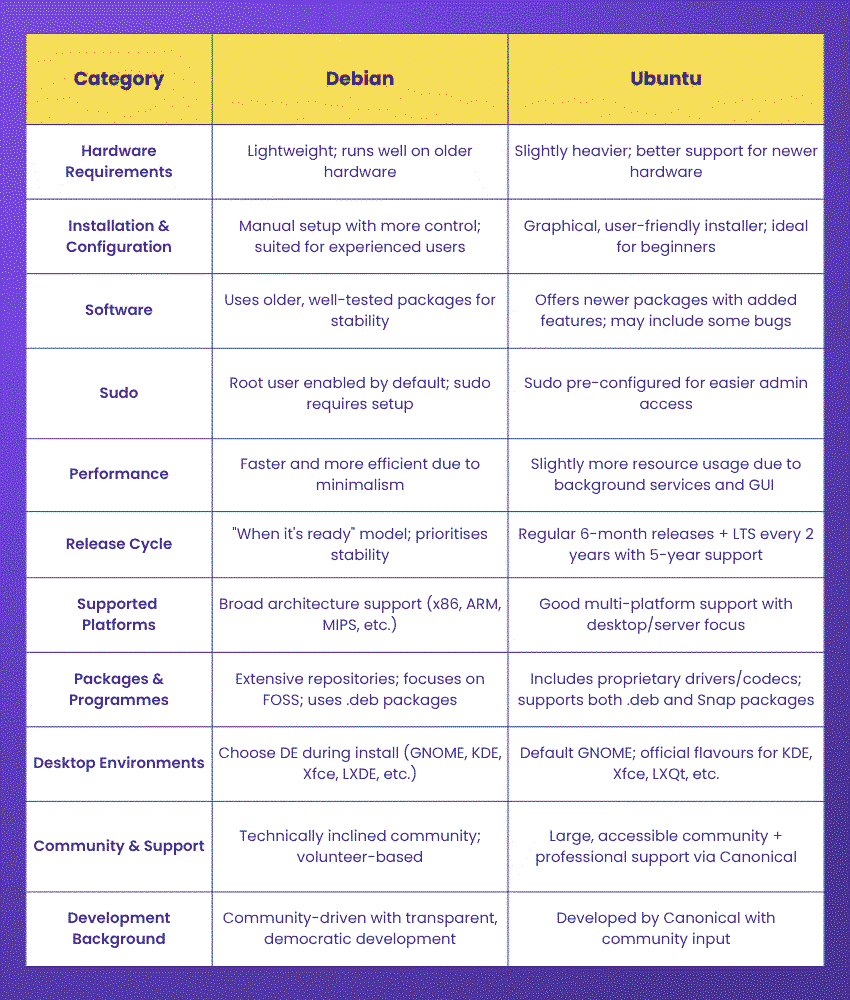
Debian doesn’t need much to run well. It’s lightweight and can handle older hardware smoothly. Ubuntu is still light compared to a lot of other Operating Systems (OS). However, it needs a little more power. This is mainly because of its default GNOME desktop, which is heavier. Still, Ubuntu usually does a better job with hardware support when it comes to newer laptops and devices.
2) Installation and Configuration
Debian’s installer gives you a lot of control. This usually involves things like manual partitioning and setting up the network yourself. It is built for folks who don’t mind rolling up their sleeves. Ubuntu, on the other hand, is easier. Its installer is super user-friendly, with a clean graphical interface. Plus, there are step-by-step prompts that help you through everything. Even if it’s your first time installing an OS, you’ll be fine.
3) Software
Both distributions offer access to a massive range of software through the APT package manager, but there are differences. Debian sticks with older, well-tested versions of software to ensure maximum stability. Ubuntu includes more recent versions, which means users get newer features faster. However, sometimes, it is at the cost of occasional bugs. Additionally, Ubuntu often adds its own patches and enhancements to the software it includes.
4) Sudo
Ubuntu comes pre-configured with Sudo for administrative tasks, making it easier for users to execute commands without needing to log in as the root user. Debian, by default, enables root access and leaves it up to the user to configure Sudo if needed. This difference reflects each distro’s target audience. Still, Ubuntu aims for ease, while Debian assumes a bit more technical familiarity.
Gain a thorough understanding of LINUX and Open-source Systems through the Linux Shell Programming Course- Register now!
5) Performance
In terms of raw performance, Debian tends to be slightly faster and more efficient, largely due to its minimalist approach and lack of pre-installed extras. Ubuntu, with its heavier default desktop environment and additional background services, may use more resources. That said, for most modern machines, the performance gap is negligible unless you’re running on very limited hardware.

6) Release Cycle
Debian follows a “when it’s ready” release philosophy, prioritising stability and thorough testing over frequent updates. This results in fewer but more stable releases. Ubuntu offers time-based releases every six months, along with Long Term Support (LTS) versions every two years, which are supported for five years. This predictable cycle makes Ubuntu appealing to users who want regular updates and long-term planning.
7) Supported Platforms
Debian supports a wide range of architectures, from mainstream x86_64 systems to more niche platforms like ARM and MIPS. Ubuntu also supports various platforms, though it focuses more heavily on desktop and cloud/server environments. Both are incredibly versatile, but Debian may offer slightly broader hardware support in niche use cases.
Attain in-depth knowledge of variables, loops, conditionals, and functions by registering in our Bash Scripts Training - Now!
8) Packages and Programmes
Debian’s repositories include a massive selection of packages. However, they lean toward free and open-source software, with stricter rules around proprietary content. Ubuntu includes a wider range of software by default. This includes proprietary drivers and codecs. These can improve the out-of-box experience for desktop users. Ubuntu also supports Snap packages. However, Debian tends to stick with traditional .deb packaging.
9) Desktop Environments
With Debian, you get to pick your desktop environment right during the installation, whether it’s GNOME, KDE, Xfce, LXDE, or others. It’s flexible that way. Ubuntu, on the other hand, comes with GNOME by default, but it also offers official “flavours” that use different desktops, like Kubuntu for KDE, Xubuntu for Xfce, and Lubuntu for LXQt. The good thing about Ubuntu’s spins is that each one tends to feel more polished and consistent since they’re tailored specifically for that desktop environment.
10) Community and Support
Both Debian and Ubuntu have large, active communities. Debian’s community is known for its technical depth and strict commitment to open-source principles, while Ubuntu’s is broader, including many new users and contributors. Ubuntu also offers commercial support through Canonical, which is a major plus for businesses and enterprises.
11) Development Background
Debian is developed by a global network of volunteers and is managed through a democratic process that values transparency and user input. Ubuntu was developed by Canonical Ltd., a company that maintains the project’s direction while encouraging community involvement. This difference in governance can be important depending on how much you value corporate backing versus community control.
Conclusion
If we are to compare between Debian vs Ubuntu, then both are powerful. If you’re someone who prefers stability, then Debian is for you. If you’re looking for something that is easy to use, then Ubuntu is for you. Your choice is linked to your experience level. It is also dependent on how long you want to spend managing your system.
Improve skills in efficient Operating System customisation with UNIX Fundamentals Course - Sign in today!
Frequently Asked Questions
Which is Faster, Ubuntu or Debian?

Debian is usually snappier and more lightweight, which makes it a great choice for older machines. Ubuntu, on the other hand, comes packed with more features and defaults to the GNOME desktop, which can be a bit heavier. That said, it still runs smoothly on modern hardware if you’ve got enough resources to support it.
Does Debian have a GUI?
Yes, Debian offers multiple desktop environments like GNOME, KDE, Xfce, and more. During installation, you can select your preferred GUI or opt for a command-line-only setup, giving users full flexibility based on their needs and system resources.
What are the Other Resources and Offers Provided by The Knowledge Academy?
The Knowledge Academy takes global learning to new heights, offering over 3,000+ online courses across 490+ locations in 190+ countries. This expansive reach ensures accessibility and convenience for learners worldwide.
Alongside our diverse Online Course Catalogue, encompassing 17 major categories, we go the extra mile by providing a plethora of free educational Online Resources like Blogs, eBooks, Interview Questions and Videos. Tailoring learning experiences further, professionals can unlock greater value through a wide range of special discounts, seasonal deals, and Exclusive Offers.
What is The Knowledge Pass, and How Does it Work?
The Knowledge Academy’s Knowledge Pass, a prepaid voucher, adds another layer of flexibility, allowing course bookings over a 12-month period. Join us on a journey where education knows no bounds.
What are the Related Courses and Blogs Provided by The Knowledge Academy?
The Knowledge Academy offers various Linux Certification, including the Linux Fundamentals Course, Administering Linux Systems Course, and UNIX Fundamentals Course. These courses cater to different skill levels, providing comprehensive insights into AIX vs Linux.
Our IT Infrastructure & Networking Blogs cover a range of topics related to Debian vs Ubuntu, offering valuable resources, best practices, and industry insights. Whether you are a beginner or looking to advance your IT Infrastructure Knowledge, The Knowledge Academy's diverse courses and informative blogs have got you covered.

John Davies


Cyber Security Governance & Assurance Specialist
John Davies is a cybersecurity expert specialising in governance, risk management, and compliance. With over 15 years in the field, he has led enterprise-wide security programmes across finance, healthcare and public sector organisations. His content provides practical guidance on building secure environments, managing risk and aligning with regulatory frameworks.

Upcoming IT Infrastructure & Networking Resources Batches & Dates
Date
 LINUX Fundamentals Course
LINUX Fundamentals Course
Thu 10th Sep 2026
LINUX Fundamentals Course
Thu 12th Nov 2026

 If you wish to make any changes to your course, please


