


 Top Rated Course

We may not have the course you’re looking for. If you enquire or give us a call on +852 2592 5349 and speak to our training experts, we may still be able to help with your training requirements.
What is FTP (File Transfer Protocol), and How it Works?
Lily Turner 23 April 2026File Transfer Protocol (FTP) is a standard network protocol used to transfer files between a client and a server over the internet or a local network. It enables uploading, downloading, and managing files remotely. It is commonly used for web hosting, data backups, and automation while supporting large file transfers efficiently.
Home
 Resources
IT Infrastructure & Networking
What is FTP (File Transfer Protocol), and How it Works?
Resources
IT Infrastructure & Networking
What is FTP (File Transfer Protocol), and How it Works?
Resources
IT Infrastructure & Networking
What is FTP (File Transfer Protocol), and How it Works?

Training Outcomes Within Your Budget!
We ensure quality, budget-alignment, and timely delivery by our expert instructors.
Table of Contents

Imagine moving thousands of files between computers without USBs or email attachments, but with just speed and control. That’s the power of File Transfer Protocol (FTP), a classic yet dependable way to transfer data in a secure way that makes file sharing easy and efficient.
It is one of the oldest internet technologies still in use, with a simple way to send and receive data between systems anywhere in the world. Curious to know why this long-standing technology remains so important in a world dominated by modern cloud solutions? This blog deals with What is FTP, how it works, its types, benefits, and best practices. Dive in!
Table of Contents
1) What is FTP?
2) How Does FTP Work?
3) Key Characteristics of FTP
4) Types of FTP (File Transfer Protocol)
5) FTP Connection Types
6) Benefits of Using FTP (File Transfer Protocol)
7) Limitations of FTP (File Transfer Protocol)
8) Common Uses of FTP (File Transfer Protocol)
9) Best Practices for Using FTP (File Transfer Protocol)
10) Conclusion
What is FTP?
File Transfer Protocol (FTP) is a standard Network Protocol used to transfer files between a client and a server over the internet or any Transmission Control Protocol/Internet Protocol (TCP/IP) based network. In a client–server model, one device (the client) requests the transfer, and the other (the server) provides the data. You can upload, download, and manage files remotely.
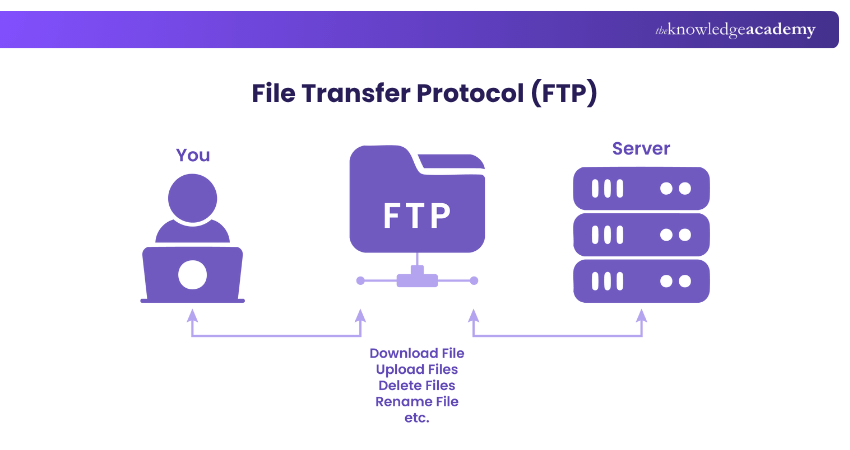
When it is done within the TCP/IP network, FTP functions as an Application Layer protocol, designed specifically to manage the exchange of files between systems. An FTP setup usually includes:
1) FTP Client: Software used to connect to the server
2) FTP Server: The computer that stores files and responds to client requests

How Does FTP Work?
FTP operates on a client–server model, where one computer requests data and the other provides it. To transfer files, FTP uses two separate communication channels between the client and the server:
1) Command Channel: Manages communication and sends instructions such as login requests or file operations.
2) Data Channel: Handles the actual transfer of files between systems.
A typical FTP transfer happens like this:
1) The user connects to an FTP server using login details such as username and password. Some Servers also allow access without a login, known as anonymous FTP.
2) The client sends a command to the server to download, upload, rename, move, or delete a file.
3) The server responds and transfers the requested files through the data channel.
Key Characteristics of FTP
FTP is known for its reliability and ease of use when moving files between systems. Its key features include:
1) Cross-Platform Compatibility: Works with Windows, macOS, and Linux
2) Bulk Transfers: Supports multiple uploads and downloads simultaneously
3) Resumable Transfers: You can continue a failed download without starting again
4) Easy Navigation: Lets you browse directories like on your local drive
5) User Access Control: Can be set for anonymous or password-protected access
) Automation Support: Allows scripts to run automatic file transfers on a schedule
Types of FTP (File Transfer Protocol)
There are several types of FTP, each designed for different levels of access and security. Here are those types:

1) Anonymous FTP
This is the simplest form of FTP. It allows users to download files without needing a username or password. It is commonly used for public data sharing, such as Open-Source Software or documents.
1) Ideal for non-sensitive files
2) Simple but not secure
2) Password-protected FTP
This version requires users to log in using a username and password before accessing files. It offers greater control over who can upload or download data, making it suitable for business or website use.
1) Offers basic access control
2) Lacks data encryption
3) FTP Secure (FTPS)
Also known as FTP-SSL, this type adds a layer of security through SSL/TLS encryption. It ensures that both login details and file data are encrypted. This helps prevent hackers from reading those details during transfer.
1) Compatible with most FTP clients
2) Uses implicit or explicit encryption
4) FTP Over Explicit SSL/TLS (FTPES)
FTPES starts as a regular FTP connection and then upgrades to a secure TLS connection when encryption is requested. This makes it flexible and widely supported by web and file-sharing services.
1) Flexible and widely supported
2) Works with modern web and file-sharing systems
5) Secure FTP (SFTP)
Despite its name, SFTP isn’t actually part of the FTP family. It is built on the SSH (Secure Shell) protocol. It encrypts login details, commands, and data, offering a much higher level of protection.
1) Ideal for confidential or business data
2) Offers strong authentication using keys instead of passwords
Boost your command-line confidence with our UNIX Shell Programming Training – Register today!
FTP Connection Types
FTP uses two separate connections to communicate between the client and the server. Each serves a different purpose in managing and transferring data. Let’s explore both types:
1) Control Connection
This connection handles the commands sent between the client and the server. For example, when you log in, view folders, or start a file transfer, those instructions go through this connection. It starts when you connect and stays open until you disconnect.
2) Data Connection
The data connection is responsible for transferring the actual files between systems. It opens temporarily whenever a file transfer or directory listing is performed and automatically closes once the operation is complete.

Benefits of Using FTP (File Transfer Protocol)
Here are the benefits of using FTP:
1) Fast File Transfers: FTP is quicker than many other methods for moving large files
2) Easy File Sharing: Files can be sent and received easily between two connected systems
3) Efficient Process: You can transfer multiple files at once without restarting each time
4) Basic Security: Logging in with a username and password offers simple access control
5) Two-way Communication: Files can be uploaded or downloaded from the same server
6) Automation Support: Regular transfers or backups can be automated with FTP tools
Limitations of FTP (File Transfer Protocol)
Though FTP is very useful, it also has a few limitations. Those include:
1) Complex User Management: Handling many users can be hard without extra tools
2) No Encryption: Standard FTP doesn’t secure data, so hackers could intercept it
3) Login Risks: Usernames and passwords can be stolen if the connection isn’t encrypted
4) Single Recipient Transfers: FTP doesn’t send one file to multiple people at once
5) Firewall Issues: Some networks may block FTP connections, especially in active mode
Discover the world behind your operating system with our UNIX Fundamentals Training – Join now!
Common Uses of FTP (File Transfer Protocol)
FTP is widely used across different industries for transferring and managing files efficiently. Below are some of its most common applications:

1) Hosting FTP Websites
Some websites use FTP instead of standard HTTPS, especially when files need to be uploaded or downloaded often. These sites usually look like ftp.domain.com and only people with login access can manage the files.
2) Web Applications for File Downloads
Many online download platforms use FTP because they are simple and reliable. Access can be restricted using a username and a password. It helps Developers and users easily exchange large files without overloading regular web servers.
3) FTP Clients for Storage and File Sharing
Software like FileZilla, WinSCP, or Cyberduck helps users connect to FTP servers easily. These tools allow faster file transfers and can continue with interrupted downloads. You can even use FTP to store and share big files safely in a central place.
4) One-time File Sharing or Downloads
FTP can be used for temporary file transfers. For instance, businesses can set up an FTP account for one-time use and delete it afterwards for safety. This method is quick and best for short-term collaborations or single project deliveries.
5) Sharing Non-sensitive Data
Businesses often automate file transfers using FTP scripts that run at scheduled intervals. This method ensures regular uploads or downloads for tasks like system backups, report updates, or data synchronisation without manual input.
6) Automating File Transfers via FTP
FTP can be set up to automatically upload or download files at specific times. Businesses use automation scripts to move files daily or weekly without human involvement, such as for backups or data updates.
7) Business-to-Business Data Exchange
Companies use FTP to share files privately between their systems or partners. It is simple to set up and doesn’t need difficult configurations. Many companies still use FTP to share invoices, product data, or reports safely between partners or suppliers.
Learn to automate complex tasks with our Solaris Shell Programming Training – Sign up soon!
Best Practices for Using FTP (File Transfer Protocol)
Now, let’s check the best practices to follow when you are using FTP:

1) Limit Transfers
FTP can handle very large files, but web browsers can’t upload or download files larger than 2 GB. If you need to transfer huge files, it is better to use a dedicated FTP client instead of a browser.
1) Best for small to medium transfers
2) Helps avoid browser crashes or failed uploads
3) Improves speed and reliability for smaller files
4) Avoids slow internet speeds when many people are using the network
2) Guest Access
Don’t give every user full access to your FTP server. Instead, you can set up guest accounts with restricted permissions. This allows users to only access certain folders or perform limited actions.
1) Protects sensitive data
2) Keeps server structure secure
3) Helps monitor user activity easily
4) Minimises the risk of accidentally deleting files
3) Vendor Expertise
Not all FTP clients offer the same level of security or control. You need to choose one from a trusted vendor that provides regular updates and technical support. This also ensures long-term stability and compatibility with modern security standards.
1) Use tools like WS_FTP, FileZilla, or WinSCP
2) Look for regular updates and bug fixes
3) Avoid unverified or outdated software
4) Check for encryption and automation options
4) Credential Monitoring
Regularly review and update user credentials. Implement strong password policies and revoke unused accounts immediately. Repeated failed login attempts may indicate either forgotten credentials or unauthorised access attempts.
1) Regularly review login logs
2) Reset locked accounts when needed
3) Block suspicious IP addresses automatically
4) Use notifications for multiple failed attempts
5) Passive Connections
Use passive FTP mode to minimise firewall conflicts and ensure smoother data connections. Because, in passive mode, the client initiates both connections, reducing the risk of unauthorised access. It also works better with firewalls.
1) Reduces attack risks on open ports
2) Improves connection stability
3) Works better with firewalls
4) Recommended for secure business environments
6) DMZ Setup
A Demilitarised Zone (DMZ) is a secure network area between your company’s internal systems and the public internet. Hosting your FTP server here allows safe external access without exposing private data.
1) Keeps internal networks secure
2) Allows safe external file access
3) Prevents direct attacks on main servers
4) Simplifies security monitoring
7) MFT Deployment
The Managed File Transfer (MFT) platforms combine FTP with other secure protocols like SFTP, FTPS, and HTTPS. They also include automation tools and compliance support for standards like PCI DSS, HIPAA, and SOX.
1) Provides automated workflows
2) Includes encryption and logging features
3) Ensures compliance with standards
4) Offers real-time tracking for file movements
8) Policy Enforcement
Establish clear internal policies governing FTP use. You need to avoid creating system-level user accounts for vendors or partners. Instead, you can try using FTP-specific accounts with clear password rules and inactivity timeouts.
1) Enforces strong passwords with numbers and symbols
2) Disables inactive or shared accounts
3) Uses Two-factor Authentication if available
4) Sets automatic account expiry
9) Software Updates
Outdated FTP servers or clients can expose vulnerabilities. So, keep FTP servers and clients updated regularly. This can patch vulnerabilities and maintain compatibility with modern encryption protocols.
1) Always installs the latest patches and updates
2) Subscribes to vendor security alerts
3) Test updates in a staging environment first
4) Updates firewall and antivirus software regularly
Conclusion
The File Transfer Protocol (FTP) has stood the test of time as one of the oldest and trusted ways to move data between computers. It is simple to use, works quickly and helps Developers, businesses, and users manage and move large files with ease. Being aware of What is FTP and its role helps you to choose secure transfer methods and enjoy the speed and simplicity of file transfers.
Discover the power of open source with our Linux Certification - Start your journey now!
Frequently Asked Questions
What is the Active Mode of FTP?

In active mode, the client opens a random port and awaits the server’s data connection. The client starts control on port 21; the server connects from port 20 to transfer.
How Many Ports Does FTP Need?
FTP typically needs two ports: one for control (port 21) and one for data. Data uses port 20 in active mode, or a dynamic high port in passive mode instead.
What are the Other Resources and Offers Provided by The Knowledge Academy?
The Knowledge Academy takes global learning to new heights, offering over 3,000+ online courses across 490+ locations in 190+ countries. This expansive reach ensures accessibility and convenience for learners worldwide.
Alongside our diverse Online Course Catalogue, encompassing 17 major categories, we go the extra mile by providing a plethora of free educational Online Resources like Blogs, eBooks, Interview Questions and Videos. Tailoring learning experiences further, professionals can unlock greater value through a wide range of special discounts, seasonal deals, and Exclusive Offers.
What is The Knowledge Pass, and How Does it Work?
The Knowledge Academy’s Knowledge Pass, a prepaid voucher, adds another layer of flexibility, allowing course bookings over a 12-month period. Join us on a journey where education knows no bounds.
What are the Related Courses and Blogs Provided by The Knowledge Academy?
The Knowledge Academy offers various Linux Certification, including the Administrating UNIX Systems Course, the UNIX Shell Programming Course and the UNIX Fundamentals Training. These courses cater to different skill levels, providing comprehensive insights into the Address Resolution Protocol.
Our IT Infrastructure & Networking Blogs cover a range of topics related to File Transfer Protocol (FTP), offering valuable resources, best practices, and industry insights. Whether you are a beginner or looking to advance your Networking skills, The Knowledge Academy's diverse courses and informative blogs have got you covered.

Lily Turner


Senior AI/ML Engineer and Data Science Author
Lily Turner is a data science professional with over 10 years of experience in artificial intelligence, machine learning, and big data analytics. Her work bridges academic research and industry innovation, with a focus on solving real-world problems using data-driven approaches. Lily’s content empowers aspiring data scientists to build practical, scalable models using the latest tools and techniques.
View Detail
Upcoming IT Infrastructure & Networking Resources Batches & Dates
Date
 Administrating UNIX Systems
Administrating UNIX Systems
Thu 30th Jul 2026
Administrating UNIX Systems
Mon 24th Aug 2026
Administrating UNIX Systems
Mon 26th Oct 2026
Administrating UNIX Systems
Thu 26th Nov 2026

 If you wish to make any changes to your course, please


