


 Top Rated Course

We may not have the course you’re looking for. If you enquire or give us a call on +30 2111995372 and speak to our training experts, we may still be able to help with your training requirements.
What is SaaS? | Software as a Service Guide
Richard Harris 23 April 2026Software as a Service (SaaS) is a cloud-based software delivery model where users access applications online via subscription, without installing them locally. Saas works on subscription models, where everything is handled by the provider. By understanding What is Saas, businesses can reduce IT costs, scale quicker and work from anywhere.

Training Outcomes Within Your Budget!
We ensure quality, budget-alignment, and timely delivery by our expert instructors.
Table of Contents
Do you no longer want to need to install heavy software or worry about updates? In today’s time, from sending mails to managing projects, you are likely using cloud-based applications. This has given convenience in the way people work, learn and handle businesses.
SaaS delivers software tools through the internet on a subscription basis. This removes the need for installations, complicated setups or large upfront costs. It has quickly become a core part of modern business operations. In this blog, you will learn What is SaaS, how it works, its benefits and why it matters in today’s digital landscape. So, let us get started.
Table of Contents
1) What is Saas (Software as a Service)?
2) How SaaS Works?
3) What are the Benefits of Saas (Software as a Service)?
4) Drawbacks of Saas (Software as a Service)
5) What are Some Commonly Used SaaS Applications?
6) What are Some Examples of SaaS Use Cases Built with AWS?
7) Conclusion
What is Saas (Software as a Service)?
SaaS is a cloud-based software delivery model where applications are hosted by a provider and can be accessed through the internet. It does not require installation on the user’s device. Here, the software vendor may host the application or utilise a third-party cloud provider, such as AWS or Microsoft Azure.
SaaS applications are widely used across different groups of users, from business professionals, IT teams to regular individuals. Their wide range of services, such as entertainment platforms like Netflix and Amazon Prime to enterprise solutions like Microsoft 365, presents SaaS a popular choice for B2B (Business-to-business) and B2C (Business-to-consumer) environments.
How SaaS Works?
SaaS works by delivering software over the internet by integrating cloud-based technology. To give you a clearer understanding, here are the main ways SaaS operates:
1) Cloud-hosted Applications: The SaaS software's run in the cloud. Providers either host the software on their own servers or use cloud platforms such as AWS or Microsoft Azure. Using well-known Cloud Services ensures global access, strong security and easy scalability.
2) Flexible Access: For using a SaaS application, the only two requirements are an internet connection and a device (mobile phone, tablet or laptop). Mostly, SaaS applications run in a web browser, making them flexible, convenient and accessible for everyone.
3) Multi-tenant Architecture: This means that one application is run for multiple users at the same time. Every user (tenant) has secure connection and personalised settings. This enables higher efficiency, lower costs and regular updates without compromising on security and performance.
4) Zero Need for User Maintenance: Users are not required to maintain updates, security or hardware. Here, the provider is in charge for managing everything. They maintain servers, enable upgrades, ensure backups, manage balancing loads and much more. This makes SaaS applications reliable and convenient.
What are the Benefits of SaaS (Software as a Service)?
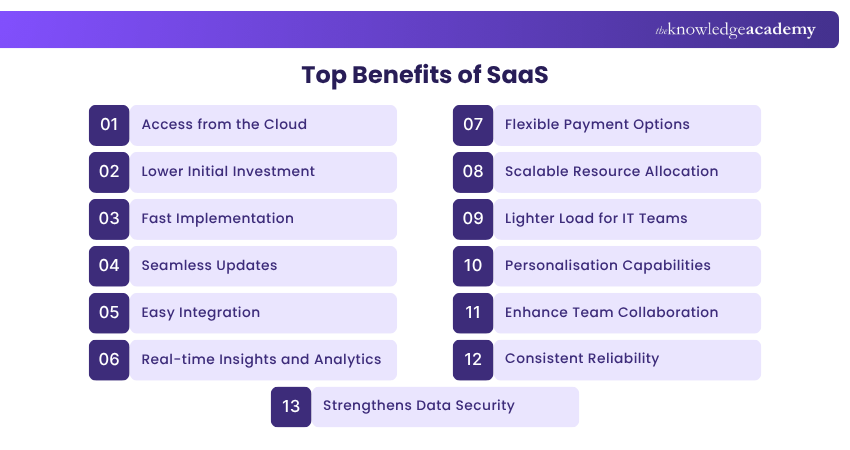
SaaS offers a wide range of advantages for both individuals and organisations. Below are some of the most significant benefits:
1) Access from the Cloud
SaaS applications are run in the cloud. This means anyone can access them anytime and from anywhere from a device with an internet connection. This service of providing instant access supports today’s hybrid and remote work environments.
2) Lower Initial Investment
Through SaaS, businesses minimise the need of high upfront costs of buying licenses, software installation and infrastructure set-up. The only requirement is to pay subscription fees that covers every aspect from hosting to maintenance. This helps to allocate budgets effectively and reduce expenditure for capital.
3) Fast Implementation
SaaS tools or applications are always ready to use. There is no time consumption regarding installation and set-up. After subscription, you can integrate the software across your organisation. This rapid implementation improves team efficiency and reduces reliance on IT resources.
Advance your cloud career with the Certified Artificial Intelligence (AI) for Cloud Professionals Training – register today!
4) Seamless Updates
SaaS providers manage updating software, security patching and brand-new features themselves. Since, users are not required to be dependent on managing upgrades, this system stays stable, secure and updated without any efforts.
5) Easy Integration
SaaS platforms use APIs (Application Programming Interface) to integrate smoothly with other business systems. Whether you need your CRM to connect with email tools or want accounting software to sync with your online store, SaaS enables simple and cost-effective connectivity.
6) Real-time Insights and Analytics
SaaS applications come with built-in analytics for collecting and processing live usage and performance data. This makes businesses efficiency for monitoring and tracking trends and make smart, data driven decisions.
7) Flexible Payment Options
Since, SaaS utilises a subscription-based model, it enables businesses to pay monthly or annually rather than making large purchase in one go. This provides certainty over expenses and supports effective budgeting. In cases of upgrades downgrades or service cancellations, it provides full control.
8) Scalable Resource Allocation
It provides high scalability. This means you can increase as well as reduce features, users and resources. So, SaaS grows with your business without needing to invest in hardware or upgrades.
9) Lighter Load for IT Teams
In SaaS applications or tools, it is the provider who manages security, upgrades or maintenance, IT teams need do not need to support software tasks. This gives space to focus on meaningful innovation and improve business routines.
10) Personalisation Capabilities
SaaS solutions are customisable and integrate seamlessly with business systems or tools. This helps business to tailor features, dashboards, and workflows to meet their needs.
11) Enhance Team Collaboration
Since, SaaS platforms are built for real-time teamwork, multiple users can work in the same project simultaneously. This enhances productivity, supports remote and hybrid work and encourages teamwork.
12) Consistent Reliability
SaaS vendors invest heavily in strong infrastructure, cybersecurity and risk management. This ensures dependable performance and uninterrupted access, helping businesses operate smoothly without unexpected downtime.
13) Strengthens Data Security
SaaS providers give strong safeguarding against cyber threats. They utilise encryption, security update, multi-factor authentication and strict controls on access. Also, they comply with security regulations for securing sensitive data of users and the platform.
Learn how to build scalable modern applications with Microservices Architecture Training – Join now!
Drawbacks of SaaS (Software as a Service)
While SaaS offers multiple benefits for its users, it also comes with its own set of challenges. Some of the known drawbacks are mentioned below:
1) Greater Need for Access Management
Since, SaaS applications are accessible online from anywhere, it requires a need for strong identify and access control. If in some cases, log-in details fall into the wrong hands, sensitive data can be exposed. This requires organisations to invest in secure authentication methods, such as MFA (Multi-factor Authentication) or role-based access.
2) Vendor Lock-in
SaaS can potentially create a long-term dependency on the provider. Also, for moving to another platform, it can be difficult and costly if large volumes of data are stored with the vendor. This makes evaluation of vendor and long-term planning essential before utilising a SaaS solution.
3) Security and Compliance
SaaS using organisations rely on the provider for the managing data security and compliance. This can pose large enterprises with the challenge of strict regulatory requirements. Some might not be able to perform their auditing for security, making trusting the provider the only security standard.
What are Some Commonly Used SaaS Applications?
SaaS based software's cover a wide range of personal and business requirements. Below, we have provided the widely used SaaS applications across industries:

1) Customer Relationship Management (CRM)
CRM platforms help manage customer interactions, sales pipelines and activities related to marketing activities. They centralise customer data, history of communication and improve customer service. For example, HubSpot and Zoho CRM.
2) Enterprise Resource Planning (ERP)
ERP systems integrate business functions, such as finance or operations into a centralised platform. They give live data and streamline a company’s processes. For example, Oracle NetSuite and Microsoft Dynamics 365.
3) E-mail Marketing Platforms
These tools automate e-mail campaigns, track engagement and help businesses stay connected with their customers. Examples include Mailchimp and Campaign Monitor.
4) Accounting and Finance Software
SaaS accounting platforms simplify the process of bookkeeping, budgeting and financial reporting. They help to track expenses, manage bills while remaining compliant with tax regulations. For example. Xero and FreshBooks.
5) HR Management Systems
These tools support the process of hiring, on-boarding employees, tracking attendance and more. They help to efficiently manage workforce operations. For example, Workday and Zenefits.
6) Security Software
Cloud-based security applications provide strong protection against cyber threats. They also monitor networks, manage access limits and secure data. For example, Okta and Duo Security.
7) Collaboration Tools
These tools allow teams to share files, track task, manage projects and work together. It is suitable for hybrid or remote-based teams. For example, Trello and Asana.
8) Online Document Editors
It allows users to create, edit, and share documents from anywhere. Here, multiple amounts of users can work together on the same file simultaneously. For example, Google Workspace and Microsoft 365.
9) Communication Software
It allows messaging, video conference and team discussions for improving remote work connectivity and efficiency. For example, Zoom and Slack.
10) Contact Center Software
These platforms support customer service teams by managing calls, chatting live and AI-driven support solutions. For example, Zendesk and Five9.
Learn essentials of cloud-based platforms with Google Cloud Platform Fundamentals Training – Join today!
What are Some Examples of SaaS Use Cases Built with AWS?
Leading organisations utilise Amazon Web Services (AWS) for building, deploying and scaling SaaS solutions. Some real-world examples of successful SaaS use cases built with AWS:
1) BMC Software
BMC Software is partnered with AWS to transform Control-M, its workload orchestration platform into a SaaS based solution. BMC gained insights on SaaS architecture and their best practices. This collaboration helped BMC to enhance efficiency on their operations and reduce costs.
2) CyberArk
CyberArk utilised AWS for evolving its Identity Security Platform into a scalable SaaS offering. With the support of AWS, CyberArk developed shared, cloud-based services to streamline remote access, credentials security and admin controls. This helped CyberArk to enhance product development and deliver quicker innovation.
3) Cohesity
Cohesity utilised AWS for launching DMaaS (Data Management as a Service). This helped Cohesity to design and implement its SaaS platform to simplify the enterprise data management. This collaboration led to 50% faster time-to-market, allowing customers to manage backup, recovery and data security.
SaaS vs IaaS vs PaaS
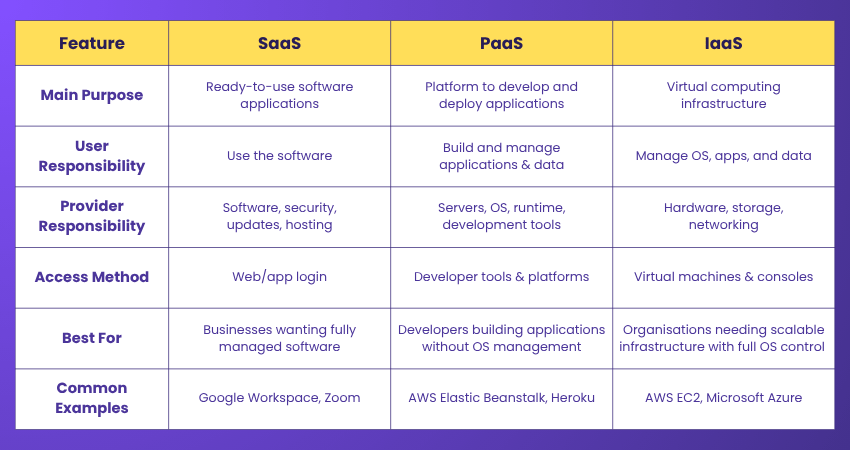
To understand how SaaS, PaaS, and IaaS differ, it helps to compare them side by side. Each model offers a different level of control, flexibility, and responsibility for users and providers.
SaaS
SaaS (Software as a Service) provides software applications fully hosted and managed by a provider. Here, users can log-in through the app or web browser. There is no requirement for handling updates, managing security and performance. This is ideal for businesses who want free software without the need to manage systems.
IaaS
IaaS (Infrastructure as a Service) provides virtual computing infrastructure, such as storage and networking hardware. Here, the provider oversees managing hardware, while users manage layers of the software. This is suitable for companies who need flexible, scalable infrastructure with OS control. For example, Microsoft Azure and Amazon Web Service.
PaaS
PaaS (Platform as a Service) gives cloud-based development platform with tools, databases and runtime environments for application development. Here, the provider manages servers, networking and operating systems, while developers manage creating apps and data. This is ideal for developers building, testing and implementing applications without the need to manage OS. For example, AWS and Heroku.
Conclusion
Understanding What is SaaS is integral for ensuring business success. SaaS has brought transformation in the way organisations access and utilise software. Their cloud-hosted solutions are easy to scale, manage and accessible from anywhere. Thus, SaaS fosters innovation, seamless operations and long-term growth. It empowers organisations of all sizes without the need for heavy investments.
Unlock future-ready skills with our Cloud Computing Courses – Accelerate your career now!
Frequently Asked Questions
What Qualifies as a SaaS Company?

A company that delivers software over the internet on the subscription basis, manages the application, handles security and updates while users can access through web or mobile app.
Is Netflix a SaaS?
Yes, Netflix is a SaaS since it is delivered over the internet based on subscription. Its focus lies on streaming content rather than business workflows.
What are the Other Resources and Offers Provided by The Knowledge Academy?
The Knowledge Academy takes global learning to new heights, offering over 3,000+ online courses across 490+ locations in 190+ countries. This expansive reach ensures accessibility and convenience for learners worldwide.
Alongside our diverse Online Course Catalogue, encompassing 17 major categories, we go the extra mile by providing a plethora of free educational Online Resources like Blogs, eBooks, Interview Questions and Videos. Tailoring learning experiences further, professionals can unlock greater value through a wide range of special discounts, seasonal deals, and Exclusive Offers.
What is The Knowledge Pass, and How Does it Work?
The Knowledge Academy’s Knowledge Pass, a prepaid voucher, adds another layer of flexibility, allowing course bookings over a 12-month period. Join us on a journey where education knows no bounds.
What are the Related Courses and Blogs Provided by The Knowledge Academy?
The Knowledge Academy offers various Cloud Computing Courses, including Cloud Computing Training, Certified Artificial Intelligence (AI) for Cloud Professionals Training and Google Cloud Platform Fundamentals. These courses cater to different skill levels, providing comprehensive insights into Cloud Service Providers.
Our Cloud Computing Blogs cover a range of topics related to Cloud Computing, offering valuable resources, best practices, and industry insights. Whether you are a beginner or looking to advance your Cloud-based skills, The Knowledge Academy's diverse courses and informative blogs have got you covered.

Richard Harris


Senior Full Stack Developer and Technology Educator
Richard Harris is a highly experienced full-stack developer with deep expertise in both frontend and backend technologies. Over his 12-year career, he has built scalable web applications for startups, enterprises and government organisations. Richard’s writing combines technical depth with clear explanations, ideal for developers looking to grow in modern frameworks and tools.

Upcoming Cloud Computing Resources Batches & Dates
Date
 Cloud Computing Training
Cloud Computing Training
Thu 13th Aug 2026
Cloud Computing Training
Thu 3rd Dec 2026

 If you wish to make any changes to your course, please


