


 Top Rated Course

We may not have the course you’re looking for. If you enquire or give us a call on +44 1344 203 999 and speak to our training experts, we may still be able to help with your training requirements.
What is Open Source Software? A Guide for Modern Businesses
Richard Harris 22 April 2026Open Source Software allows anyone to view, modify, and improve code, promoting collaboration, flexibility, and cost-effective innovation across industries. It empowers developers and organisations to build custom solutions, accelerate digital transformation, and foster transparent, secure, and community-driven development worldwide.

Training Outcomes Within Your Budget!
We ensure quality, budget-alignment, and timely delivery by our expert instructors.
Table of Contents

Have you ever wondered how some of the world’s most powerful software is built and shared freely? Open Source Software makes this possible by allowing anyone to view, modify, and improve its code. This approach fosters transparency, collaboration, and rapid innovation across industries.
From Operating Systems like Linux to platforms like WordPress, Open Source powers much of the digital world. In this blog, we’ll explore what is Open Source Software, highlight its key advantages, and share popular examples that show how it drives flexibility. Let’s get started!
Table of Contents
1) What is Open Source Software?
2) How Does Open Source Software Work?
3) Popular Open Source Software Examples
4) Advantages of Open Source Software
5) Disadvantages of Open Source Software
6) Best Practices for Managing Open Source Software
7) Conclusion
What is Open Source Software?
Open Source Software is a type of software where the source code is made available for everyone to see, use, and change. This means anyone can copy, share, or improve it without paying license fees. It encourages teamwork, learning, and faster problem-solving across the world.
A key part of Open Source is that developers from different places can work together on the same project. For example, Linux is one of the most famous open-source operating systems, used in computers, phones, and even servers. Since the code is open, it has become better over time through thousands of contributions.

How Does Open Source Software Work?
Open Source Software (OSS) works by making its source code publicly available, typically stored in public repositories such as GitHub or GitLab. Anyone can access these repositories to use the code independently or contribute enhancements to its design and functionality.
This open collaboration encourages innovation, rapid problem-solving, and continuous improvement through community involvement. OSS is usually distributed under a specific license that outlines how the software can be used, modified, and shared. Here are five of the most popular Open Source licenses:
a) MIT License: Lets you use, change, and share the code freely if you give credit to the original author.
b) GNU General Public License (GPL) 2.0: Lets you use and change the code, but any shared version must also stay Open Source.
c) Apache License 2.0: Lets you use the code freely, even for business, as long as you give credit and follow basic rules.
d) GNU General Public License (GPL) 3.0: Works like GPL 2.0 but adds stronger rules to stop restrictions or patent misuse.
e) BSD License (3-clause, New or Revised): Lets you use, change, and share the code if you credit the original creators.
Be the Linux admin every company wants — Join our Administering Linux Systems Training now!
Popular Open Source Software Examples
Here are some popular examples of Open Source Software across various categories:
1) Operating Systems
1) Linux: Widely used Open Source OS, especially for servers and developers.
2) Ubuntu: User-friendly Linux distribution for desktops and servers.
3) Fedora: Cutting-edge Linux OS maintained by the Fedora Project.
2) Web Browsers
1) Mozilla Firefox: Privacy-focused browser with extensive extension support.
2) Chromium: Open-source base of Google Chrome.
3) Development Tools
1) Visual Studio Code: Lightweight code editor with rich extension support.
2) Eclipse: Java-based Integrated Development Environment (IDE) for Software Development.
3) Git: Version control system created by Linus Torvalds.
4) Office & Productivity
1) LibreOffice: Full office suite (Writer, Calc, Impress, etc.).
2) ONLYOFFICE: Online office suite alternative compatible with MS formats.
5) Database Systems
1) MySQL: Popular relational database used by websites and apps.
2) PostgreSQL: Advanced Open Source relational database with rich features.
3) MariaDB: Fork of MySQL, known for its performance and open governance.
6) Graphics & Design
1) GIMP: Powerful image editing alternative to Photoshop.
2) Inkscape: Vector graphics editor similar to Adobe Illustrator.
3) Blender: 3D creation suite for animation, modelling, rendering, etc.
7) File Sharing & Storage
1) Nextcloud: Private cloud storage and collaboration platform.
2) OwnCloud: Similar to Nextcloud, secure file storage and sharing.
8) Web Servers & DevOps
1) Apache HTTP Server: One of the oldest and most used web servers.
2) Nginx: High-performance web server and reverse proxy.
3) Docker: Containerisation platform used for DevOps and microservices.
Gain hands-on practical coding practice through our Java Programming- Start learning now!
Advantages of Open Source Software
Open Source Software offers several compelling benefits that make it a popular choice among developers, organisations, and individuals worldwide. Below are some of its key advantages:

1) Cost-effective
The Open Source Software significantly reduces the costs by elimination the license fees. It stands as an affordable solution for individuals, startups and organisations with constrained budgets.
2) Highly Flexible
They allow users to access and modify the source code, and it offers freedom to customise the software to meet specific operational, technical or personal requirements. It is considered to be a highly flexible source.
3) Sparks Innovation
Open Source supports innovation, and it enables faster feature development, rapid experimentation and continuous improvement of an organisation. It allows users to explore the different scopes of the software.
4) Encourages Collaboration
Open Source enables effective collaboration between the developers and users worldwide to work together. It enhances functionality, fix bugs and improve overall software quality by making the development process more transparent.
5) Strengthens Cyber Security Testing
Cyber Security experts review Open Source code to find and fix vulnerabilities quickly. This open access invites constant testing from global contributors, making software safer, more transparent, and easier to trust than proprietary alternatives with limited visibility.
6) Increases Accountability in the Software Supply Chain
Developers can inspect every part of Open Source Software. They trace components, verify sources, and reduce risks from unknown codes. This transparency helps maintain secure, compliant, and trustworthy supply chains for critical digital infrastructure.
Disadvantages of Open Source Software
Despite its strengths, Open Source Software is not without challenges. It’s important to consider the following drawbacks before choosing Open Source solutions:
1) Lack of Timely Support
Open Source relies on community forums for resolving user queries. This leads to delayed responses to resolve critical issues.
2) Steep Learning Curve
Beginners or non-technical users need to practice more and develop technical knowledge for various tasks like installation, configuration and usage.
3) Feature Limitations
The Open Source Software lacks in the advances features, integration or policies offered in the enterprise environments.
4) Potential Stability Issues
Open Sources focuses on featured updates and community led changes which lead to bugs and instability. These issues raise because of lack of proper testing.
5) Higher Maintenance Requirements
Users are responsible for managing updates, applying security patches, and ensuring compatibility, all of which require ongoing technical effort and expertise.
Drive impactful software-driven change with our Software Development Lifecycle Training – Join now!
Best Practices for Managing Open Source Software
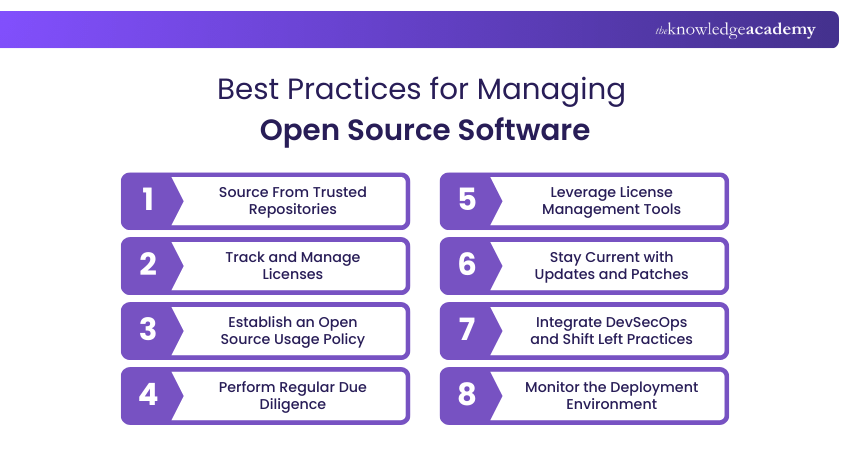
To effectively manage the risks associated with Open Source, organisations should follow key practices across sourcing, licensing, security, and deployment:
1) Source From Trusted Repositories
Always obtain Open Source components from reputable repositories to reduce the risk of embedded flaws or malicious code. Trusted sources also provide regular updates and active community support. This reduces long-term risks and ensures safer adoption.
2) Track and Manage Licenses
Maintain appropriate inventory of Open Source to ensure compliance and avoid legal or operational risks. A clear record helps manage permissions and restrictions. It also prevents conflicts when scaling projects into production.
3) Establish an Open Source Usage Policy
Create clear internal policies that define the usage of Open Source Software. It can be used, modified and distributed within your organisation. Policies guide teams on best practices and responsibilities. This avoids confusion and keeps the organisation legally safe.
4) Perform Regular Due Diligence
Evaluate your Open Source component with different parameters, such as security, community support, ongoing maintenance, and status, before production. Checking update frequency shows if a project is reliable. Selecting active projects ensures long-term stability.
5) Leverage License Management Tools
Utilise the advantages of automated tools and they can be equipped for various tasks to detect, monitor and manage licensing obligations across your codebase. These tools reduce manual workload and errors. They also help companies stay compliant at scale.
6) Stay Current with Updates and Patches
Monitor your system regularly and incorporate security patches to keep Open Source dependencies secure and updated. Applying patches quickly reduces the risk of cyberattacks. Regular updates ensure your systems remain safe and stable.
7) Integrate DevSecOps and Shift Left Practices
Embed security early in the development lifecycle by integrating scanning tools and secure coding practices into your CI/CD pipelines. This prevents vulnerabilities from reaching production. It also lowers costs by fixing issues early.
8) Monitor the Deployment Environment
Monitor continuously your runtime environment to detect vulnerabilities, misconfigurations, and any unauthorised changes in Open Source components. Continuous monitoring improves visibility of risks. It ensures your systems stay protected over time.
Conclusion
Open Source Software is transforming the way we build, share, and innovate across industries. Its transparency, flexibility, and collaborative nature make it a powerful tool for developers and organisations alike. While it comes with certain challenges, following best practices ensures security and reliability. Embracing Open Source means joining a global movement that values openness, continuous improvement, and shared progress in the digital age.
Boost your IT skills fast with our industry-recognised Software Engineering Courses — Register today!
Frequently Asked Questions
Is Google an Open Source Software?

No, Google is not an Open Source Software. It’s a private tech company offering mostly proprietary services. However, Google contributes to Open Source through major projects like Android, Chromium, and TensorFlow, supporting global developer communities.
Is Netflix an Open Source Software?
No, Netflix is not Open Source Software. It’s a proprietary streaming platform. However, Netflix supports Open Source development by releasing tools like Chaos Monkey and Zuul, which are freely available for developers to use and contribute to.
What are the Other Resources and Offers Provided by The Knowledge Academy?
The Knowledge Academy takes global learning to new heights, offering over 3,000+ online courses across 490+ locations in 190+ countries. This expansive reach ensures accessibility and convenience for learners worldwide.
Alongside our diverse Online Course Catalogue, encompassing 17 major categories, we go the extra mile by providing a plethora of free educational Online Resources like Blogs, eBooks, Interview Questions and Videos. Tailoring learning experiences further, professionals can unlock greater value through a wide range of special discounts, seasonal deals, and Exclusive Offers.
What is The Knowledge Pass, and How Does it Work?
The Knowledge Academy’s Knowledge Pass, a prepaid voucher, adds another layer of flexibility, allowing course bookings over a 12-month period. Join us on a journey where education knows no bounds.
What are the Related Courses and Blogs Provided by The Knowledge Academy?
The Knowledge Academy offers various Software Engineering Courses, including Systems Modelling Techniques Course, Software Development Lifecycle Training and Agile Software Development Training. These courses cater to different skill levels, providing comprehensive insights into Scripting Language.
Our Programming & DevOps Blogs cover a range of topics related to Open Source, offering valuable resources, best practices, and industry insights. Whether you are a beginner or looking to advance your Software Engineering skills, The Knowledge Academy's diverse courses and informative blogs have got you covered.

Richard Harris


Senior Full Stack Developer and Technology Educator
Richard Harris is a highly experienced full-stack developer with deep expertise in both frontend and backend technologies. Over his 12-year career, he has built scalable web applications for startups, enterprises and government organisations. Richard’s writing combines technical depth with clear explanations, ideal for developers looking to grow in modern frameworks and tools.

Upcoming Programming & DevOps Resources Batches & Dates
Date
 Java Programming and Software Engineering Fundamentals Training
Java Programming and Software Engineering Fundamentals Training
Thu 17th Sep 2026
Java Programming and Software Engineering Fundamentals Training
Thu 17th Dec 2026

 If you wish to make any changes to your course, please


