Microsoft 365 Copilot Training

Online Instructor-led (1 days)

Classroom (1 days)

Online Self-paced (8 hours)

Microsoft 365 Copilot for Excel Training Course Outline

Module 1: Introduction to Microsoft 365 Copilot

  • Overview of Microsoft 365 Copilot
  • Microsoft 365 Copilot Interface
  • Connecting to Data Sources

Module 2: Data Analysis with Microsoft 365 Copilot

  • Using Microsoft 365 Copilot for Data Analysis
  • Importing Data from Excel
  • Creating Charts, Graphs, and Tables
  • Applying Filters and Sorts to Data
  • Grouping and Summarising Data
  • Using Functions in Microsoft 365 Copilot

Module 3: Data Visualisation with Microsoft 365 Copilot

  • Creating Effective Visualisations with Microsoft 365 Copilot
  • Customising Visualisations to Meet Specific Needs
  • Using Conditional Formatting to Highlight Trends and Anomalies
  • Using Slicers to Filter Data

Module 4: Creating Reports with Microsoft 365 Copilot

  • Creating Reports Using Microsoft 365 Copilot
  • How to Use Templates
  • Sharing Reports with Stakeholders

Module 5: Troubleshooting and Maintenance

  • Troubleshooting Common Issues in Microsoft 365 Copilot
  • Maintaining Microsoft 365 Copilot
  • Upgrading to New Versions of Microsoft 365 Copilot

Show moredown

Who should attend this Microsoft 365 Copilot for Excel Training Course?

The Microsoft 365 Copilot for Excel Training offers participants a comprehensive understanding of how to leverage the advanced features and functionalities of Microsoft 365 Copilot within the Excel application. This Microsoft 365 Copilot Certification course will greatly benefit the following professionals:

  • Data Analysts
  • Financial Analysts
  • Business Analysts
  • Accountants
  • Customer Service Representatives
  • Healthcare Professionals
  • Administrative Professionals

Prerequisites of the Microsoft 365 Copilot for Excel Training

There are no formal prerequisites for this Microsoft 365 Copilot for Excel Training Course. However, prior experience in Microsoft 365 is recommended but not mandatory. Also, familiarity with Artificial Intelligence (AI) might prove to be beneficial for the delegate.

Microsoft 365 Copilot for Excel Training Course Overview

Microsoft 365 Copilot is a powerful application designed to elevate data analysis and visualisation for organisations, facilitating informed decision-making. In today's competitive landscape, honing data analysis skills through this training is crucial for organisations seeking to enhance efficiency and gain a strategic edge. It delves into the significance of Microsoft 365 Copilot, emphasising its role in automating tasks and fostering productivity.

Professionals across various sectors will find mastering Microsoft 365 Copilot indispensable. From improving data analysis proficiency to streamlining decision-making processes, individuals stand to elevate their career prospects. This course caters to a diverse audience, including analysts, managers, and decision-makers, providing them with the tools to leverage Microsoft 365 Copilot effectively.

The Knowledge Academy's 1-day training on Microsoft 365 Copilot for Excel is a valuable opportunity for delegates to acquire hands-on expertise. Participants will learn to harness the capabilities of Microsoft 365 Copilot within Excel, automating tasks, enhancing collaboration, and producing insightful reports. With a focus on real-time collaboration, this training ensures that professionals can immediately apply their newfound skills.

Course Objectives:

  • To connect to data sources and navigate the Microsoft 365 Copilot dashboard
  • To analyse data using charts, graphs, tables, and formulas
  • To visualise data using conditional formatting, pivot tables, and slicers
  • To troubleshoot and maintain Microsoft 365 Copilot for Excel
  • To create reports with customisations and templates
  • To integrate Microsoft 365 Copilot for Excel with other Microsoft products

Upon completion of this course, delegates will benefit by acquiring a comprehensive understanding of Microsoft 365 Copilot for Excel, enabling them to proficiently analyse, visualise, and report on data. This newfound expertise will not only enhance their job performance but also contribute to streamlined collaboration and improved decision-making within their organisations.

Show moredown

What’s included in this Microsoft 365 Copilot for Excel Training Course?

  • World-Class Training Sessions from Experienced Instructors
  • Microsoft 365 Copilot for Excel Certificate
  • Digital Delegate Pack

Show moredown

accredited by

Our Microsoft Training course is accredited by Microsoft

Online Instructor-led (1 days)

Classroom (1 days)

Online Self-paced (8 hours)

Microsoft 365 Copilot and Agent Administration Fundamentals AB-900 Course Outline

Module 1: Identify the Core Features and Objects of Microsoft 365 Services

  • Identify the Core Objects of Microsoft 365 Services
    • How License Types Assigned to Users and Groups
    • Explore the Organisation Configurations
    • Identify the Appropriate Objects to Configure by using the Exchange Online Admin Centre
    • Identify the Appropriate Objects to Configure by using the SharePoint in Microsoft 365 Admin Centre
    • Identify the Appropriate Roles and Permissions for Sites in SharePoint in Microsoft 365
    • Identify the Appropriate Objects to Configure by using the Teams Admin Centre
  • Understand the Microsoft 365 Security Principles
    • Explain the Core Zero Trust Principles
    • Understand Authorisation
    • Understand Authentication Methods
    • Understand Threat Protection and Intelligence
    • Understand Features and Capabilities of Microsoft Defender XDR
  • Identify the Core Security Features of Microsoft 365 Services
    • Understand Features and Capabilities of Microsoft Entra
    • Understand Conditional Access Policies
    • Understand the Purpose and Benefits of SSO
    • Identify the Appropriate Security Object to Use in an Organisation
    • Identify the Appropriate Tools to Troubleshoot Common Sign-in Issues
    • Interpret Identity Secure Score in Microsoft Entra ID
    • Use the Appropriate Tools to Review Audit Logs for User and Admin Activity
    • Role of Privileged Identity Management (PIM) in an Organisation
    • Understand App registrations and Enterprise Apps

Module 2: Understand Data Protection and Governance Tasks for Microsoft 365 and Copilot

  • Understand Microsoft Purview
    • Features and Capabilities of Microsoft Purview
    • Use Cases for Sensitivity Labels in Microsoft Purview
    • Data Classification in Microsoft Purview
    • Understand Retention
  • Understand Data Security Implications of Copilot
    • How Copilot Accesses Data?
    • How Microsoft Graph Influences Copilot Responses?
    • How Copilot Uses Permissions and other Controls in Microsoft 365, Microsoft Purview, and Microsoft Defender
    • Understand Responsible AI Principles
  • Identify Data Protection and Governance Risks for Microsoft 365 and Copilot
    • Identify Compliance Risks and Recommendations by using Microsoft Purview Compliance Manager
    • Identify Sensitive Information by using Microsoft Purview Data Explorer
    • Identify Risks by using Insider Risk Management
    • Identify and Respond to Alerts Generated by Microsoft Purview DLP
    • Identify Policy Violations Generated by Communication Compliance
    • Identify user Activities Reported by Microsoft Purview Activity Explorer
    • Discover and Manage AI Activity by using DSPM for AI
    • Search for Files and Emails by using Content Search in Microsoft Purview eDiscovery
  • Identify and Monitor Oversharing in SharePoint in Microsoft 365
    • Identify the Tools to Troubleshoot Oversharing in an Organisation
    • Run a Data Access Governance Report in SharePoint
    • Features and Capabilities of SharePoint Advanced Management

Module 3: Perform Basic Administrative Tasks for Copilot and Agents

  • Understand Features and Capabilities of Copilot and Agents
    • Compare the built-in Capabilities of Copilot and Agents
    • Compare Copilot Monthly License Model to pay-as-you-go, including SharePoint
    • Identify which Copilot Features can be Enabled or Disabled
    • Identify use Cases for Researcher
    • Identify use Cases for Analyst
    • Identify use Cases for Custom Agents
  • Perform Basic Administrative Tasks for Copilot
    • Assign Copilot Licenses
    • Monitor and Manage Copilot pay-as-you-go Billing Policies
    • Monitor Copilot Usage and Adoption, including Copilot Analytics and the Microsoft 365 Admin Centre
    • Manage Prompts, including Saving, Sharing, Scheduling, and Deleting
  • Perform Basic Administrative Tasks for Agents
    • Identify how to Configure User Access to Agents
    • Create an Agent
    • Understand Approval Process for Agents
    • Monitor Agents

Show moredown

Who Should Attend This Microsoft 365 Copilot and Agent Administration Fundamentals AB-900 Course?

This course is designed for professionals responsible for administering, securing, and governing Microsoft 365 environments. It supports individuals involved in AI deployment, tenant management, compliance, and digital workplace transformation initiatives.

  • Microsoft 365 Administrators
  • IT Administrators
  • Security and Compliance Professionals
  • Cloud Administrators
  • Governance and Risk Managers
  • Digital Workplace Managers

Prerequisites of the Microsoft 365 Copilot and Agent Administration Fundamentals AB-900 Course

There are no formal prerequisites for attending this Microsoft 365 Copilot and Agent Administration Fundamentals AB-900 Course. However, a basic understanding of Microsoft 365 services, cloud concepts, and organisational IT administration can help delegates follow the material more effectively.

Microsoft 365 Copilot and Agent Administration Fundamentals AB-900 Course Overview

The Microsoft 365 Copilot and Agent Administration Fundamentals AB-900 Course introduces delegates to the foundational concepts required to administer Copilot and manage agent experiences securely within Microsoft 365. It focuses on governance, configuration, monitoring, and compliance rather than development.

This training explores Copilot architecture, tenant readiness, security controls, licensing considerations, and responsible AI practices. Delegates gain clarity on how to manage Copilot access, configure policies, and oversee AI usage across organisational environments.

This 1-Day training by The Knowledge Academy helps delegates strengthen their understanding of AI governance within Microsoft 365. It supports secure configuration, effective oversight, and structured adoption of Copilot and agent capabilities.

Microsoft 365 Copilot and Agent Administration Fundamentals AB-900 Course Objectives

  • To understand Microsoft 365 Copilot capabilities and architecture
  • To explain how Copilot integrates with Microsoft 365 services
  • To configure and manage Copilot settings and permissions
  • To administer Microsoft 365 Copilot agents effectively
  • To apply security, compliance, and governance controls
  • To monitor Copilot usage and manage AI-related risks

Upon completion of this Microsoft 365 Copilot and Agent Administration Fundamentals AB-900 Course, delegates will be able to administer Copilot features confidently and support secure AI deployment within Microsoft 365 environments. Delegates will gain awareness of governance and compliance responsibilities associated with AI adoption.

Show moredown

What’s Included in this Microsoft 365 Copilot and Agent Administration Fundamentals AB-900 Course?

  • World-class Training from Experienced Instructors
  • Digital Delegate Pack
  • Interactive Learning with 24*7 Support

Show moredown

Online Instructor-led (1 days)

Classroom (1 days)

Online Self-paced (8 hours)

Microsoft 365 Copilot for Teams Training Course Outline

Module 1: Introduction to Microsoft Teams

  • Overview of Teams Interface and Features
  • Best Practices for Setting up and Customising Teams

Module 2: Managing Teams and Channels

  • Creating and Managing Teams and Channels
  • Understanding Channel Settings and Permissions
  • Using Tags and @mentions

Module 3: Collaboration and Communication in Teams

  • Using Chat and Messaging Features
  • Working with Files and Documents in Teams
  • Conducting Online Meetings and Calls

Module 4: Integrating Apps and Services in Teams

  • Using Third-Party Apps in Teams
  • Customising and Building Teams Apps
  • Integrating with other Microsoft Apps and Services

Module 5: Advanced Teams Features and Administration

  • Managing Teams Security and Compliance
  • Using Teams Analytics and Reporting Features
  • Customising Teams with Microsoft Power Platform

Show moredown

Who should attend this Microsoft 365 Copilot for Teams Training Course?

The Microsoft 365 Copilot for Teams Training Course is designed to empower individuals with the knowledge and skills to harness the capabilities of Microsoft 365 Copilot within the context of Microsoft Teams. This course will benefit the following professionals:

  • Data Analysts
  • Customer Service Representatives
  • Sales Representatives
  • Marketing Professionals
  • Technical Writers
  • Administrative Professionals
  • Legal Professionals

Prerequisites of the Microsoft 365 Copilot for Teams Training Course

There are no formal prerequisites for this Microsoft 365 Copilot Teams Training Course. However, prior experience in Microsoft 365 is recommended but not mandatory. Also, familiarity with Artificial Intelligence (AI) might prove to be beneficial for the delegate.

Microsoft 365 Copilot for Teams Training Course Overview

Microsoft 365 Copilot for Teams Training focuses on optimising the collaboration platform, Teams, enabling users to harness its full potential for seamless communication, file sharing, online meetings, and real-time document collaboration. As an essential tool for modern workplace dynamics, this course aims to enhance participants' understanding and proficiency in utilising Microsoft Teams effectively.

Understanding Microsoft 365 Copilot for Teams is imperative for professionals seeking to boost business decisions and productivity through enhanced collaboration. It's ideal for team leaders, project managers, and individuals who want to leverage Microsoft Teams to its fullest extent.

The Knowledge Academy's 1-day training on Microsoft 365 Copilot for Teams is designed to empower delegates with advanced Copilot features. From configuring Copilot to monitoring Teams usage and troubleshooting, participants will gain comprehensive skills. By mastering Copilot, professionals can streamline workflows, troubleshoot common issues, and maximise the utility of Teams for improved team communication.

Course Objectives

  • To optimise collaboration and communication using Microsoft 365 Copilot for Teams
  • To enhance proficiency in configuring Copilot for Teams' advanced features
  • To troubleshoot common issues and streamline workflows within Microsoft Teams
  • To monitor Teams usage effectively with Copilot and track user activity
  • To identify and leverage advanced features of Copilot for improved collaboration
  • To generate detailed reports using Copilot to assess and enhance team productivity

Upon completion of this course, delegates will benefit by gaining in-depth knowledge and skills to effectively utilise Microsoft 365 Copilot for Teams. Armed with the ability to configure advanced features, troubleshoot issues, and monitor usage, participants will enhance collaboration and communication within their teams, contributing to increased efficiency and productivity in their professional endeavours.

Show moredown

What’s included in this Microsoft 365 Copilot for Teams Training Course?

  • World-Class Training Sessions from Experienced Instructors
  • Microsoft 365 Copilot for Teams Certificate
  • Digital Delegate Pack

Show moredown

Online Instructor-led (1 days)

Classroom (1 days)

Online Self-paced (8 hours)

Microsoft 365 Copilot Introduction Training Course Outline

Module 1: Introduction to Microsoft 365 Copilot

  • Overview of Microsoft 365 Copilot
  • How it Works and its Features?
  • Benefits of using Microsoft 365 Copilot

Module 2: Setting up Microsoft 365 Copilot

  • How to Get Started with Microsoft 365 Copilot?
  • Understanding the Prerequisites for Installation
  • Configuring Copilot for your Environment

Module 3: Using Microsoft 365 Copilot

  • Getting Familiar with Copilot's Interface
  • How Copilot Completes Code?
  • How to Accept and Reject Copilot's Suggestions?
  • Customising Copilot's Behaviour

Module 4: Advanced Features of Microsoft 365 Copilot

  • Collaborative Coding with Copilot
  • Multilingual Coding with Copilot
  • Copilot Limitations and known Issues

Module 5: Integrating Microsoft 365 Copilot with Other Tools

  • Working with Visual Studio Code
  • Using Copilot with GitHub
  • Copilot's Compatibility with Other Development Tools

Module 6: Best Practices for using Microsoft 365 Copilot

  • How to Maximise the Benefits of Copilot?
  • Best Practices for Efficient Coding
  • Tips for Troubleshooting Copilot Issues

Show moredown

Who should attend this Microsoft 365 Copilot Introduction Training Course?

A Microsoft 365 Copilot Introduction Training Course is designed to provide individuals with the knowledge and skills to effectively utilise Microsoft 365 Copilot, which is a tool or feature designed to assist users in various tasks within the Microsoft 365 suite of applications. This course will benefit the following professionals:

  • Business Users
  • Data Analysts
  • Customer Service Representatives
  • Marketing Professionals
  • Technical Writers
  • Administrative Professionals
  • Healthcare Professionals

Prerequisites of the Microsoft 365 Copilot Introduction Training Course

There are no formal prerequisites for this Microsoft 365 Copilot Introduction Training Course. However, prior experience in Microsoft 365 is recommended but not mandatory. Also, familiarity with Artificial Intelligence (AI) might prove to be beneficial for the delegate.

Microsoft 365 Copilot Introduction Training Course Overview

Microsoft 365 Copilot Introduction Training provides a gateway to the cloud-based service, offering an array of data analysis and visualisation tools for informed business decision-making. With a user-friendly interface, it simplifies connecting to data sources, creating reports, and sharing insights, making it a vital asset for professionals seeking to enhance their coding skills and contribute data-driven insights to their organisations.

Proficiency in Microsoft 365 Copilot is essential for individuals aiming to improve their job performance by delivering insightful recommendations. This training is tailored for those looking to harness the power of Microsoft 365 Copilot effectively. Professionals in roles involving data analysis, coding, and decision support will find mastering Copilot invaluable for enhancing their capabilities and delivering enhanced value to their organisations.

The Knowledge Academy's 1-day Microsoft 365 Copilot Introduction Training offers delegates a comprehensive introduction to this AI-powered code completion tool. Participants will gain in-depth knowledge of integrating Copilot with various tools, including GitHub, and learn how to seamlessly incorporate it into Microsoft products like Power BI and Excel.

Course Objectives

  • To provide a comprehensive introduction to Microsoft 365 Copilot and its capabilities
  • To equip delegates with the skills to proficiently use Microsoft 365 Copilot for data analysis
  • To demonstrate the integration of Copilot with GitHub and other relevant tools
  • To guide participants in utilising Copilot for enhanced coding proficiency
  • To showcase the seamless integration of Copilot with Microsoft products like Power BI and Excel
  • To empower individuals with the knowledge needed to deliver data-driven insights and recommendations

Upon completion of this course, delegates will benefit by gaining a thorough understanding of Microsoft 365 Copilot and its capabilities. Armed with enhanced coding skills and the ability to integrate Copilot into various tools and Microsoft products, participants will be well-positioned to contribute valuable, data-driven insights to their organisations, ultimately improving their job performance and decision-making processes.

Show moredown

What’s included in this Microsoft 365 Copilot Introduction Training Course?

  • World-Class Training Sessions from Experienced Instructors
  • Microsoft 365 Copilot Introduction Certificate
  • Digital Delegate Pack

Show moredown

accredited by

Our Microsoft training course is accredited by Microsoft

Online Instructor-led (1 days)

Classroom (1 days)

Online Self-paced (8 hours)

Extend Microsoft 365 Copilot in Copilot Studio MS4022 Course Outline

Module 1: Introduction to Declarative Agents for Microsoft 365 Copilot

  • Introduction
  • What Are Declarative Agents?
  • How Declarative Agents Work
  • When to Use Declarative Agents

Module 2: Build Your First Declarative Agent for Microsoft 365 Copilot By Using Copilot Studio

  • Introduction
  • Create A Declarative Agent
  • Exercise - Create A Declarative Agent
  • Add Custom Knowledge
  • Exercise - Add Custom Knowledge
  • Add Starter Prompts
  • Exercise - Add Starter Prompts

Module 3: Introduction to Actions for Declarative Agents in Copilot Studio

  • Introduction
  • Actions and Agents
  • Types of Copilot Studio Actions
  • Action Development Considerations
  • Extend Declarative Agents with Actions

Module 4: Extend Declarative Agents with Prompt Actions in Copilot Studio

  • Introduction
  • What Are Prompt Actions?
  • Create A Prompt Action
  • Exercise - Create A Prompt Action

Module 5: Extend Declarative Agents with Connector Actions in Copilot Studio

  • Introduction
  • What Are Connector Actions?
  • Create Connector Actions
  • Exercise - Create A Connector Action

Show moredown

Who should attend this Extend Microsoft 365 Copilot in Copilot Studio MS-4022 Course?

This Extend Microsoft 365 Copilot in Copilot Studio MS-4022 Course is ideal for individuals looking to deepen their expertise in AI-powered productivity tools and automation within Microsoft 365 environments. It is particularly beneficial for:

  • IT Managers and Directors
  • Business Analysts
  • Digital Transformation Leaders
  • Microsoft 365 Administrators
  • Solution Architects
  • Application Developers
  • Technical Project Managers

Prerequisites of Extend Microsoft 365 Copilot in Copilot Studio MS-4022 Course

There are no formal prerequisites to attend this Extend Microsoft 365 Copilot in Copilot Studio MS-4022 Course.

Extend Microsoft 365 Copilot in Copilot Studio MS4022 Course Overview

The Extend Microsoft 365 Copilot in Copilot Studio MS-4022 is a strategic introduction to enhancing AI-driven productivity within the Microsoft 365 ecosystem. Focusing on the core features and extensibility of Copilot Studio, this course is highly relevant for individuals and organisations aiming to unlock the potential of intelligent automation. As AI-powered solutions rapidly transform business operations, expertise in customising and deploying Microsoft 365 Copilot becomes increasingly essential for IT professionals, digital leaders, and automation specialists.

Professionals across multiple roles will find significant value in mastering the skills offered by the Extend Microsoft 365 Copilot in Copilot Studio Training. The course is especially beneficial for IT Managers, Solution Architects, Microsoft 365 Administrators, Business Analysts, and those responsible for driving digital transformation initiatives within their organisations.

This 1-day Microsoft 365 Copilot Studio Training provides delegates with concentrated, practical knowledge needed to extend and tailor Copilot to diverse business needs. Covering areas such as declarative agents, prompt actions, connector actions, and the integration of custom knowledge, the course ensures participants gain the expertise required to innovate and automate with confidence using Microsoft 365 Copilot Studio.

Course Objectives

  • To understand the concept of declarative agents in Copilot Studio
  • To build and customise agents for specific business requirements
  • To integrate custom knowledge into Microsoft 365 Copilot agents
  • To develop prompt actions for dynamic Copilot interactions
  • To create connector actions for seamless data integration
  • To apply best practices for agent deployment and management

Delegates will be able to confidently create, extend, and manage declarative agents in Microsoft 365 Copilot using Copilot Studio. They will possess the skills to integrate custom knowledge and automate workflows, develop both prompt and connector actions, and align Copilot solutions with their organisation’s strategic objectives.

Show moredown

What’s included in this Extend Microsoft 365 Copilot in Copilot Studio MS4022 Course?

  • World-Class Training Sessions from Experienced Instructors
  • Extend Microsoft 365 Copilot in Copilot Studio MS4022 Certificate
  • Digital Delegate Pack

Show moredown

Not sure which course to choose?

Speak to a training expert for advice if you are unsure of what course is right for you. Give us a call on +33 805638382 or Enquire.

Skills Gained from Microsoft 365 Copilot Courses

Microsoft 365 Copilot Courses help learners understand and use Copilot within the Microsoft 365 environment, with focused tracks for Excel, Teams, and Copilot Studio. Professionals gain practical, AI-driven productivity skills to streamline workflows and automate everyday tasks using Microsoft’s integrated AI capabilities.

Key skills gained from these courses include:

  • Copilot Fundamentals and Interface Skills: Learners gain hands on experience with the Microsoft 365 Copilot interface, its core functions, how it interprets prompts, and how to configure the Microsoft 365 environment for accurate and efficient results.
  • AI Driven Data Analysis and Insight Creation: Professionals learn to use Copilot in Excel to analyse data through natural language prompts. They learn to generate summaries, charts, visual outputs, and key observations using Copilot without relying on manual formula creation or traditional data processing methods.
  • Automated Reporting and Productivity Skills: Learners develop the ability to use Copilot to create reports, summaries, drafts, task lists, and other content outputs in Excel and Teams. They understand how Copilot reduces repetitive work and supports faster and more informed decision making.
  • Teams Collaboration and Meeting Assistance Skills: Learners develop the skills to use Copilot in Teams to produce meeting recaps, summarise chat conversations, extract action items, draft messages, and support collaborative work.
  • Copilot Studio Agent Building and Extension Skills: Learners gain practical experience using Copilot Studio to build declarative agents, add custom knowledge sources, design prompt based actions, and create connector actions that extend Copilot to meet specific organisational requirements.
  • Troubleshooting and Support Skills: Learners develop the ability to maintain Copilot enabled workflows by troubleshooting common issues, validating permissions, resolving data access problems, and applying best practice to ensure consistent and reliable Copilot performance.
     

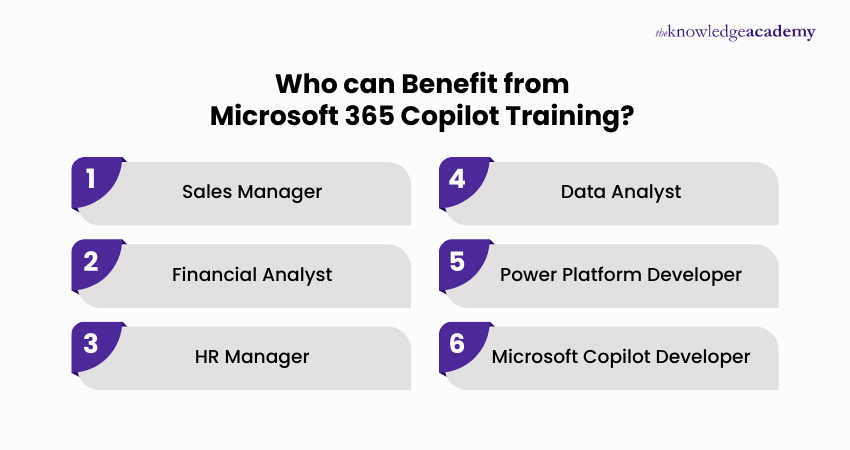
Who can Benefit from Microsoft 365 Copilot Training?

Microsoft 365 Copilot Training supports a wide range of professionals who use Microsoft 365 tools for communication, data handling, collaboration, or workflow optimisation. Learners who can benefit include:

Who can Benefit from  Microsoft 365 Copilot Training

  • Sales Manager: Leverage Copilot to accelerate proposals, analyse sales performance, enhance customer communication, summarise CRM data, and produce impactful sales presentations.
  • Financial Analyst: Analyse financial datasets using Copilot in Excel, build detailed financial reports, visualise data trends, manage budgets, create forecasts, and automate financial analysis tasks to improve decision-making accuracy.
  • HR Manager: Streamline HR processes by using Copilot to create job descriptions, evaluate resumes, develop interview questions, draft offer letters, prepare onboarding materials, update HR policies, and manage employee communications across Microsoft 365 applications.
  • Data Analyst: Analyse datasets using Copilot, applying automated summaries, visualisations, and data transformations to speed up reporting and improve decision-making accuracy.
  • Power Platform Developer: Build and customise Copilot Studio agents, create declarative agents, integrate organisational knowledge sources, design prompt-based actions, develop custom connectors, and extend Microsoft 365 Copilot capabilities through APIs.
  • Microsoft Copilot Developer: Develop and maintain AI-powered agents using Copilot Studio, integrate enterprise data sources, build custom extensions for Microsoft 365 Copilot, and create automation workflows to support specific business needs and technical requirements.
Show more blue-arrow

Microsoft 365 Copilot Training FAQs

Microsoft 365 Copilot is an AI-powered tool integrated within Microsoft 365 apps, designed to enhance productivity by assisting with tasks such as document creation, data analysis, and email management.

To activate Microsoft 365 Copilot, ensure you have the appropriate Microsoft 365 subscription. Once available, it will be automatically integrated into apps like Word and Excel, requiring no additional setup.

If you're not getting Copilot in Windows 11, it could be due to the following reasons: you may not have the appropriate Microsoft 365 subscription, or Copilot might not yet be available in your region or for your specific plan.

The Microsoft 365 Copilot Certification aims to validate your ability to effectively use Microsoft 365 Copilot tools, enhancing productivity through AI-powered features in applications like Word, Excel, and Outlook.

Microsoft 365 Copilot training enhances your skills in using AI-powered tools, boosts productivity, streamlines tasks like document creation and data analysis, and improves overall efficiency across Microsoft 365 applications.

Microsoft 365 Copilot certification is beneficial for business professionals, data analysts, project managers, IT specialists, and anyone aiming to enhance productivity and efficiency through AI-powered tools within Microsoft 365 apps.

If you are unable to access your training, contact the support team at The Knowledge Academy via their customer service email or phone number provided on their website for prompt assistance and resolution of your issue.

After completing Microsoft 365 Copilot training, you can apply your skills in your current role, seek certifications to further enhance your expertise, or pursue job opportunities that require proficiency in AI tools and Microsoft 365 applications.

This course takes 1-day to complete during which delegates participate in intensive learning sessions that cover various course topics.

The Knowledge Academy provides flexible self-paced training for this course. Self-paced training is beneficial for individuals who have an independent learning style and wish to study at their own pace and convenience.

The Knowledge Academy in France stands out as a prestigious training provider known for its extensive course offerings, expert instructors, adaptable learning formats, and industry recognition. It's a dependable option for those seeking this course.

The Knowledge Academy is one of the Leading global training provider for Microsoft 365 Copilot Training.

The training fees for Microsoft 365 Copilot Training in France starts from €1995

Show more down

Why we're the go to training provider for you

icon

Best price in the industry

You won't find better value in the marketplace. If you do find a lower price, we will beat it.

icon

Trusted & Approved

Recognised by leading certification bodies, we deliver training you can trust.

icon

Many delivery methods

Flexible delivery methods are available depending on your learning style.
icon

High quality resources

Resources are included for a comprehensive learning experience.

barclays Logo
deloitte Logo
Thames Water Logo

"Really good course and well organised. Trainer was great with a sense of humour - his experience allowed a free flowing course, structured to help you gain as much information & relevant experience whilst helping prepare you for the exam"

Joshua Davies, Thames Water

santander logo
bmw Logo
Google Logo
cross

Upgrade Your Skills. Save More Today.

superSale Unlock up to 40% off today!

WHO WILL BE FUNDING THE COURSE?

close

close

Thank you for your enquiry!

One of our training experts will be in touch shortly to go over your training requirements.

close

close

Press esc to close

close close

Back to course information

Thank you for your enquiry!

One of our training experts will be in touch shortly to go overy your training requirements.

close close

Thank you for your enquiry!

One of our training experts will be in touch shortly to go over your training requirements.