


 Top Rated Course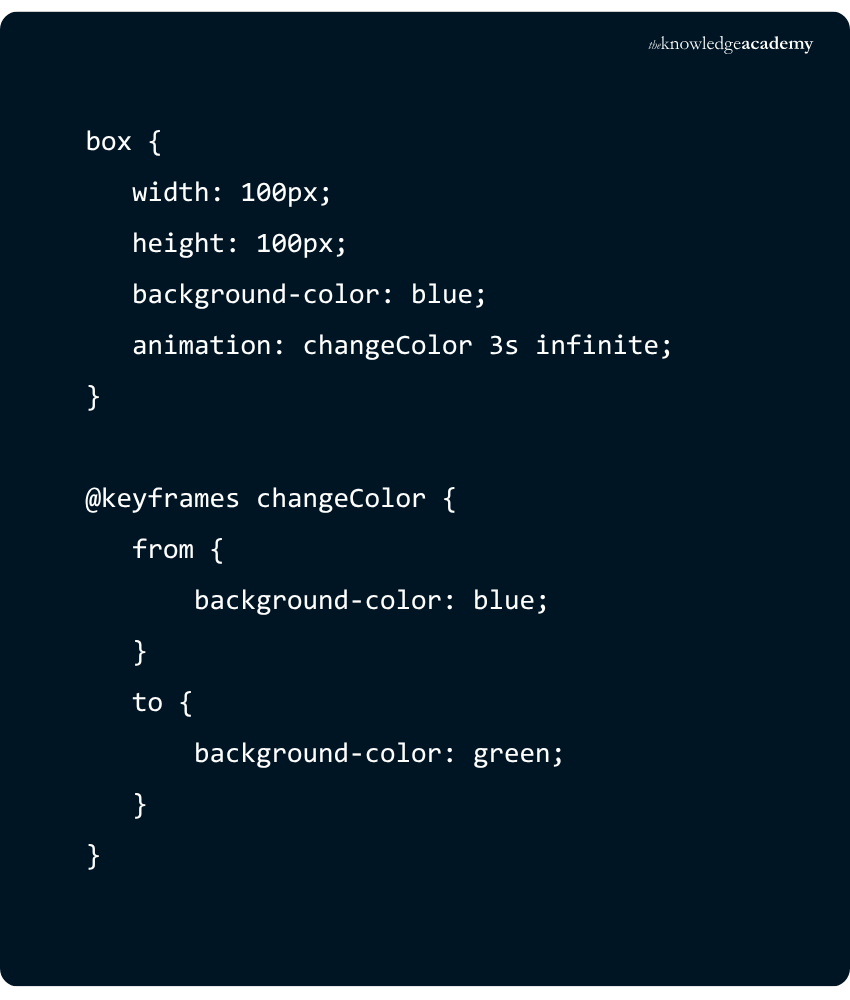


We may not have the course you’re looking for. If you enquire or give us a call on 0800 446148 and speak to our training experts, we may still be able to help with your training requirements.
CSS Animation: Simplify Complex Motion with Advanced Techniques
Richard Harris 15 July 2026CSS animations create engaging effects by animating CSS properties via keyframes, enabling multi-step sequences, looping, delays, and custom timing for elements.. They enhance user experience by adding visual interest and guiding attention. With minimal code, designers can easily create dynamic, interactive, and visually appealing interfaces.

Training Outcomes Within Your Budget!
We ensure quality, budget-alignment, and timely delivery by our expert instructors.
Table of Contents
What is CSS Animation? Imagine a website where buttons bounce, text gently slides in, and elements smoothly fade like a well-choreographed dance. Static pages just don’t cut it in a world where users expect personality and energy in every click. That’s where CSS Animation steps in, adding life and movement without heavy coding. Curious to see how it works? In this blog, let us learn about CSS Animations in detail.
Table of Contents
1) Understanding CSS Animation
2) Why use CSS Animation?
3) CSS Animation Properties
4) @keyframes Rule
5) How to use CSS Animation?
6) CSS Animation Examples
7) Common CSS Animation Mistakes and How to Avoid Them
8) Conclusion
Understanding CSS Animation
CSS Animation is a method which enables the elements in a webpage to change in style smoothly between them. It relies on keyframes to specify the initial and final states and can specify intermediate states. This produces interesting visual effects without JavaScript.
The definition of animation is based on the @keyframes rule, which provides implementation of the changes in the CSS properties with respect to time. These animations are thereafter applied to elements via the animation property. The length, delay, speed and repetition of the animation can be controlled.
CSS Animation is also a way of improving the user experience on web pages through the incorporation of motion and interactivity. They are capable of attracting attention, feedback, or even making interfaces more polished. They are also efficient and do not need outside libraries as they are browser-based.
Why use CSS Animation?
CSS Animation offers a range of reasons for Web Designers and developers to incorporate it into their projects. This powerful tool adds an extra layer of dynamism and interactivity to websites. Here's why you should consider using it:
Visual Appeal
Animations capture attention and make web pages more visually appealing, from a subtle hover animation on a button, a smooth transition between sections, or eye-catching loading animations. These visual enhancements can leave a lasting impression on users, making your website stand out from the crowd.
Lightweight
Compared to some other animation techniques, CSS Animation can be lightweight, reducing the impact on page load times. You have more control over the performance impact by optimising animation properties, such as using hardware-accelerated transitions.
User Engagement
Interactivity is a key factor in keeping users engaged. CSS Animation enables you to create interactive elements that respond to user actions. For example, you can animate buttons to change colour when hovered over, provide feedback when a form is submitted, or create captivating sliders that users can interact with.
Performance
It often performs better than animations created using JavaScript. Browser optimisation for CSS Animations is generally more efficient, leading to smoother animations and better overall performance. This efficiency translates into faster load times and a more responsive website, especially on mobile devices.
Discover animation techniques and create stunning visual stories with our Animation Course – Join now!
CSS Animation Properties
The CSS Animation property defines which animation effect applies to an element, combining multiple animation-related settings into one.
1) animation-name - Specifies the name of the @keyframes rule that defines the animation sequence.
2) animation-duration - Sets how long one cycle of the animation takes to complete. The value is typically given in seconds (s) or milliseconds (ms).
3) animation-timing-function - Controls the pace of the animation through its duration. Common values include linear, ease, ease-in, ease-out, and ease-in-out.
4) animation-delay - Defines the delay before the animation begins after being applied.
5) animation-iteration-count - Determines how many times the animation should repeat. You can use a specific number or infinite for continuous looping.
6) animation-direction - Specifies the direction in which the animation plays. Options include normal, reverse, alternate, and alternate-reverse.
7) animation-fill-mode - Dictates how styles are applied to the element before and after the animation runs. Values include none, forwards, backwards, and both.
8) animation-play-state - Allows you to pause or resume the animation using values like running or paused.
@keyframes Rule
The @keyframes rule in CSS defines how an element's styles should change at various stages of an animation. It allows you to break down the animation into key steps, specifying the styles that should apply at each point in time.
Syntax
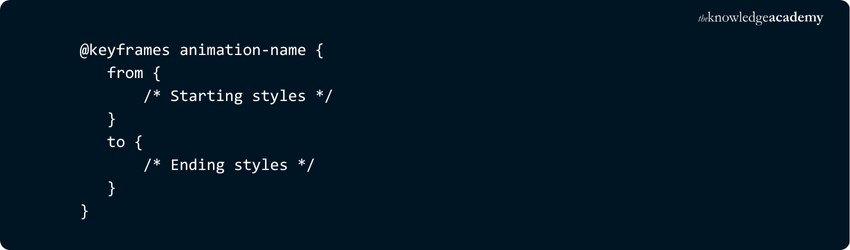
Alternatively, you can use percentage values (e.g., 0%, 50%, 100%) to define multiple intermediate steps for more complex animations.
How It Works -
1) from represents the initial state of the element (equivalent to 0%)
2) to represents the final state (equivalent to 100%)
3) Intermediate percentages allow for smooth transitions between multiple style changes
For Example
In this example, the .box element changes its background colour from blue to green over 3 seconds and repeats the animation infinitely.
How to use CSS Animation?
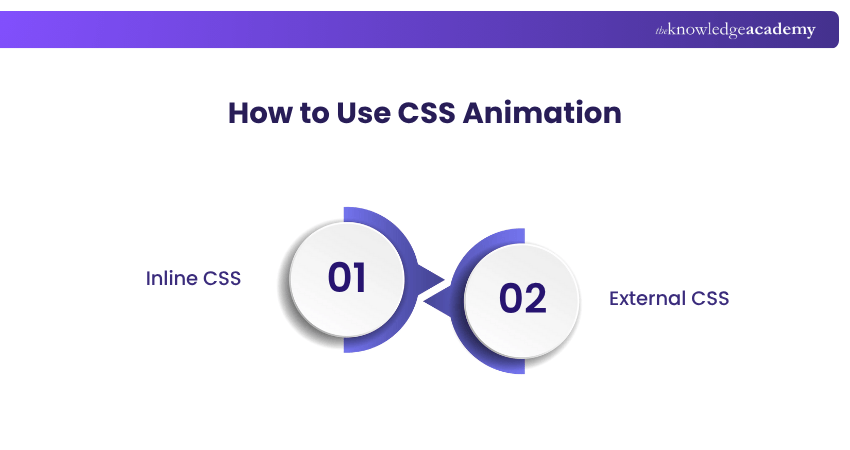
CSS Animations can be added to your web projects in a few different ways, depending on how you choose to apply your styles. The two most common methods are using inline CSS and external CSS.
Inline CSS
Inline CSS involves adding styles directly to an HTML element using the style attribute. This method is quick and useful for small-scale animations or testing purposes.
Example -

While convenient, inline CSS is not ideal for larger projects as it can make your HTML harder to read and maintain.
External CSS
External CSS allows you to write all your styles in a separate .css file and link it to your HTML document using the tag in the section.
Example -

This approach is preferred for larger or more complex projects, as it keeps your code clean, modular, and easier to manage across multiple pages.
CSS Animation Examples

Simple CSS Loaders
Simple CSS loaders are lightweight animations used to indicate that content is loading. These can range from pulsing dots and bouncing squares to falling lines. They’re ideal for keeping users engaged during wait times. A great example is a grid of animated loaders, each with a unique style, allowing designers to choose one that best fits their brand aesthetic.
Simple Loading Spinners
Loading spinners are one of the most recognisable loading indicators. They typically involve a circular motion that suggests ongoing activity. Using just HTML and CSS, you can create scalable vector-based spinners that are smooth, responsive, and easy to implement. These spinners are perfect for minimalistic designs and are widely understood by users.
Rotating Changing Shapes
This animation style involves morphing one shape into another — for example, a circle transforming into a square. These animations are excellent for learning how keyframes work, as they often involve multiple stages of transformation. They can be used to add visual interest to icons, buttons, or background elements.
Scrolling Text Animation
Scrolling text animations add movement to typography, often used to cycle through words or phrases. A popular example is a slot-machine-style effect where words rotate in and out of view. This is a creative way to highlight features, values, or services on a landing page, making the content more dynamic and engaging.
Take your graphic design to the next level with our CorelDRAW Training - Join now!
Common CSS Animation Mistakes and How to Avoid Them

1) Animating Layout-triggering Properties
Using properties like top, left, width, or height can cause layout recalculations, which slow down performance. Instead, use transform and opacity, which are more efficient and GPU-accelerated.
2) Overusing the Will-change Property
While will-change can improve performance by preparing the browser for changes, overusing it can consume unnecessary memory. Use it sparingly and only when you know an element will animate.
3) Ignoring Overflow and Clipping Issues
Animations that move or scale elements can cause them to overflow their containers, leading to layout problems or unwanted scrollbars. Always test animations across devices and screen sizes.
4) Not Using Timing Functions Effectively
Animations without proper timing functions can feel abrupt or unnatural. Use easing functions like ease-in-out to create smoother, more visually appealing transitions.
5) Forgetting Accessibility and Motion Preferences
Some users prefer reduced motion due to motion sensitivity. Failing to respect this can negatively impact user experience. Use media queries like prefers-reduced-motion to offer alternatives.
6) Lack of Responsiveness
Animations that look good on desktop may not work well on mobile. Always test and adjust animations using media queries to ensure they scale and behave correctly on all devices.
Conclusion
CSS Animation adds life and interactivity to web elements with minimal effort. When used thoughtfully, it enhances user experience and visual appeal. Start small, experiment, and let your creativity flow. With the right approach, animations can turn static designs into memorable digital experiences.Understand design principles to create impactful logos with our Logo Design Course – Join now!
Frequently Asked Questions
What are the Types of CSS Animations?

CSS Animations generally fall into two types: transitions and keyframe animations. Transitions animate changes between states, triggered by user interaction. Keyframe animations define multiple steps and run automatically, allowing complex, continuous, or infinite animations without user input.
Can CSS Animations be Used With Pseudo-elements?
Yes, CSS Animations can be used with pseudo-elements like ::before and ::after. These pseudo-elements behave like regular elements in the DOM, so you can apply animations to them just as you would with any other element. This allows for creative effects without adding extra HTML elements.

Richard Harris


Senior Full Stack Developer and Technology Educator
Richard Harris is a highly experienced full-stack developer with deep expertise in both frontend and backend technologies. Over his 12-year career, he has built scalable web applications for startups, enterprises and government organisations. Richard’s writing combines technical depth with clear explanations, ideal for developers looking to grow in modern frameworks and tools.


 If you wish to make any changes to your course, please


