


 Top Rated Course

We may not have the course you’re looking for. If you enquire or give us a call on +358 942454206 and speak to our training experts, we may still be able to help with your training requirements.
Cypress vs Selenium: A Detailed Comparison
Lily Turner 28 April 2026Cypress and Selenium are both frameworks for automating web application testing. They may seem similar, but they carry significant differences. These differences are what set them apart from each other. Continue diving into this blog to unveil the comparison between Cypress vs Selenium to gain a clearer topic understanding.

Training Outcomes Within Your Budget!
We ensure quality, budget-alignment, and timely delivery by our expert instructors.
Table of Contents
Cypress and Selenium are two popular tools for testing web applications. Both help ensure websites work as expected, but they differ in how they operate and what they offer. Selenium has been a trusted choice for years, offering support for multiple browsers and programming languages. Cypress is newer and designed for faster, easier testing with modern web apps.
Understanding the differences between Cypress vs Selenium can help teams choose the right tool for their testing needs. This comparison will explore their features, advantages, and use cases.
Table of Contents
1) What is Cypress?
2) What is Selenium?
3) Difference Between Cypress vs Selenium
4) When to Use Selenium or Cypress
5) Key Considerations in Selecting an Automation Testing Tool
6) Determining the Right Tool for Test Automation: Cypress vs Selenium
7) Conclusion
What is Cypress?
Cypress is a modern front-end testing framework built for the web. It is designed to enable developers and quality assurance (QA) engineers to write robust and reliable tests for web applications. The good point about Cypress is that it operates directly in the browser, which offers a fast, real-time, interactive testing environment. As detailed in the Cypress Guide, this browser-based execution allows developers to debug and observe tests more effectively during development.
Using Cypress, QAs or developers can create various types of tests. These include:
1) Component Tests: These tests focus on individual components of an application, ensuring they function as expected in isolation. Component tests help verify that each piece of the UI behaves correctly and interacts properly with other components.
2) Integration Tests: Integration tests assess how different components of an application work together. They ensure that various parts of the application interact as intended, providing a broader scope of validation than component tests.
3) End-to-End (E2E) Tests: E2E tests simulate real user interactions with the application from start to finish. These tests cover complete user workflows by verifying that the application functions correctly from the user's perspective, including navigation, form submissions, and other user actions.
4)API Tests: Cypress can also be used to test the backend APIs with which the front end interacts. API tests ensure that the endpoints return the expected responses, handle different input scenarios, and maintain performance and reliability.
Pros of Cypress
Cypress offers several advantages for web application testing. Some of these advantages are as follows:
1) Direct Access: It runs directly in the browser, which provides immediate feedback and control over the application.
2) Real-Time Reloads: Tests reload automatically as changes are made that streamline the development and debugging process.
3) Automatic Waiting: Cypress intelligently waits for commands and assertions, reducing the need for manual waits.
4) Debugging: Debugging is simplified with readable error messages and direct access to developer tools.
5) Network Traffic Control: It allows precise control over network requests, enabling the simulation of various network conditions.
6) Screenshots and Videos: Automatic capture of screenshots and videos aids in visual debugging and documentation.
7) Extensive Documentation and Community: Comprehensive resources and an active community ensure ample support and learning opportunities.
Excel in Mobile App Testing with our Appium Training- join today!
Cons of Cypress
Besides the pros, Cypress also comes with a few limitations. These limitations are described below:
1) Limited Browser Support: Cypress only supports Chrome, Edge, and Firefox, excluding some users who rely on other browsers.
2) No Native Mobile Testing: It is designed for web applications and lacks direct support for mobile app testing, making it less suitable for use with Mobile App Testing Tools.
3) Heavy Memory Usage: It can consume significant memory, potentially impacting system performance.
4) Restricted to JavaScript: It only supports JavaScript, TypeScript, and related frameworks, limiting its use to other languages.
5) Difficulties with Multi-tab: It can handle multi-tab scenarios that can be challenging and less intuitive.
6) Limited Support for Shadow DOM: Testing Shadow DOM elements can be more complex.
7) Complex Network Interception: Intercepting and mocking network requests can sometimes be complex.
Boost your career opportunities and earnings with our Software Testing Courses now!
What is Selenium?
Selenium is a popular open-source framework for automating web browser interactions that makes it a staple in web application testing. It supports various programming languages, such as Java, C#, Python, and Ruby, enabling developers and testers to write scripts that control browser actions.
At a high level, execution in Selenium involves three main steps:
1) Test Commands are Translated into a URL: Selenium converts each command in the test script into a URL format. These URLs represent different actions, such as clicking a button, entering text, or navigating to a page.
2) Browser Drivers Receive These URLs Using the HTTP Server:Each browser (Chrome, Firefox, Safari, etc.) has its specific WebDriver that acts as a bridge between Selenium and the browser. The WebDriver receives the URLs from Selenium's HTTP server, interpreting them as commands to be executed.
3) The URLs are Forwarded to the Actual Browsers:The WebDriver forwards the requests to the browser. The browser processes these commands and performs the corresponding actions, such as rendering a web page or interacting with elements on the page.
Selenium supports a variety of browsers and platforms, making it exceptionally versatile. In addition to exploring Selenium Interview Questions, it’s worth noting that Selenium integrates seamlessly with other testing frameworks and tools, enhancing its overall functionality. However, setting it up and maintaining it can be challenging, particularly for large-scale projects. Even so, its flexibility and strong community support make it a robust choice for automated web testing.
Pros of Selenium
Selenium offers numerous advantages for web testing. Some of these advantages are:
1) Cross-Browser Support: It supports major browsers like Chrome, Firefox, Safari, and Edge, ensuring comprehensive test coverage.
2) Multiple Language Support: This feature allows scripting in various Programming Languages, including Java, Python, C#, and Ruby, catering to diverse development teams.
3) Open-Source: Being free and open-source, it reduces costs and encourages community contributions and enhancements.
4) Wide Integration: It integrates seamlessly with tools like Maven, Jenkins, and Docker, facilitating continuous integration and delivery.
5) Active Community: A large, active community provides extensive resources, tutorials, and support.
6) Parallel Test Execution: Supports running tests concurrently across multiple environments, speeding up the testing process.
7) Extensibility: Its architecture allows custom extensions and plugins to be created, enhancing its functionality.
Enhance your Web Testing skills with our Web Application Testing With PHPUnit Framework- register today!
Cons of Selenium
Selenium comes with a few limitations. Those limitations are described as follows:
1) Complex Setup: Initial setup and configuration can be challenging, requiring significant time and effort.
2) Limited Mobile Testing: It lacks built-in support for mobile application testing, so additional tools like Appium are needed.
3) Maintenance Overhead: Test scripts can be fragile and require frequent updates with changes in the application.
4) No Built-in Reporting: Lacks built-in reporting, necessitating integration with third-party tools for comprehensive test reports.
5) Browser-Specific Issues: Different browser behaviours can lead to inconsistent test results.
6) Slower Execution: Running tests can be slower compared to some modern testing frameworks.
7) Steep Learning Curve: Requires substantial knowledge of programming and test automation concepts.
Difference Between Cypress vs Selenium
There are certain vital differences between Cypress vs Selenium. Some of these include:
|
Feature |
Cypress |
Selenium |
|
Architecture |
Directly operates within the browser, providing a real-time interactive environment. |
Uses WebDriver to operate with browsers, involving an additional layer. |
|
Language Support |
Supports primarily JavaScript and TypeScript. |
Supports multiple languages including Java, Python, C#, Ruby, JavaScript, and Kotlin. |
|
Browser Support |
Supports only Chrome, Firefox, Edge. |
Supports a wide range of browsers including Chrome, Firefox, Safari, Edge, Internet Explorer, and Opera. |
|
Test Execution Speed |
Faster due to direct interaction with the browser. |
Generally slower due to the overhead of WebDriver communication. |
|
Debugging |
Provides excellent debugging with detailed error messages and browser developer tools. |
Debugging can be more challenging; relies on browser-specific developer tools. |
|
Automatic Waiting |
It comes with built-in automatic waiting for elements, commands, and assertions. |
It requires explicit waits or sleep commands to handle asynchronous operations. |
|
Real-Time Reloads |
Automatically reloads tests upon code changes, enhancing developer experience. |
Does not provide real-time reloads; tests need to be rerun manually. |
|
Network Traffic Control |
Allows easy interception and mocking of network requests. |
Network interception is more complex and often requires additional tools or configurations. |
|
Screenshots and Videos |
Automatically captures screenshots and videos of test runs. |
Requires additional configuration and tools for capturing screenshots and videos. |
|
Parallel Test Execution |
Supports parallel test execution with additional configuration (e.g., using Cypress Dashboard). |
Supports parallel execution via Selenium Grid, allowing tests to run across multiple machines and browsers. |
|
Community and Documentation |
It has extensive documentation and a rapidly growing community. |
Long-established with extensive documentation and a large, active community. |
|
Test Type Focus |
Focuses on end-to-end testing but also supports component and integration testing. |
Designed for end-to-end testing but can also handle unit and integration testing with additional setup. |
|
Mobile Testing |
No built-in support for mobile testing; relies on other tools like Appium for mobile automation. |
Supports mobile testing through Appium, providing a more integrated solution for mobile and web testing. |
|
Setup and Configuration |
Easier setup with minimal configuration, especially for front-end applications. |
More complex setup and configuration, especially for integrating different browsers and languages. |
|
Execution Environment |
Runs tests in the same run-loop as the application, providing a more natural user experience. |
Runs tests outside of the browser, which can lead to differences in environment and execution. |
|
Custom Commands and Extensions |
Allows creation of custom commands and extensions directly within the testing environment. |
Supports custom commands and extensions but often requires more boilerplate code. |
|
Built-in Assertions |
Provides built-in assertions and utilities tailored for testing. |
Relies on third-party libraries for assertions and utilities, offering greater flexibility at the cost of simplicity. |
When to Use Selenium or Cypress?
Choosing between Cypress and Selenium for automated testing can be challenging for testers or developers. Both are robust frameworks but have unique advantages for specific use cases.
Cypress Use Cases
a) Modern Web Apps: Ideal for apps built with JavaScript frameworks like React or Vue.js.
b) Simple Tests: Straightforward API and syntax make writing tests easy.
c) Speed and Efficiency: Runs tests directly in the browser, making it very fast.
Selenium Use Cases
a) Multi-Browser Testing: Supports all major browsers, unlike Cypress which only supports Chrome.
b) Complex Testing Needs: Offers more flexibility for advanced test scenarios.
c) Integration with Test Frameworks: Works with popular test automation frameworks like Cucumber, TestNG, and JUnit.
Using Them Together
Evaluating your needs can help determine the best framework—or combination—for your project. Using Cypress and Selenium together can provide the best of both:
a) Cypress: Use for fast, efficient unit and integration testing during development.
b) Selenium: Use for comprehensive end-to-end testing.
c) Transition Strategy: Gradually transition existing Selenium tests to Cypress over time, while using Cypress for new features.
Understanding the strengths and limitations of each tool can help you maximise automated testing to build high-quality web applications.
Key Considerations in Selecting an Automation Testing Tool
When selecting an automation testing tool, several key considerations ensure the chosen tool aligns with project requirements and team capabilities. Here are the primary factors to consider:
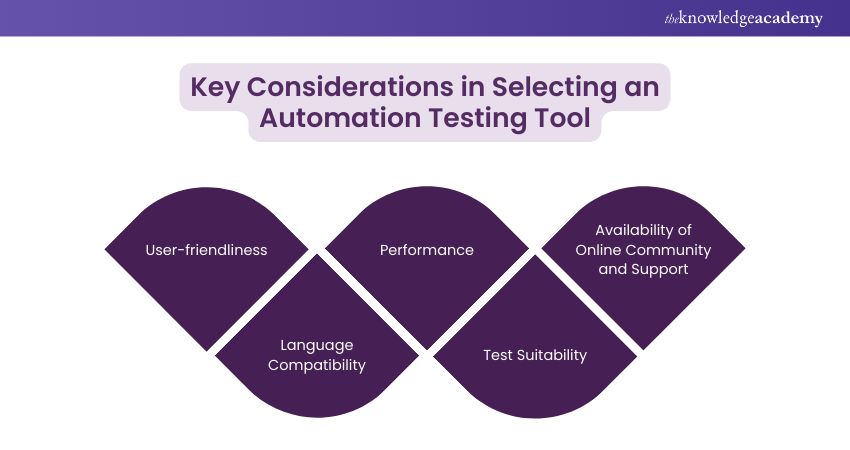
1) User-Friendliness
A user-friendly automation testing tool enhances productivity with an intuitive interface that simplifies test script creation, execution, and maintenance. Features like record-and-playback, visual scripting, and comprehensive documentation aid quick adoption. Tools that integrate seamlessly with existing workflows reduce implementation time and effort, making it easier for teams with varying technical expertise to use effectively.
2) Language Compatibility
Language compatibility ensures the tool fits your tech stack, allowing teams to script in languages they are comfortable with, such as Java, Python, or JavaScript. This facilitates collaboration between developers and testers and improves efficiency. Tools supporting multiple languages provide flexibility, enabling the selection of the best-suited language for different tests, ensuring smoother adoption and efficient script creation.
3) Performance
The performance of an automation testing tool is crucial, encompassing the ability to handle large test suites and execute tests quickly. Features like parallel test execution across multiple environments reduce testing time. Robust reporting and logging enable quick issue identification. Integration with CI/CD pipelines ensure automated tests run efficiently within the build process, maintaining development speed and accuracy.
4) Test Suitability
The tool’s suitability for specific test types (e.g., unit, integration, end-to-end, performance) is essential. It should support your application’s web, mobile, or desktop requirements. Tools like Selenium excel in web testing, while Appium is ideal for mobile. Referring to resources such as the Appium Cheat Sheet can help teams take full advantage of its features, including test data management and support for various frameworks, enhancing the tool’s effectiveness in meeting your project’s unique testing needs.
5) Availability of Online Community and Support
A robust online community and available support are invaluable. An active community provides resources like tutorials, forums, and plugins, aiding problem-solving and extending functionality. Official support ensures timely updates, bug fixes, and direct assistance. Access to professional support minimises downtime, keeping projects on track by resolving critical issues promptly and effectively.
Determining the Right Tool for Test Automation: Cypress vs Selenium
Cypress and Selenium are two prominent frameworks for automating web application testing, each offering unique features and benefits catering to different testing needs. Cypress is a modern front-end testing tool that operates directly in the browser, providing a fast, real-time interactive testing environment. It allows developers and QA engineers to write various types of tests, including component, integration, end-to-end, and API tests.
On the other hand, Selenium is a widely used open-source framework that supports multiple programming languages such as Java, Python, C#, and Ruby, making it highly versatile for diverse development teams. Selenium operates through WebDriver, which bridges the test scripts and browsers, translating test commands into URLs that browsers can execute.
When choosing between Cypress vs Selenium, several key considerations come into play. These include user-friendliness, language compatibility, performance, test suitability, and the availability of an online community and support.
The choice between Cypress vs Selenium depends on your project's specific needs. Where Cypress is ideal for modern web applications requiring fast, real-time testing within the browser and a simpler setup. Selenium, with its broader language support and extensive integration capabilities, is better suited for projects requiring cross-browser testing and more complex testing environments. Assessing these factors will help you to determine the right tool for your automation needs.
Excel in test automation with our Introduction to Test Automation with Selenium Web Driver Training - join today!
Which Automation Tool is in Demand in 2024?
In 2024, Selenium remains one of the most in-demand automation tools. It's widely used for end-to-end test automation across various browsers and platforms. Its flexibility and extensive features make it a top choice for many organisations.
Another tool gaining popularity is Cypress. Known for its simplicity and speed, Cypress is ideal for modern web applications built with JavaScript frameworks. It's easy-to-write tests and direct browser testing capabilities make it a favourite among developers and testers.
Conclusion
The choice between Cypress vs Selenium depends on the specific needs of your project. Cypress supports fast, real-time testing within the browser, simplified setup, and direct interaction with the application. Conversely, Selenium has extensive language support, cross-browser compatibility, and robust integration capabilities. Additionally, using the CSS Selector in Selenium effectively can help you improve the precision of your element targeting, further enhancing your automation testing efforts.
Become a Selenium WebDriver PRO with our Selenium Testing Framework Training - join today!
Frequently Asked Questions
Can Selenium and Cypress be Used Together?

Yes, Selenium and Cypress can be used together in a testing strategy, but it's uncommon. Selenium is great for cross-browser testing, while Cypress excels in fast, front-end testing. Combining them may help utilise their strengths, but managing separate frameworks increases complexity.
Is Selenium Harder Than Cypress?
Selenium is considered harder than Cypress for beginners due to its setup and code-driven nature. It supports multiple languages but requires more configuration. Cypress is easier to learn with a simpler setup, built-in features, and a focus on JavaScript, making it ideal for front-end developers.
What are the Other Resources and Offers Provided by The Knowledge Academy?
The Knowledge Academy takes global learning to new heights, offering over 3,000+ online courses across 490+ locations in 190+ countries. This expansive reach ensures accessibility and convenience for learners worldwide.
Alongside our diverse Online Course Catalogue, encompassing 17 major categories, we go the extra mile by providing a plethora of free educational Online Resources like Blogs, eBooks, Interview Questions and Videos. Tailoring learning experiences further, professionals can unlock greater value through a wide range of special discounts, seasonal deals, and Exclusive Offers.
What is The Knowledge Pass, and How Does it Work?
The Knowledge Academy’s Knowledge Pass, a prepaid voucher, adds another layer of flexibility, allowing course bookings over a 12-month period. Join us on a journey where education knows no bounds.
What are the Related Courses and Blogs Provided by The Knowledge Academy?
The Knowledge Academy offers various Framework Training Courses, including Cypress Training, Appium Training, and Web Application Testing Training. These courses cater to different skill levels, providing comprehensive insights into Magento vs WooCommerce.
Our Programming & DevOps Blogs cover a range of topics related to framework training and Selenium Training offer valuable resources, best practices, and industry insights. Whether you are a beginner or looking to advance your framework development skills, The Knowledge Academy's diverse courses and informative blogs have got you covered.

Lily Turner


Senior AI/ML Engineer and Data Science Author
Lily Turner is a data science professional with over 10 years of experience in artificial intelligence, machine learning, and big data analytics. Her work bridges academic research and industry innovation, with a focus on solving real-world problems using data-driven approaches. Lily’s content empowers aspiring data scientists to build practical, scalable models using the latest tools and techniques.
View Detail

 If you wish to make any changes to your course, please


