


 Top Rated Course

We may not have the course you’re looking for. If you enquire or give us a call on +34 932716793 and speak to our training experts, we may still be able to help with your training requirements.
Server vs Serverless Architecture Benefits in Cloud Computing
The Knowledge Academy 18 December 2025The choice between Server vs Serverless Architecture for your organisation depends on your understanding of their distinct pros, cons and their use cases. While the traditional servers require constant management, the serverless architecture lets you focus purely on the code thanks to the reduced operational overhead.

Training Outcomes Within Your Budget!
We ensure quality, budget-alignment, and timely delivery by our expert instructors.
Table of Contents
Cloud Computing is nothing short of a digital workshop. While some builders like having every tool laid out and adjusting each detail themselves, others hand over the toolkit to a clever assistant who does the job behind the scenes. This is the concept behind server and serverless architecture, respectively.
This blog takes a deep dive into the contrast between Server vs Serverless Architecture and how there are perks to both in the realm of Cloud Computing. From speed and scalability to control and cost, discover which setup fuels your drive for innovation and aligns best with your tech ambitions!
Table of Contents
1) What is a Server?
2) What is Serverless?
3) Server vs Serverless: Which is the Best Architecture?
4) Differences Between Server vs Serverless Architecture
5) Technical Limits
6) Conclusion
What is a Server?
Server computing is still seen as the most trusted choice by many business owners. People often prefer this traditional method because it offers strong security and data protection. However, the growing use of serverless computing shows that server computing also has some limits. Let’s look at the pros and cons of server computing and when it might be the better option.
Server Computing Use Cases
Server computing works well for companies that don’t have a dependable internet connection. It’s also a good fit for businesses with a strong IT team that can manage servers, handle hardware upgrades, and fix problems internally. Common use cases include:
a) Web Hosting: Host websites and web applications such as e-commerce platforms, blogs, and company sites using tools like Apache, Nginx, or Microsoft IIS.
b) Database Management: Handles data storage, retrieval, and management for apps and analytics using systems like MySQL, PostgreSQL and Oracle.
c) File and Storage Servers: Offers centralised storage and file sharing for purposes like Document Management, backups, and media libraries using NAS or SAN.
d) Application Hosting: Runs business software, including ERP and CRM systems such as SAP, Salesforce, or Microsoft Dynamics.
e) Virtualisation: Used to host virtual machines and containers through platforms like VMware, Hyper-V, Docker, and Kubernetes. These are ideal for Cloud services and DevOps environments.
Benefits of Server Computing
Here are the three biggest benefits of Server Computing:
a) Complete Control: In-house IT teams can install, update, and manage software freely, with complete control over systems and backups.
b) Improved Security: Data stays on-site, which reduces exposure to third-party risks and offers stronger protection against breaches.
c) No Internet Dependency: Systems remain accessible even without a stable internet connection, which is ideal for areas with unreliable service.
Power up businesses, secure data and connect the world! Sign up for our Microsoft Windows Server Training - Sign up now!
What is Serverless?
Despite its name, serverless computing doesn’t eliminate servers. Instead, it means that a third-party Cloud provider handles Server Management and maintenance. This allows companies to concentrate on building products and writing code while the Cloud provider handles the backend infrastructure.
Serverless Computing Use Cases
One of the most significant benefits of serverless computing is its scalability. Serverless is the right choice if you expect growth and require an environment that meets the demand and adapts to your needs. Here are some of its use cases:
a) Real-time File Processing: Automatically process files like images or videos when uploaded, ideal for tasks such as resizing or transcoding.
b) RESTful APIs and Microservices: Build scalable APIs and services without managing servers, perfect for handling HTTP requests.
c) Event-driven Automation: Trigger actions based on events like user sign-ups, file uploads, or database changes.
d) Scheduled Tasks: Run regular tasks such as backups, cleanups, or report generation on a set schedule.&nb
e) Chatbots and Voice Assistants: Power conversational apps by handling backend logic and interactions using serverless functions.

Benefits of Serverless Computing
Here are the three biggest benefits of Serverless Computing:
a) Cost-effective: You only pay for what you use, avoiding expenses on hardware, electricity, and full-time IT staff.
b) Scalable: Automatically adjusts to your app’s needs, from small-scale use to handling thousands of users.
c) Global Access: Enables employees and remote teams to access data anytime, anywhere, from any device.
Learn what constitutes the backbone of modern IT in our Windows Server Administration 55371AC Training - Sign up now!
Server vs Serverless: Which is the Best Architecture?
Determining the best architecture between serverless vs server depends on project specifics. Server-based architectures offer greater control and are suitable for complex applications needing high performance and specific resource configurations.
Serverless, however, excels in scalability and cost-efficiency, especially for event-driven applications or workloads with fluctuating demand, by eliminating Server Management overhead. The choice hinges on required control, budget, scalability needs, and development team expertise. Serverless is often preferred for its speed of deployment and focus on code rather than infrastructure.
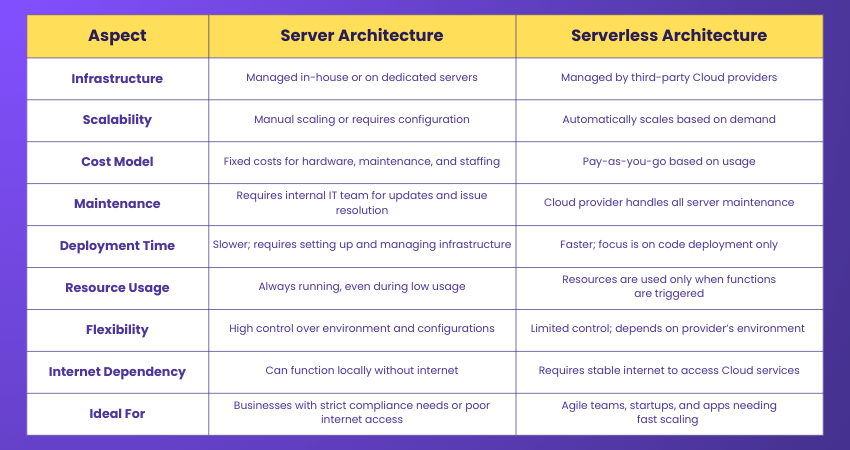
Differences Between Server vs Serverless Architecture
Here are key distinctions between server and serverless architecture:
Technical Limits
Let's explore the technical limits of server and Serverless Computing:
1) Server Computing:
a) High Setup and Maintenance Costs: Server Computing requires significant investment in hardware, infrastructure, and IT personnel for setup, maintenance, and repairs.
b) Scalability Challenges: Scaling resources to meet increased demand often involves manual intervention and can be time-consuming.
c) Single Point of Failure: Hardware failures can lead to significant downtime if redundancy isn't properly implemented.
d) Resource Underutilisation: Servers may run at low capacity during off-peak times, leading to inefficient resource utilisation.
e) Limited Flexibility: Upgrading or modifying server configurations can be complex and may require downtime.
2) Serverless Computing:
a) Cold Starts: Serverless functions may take a moment to start when triggered for the first time, similar to starting a cold engine. While the delay is brief, it can affect tasks that need a fast response.
b) Compute Time Limits: Serverless platforms usually limit a function's running time. A good solution is dividing tasks into smaller steps and designing your app to fit these limits.
c) Network Challenges: In Virtual Private Clouds (VPCs) cases, serverless might not be the best option. It’s rare but worth considering during planning.
d) Debugging Limitations: Developers who use detailed debugging tools may find serverless environments less flexible. However, tools are improving, and strong app design can help avoid most issues.
Conclusion
Choosing between Server vs Serverless Architecture depends on your business goals, budget and technical needs. While servers offer complete control, serverless brings the benefits of speed and scalability to the table. Both have unique advantages in the context of Cloud. By understanding their benefits, you can make smarter decisions and build Cloud solutions that are cost-effective and ready to grow with you.
Step up the expertise ladder in real-world server installation and configuration! Sign up for our Install And Configure Microsoft Windows Server And Active Directory Training now!
Frequently Asked Questions
What is the Difference Between a Serverless and a Server Database?

Serverless databases take care of Server Management for you. They adjust resources on their own and handle database tasks automatically. You only pay for what you use. On the other hand, traditional databases need you to set up, manage, and maintain servers, including installing and updating software.
Is Serverless Cheaper Than Traditional Servers?
It depends on how much traffic your application gets. Serverless is usually cheaper for low or uneven-traffic applications because you only pay when it runs. But if your application has heavy, constant traffic, traditional servers might cost less since you’re not charged for each request.
What are the Other Resources and Offers Provided by The Knowledge Academy?
The Knowledge Academy takes global learning to new heights, offering over 3,000+ online courses across 490+ locations in 190+ countries. This expansive reach ensures accessibility and convenience for learners worldwide.
Alongside our diverse Online Course Catalogue, encompassing 19 major categories, we go the extra mile by providing a plethora of free educational Online Resources like Blogs, eBooks, Interview Questions and Videos. Tailoring learning experiences further, professionals can unlock greater value through a wide range of special discounts, seasonal deals, and Exclusive Offers.
What is The Knowledge Pass, and How Does it Work?
The Knowledge Academy’s Knowledge Pass, a prepaid voucher, adds another layer of flexibility, allowing course bookings over a 12-month period. Join us on a journey where education knows no bounds.
What are the Related Courses and Blogs Provided by The Knowledge Academy?
The Knowledge Academy offers various Microsoft Windows Server Training, including the Windows Server Administration 55371AC Training and the Identity with Windows Server 2016 M55344AC Course. These courses cater to different skill levels, providing comprehensive insights into Microsoft Windows Server Licensing.
Our Microsoft Technical Blogs cover a range of topics related to Server Architecture, offering valuable resources, best practices, and industry insights. Whether you are a beginner or looking to advance your Server Management skills, The Knowledge Academy's diverse courses and informative blogs have got you covered.

The Knowledge Academy


Global Training Provider
The Knowledge Academy is a world-leading provider of professional training courses, offering globally recognised qualifications across a wide range of subjects. With expert trainers, up-to-date course material, and flexible learning options, we aim to empower professionals and organisations to achieve their goals through continuous learning.

Upcoming Microsoft Technical Resources Batches & Dates
Date
 Windows Server Administration 55371AC
Windows Server Administration 55371AC
Mon 27th Jul 2026
Windows Server Administration 55371AC
Mon 16th Nov 2026

 If you wish to make any changes to your course, please


