


 Top Rated Course

We may not have the course you’re looking for. If you enquire or give us a call on +420 210012971 and speak to our training experts, we may still be able to help with your training requirements.
What is Microsoft Project? Complete Beginner’s Guide
Richard Harris 15 July 2026Microsoft Project is project management software for planning schedules, assigning resources, tracking progress, managing budgets, and analysing workload. It helps teams stay organised and meet deadlines efficiently. With clear timelines and reporting tools, it supports better decision-making throughout the project lifecycle.

Training Outcomes Within Your Budget!
We ensure quality, budget-alignment, and timely delivery by our expert instructors.
Table of Contents
Related Courses

Managing projects without the right tools can quickly become overwhelming. From timelines to budgets, every detail needs careful coordination. That’s where understanding What is Microsoft Project becomes essential.
This powerful software helps teams plan smarter and work more efficiently. It brings structure, visibility, and control to complex tasks. Let’s explore how it can transform the way you manage projects.
Table of Contents
1) What is Microsoft Project?
2) How Does Microsoft Project Work?
3) Microsoft Project Features
4) Plans and Pricing of Microsoft Project
5) What Do We Use Microsoft Project For?
6) Pros and Cons of Microsoft Project
7) MS Project vs Other Tools
8) Is Microsoft Project Just Excel?
9) Is MS Project Being Discontinued?
10) Conclusion
What is Microsoft Project?
Microsoft Project is a Project Management software used to plan schedules, create project plans, manage resources, and track time throughout the project lifecycle. It provides professional planning tools, such as Gantt charts, Kanban boards, and project calendars, to handle projects in a structured and timeline-driven manner.
Microsoft Project is available in two main desktop versions: Project Standard and Project Professional. While it offers powerful project planning capabilities, it is often considered more complex than modern cloud-based tools. As a result, it is better suited for experienced Project Managers who require detailed planning and control features.

How Does Microsoft Project Work?
Microsoft Project follows a clear, structured process to help teams plan, manage, and control projects effectively. For understanding What is Microsoft Project, let’s look at the steps below.
1) Setting up a Project
Begin by defining the basic details of a project. It includes start date, end date, working hours, and project calendar. This ensures that timelines are accurate from the beginning.
For Example: For a product development project, you set the start date as 1st March, working hours as 9 a.m. to 5 p.m., and exclude weekends from the project calendar.
2) Defining Tasks
Next, the project is broken down into smaller, manageable tasks. Each task is assigned a specific duration, dependencies, and required resources such as team members, tools, or equipment.
For Example: Tasks such as “design homepage” or “test website” are added with testing to start only after development is completed.
3) Creating a Task Schedule
Microsoft Project builds the schedule by calculating start and finish dates based on the task duration and dependencies. This is done through visual display using Gantt Charts.
For Example: If a backend development is delayed by three days, the Gantt chart automatically adjusts the timeline for testing and deployment.
4) Tracking Progress
As work progresses, the status of the tasks is updated to show the amount of work that has been completed. This is helpful for identifying early delays and assessing their impact on the project plan.
For Example: A task is marked as 50%. It signals that half the work is over, allowing the Project Manager to assess if the progress and work are on track.
5) Generating Reports
Finally, Microsoft Project generates clear reports on timelines, progress, resource usage, and costs. These reports support informed decision-making and effective stakeholder communication.
For Example: A weekly progress report showing completed tasks, upcoming objectives, and current cost is shared with senior management or clients.
Acquire skills to work with channels and apps effectively with our Microsoft Teams Training – Join now!
Microsoft Project Features
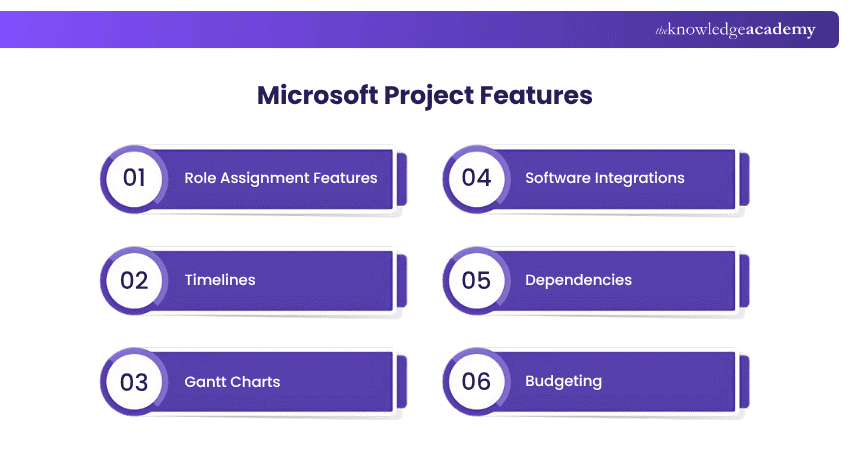
Microsoft Project offers powerful features designed to help Project Managers plan, manage, and deliver projects. Let’s look at its features for a better understanding of What is Microsoft Project and how it supports project delivery.
1) Role Assignment Features
Microsoft Project enables Project Managers to assign roles and responsibilities to team members with ease. It helps to track who is working on what, checks availability, and highlights allocated resources. This ensures tasks are started on time, and resources are efficiently utilised.
2) Timelines
This feature provides a high-level, clear view of the project. Timelines are valuable for presentations and status updates where a quick overview is required. It helps teams and stakeholders understand key milestones, deadlines, and progress made at a single glance.
3) Gantt Charts
Gantt charts visually display tasks, durations, and schedules across the entire project lifecycle. This helps Project Managers identify task overlaps, detect potential delays early, and understand workflow dependencies. Any changes made to tasks are automatically reflected in the chart, keeping project plans up to date.
4) Software Integrations
Microsoft Project can integrate seamlessly with other Microsoft tools, such as Excel, Teams, and the Microsoft 365 ecosystem. This makes it easier to share data, collaborate with teams, and export reports for conducting further analysis without any work duplication.
5) Dependencies
Microsoft Project enables users to define task dependencies. This shows how tasks must be completed before others can begin. When a task changes, the software automatically updates any related tasks. This is helpful for teams to manage changes without manually needing to adjust the schedule.
6) Budgeting
Microsoft Project includes budgeting and cost management tools to estimate and track project-related expenses. It is useful for monitoring labour, material costs, and overall spending. This allows Project Managers to identify any overruns proactively and keep the project within the budget limits.
Learn about how to enhance business process flows with branching. Join our Power Apps and Power Automate Training now!
Plans and Pricing of Microsoft Project
Microsoft Project started as a desktop tool, but now it also offers monthly plans you can pay for online. There are three main subscription plans and two desktop versions.
1) Desktop Versions (One-time Payment)
1) Project Standard 2024: Costs £504.63. It is a basic desktop project planning on the PC with basic features.
2) Project Standard 2024: Costs £839.07. It is the professional desktop version for project planning with advanced features.
2) Online Plans (Monthly Payment)
1) Project Plan 1:£7.43 user/month
You can use Project for the web and Project Home. These are light versions of the full tool. Good for team members who only need simple tracking.
2) Project Plan 3:£22.30 user/month
You can use Microsoft Project on your computer and online. It helps you manage projects well, but not large project portfolios.
3) Project Plan 5:£40.88 user/month
This plan gives you everything, Project for the web, the desktop app, and full online access. Best for big teams and many projects.
What Do We Use Microsoft Project For?
Microsoft Project finds applications across various industries and sectors. Let's explore some of them in the following points:

1) Construction
In the construction industry, Microsoft Project is used to plan and manage construction projects, coordinate resources, and track progress against project timelines and Budgets.
2) Information Technology
In the IT sector, Microsoft Project helps manage Software Development projects, IT Infrastructure upgrades, and system implementations, ensuring timely delivery and efficient resource allocation.
3) Manufacturing
Manufacturing companies utilise Microsoft Project to schedule production activities, manage inventory levels, and optimise manufacturing processes for maximum efficiency and profitability.
4) Healthcare
In healthcare, Microsoft Project is used to plan and manage healthcare facility construction, medical equipment installations, and IT system upgrades, ensuring compliance with regulatory requirements and patient safety standards.
5) Government
Government agencies leverage Microsoft Project to plan and execute public infrastructure projects, government initiatives, and policy implementation programs, ensuring transparency and accountability in project delivery.
6) Education
Educational institutions utilise Microsoft Project to plan and manage construction projects, campus expansions, and IT system upgrades, ensuring efficient resource allocation and timely project completion.
7) Marketing and Advertising
In the Marketing and advertising industry, Microsoft Project helps plan and execute marketing campaigns, product launches, and promotional events, ensuring alignment with marketing objectives and deadlines.
Enhance time efficiency by automating tasks and optimising processes. Join our Microsoft Project Course now!
Pros and cons of Microsoft Project
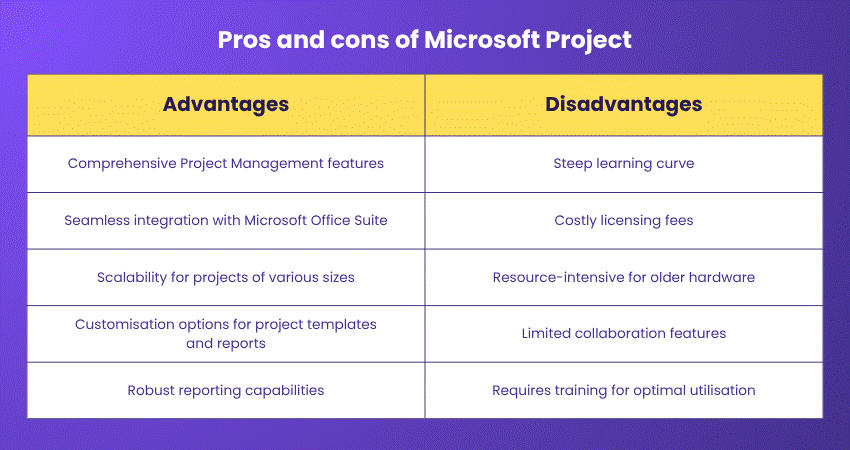
Let's explore the pros and cons of Microsoft Project to help you assess its suitability for your Project Management requirements and preferences:
1) Pros of Microsoft Project
Microsoft Project offers a wide range of powerful features designed to support detailed planning and effective project control.
a) Provides a comprehensive and organised view of project tasks, timelines, and schedules
b) Offers powerful tracking tools to monitor progress and identify potential issues
c) Enables effective resource allocation and budgeting for complex projects
d) Allows creation of detailed reports and data analysis to support decision-making
e) Integrates with other Microsoft Office applications for added functionality
f) Includes templates and pre-built plans to speed up project setup
Has a large user community and support network for shared best practices
2) Cons of Microsoft Project
Despite its capabilities, Microsoft Project also comes with certain limitations that may not suit every team or project.
a) Can be complex and time-consuming to learn and use effectively
b) Licensing and setup can be costly, especially for small teams or individual users
c) Compatibility issues may arise if team members use different versions or tools
d) Not always suitable for very simple or small projects
e) Limited customisation compared with some modern project management tools
Learning curve and complexity may deter users unfamiliar with advanced project planning
MS Project vs Other Tools
Project management tools differ in purpose and complexity, but Microsoft Project stands out for structured planning and detailed control. Unlike tools that prioritise collaboration or agile workflows, it focuses on advanced scheduling, resource management, and risk analysis. Let’s take a brief look at how it compares below.
1) Microsoft Project vs Asana
Microsoft Project is designed for structured project planning with advanced scheduling, resource management, and detailed reporting tools. It is well suited for organisations managing complex projects that require timeline control and governance.
Asana focuses on collaboration and task management with a simple, user-friendly interface. While it works well for small teams and straightforward workflows, it does not offer the same depth in scheduling and resource forecasting as Microsoft Project.
2) Microsoft Project vs Primavera P6
Microsoft Project provides powerful scheduling features combined with an intuitive interface and strong integration within the Microsoft ecosystem. It is ideal for businesses that need structured planning without excessive complexity.
Primavera P6 is widely used in large-scale industries such as construction and engineering for handling highly complex, multi-layered projects. Compared to Microsoft Project, it offers deep enterprise-level capabilities but comes with a steeper learning curve.
3) Microsoft Project vs Jira
Microsoft Project supports traditional project management with defined timelines, resource allocation, and performance tracking. It is suitable for projects that require comprehensive planning and documentation.
Jira is tailored for agile environments, particularly software development teams managing sprints and issue tracking. Unlike Microsoft Project, it prioritises workflow flexibility and iterative progress over detailed long-term scheduling.
Is Microsoft Project Just Excel?
No, Microsoft Project and Excel are not the same. Some people try to manage projects using Excel by making charts, but Excel is not made for that. Microsoft Project is built especially for project work. It has simple tools and ready-made templates to help plan and track tasks easily. Using Excel for projects requires more skill and effort.
Is MS Project Being Discontinued?
No, Microsoft Project is not being discontinued. However, it is going through an important transition. Since Microsoft has announced that Project Online, its cloud service, will retire on 30 September 2026, it is a broader move toward a unified and modern work management experience within Microsoft 365.
While Project Online is being phased out, Microsoft Project’s desktop versions and Project Server remain available. Also, Microsoft is shifting its focus to cloud-based and AI-enabled tools to bring project and work management together through Microsoft Planner and Project for the web with Copilot. This means MS Project is evolving rather than ending.
Conclusion
Projects can feel chaotic, but the right tool brings clarity and control. Now that you understand What is Microsoft Project, you can decide if it’s the secret weapon your projects need. Plan smart, track better, and turn every deadline into a win.
Master end-to-end project management with the PRINCE2® Foundation and Practitioner Course – Join now!
Frequently Asked Questions
Can I Convert MS Project to Excel?

Yes, you can export Microsoft Project to Excel.
1) In Project for the web, click “...” > Export to Excel
2) In the desktop version, go to File > Export > Excel and follow the steps
This makes it easy to share project data with others.
How to Create an MS Project File?
To make a new project in Microsoft Project:
1) Open the app
2) Click File > New > Blank Project
3) A new project will open
4) Add tasks, dates and people

Richard Harris


Senior Full Stack Developer and Technology Educator
Richard Harris is a highly experienced full-stack developer with deep expertise in both frontend and backend technologies. Over his 12-year career, he has built scalable web applications for startups, enterprises and government organisations. Richard’s writing combines technical depth with clear explanations, ideal for developers looking to grow in modern frameworks and tools.


 If you wish to make any changes to your course, please


