


 Top Rated Course

We may not have the course you’re looking for. If you enquire or give us a call on +420 210012971 and speak to our training experts, we may still be able to help with your training requirements.
Understanding User-Defined Functions (UDFs) in SQL and JavaScript
Richard Harris 22 April 2026A User-Defined Function (UDF) is a custom function created by users to improve code efficiency, enhance reusability, and simplify tasks in SQL or JavaScript. It ensures consistent operations across databases or applications while maintaining programming structures. It reduces redundancy by defining complex logic once for repeated use.
Home
 Resources
Programming & DevOps
Understanding User-Defined Functions (UDFs) in SQL and JavaScript
Resources
Programming & DevOps
Understanding User-Defined Functions (UDFs) in SQL and JavaScript
Resources
Programming & DevOps
Understanding User-Defined Functions (UDFs) in SQL and JavaScript

Training Outcomes Within Your Budget!
We ensure quality, budget-alignment, and timely delivery by our expert instructors.
Table of Contents

Tired of writing the same logic again and again in your code? Many developers struggle with this, especially when working on data-heavy SQL or JavaScript applications. Repeating code takes extra time, increases errors, and makes projects harder to manage. That is where User-Defined Functions (UDFs) come in.
These are custom functions you create to handle specific tasks, so you can reuse them whenever needed. With UDFs, you can work faster, keep your code consistent, and spend less time fixing the same problems. Curious to know how? Read this blog to discover the hidden power of UDFs!
Table of Contents
1) Understanding User-Defined Functions (UDFs)
2) When Should You Use a UDF?
3) Various Types of User-Defined Functions
4) SQL-based User-Defined Functions (UDFs)
5) JavaScript-based User-Defined Functions (UDFs)
6) Allowed Statements in a Function
7) Key Benefits of User-Defined Functions
8) Limitations of User-Defined Functions
9) Conclusion
Understanding User-Defined Functions (UDFs)
A User-Defined Functions (UDFs) is a custom-built function that users create to enhance and extend the existing capabilities of programming languages or data platforms like SQL, JavaScript, or Databricks. It allows you to reuse and share code that performs specific and complex tasks such as calculations, data transformations, or custom manipulations.
In simpler terms, a UDF enables you to write your own logic once and use it whenever needed, making code more modular and consistent. This not only saves time but also helps reduce errors by avoiding repetitive coding.

When Should You Use a UDF?
You should use a User-Defined Function (UDF) when you notice yourself writing the same logic or calculations repeatedly in your code or queries. UDFs help you make your work easier, faster, and more consistent. Here are some simple situations where they are most useful:
1) Reusability: When you use the same formula or calculation in several queries or scripts, a UDF lets you write it once and reuse it anywhere.
2) Data Validation: When you want to apply the same data-checking rules in multiple places, such as ensuring all entries follow a specific format.
3) Simplification: When your query becomes long or complicated, you can move part of the logic into a UDF to make it cleaner and easier to read.
4) Custom Operations: When built-in SQL or JavaScript functions don’t have what you need, you can create your own custom function.
5) Performance: When you want to speed up repeated operations by keeping logic in one place instead of running it multiple times.
Various Types of User-Defined Functions
UDFs come in several forms, each designed for a specific purpose. Let's check the different types of it:
1) Scalar Functions
A scalar function returns a single value such as a number, string, or date. It performs an operation on one or more inputs and gives back a single output.
Example:
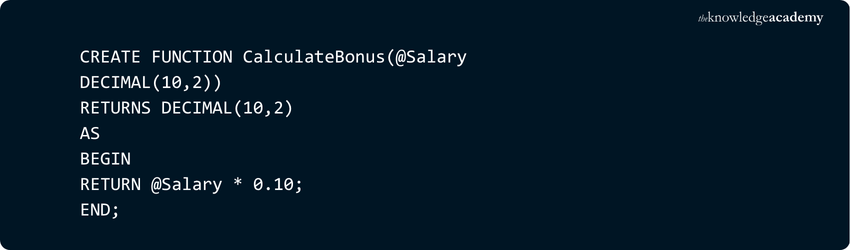
Here, the function calculates a 10% bonus for a given salary. Scalar functions like this are useful for performing repeated calculations or formatting data consistently.
2) Table-valued Functions
Table-valued functions return a table as output, rather than a single scalar value. This makes them ideal for queries that need to return multiple records or filtered subsets of data.
Example:

When you call this function, it returns a table of employees belonging to a specific department. This function is great for reusing complex filtering or joining logic in different parts of your database.
3) System Functions
System functions are built-in SQL functions provided by the database engine. You can use them for operations such as string manipulation, date and time handling, mathematical calculations, and metadata retrieval.
Common examples include:
1) GETDATE(): Returns the current date and time
2) LEN(): Returns the length of a string
3) ABS(): Returns the absolute value of a number
These functions are part of SQL Server and cannot be modified or removed. They are designed for performance and reliability, covering a wide range of standard database operations.
Build fast and cross-platform apps with our React Native Training – Register today!
SQL-based User-Defined Functions (UDFs)
SQL-based UDFs let you create your own custom functions in SQL. They extend the power of standard SQL by allowing you to reuse logic instead of writing the same code in multiple queries. Let's check some of the SQL-based UDFs:
1) Templated SQL UDF Parameters
Templated parameters in SQL UDFs allow functions to handle dynamic data types. This enables flexibility by letting a single function work with multiple data types. It includes integers, floats, arrays, or other compatible types.
This is defined using the ANY TYPE keyword. This means that when the function is called, each parameter defined as ANY TYPE can accept different input types.
Example:
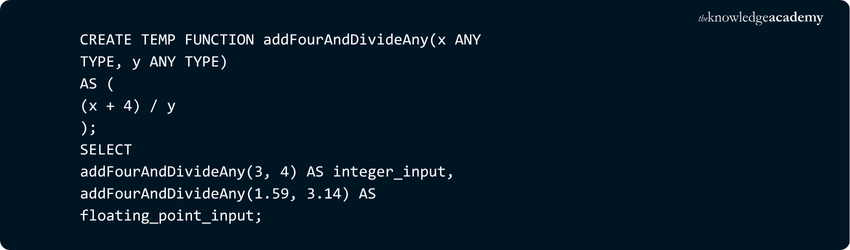
Output:
1) integer_input – 1.75
2) floating_point_input - 1.7802547770700636
2) Scalar Subqueries
A scalar subquery is a subquery that returns exactly one value based on internal queries. It is often used within a SQL UDF to calculate or fetch a specific result based on existing data. The subquery must select a single column and produce one value per execution.
This method is useful when you want your UDF to use data from existing tables or calculate summary values, like a count or average, directly from the stored data.
Example:
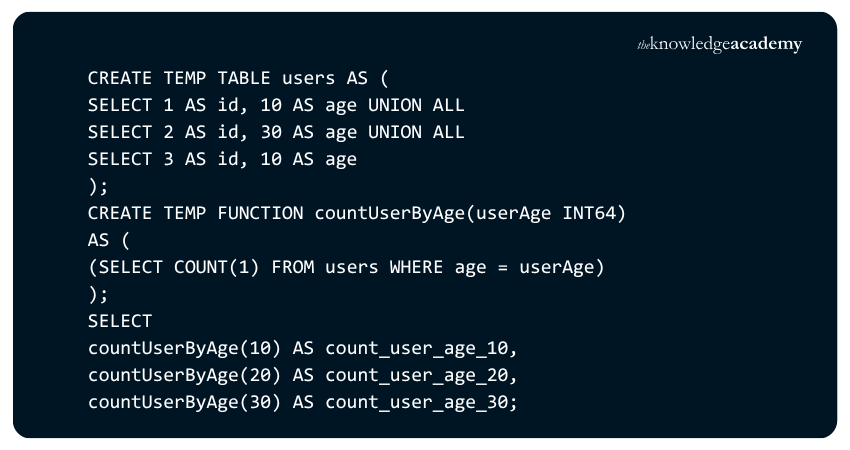
Output:
1) count_user_age_10 - 2
2) count_user_age_20 - 0
3) count_user_age_30 - 1
3) Default Project in SQL Expressions
When creating a SQL UDF in BigQuery or other cloud SQL platforms, you need to correctly reference the tables and datasets used inside the function. Each table or view needs to include its project ID, unless it is in the same project as the UDF.
If you leave the project ID and run the UDF from a different project, it might not find the table. To prevent this, always include the full project and dataset name.
Example:
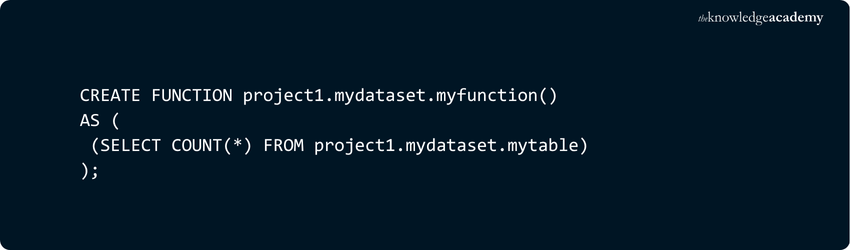
Output:
The output of this function is a single value showing the total number of rows in the table “project1.mydataset.mytable.” For example, if the table contains 120 rows, the function will return 120.
Learn advanced SQL techniques with our Advanced SQL Course – Join now!
JavaScript-based User-Defined Functions (UDFs)
In addition to SQL, many modern database engines and web applications support JavaScript UDFs. These functions let you define custom logic in JavaScript to process, transform, or validate data before or after queries. Let's explore some of the JavaScript-based UDFs:
1) Supported JavaScript UDF Data Types
Not all SQL data types map directly to JavaScript types. Here’s how BigQuery represents them:

2) Quoting Rules
When writing JavaScript UDFs, quoting is very important. Your code has been enclosed in quotes. SQL usually uses single quotes, while JavaScript uses double quotes. For short, one-line functions, you can use normal quotation marks like:
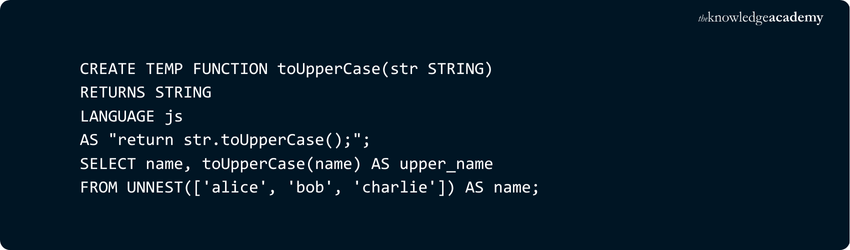
Output:
Your name mentioned as “alice” will be changed into “ALICE.”
Now, for the multi-line or quoted code, use triple quotes (r""" ... """) like:
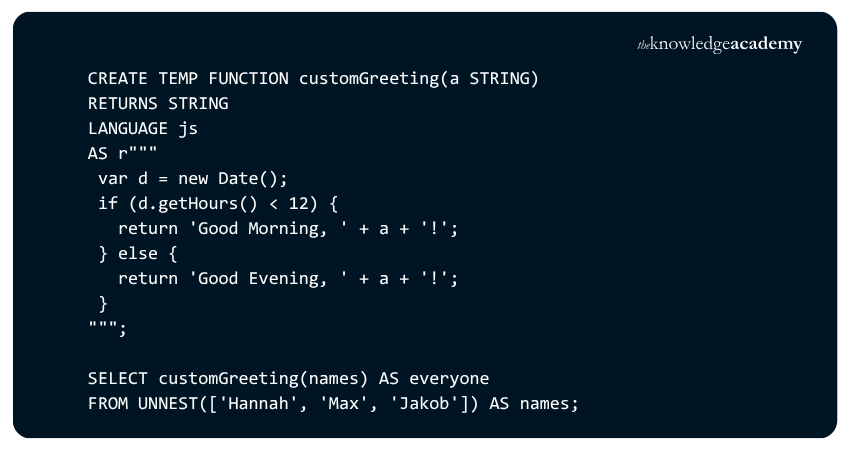
Output:
You will receive an output for this like “everyone, Good Morning, Hannah! Good Morning, Max! Good Morning, Jakob!”
3) Using JavaScript Libraries
You can extend JavaScript UDFs by including external JavaScript libraries. This is done using the OPTIONS section, which lets you reference external files stored in Google Cloud Storage.
Example:

Output:
Any functions or code defined in lib1.js or lib2.js become available for use within the UDF.
Best Practices for JavaScript UDFs
To make your JavaScript UDFs work well and run efficiently, follow these simple tips:
1) Keep it Simple: Write clear and short functions. Avoid adding too much logic inside a UDF.
2) Avoid Heavy Work: Don’t use JavaScript UDFs for large data loops or complex processing since they can slow down performance.
3) Check Your Inputs: Always handle NULL or undefined values to avoid errors or wrong results.
4) Focus on Performance: Use built-in SQL functions for tasks like calculations or aggregations, and use UDFs for custom logic only.
Allowed Statements in a Function
Only statements can be used inside a User-Defined Function (UDF) to keep it safe and predictable. These include:
1) DECLARE: Define local variables or cursors within the function
2) SET: Assign values to local variables
3) Cursors: Declare, open, fetch (using INTO), close and deallocate local cursors
4) Control Flow: Use IF, ELSE, WHILE and RETURN (but not TRY...CATCH)
5) SELECT: Retrieve and assign values to local variables
6) UPDATE, INSERT and DELETE: Modify only local table variables, not permanent tables
7) EXECUTE: Call extended stored procedures
These rules keep UDFs efficient, consistent, and free from unwanted side effects while maintaining data integrity.
Develop the art of building stunning websites with our Web Development Training – Sign up soon!
Key Benefits of User-Defined Functions
Below are the key benefits of User-Defined Functions:
1) Modular Programming
1) You can write a function once and use it in many queries or programmes
2) You can update the function for changes instead of editing every query
3) Keeps your code neat and easy to understand
4) Avoids repeating the same logic in different places
5) Helps teams share and use the same functions easily
2) Faster Execution
1) UDFs run faster because they reuse saved execution plans
2) They reduce the time needed for running repeated queries
3) CLR functions are even quicker for heavy calculations or text tasks
4) Makes query results load more smoothly
5) Reduces workload on the server when similar functions are used often
3) Reduce Network Traffic
1) UDFs filter and process data on the server before sending it to the client
2) Saves time and reduces the amount of data sent over the network
3) Keeps the network from slowing down with large data loads
4) Makes queries faster by returning only needed results
5) Improves performance for remote databases
Limitations of User-Defined Functions
Even though UDFs are useful, they do have some limits you should know about:
1) Performance Issues: If a UDF isn’t written well, it can slow down queries, especially when working with big datasets.
2) Hard to Debug: Finding and fixing errors can be tricky since UDFs run inside the database system.
3) Limited Actions: Most databases don’t allow UDFs to change or create tables to keep data safe.
4) Compatibility Problems: Moving a UDF from one database (like SQL Server) to another (like PostgreSQL) may need code changes.
5) Resource Limits: JavaScript UDFs can be stopped by the system if they use too much time or memory.
Conclusion
User-Defined Functions (UDFs) are a smart way to make your code cleaner, faster and easier to maintain. Whether you’re working in SQL or JavaScript, UDFs let you build custom functions that simplify complex logic, promote reusability, and keep your projects consistent. When designed well, UDFs can save time, reduce errors, and make your workflow far more efficient.
Learn to create powerful and user-friendly apps with our App & Web Development Training – Explore now!
Frequently Asked Questions
What are the Three Elements of User-Defined Function?

Every User-Defined Function has three elements:
1) Function Declaration: Where you define the name, parameters and return type
2) Function Body: The logic that performs the actual work
3) Return Statement: The output that is sent back when the function finishes
Why Main is a User-defined Function?
The function main is called a User-defined Function because it is created by the programmer, not built into the system. It tells the program where to start running instructions. It is the entry point written by the user.
What are the Other Resources and Offers Provided by The Knowledge Academy?
The Knowledge Academy takes global learning to new heights, offering over 3,000+ online courses across 490+ locations in 190+ countries. This expansive reach ensures accessibility and convenience for learners worldwide.
Alongside our diverse Online Course Catalogue, encompassing 17 major categories, we go the extra mile by providing a plethora of free educational Online Resources like Blogs, eBooks, Interview Questions and Videos. Tailoring learning experiences further, professionals can unlock greater value through a wide range of special discounts, seasonal deals, and Exclusive Offers.
What is The Knowledge Pass, and How Does it Work?
The Knowledge Academy’s Knowledge Pass, a prepaid voucher, adds another layer of flexibility, allowing course bookings over a 12-month period. Join us on a journey where education knows no bounds.
What are the Related Courses and Blogs Provided by The Knowledge Academy?
The Knowledge Academy offers various App & Web Development Training, including Javascript and JQuery Training, Node.JS Course and React Native Training. These courses cater to different skill levels, providing comprehensive insights into NoSQL.
Our Programming & DevOps Blogs cover a range of topics related to User-Defined Functions, offering valuable resources, best practices, and industry insights. Whether you are a beginner or looking to advance your Programming & DevOps skills, The Knowledge Academy's diverse courses and informative blogs have got you covered.

Richard Harris


Senior Full Stack Developer and Technology Educator
Richard Harris is a highly experienced full-stack developer with deep expertise in both frontend and backend technologies. Over his 12-year career, he has built scalable web applications for startups, enterprises and government organisations. Richard’s writing combines technical depth with clear explanations, ideal for developers looking to grow in modern frameworks and tools.

Upcoming Programming & DevOps Resources Batches & Dates
Date
 Javascript and JQuery Training
Javascript and JQuery Training
Wed 1st Jul 2026
Javascript and JQuery Training
Thu 27th Aug 2026
Javascript and JQuery Training
Mon 7th Sep 2026
Javascript and JQuery Training
Mon 23rd Nov 2026
Javascript and JQuery Training
Thu 26th Nov 2026

 If you wish to make any changes to your course, please


