


 Top Rated Course

We may not have the course you’re looking for. If you enquire or give us a call on +420 210012971 and speak to our training experts, we may still be able to help with your training requirements.
Types of Google Ads Campaign: Explained in Detail
James Smith 23 March 2026Google Ads offers different campaign types to suit various marketing goals. These include Search, Display, Shopping, Video, App, Smart, and Performance Max. Each type targets specific users with custom ad formats and placements. This helps businesses grow visibility, boost engagement, and drive more sales across Google’s wide network.

Training Outcomes Within Your Budget!
We ensure quality, budget-alignment, and timely delivery by our expert instructors.
Table of Contents

The era of handing out pamphlets and stuffing letterboxes with brochures is long behind us. In today’s digitally driven world, even newsletters have gone virtual. Why the shift? Because Online Advertising has gone from being just an option to being a business essential.
Whether you are running a small shop or a large business, reaching people online is the base to grow your brand. Google Ads is one of the most prominent tools for this. It helps you show your ads to the right people across Google apps, websites, and more. Let’s begin exploring the Google Ads Campaign Types, how they work, and which ones to choose depending on what you want to achieve.
Table of Contents
1) What are Google Ads Campaigns?
2) What are the Types of Google Ads Campaigns?
3) What are the Three Levels of Google Ads?
4) Choosing the Right Google Ads Options
5) Conclusion
What are Google Ads Campaigns?
A Google Ads campaign is a setup that helps you show your ads to people on Google’s platforms. You are free to choose your goal, like getting more website visits, more phone calls, or more sales. Then, you decide where the ads will show, who should see them, how much you want to spend, and what message you want to send.
Google Ads works across many places like search results, websites, mobile apps, Google Maps, YouTube, and more. Depending on the campaign type you pick, your ad could be a simple text ad, a product image, a video, or even an app download button. The right campaign choice makes a big difference in how effective your ad will be.
What are the Types of Google Ads Campaigns?
Google Ads offers many types of campaigns, each with its own style and purpose. Those include search campaigns, display campaigns, shopping campaigns, app campaigns, video campaigns, and a lot more. Let’s have a closer look at the best campaign type for Google Ads.
1) Search Campaigns
Search campaigns are ads that show up on the search results page of Google. They are often in text format and appear when people search for certain words. It highly relies on keywords and, optimising the right keyword is the key here.
How Do They Work?
Search campaigns show your ads on Google when users search for things related to your business. You choose keywords, create a short-text ad, and set a budget. When someone searches for your keywords, Google decides which ads to show based on your pricing and how useful your ad is.
If your ad is a good match, it appears either at the top or bottom of the search results. When the users click it, they are taken to your website or can call your business.
Types of Google Search Ads
1) Responsive Search Ads: You write several headlines and descriptions; Google tests different combinations to show the best one.
2) Dynamic Search Ads: Google creates ads using your website content automatically by matching a user’s search with pages on your site.
3) Call Ads: Designed to get phone calls. Instead of clicking to visit your website, users tap the ad to call your business directly.
2) Display Campaigns
Display campaigns, being one of the best Google Ads campaign types, use image-based ads that show on millions of websites, blogs, and mobile apps in Google’s Display Network. Your target people can be found based on interests, age, or past behaviour.
How Do They Work?
Display campaigns show visual ads like pictures, banners, or animations across websites, apps, and YouTube. These ads don’t appear in search results but instead, show up while people are browsing online. They work by targeting users based on interests, age, location, or websites they visit.
You can also show ads to people who’ve already visited your website. This is called remarketing. Display ads are great for making people aware of your brand.
Types of Google Display Ads
1) Responsive Display Ads: These are the easiest to use. You just upload your images, logos, headlines, and text, and Google automatically creates ads.
2) Uploaded Image Ads: These are banner ads that you design yourself and upload to Google Ads. They give you full control over how your ad looks.
3) Gmail Ads: These ads show up in people’s Gmail inboxes under the Promotions or Social tabs. When someone clicks, the ad opens like an email.
Implement the advanced strategies to enhance your online presence effectively by registering for our Social Media Marketing Course today!
3) Shopping Campaigns
Shopping campaigns are Google Ads that show your products with pictures, prices, and your shop name. They appear when people search on Google or visit the Shopping tab. These ads help you reach customers who are already looking to buy what you sell.
How Do They Work?
When someone searches for a product, Google matches the search with items listed in your product feed from the Google Merchant Center. This feed includes product details like name, price, and availability. Unlike regular text ads, you don’t choose keywords. Instead, Google uses your product data to decide when and where to show your ads.
You only pay when people click on your ad, and you can also adjust your price based on device type, location, or audience.
Types of Google Shopping Ads
1) Product Shopping Ads: These are the most common ads. They show products with their image, price, and store name in search results.
2) Showcase Shopping Ads: These group similar products together. When someone clicks the ad, they see a collection of related items from your store.
3) Local Inventory Ads (LIAs): These ads show products you have in stock at your nearby shop. They also show your store location and hours.
4) App Campaigns
App campaigns are one of the different Google Ads campaign types that help promote your mobile app across Google Search, Play Store, YouTube, and other platforms. Google uses your app info and ad text to create ads automatically.
How Do They Work?
Instead of making each ad by yourself, you just give Google some basic info like your application name, a few headlines, images or videos, and your goal (such as more installs). Google then automatically creates different versions of your ad and shows the best ones to people most likely to download or use your app.
The system uses smart learning to find the right audience based on how they’ve behaved in the past. You can choose if you want to focus on getting new installs or increasing app actions.
Types of Google App Ads
1) App Install Ads: These ads are shown to people likely to download your app. They can appear on Google Search, YouTube, and the Play Store.
2) App Engagement Ads: These target users who already have your app, encouraging them to use it again or complete certain actions.
3) App Pre-registration Ads: For Android apps launching soon. People can sign up early to be notified when the app becomes available.
5) Demand Gen Campaigns
Demand Gen campaigns are Google Ads that help you reach people with eye-catching images or video ads on YouTube, Gmail, and Discover. They are made to grab attention and get users interested in your brand, even if they aren’t actively searching for your product or service.
How Do They Work?
Instead of using keywords, Demand Gen campaigns focus on showing ads to the right people based on their interests, past behaviour, or how they’ve interacted with your business before. You can also upload your particular customer lists to reach similar users. Google then decides where to show your ads and which version works best based on performance.
The goal is to catch users’ attention with eye-catching images or videos and get them interested in what you offer.
Types of Google Demand Gen Ads
1) Image Ads: It particularly focuses on a single photo with a message that grabs users’ attention.
2) Carousel Ads: It is a series of swipeable images which are great for showing different products.
3) Video Ads: These are the short videos that play on YouTube or Discover to show off your brand.
6) Video Campaigns
Video campaigns tend to show your video ads on YouTube and other video websites. You can use short or long videos to promote your product, service, or brand. These ads help you reach people while they are watching videos that match their interests.
How Do They Work?
To start, you upload a video ad to your Google Ads account, choose your goal (like more views, website visits, or sales), and set your budget. You then pick your audience based on things like age, location, interests, or the type of content they watch. Google will show your ads to the right people based on your settings.
These ads help you reach people who enjoy watching videos online. You can employ them to promote your brand, products, or services through visual and engaging ways.
Types of Google Video Ads
1) Skippable In-stream Ads: These play before or during videos. The users can skip it after 5 seconds.
2) Non-skippable In-stream Ads: These are short ads (up to 15 seconds) that viewers must watch before the video plays.
3) Outstream Ads: These kinds of videos usually appear on other websites and mobile apps, mainly on phones.
Elevate your content and optimise channel growth for business success with our YouTube Marketing Course – Join now!
7) Performance Max
Performance Max uses automation to show your ads across Google Search, YouTube, Gmail, Maps, and more. You set a goal like getting more sales or visits, and Google’s system picks the best places to show your ads to the right people.
How Do They Work?
Rather than creating different campaigns for each platform, you just need to set up one campaign, and Google will handle the rest. You add your ad content, like headlines, text, images, logos, and videos, along with your goals such as getting more sales or leads. Google then mixes and matches your content and shows the ads where they are most likely to work.
Types of Google Performance Max Ads
1) Performance Max doesn’t use fixed ad types. Instead, it creates many kinds of ads based on what you provide.
2) These include text ads on Google Searches, image ads on websites and apps, product ads in shopping, video ads on YouTube, and more.
3) This type is useful if you want your ads to appear in lots of different places without setting each one up yourself. It saves time and helps you reach more customers.
Upskill data-driven marketing strategies for optimal campaign performance with our Performance Marketing Training – Sign up soon!
8) Discovery Campaigns
Discovery campaigns, being one of the types of Google Ads, show image-based ads on YouTube, Gmail, and Discover feed. They help you reach people who might be interested in your product or service by showing eye-catching content while they browse or check emails.
How Do They Work?
Google uses its smart systems to decide who sees the ads based on what people search, watch, or read online. You just need to add your text, images, and logo, and Google will create and automatically test different versions of your ads. It also sees what works best. The goal is to catch users’ attention while they are browsing content they enjoy.
These ads appear in places like home feed of your YouTube, Gmail Promotions tab, and Discover feed on Google’s app.
Types of Google Discovery Ads
1) Discovery Carousel Ads: These show a row of images that people can swipe through. It is great for displaying different products or showing steps in a process.
2) Discovery Single Image Ads: These use one strong photo with a headline and button. It is simple but effective for grabbing attention.
3) Discovery Product Feed Ads: These pull items from your product feed to show personalised ads to potential shoppers.
9) Local Services Ads
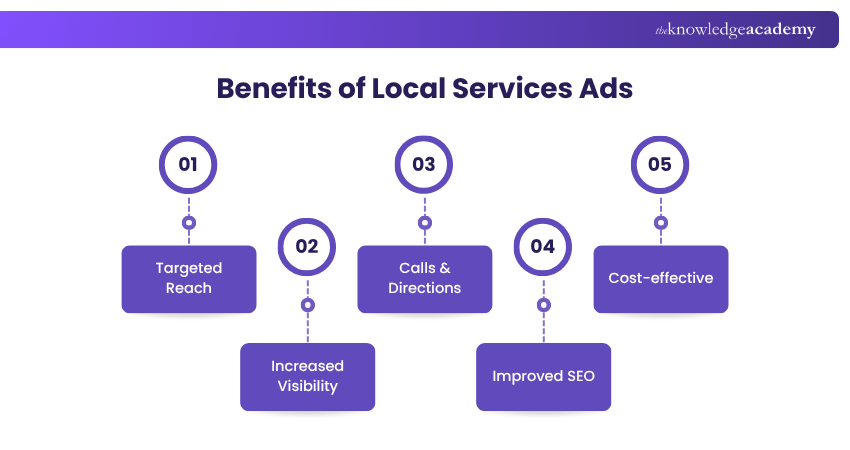
Local Services Ads help local businesses, like plumbers or electricians, get seen by nearby customers. The ads secure at the top of Google Search and let people call or message you directly. You only pay for real leads, and the badge builds trust.
How Do They Work?
To use LSAs, you set up a profile with your business name, service areas, hours, and what you offer. Google may check your licence, insurance, or background (depending on your job type). If everything looks good, you can earn the “Google Guaranteed” badge, which helps people trust your business more.
Google shows your ad based on your location, reviews, and the type of service. You can stop or restart ads whenever you like and manage leads through your account.
Types of Google Local Services Ads
1) Home Services Ads: They help homeowners find trusted professionals nearby. It includes plumbers, electricians, appliance repairs, and more.
2) Cleaning Services Ads: People often search for cleaning help online. These ads for house cleaning and carpet cleaning connect them with reliable providers.
3) Pet Care Services Ads: Local Services Ads are also used by pet professionals. Examples are dog walkers, pet groomers, and a lot more.
10) Smart Campaigns
Smart campaigns are simple Google Ads made for small businesses or people new to ads. You choose a goal like more calls or visits, and Google does the rest. It shows your ads on Search, Maps, and websites, helping you reach local customers without much effort or skill.
How Do They Work?
All you need to do is choose your goal like getting more calls, website visits, or people coming to your shop. Then, you write a short ad, pick your business type, and set your daily budget. Google handles the rest. Once your campaign is set up, Google shows your ad to the right people.
It picks keywords, decides where your ad appears (on Google Search, websites, YouTube, Maps, and more), and helps you get the best results.
Types of Google Local Services Ads
1) Smart Search Ads: These are the text ads that show up when people search for products or services related to yours.
2) Smart Display Ads: These include the image or banner ads shown on websites, apps, and YouTube.
3) Smart Maps Ads: It contains ads that show your business on Google Maps when people search in your area.
What are the Three Levels of Google Ads?
Google Ads has three main levels as Account, Campaign, and Ad Group. The Account is where you set up your login, payment, and user access. A Campaign lets you choose your goal, budget, and where your ads will appear. Inside each campaign, Ad Groups help organise your ads and match them with the right keywords or audience.
Choosing the Right Google Ads Options
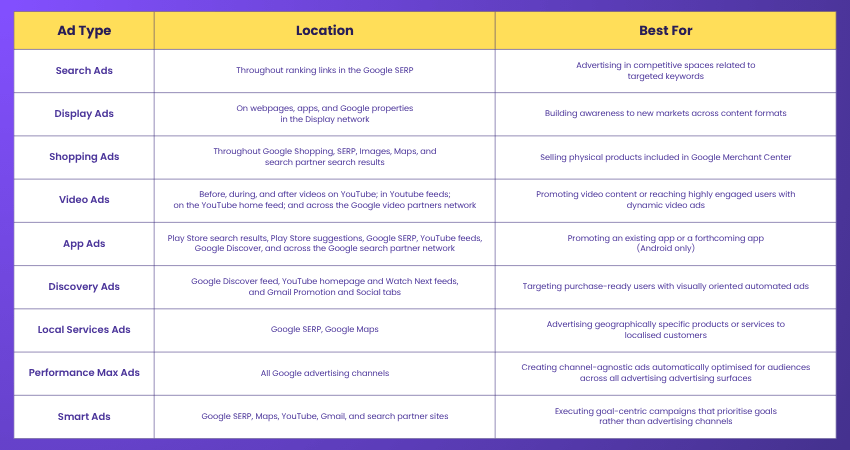
This table below provides an overview of the various Google ad types, where they can be found, and what they are best used for:
Conclusion
Picking the right Google Ads Campaign Types can help you reach the right people and grow your business. Whether you want to get more sales, bring in local customers, or build your brand, there’s a campaign that fits your needs. With the right plan and a bit of testing, your ads can bring real results and help your business succeed online.
Enrich your understanding of Social Media, SEO, Email Marketing, and more by registering for our Digital Marketing Course today!
Frequently Asked Questions
Are There any Budget Considerations for Different Campaign Types?

Budget considerations vary for different campaign types, such as social media ads, PPC, and influencer marketing. It's essential to allocate funds strategically based on campaign goals and audience reach.
What are Some Common Mistakes to Avoid When Running Google Ads Campaigns?
Common mistakes in Google Ads campaigns include neglecting negative keywords, ignoring ad extensions, overlooking mobile optimisation, and not testing ad copy effectively.
What are the Other Resources and Offers Provided by The Knowledge Academy?
The Knowledge Academy takes global learning to new heights, offering over 3,000 online courses across 490+ locations in 190+ countries. This expansive reach ensures accessibility and convenience for learners worldwide.
Alongside our diverse Online Course Catalogue, encompassing 19 major categories, we go the extra mile by providing a plethora of free educational Online Resources like Blogs, eBooks, Interview Questions and Videos. Tailoring learning experiences further, professionals can unlock greater value through a wide range of special discounts, seasonal deals, and Exclusive Offers.
What is the Knowledge Pass, and how Does it Work?
The Knowledge Academy’s Knowledge Pass, a prepaid voucher, adds another layer of flexibility, allowing course bookings over a 12-month period. Join us on a journey where education knows no bounds.
What are Related Courses and Blogs Provided by The Knowledge Academy?
The Knowledge Academy offers various Digital Marketing Courses, including the Campaign Planning Training, Pinterest Marketing Course, and Display Advertising Course. These courses cater to different skill levels, providing comprehensive insights into What is a Digital Marketing Campaign.
Our Digital Marketing Blogs cover a range of topics related to Google Ads, offering valuable resources, best practices, and industry insights. Whether you are a beginner or looking to advance your Digital Marketing skills, The Knowledge Academy's diverse courses and informative blogs have got you covered.

James Smith


Digital Marketing Manager and Trainer
James Smith is a digital marketing professional with over a decade of experience in SEO, content strategy, paid media and analytics. He has supported both SMEs and global brands in transforming their digital presence. James’s writing and training are rooted in results-driven tactics and the latest marketing trends.
View Detail
Upcoming Digital Marketing Resources Batches & Dates
Date
 Google Ads Certification
Google Ads Certification
Fri 24th Jul 2026
Google Ads Certification
Fri 27th Nov 2026

 If you wish to make any changes to your course, please


