


 Top Rated Course

We may not have the course you’re looking for. If you enquire or give us a call on + 1-866 272 8822 and speak to our training experts, we may still be able to help with your training requirements.
What is an IP Address? Everything You Need to Know
John Davies 11 March 2026An IP Address is a unique identifier assigned to devices on a network, enabling data routing and communications across the internet and local networks. This enables devices, such as computers or servers, to identify each other and communicate over the internet. Without an IP Address, data would not know where to go or where it came from.

Training Outcomes Within Your Budget!
We ensure quality, budget-alignment, and timely delivery by our expert instructors.
Table of Contents
Every time you check the weather on your phone, join a voice call, or order something online, your device needs a way to be found. That is where the Internet Protocol (IP) Address comes in. If you have ever wondered What is an IP Address, think of it as a home address for your device. This helps the internet deliver information to the right place.
Without an IP Address, the internet will not work, as it tells the data to which device to go. In this blog, you will learn about What is an IP Address, how it works, its important types, and more. Keep reading to learn more about it!
Table of Contents
1) IP Address Definition
2) How Do IP Addresses Work?
3) Types of IP Addresses
4) Internet Addresses and Subnets
5) How to Locate Your IP Address?
6) Security Concerns with an IP Address
7) How to Hide Your IP Address?
8) Conclusion
IP Address Definition
An Internet Protocol (IP) address is a unique identifier that allows devices like computers, smartphones, and laptops to communicate across networks. The IP Address Definition was developed and standardised by the Internet Society and remains fundamental to how online communication works globally.
Currently, two versions of IP Addresses are widely used: Internet Protocol version 4 (IPv4) and Internet Protocol version 6 (IPv6). IPv4 follows a 32-bit numeric structure, while IPv6 uses a 128-bit format that supports far more combinations. In addition to these, IPs can also be classified as public or private, and static or dynamic, depending on how they are assigned and used.
How Do IP Addresses Work?
An IP Address helps identify your device and receive the data you request when using the internet. Whether you browse a website or send an email, your device uses its IP Address to communicate with other devices and servers. It tells the network where to send the requested information and where that information should return.
One of the main tasks of an IP Address is to identify a device or network and point to its location. IP Addresses are created using mathematical rules to ensure each address is unique. Since it is assigned in a structured way, networks can reliably connect one device to another. This ensures data reaches the correct destination and smoothly communicates across the internet.
Types of IP Addresses
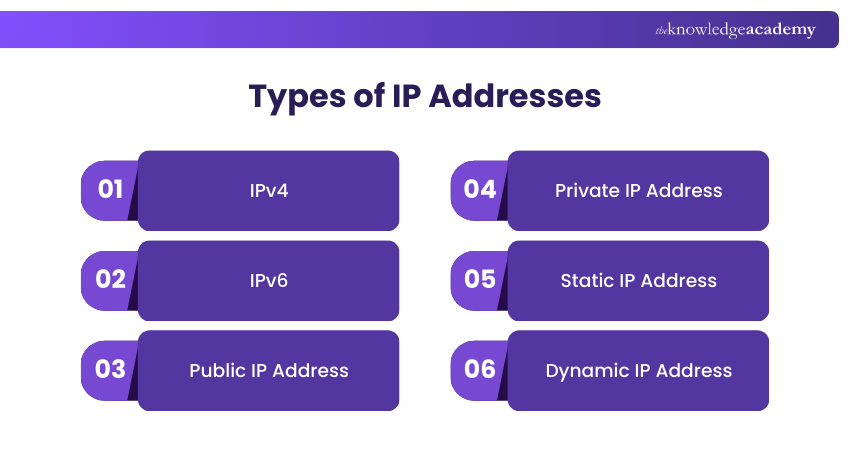
IP Addresses come with various types used to manage the limited number of available addresses, improve security, and meet networking needs. Let’s look at its types below.
1) IPv4
Internet Protocol version 4 is the old and most widely used version of IP Addressing. It uses a 32-bit address format written in dotted decimal form and can contain up to 15 characters. It comes with a limitation, that is, a limited address space, with around 4 billion unique addresses available. To tackle this shortage, Internet Service Providers use Network Address Translation to enable multiple devices to share a single public IP Address.
2) IPv6
Internet Protocol version 6 is the newer version of IP addressing. It uses a 128-bit address format written as eight groups of hexadecimal numbers, providing an extremely large number of unique addresses. This ensures enough IP Addresses for future devices, while also improving routing efficiency and including built-in support for advanced security features.
3) Public IP Address
A public IP Address, also known as an external-facing address, is assigned by your Internet Service Provider (ISP) to your main network device, usually the router. It enables communication between your network and the wider internet. Public IPs are essential for tasks like gaming, streaming, running servers, and creating remote connections.
4) Private IP Address
A private IP Address, also called an internal-facing address, is assigned by your router to devices within your local network, such as phones, laptops, or smart TVs. These addresses are reused across different networks, conserving IPv4 space. In IPv6, this practice is known as Unique Local Addressing (ULA), where every device can still have a unique identifier.
5) Static IP Address
A static IP Address is one that remains fixed and does not change automatically. It is manually configured or assigned permanently by an ISP to a device or user account. Static IPs are valuable for businesses or individuals running their own servers, as they allow consistent identification and accessibility from anywhere on the internet.
6) Dynamic IP Address
A dynamic IP Address is automatically assigned by the Dynamic Host Configuration Protocol (DHCP) whenever a router connects to the internet. ISPs manage these addresses by rotating them across customers. Dynamic IPs are cost-effective, reduce configuration effort, and add a layer of security since they change periodically, making it harder for hackers to target.
Master network design through Designing Cisco Enterprise Networks (ENSLD) - Register Now!
Internet Addresses and Subnets
Internet Addresses are managed in a structured way to keep the internet organised and reliable. The Internet Assigned Numbers Authority (IANA) reserves blocks of IP Addresses for organisations, governments, and Internet Service Providers (ISPs). When you connect to the internet, your ISP assigns an IP Address from its allocated block.
In most homes, a router shares one internet connection with many devices by creating a subnet. Each device within the subnet gets its own private IP Address, made up of a network and a node. A subnet mask separates these parts, with the first address reserved for the subnet and the last for the broadcast address.
How to Locate Your IP Address?
Finding your IP Address is simple, but it is important to know the difference between a public and a private IP Address, as both serve different purposes in identifying your device.
1) Identifying a Public IP Address
Your public IP address can be found quickly by typing “what is my IP” into any search engine. Several websites, such as WhatsMyIP.org, also display your public IP along with details like location data.
2) Identifying a Private IP Address
To locate a private IP Address, the process depends on your device:
a) Windows: Open Command Prompt (Win + R → type cmd), then enter ipconfig to view IPv4 and IPv6 addresses.
b) macOS/Linux: Use Terminal and type ifconfig (macOS) or ip addr show (Linux) to display network details.
c) Mobile devices: Tools like WhatIsMyLocalIP.com can identify private IPs across multiple platforms.
Advance your networking career and learn enterprise-level networking with CCNP Training (Cisco Certified Network Professional) - Register now!
Security Concerns With an IP Address
An IP Address plays a key role in connecting your device to the internet, but it can create security risks if it is exposed. Cybercriminals can misuse it to monitor activity, impersonate users, or target networks. Some common security concerns include:
1) Online Stalking and Tracking: Attackers can track online behaviour and estimate a user’s location by monitoring an exposed IP Address.
2) Social Engineering Attacks: Cybercriminals may use IP-related information to pretend to be you or manipulate you into sharing sensitive information.
3) Location Exposure: An IP Address can reveal general location details, which may be misused for targeted attacks.
4) Distributed Denial of Service Attacks: Hackers can use an IP Address to flood a network with traffic, causing websites or services to crash.
5) Illegal Activity Misuse: Cybercriminals may use your IP Address to download illegal content, which could be wrongly tracked back to you.
Build strong cybersecurity skills and learn how to defend a network against real cyber threats with CCNA Cybersecurity Operation Training now!
How to Hide Your IP Address?
Hiding your IP Address helps to protect online privacy and reduces the risk of tracking, targeting, or cyberattacks. Some practical ways to hide it include:
1) Use a VPN: Virtual Private Network (VPN) encrypts your traffic and routes it through a secure server, masking your real IP Address.
2) Use a Proxy Server: Proxy Server hide your IP by showing their own address to websites, though they usually lack encryption.
3) Use a Dynamic IP Address: Dynamic IPs change regularly, making it harder to track your online activity over time.
4) Use a NAT Firewall: A Network Address Translation (NAT) firewall hides your device behind a shared public IP and blocks unauthorised access.
5) Reset Your Router: Restarting your router may assign a new IP Address if your ISP use dynamic IPs.
6) Browse Using Tor: The Onion Route (Tor) routes traffic through multiple encrypted nodes, helping conceal your original IP Address.
Conclusion
Understanding What is an IP Address helps you to see how the internet connects devices, shares data, and keeps information moving smoothly. IP Addresses play a much bigger role than people realise. Knowing how they work gives you better control over your digital presence. This helps to make smart online choices and reduce potential security threats.
Explore Cisco technologies and build job-ready networking expertise with Cisco Training today!
Frequently Asked Questions
What will an IP Address tell you?

An IP address can tell your approximate location, internet service provider, and the device's connection point to the internet. However, it doesn't show personal details like your name or exact home address.
What happens if someone has your IP address?
If someone has your IP address, they can approximate your location, target you with phishing attempts, or even launch DDoS attacks. While they usually cannot access personal data directly, it can still threaten your online privacy and security.
What are the Other Resources and Offers Provided by The Knowledge Academy?
The Knowledge Academy takes global learning to new heights, offering over 3,000+ online courses across 490+ locations in 190+ countries. This expansive reach ensures accessibility and convenience for learners worldwide.
Alongside our diverse Online Course Catalogue, encompassing 19 major categories, we go the extra mile by providing a plethora of free educational Online Resources like Blogs, eBooks, Interview Questions and Videos. Tailoring learning experiences further, professionals can unlock greater value through a wide range of special discounts, seasonal deals, and Exclusive Offers.
What is The Knowledge Pass, and How Does it Work?
The Knowledge Academy’s Knowledge Pass, a prepaid voucher, adds another layer of flexibility, allowing course bookings over a 12-month period. Join us on a journey where education knows no bounds.
What are the Related Courses and Blogs Provided by The Knowledge Academy?
The Knowledge Academy offers various Cisco Courses, including the IPv6 Basics Course, CCNP Security Training, and the CCNP Training (Cisco Certified Network Professional). These courses cater to different skill levels, providing comprehensive insights into What is SSL.
Our IT Infrastructure & Networking Blogs cover a range of topics related to Networking , offering valuable resources, best practices, and industry insights. Whether you are a beginner or looking to advance your Networking skills, The Knowledge Academy's diverse courses and informative blogs have got you covered.

John Davies


Cyber Security Governance & Assurance Specialist
John Davies is a cybersecurity expert specialising in governance, risk management, and compliance. With over 15 years in the field, he has led enterprise-wide security programmes across finance, healthcare and public sector organisations. His content provides practical guidance on building secure environments, managing risk and aligning with regulatory frameworks.

Upcoming IT Infrastructure & Networking Resources Batches & Dates
Date
 Cisco MPLS Training
Cisco MPLS Training
Thu 6th Aug 2026
Cisco MPLS Training
Thu 24th Sep 2026
Cisco MPLS Training
Thu 5th Nov 2026
Cisco MPLS Training
Thu 3rd Dec 2026

 If you wish to make any changes to your course, please


