


 Top Rated Course


We may not have the course you’re looking for. If you enquire or give us a call on +43 720 115337 and speak to our training experts, we may still be able to help with your training requirements.
How to Insert Data into SQL Tables: Syntax and Examples
The Knowledge Academy 01 April 2026Learn how to insert data in SQL using the INSERT statement with clear syntax, step-by-step queries, practical examples, and simple explanations for beginners. Understand how to add single or multiple records and manage default values. Use simple examples to write accurate queries and avoid common SQL mistakes.

Training Outcomes Within Your Budget!
We ensure quality, budget-alignment, and timely delivery by our expert instructors.
Table of Contents

Inserting data into an SQL database is a critical operation that allows you to populate your tables with valuable information. Whether you’re working on a small project or managing large datasets, understanding how to effectively insert data is key to maintaining a robust and functional database system.
In this comprehensive blog, we’ll walk you through the fundamental steps of "How to Insert Data in SQL". By mastering the techniques presented here, you’ll be well-equipped to confidently add new data to your database tables.
Table of Contents
1) What is the SQL INSERT Statement?
2) SQL INSERT INTO Syntax
a) Insert Data Into a Single Column
b) Insert Data into Multiple Columns
c) Use the VALUES Clause
d) Insert Data Into Specific Columns
e) Insert Data Into Multiple Rows
3) How to Insert Data into a Table in SQL
4) Conclusion
What is the SQL INSERT Statement?
The SQL INSERT statement is used to add new data into a table in a database. It allows you to insert one or more rows by specifying the table name, the columns you want to fill, and the values for those columns.
In its simplest form, the INSERT statement follows this basic syntax:

This command is essential for storing new information in a database, whether it is customer details, product records, or transaction data. You can insert data in different ways, such as adding a single row, inserting multiple rows at once, or even copying data from another table.
In SQL Server, the process typically involves identifying the table and columns, writing the correct INSERT query, and executing it to store the new records.
Overall, the INSERT statement is a fundamental SQL command that helps you build and maintain your database by continuously adding new and relevant data.

SQL INSERT INTO Syntax
The Basic Structure of SQL Queries of the INSERT statement looks like this:
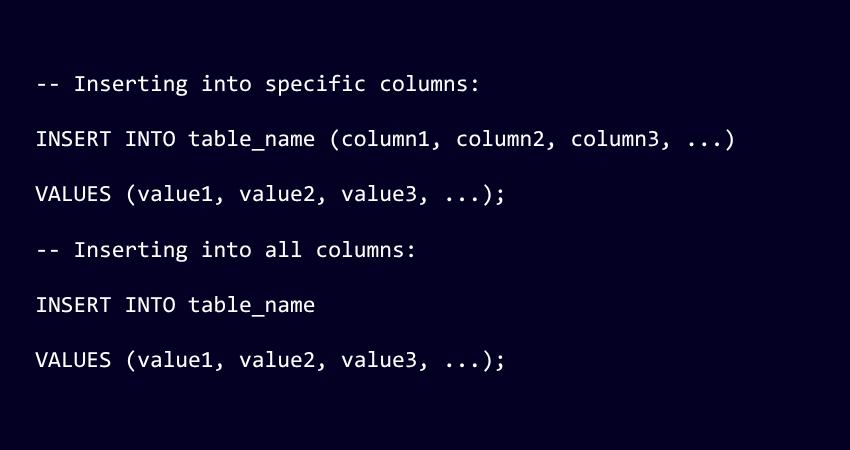
a) table_name: The name of the table where you want to insert data.
b) column1, column2, …: The names of the columns in the table that you want to fill with data.
c) value1, value2, …: The values corresponding to the columns that you want to insert.
If you’re inserting values for all the columns of the table, you don’t need to specify the column names, but the values must be in the same order as the columns in the table.
Let's Look Into Different Methods to Insert Data in SQL:
Insert Data into A Single Column
To insert data into a single column in SQL, you would use the INSERT INTO statement and specify only the column you want to fill with data. Here’s the basic syntax for inserting data into one column:

a) table_name: The name of the table where you want to insert data.
b) column_name: The name of the column in the table that you want to fill with data.
c) value: The value you want to insert into the specified column.
Boost Your Confidence – Dive into Key Data Entry Interview Questions Now!
Insert Data into Multiple Columns
To insert data into multiple columns in SQL, you use the INSERT INTO statement and specify the columns you want to fill with data, along with their corresponding values. Here’s how you do it:

a) table_name: The name of the table where you want to insert data.
b) column1, column2, …: The names of the columns in the table that you want to fill with data.
c) value1, value2, …: The values corresponding to the columns that you want to insert.
Use the VALUES Clause
The VALUES clause in SQL is used to provide a set of values for each column when inserting data into a table. It’s part of the INSERT INTO statement and is essential for specifying the data that you want to add to the table. Here’s the basic syntax:

a) table_name: The name of the table where you want to insert data.
b) column1, column2, …: The names of the columns in the table that you want to fill with data.
c) value1, value2, …: The values corresponding to the columns that you want to insert.
The VALUES clause can also be used to insert multiple rows in a single statement by providing multiple sets of values, each set enclosed in parentheses and separated by commas:

This will insert three new rows into table_name. It’s a convenient way to add multiple rows of data efficiently.
Additionally, the VALUES clause can be used to create a derived table within a SELECT statement or as part of the USING clause in a MERGE statement. This allows for more complex operations, like combining data from multiple sources or performing conditional updates and inserts.
Insert Data into Specific Columns
To insert data into specific columns of a table in SQL, you use the INSERT INTO statement with the specified column names and their corresponding values. Here’s the syntax:

a) table_name: The name of the table where you want to insert data.
b) column1, column2, …: The names of the columns you want to insert data into.
c) value1, value2, …: The values for the specified columns.
Insert Data into Multiple Rows
In SQL, to insert data into multiple rows, you can use the INSERT INTO statement with multiple sets of values. Here’s the general syntax for inserting multiple rows at once:

This allows you to insert data into specific columns for multiple rows. If you’re inserting values for all the columns in the table, you can omit the column names and use:

Make sure the order of the values corresponds to the order of the columns in the table. This method is efficient and widely used for bulk data entry.
Insert Data With NULL Values
In SQL, inserting data with NULL values is straightforward. You use the keyword NULL to represent a missing or unknown value in a column. Here’s an example of how to insert rows with NULL values:

Title:
In this example, NULL is used without quotes to indicate that the value for that column should be set to NULL. It’s important to ensure that the columns you are inserting NULL into are defined to allow NULL values in your database schema.
Remember, NULL represents the absence of a value and is different from a zero value or a field that contains spaces. It’s used when the actual value is unknown or not applicable.
Ready to dive into the world of MySQL? Our Introduction to MySQL Course is the perfect starting point!
How to Insert Data into a Table in SQL
In SQL, inserting data into a table is done using the INSERT INTO statement. You can add data in different ways depending on your requirement, such as inserting a single row, multiple rows, or copying data from another table.
Below are the Most Common Methods Explained in a Simple Way:
Inserting a Data into Single Row
You can insert one row at a time by specifying the table name, columns, and corresponding values.

This adds one new record to the table. Each value must match the column’s data type and order.
Inserting a Data into Multiple Rows
SQL allows you to insert multiple rows in a single query, which is faster and more efficient than running multiple single inserts.

This method reduces the number of queries sent to the database and improves performance.
Inserting Data from Another Table
You can copy data from one table to another using the INSERT INTO ... SELECT statement.

This is useful for backups, data migration, or creating summary tables without manual input.
Inserting Data with Default Values
If a table has default values or auto-generated columns, you can skip them during insertion.

The database automatically fills in default fields such as IDs or timestamps. You can also use the DEFAULT keyword explicitly if needed.
Using OUTPUT Clause with INSERT
In some databases like SQL Server, the OUTPUT clause lets you return values from the inserted rows, such as generated IDs.

This is helpful when you need to immediately use the inserted data in your application, such as retrieving a newly created record ID.
These methods make the INSERT INTO statement flexible and powerful, allowing you to handle different data insertion scenarios with ease.
Transform your career with our expert-led SQL Courses! Gain practical skills, hands-on experience, & certifications that set you apart.
Conclusion
Mastering the art of data insertion in SQL is a crucial step towards effective Database Management. By understanding the syntax and concepts behind How to Insert Data in SQL INSERT statements, you’ve unlocked the ability to add new data to your tables seamlessly. Whether you’re using SQL, SQL Server, or any other SQL-based platform, these skills remain invaluable.
Take your SQL skills to the next level with our course on Advanced SQL Course.
Frequently Asked Questions
How to Insert 10 Values In SQL?

You can insert 10 values in SQL by using a single INSERT INTO statement and adding multiple sets of values separated by commas. Each set represents one row, and the values must match the order of the specified columns. This approach is efficient and reduces the need for multiple queries.
How Does insert () Work?
The insert() function in Python works by adding an element at a specific position in a list using the syntax list.insert(index, element). It takes two inputs: the position (index) and the value to insert. Once added, the existing elements are shifted to the right to make space, and the original list is updated directly.
What are the other resources and offers provided by The Knowledge Academy?
The Knowledge Academy takes global learning to new heights, offering over 3,000+ online courses across 490+ locations in 190+ countries. This expansive reach ensures accessibility and convenience for learners worldwide.
Alongside our diverse Online Course Catalogue, encompassing 17 major categories, we go the extra mile by providing a plethora of free educational Online Resources like Blogs, eBooks, Interview Questions and Videos. Tailoring learning experiences further, professionals can unlock greater value through a wide range of special discounts, seasonal deals, and Exclusive Offers.
What is the Knowledge Pass, and how does it work?
The Knowledge Academy’s Knowledge Pass, a prepaid voucher, adds another layer of flexibility, allowing course bookings over a 12-month period. Join us on a journey where education knows no bounds.
What are the Related Courses and Blogs Provided by The Knowledge Academy?
The Knowledge Academy offers various SQL Courses, including Introduction to SQL and Advanced SQL. These courses cater to different skill levels, providing comprehensive insights into Advanced SQL Functions.
Our Programming and DevOps Blogs cover a range of topics related to SQL, offering valuable resources, best practices, and industry insights. Whether you are a beginner or looking to advance your SQL Database Management skills, The Knowledge Academy's diverse courses and informative blogs have you covered.

The Knowledge Academy


Global Training Provider
The Knowledge Academy is a world-leading provider of professional training courses, offering globally recognised qualifications across a wide range of subjects. With expert trainers, up-to-date course material, and flexible learning options, we aim to empower professionals and organisations to achieve their goals through continuous learning.


 If you wish to make any changes to your course, please


