


 Top Rated Course

We may not have the course you’re looking for. If you enquire or give us a call on +27 800 780004 and speak to our training experts, we may still be able to help with your training requirements.
QuickBooks Explained: What it is and How it Works?
Olivia Taylor 24 March 2026QuickBooks is an Accounting software by Intuit that helps small businesses manage invoicing, expenses, payments, and financial reports efficiently. It simplifies daily bookkeeping by automating routine tasks and giving real time visibility into cash flow. This helps owners make informed decisions without deep expertise.

Training Outcomes Within Your Budget!
We ensure quality, budget-alignment, and timely delivery by our expert instructors.
Table of Contents

It usually starts the same way every month. Unpaid invoices pile up, receipts get lost in emails and folders, and tax deadlines create quiet panic. If this sounds familiar, you are not alone. This is where QuickBooks steps in. Created by Intuit, it acts as a dependable digital bookkeeper, bringing order to financial chaos for freelancers and small business owners.
This blog explains What is QuickBooks, how it works, and why businesses rely on it daily. You’ll see how it simplifies expenses, invoicing, and taxes, making Finance Management easier. Let’s get started.
Table of Contents
1) What is QuickBooks?
2) QuickBooks at a Glance
3) How Does QuickBooks Work?
4) Types of QuickBooks
5) Features of QuickBooks
6) Benefits of Using QuickBooks
7) How to Use QuickBooks for Small Business?
8) What is the Difference Between QuickBooks Online and QuickBooks Desktop?
9) What is QuickBooks Best Used For?
10) Conclusion
What is QuickBooks?
QuickBooks is an Accounting software developed by Intuit that helps businesses manage their day to day financial activities efficiently. For those wondering What is QuickBooks, it allows users to record transactions, send invoices, track payments, and categorise expenses in a structured way.
The software also supports bank reconciliation and the preparation of financial statements, giving businesses a clear view of their financial performance. QuickBooks is available as cloud-based software through QuickBooks Online, with desktop versions still offered in certain markets.
Why Many Teams Choose QuickBooks Online?
Many teams choose QuickBooks Online because it works directly in a web browser and on mobile devices, allowing access to accounts from anywhere. This flexibility supports remote work and makes collaboration between teams and Accountants much easier.
It securely connects to bank and card accounts to automatically import transactions, reducing manual entry. QuickBooks Online also supports invoicing and bill payments, with add-ons for payroll and advanced reporting as the business grows.
QuickBooks at a Glance
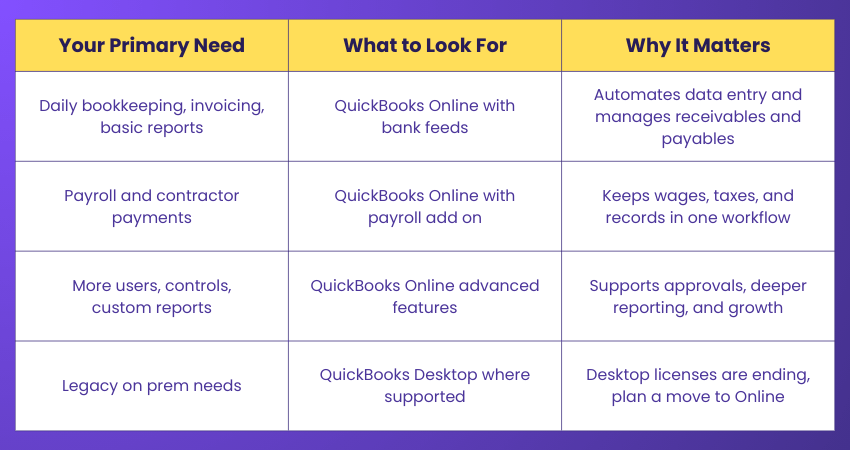
QuickBooks offers different options based on business needs, from basic bookkeeping to advanced reporting and payroll. The table below gives a quick overview to help you choose the right QuickBooks solution and understand its value.
How Does QuickBooks Work?
QuickBooks is an intuitive and powerful Accounting Software that simplifies Financial Management for businesses. Understanding how QuickBooks works is essential for maximising its potential and efficiently managing financial transactions. Following is the step-by-step process on How to use QuickBooks:
a) Setting up QuickBooks: Getting started with QuickBooks is easy. You can choose either QuickBooks Online or the Desktop version. Once you pick, sign up or install the software. You’ll then be asked to enter basic business details such as your name, address, and contact info.
b) Navigating the Dashboard: The dashboard is QuickBooks's main view. It shows key financial information, such as income, expenses, and profits, in a simple layout. You can easily click around to use different features and see reports.
c) Adding Company Information: To get started properly, you must add details like bank accounts, vendors, customers, and employee information. This helps QuickBooks run tasks and create accurate reports.
d) Chart of Accounts: This is a list of categories for all your business transactions, such as income, expenses, assets, and debts. It helps you keep everything organised and easy to track.
e) Entering Transactions: One of QuickBooks’ main jobs is to record money coming in and going out. You can add sales, bills, invoices, and payments. Each one goes into the right account to keep things tidy and correct.
f) Generating Reports: QuickBooks has ready-to-use reports to help you see how your business is doing. You can also customise these reports to focus on certain dates or accounts to understand your finances better.
g) Security and Data Backups: QuickBooks is adept at protecting your Data. The Online version uses encryption to keep info safe, while the Desktop version stores your data locally which reduces the risks from internet issues.
Build expertise in cloud-based Accounting Software with our Xero Training – Register now!
Types of QuickBooks
QuickBooks comes in different versions to meet the diverse requirements of various users. The most popular versions have been discussed below.
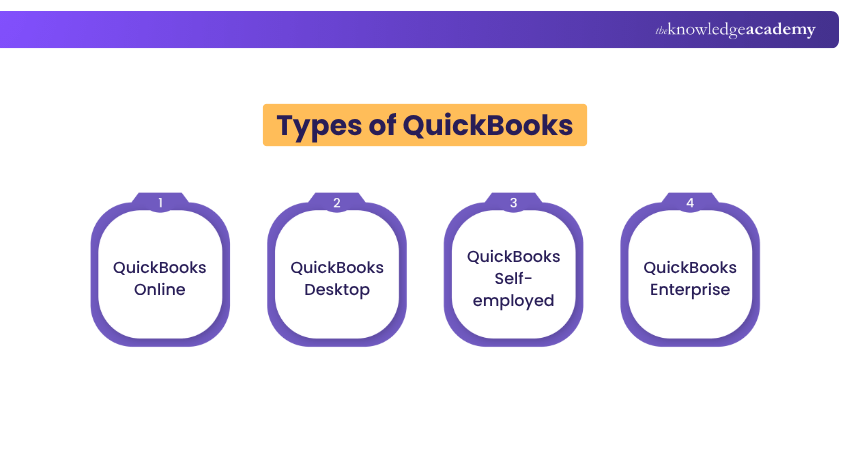
a) QuickBooks Online: This cloud version lets you manage your finances from anywhere with internet access. It’s great for businesses with remote teams or those who need flexibility.
b) QuickBooks Desktop: This version is installed on your computer and stores your financial data locally. It’s ideal for businesses that want more control over their data and require advanced features.
c) QuickBooks Self-employed: This one is made for freelancers and Contractors, as it helps track income and expenses easily to simplify Money Management.
d) QuickBooks Enterprise: Designed for larger businesses, it offers advanced tools like detailed reports, user permissions, and features tailored to specific industries.
Learn how Bookkeeping can be the backbone of every business in our comprehensive Bookkeeping Course – Sign up now!
Features of QuickBooks
Invoicing is a core QuickBooks feature, allowing users to create and send professional invoices with custom branding, payment links, and recurring options. Along with payroll, QuickBooks also offers several other useful features, outlined below.
a) Expense Tracking: QuickBooks makes it easy to track your spending by letting you upload receipts directly. It sorts your expenses automatically, helping you understand where your money goes and plan your budget better.
b) Financial Reporting: QuickBooks provides ready-made reports like Profit and Loss, Cash Flow, and Balance Sheets. These reports give a clear picture of how your business is doing financially.
c) Payroll Management: Paying Employees can be tricky, but QuickBooks handles it smoothly. It works out salaries, taxes, and deductions, making sure payments are correct and on time.
d) Inventory Management: For businesses that sell products, QuickBooks helps track stock levels, manage sales, and reorder items when needed. This prevents you from running out of stock and keeps things running smoothly.
e) Integration With Third-party Apps: QuickBooks works well with other apps like Project Management Tools and online shops. These connections help you do more with less effort, making your work faster and more organised.
Understand Wave Accounting features for efficient Financial Management. Join our Wave Accounting Training now!
Benefits of Using QuickBooks
QuickBooks is not just Accounting Software; it is a powerful tool with many other benefits. Whether you are a small startup, a growing enterprise, or a self-employed professional, embracing QuickBooks can significantly impact your Financial Management and overall business success. Here are some of the key benefits of using QuickBooks:
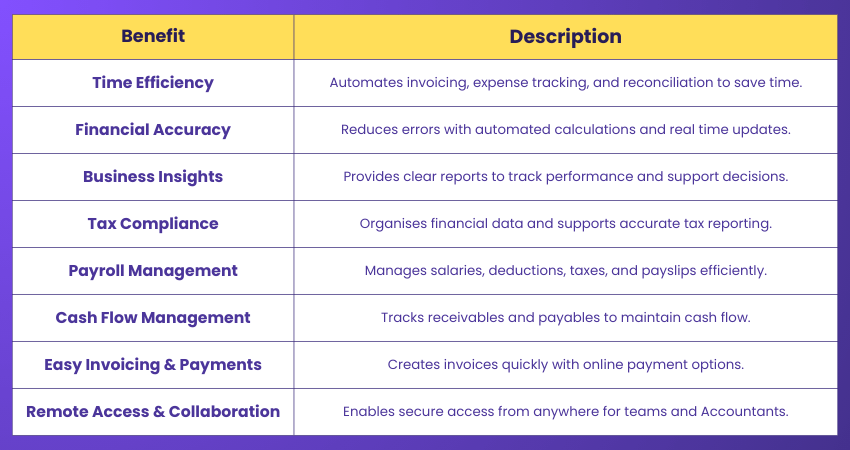
Due to its different features, QuickBooks is a game-changer for businesses seeking efficient Financial Management and data-driven Decision-making. For professionals preparing for roles in this field, reviewing QuickBooks Interview Questions can provide valuable knowledge and insights into its functionalities.
How to Use QuickBooks for Small Business?
Using QuickBooks for your small business can streamline Financial Management and improve efficiency. Here's a step-by-step approach to help you get started:
1) Set Up Your Account: Download QuickBooks and add your business info like name, address, logo, and contact details. Set your currency, business type, and Accounting method. Link your bank and card accounts for automatic updates, and add your tax info to keep everything in order.
2) Track Bills and Expenses: Connect your accounts so QuickBooks can pull in expenses automatically. Set up rules to sort your spending and avoid missing payments. This keeps your records updated and accurate.
3) Monitor Income and Create Reports: Use QuickBooks to send invoices and log sales. You’ll also get helpful reports like profit and loss or balance sheets to see how your business is doing.
4) Manage Payroll and Taxes: You can handle staff pay, work out taxes, and file forms easily. QuickBooks helps you track tax deductions and prepares your finances for tax time.
5) Connect with Other Tools: You can link QuickBooks with apps to simplify the payment handling process. This reduces the need for manual Data Entry and helps you avoid mistakes.
6) Use QuickBooks Online: You can access your accounts anywhere with QuickBooks Online. It gives you mobile access and auto backups and works with many other apps, which is perfect for busy small business owners.
Understand essential Accounting principles and how to apply them effectively with our Tally Training – Join now!
What is the Difference Between QuickBooks Online and QuickBooks Desktop?
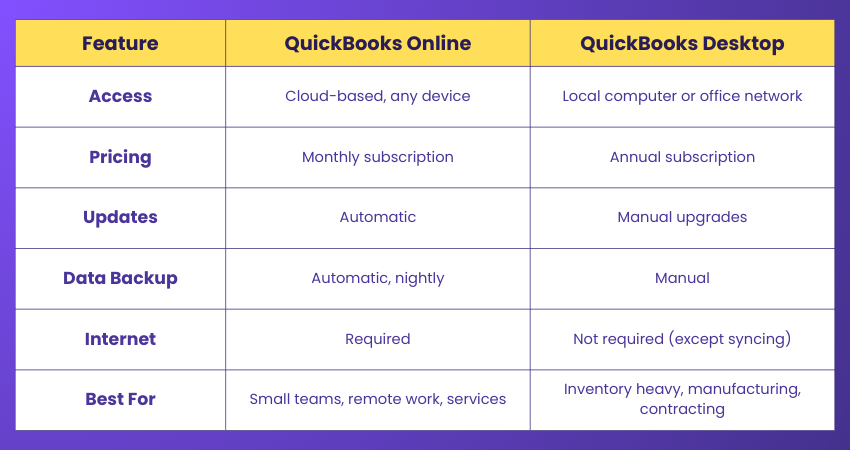
QuickBooks Online and QuickBooks Desktop mainly differ in how they are accessed and used. QuickBooks Online is cloud-based with automatic updates and remote access, while QuickBooks Desktop is locally installed and works offline. The table below shows the key differences briefly:
What is QuickBooks Best Used For?
QuickBooks Online is good for keeping your business finances simple and organised. It helps you track your income and spending, create and send invoices, manage taxes, and see reports that show how your business is doing.
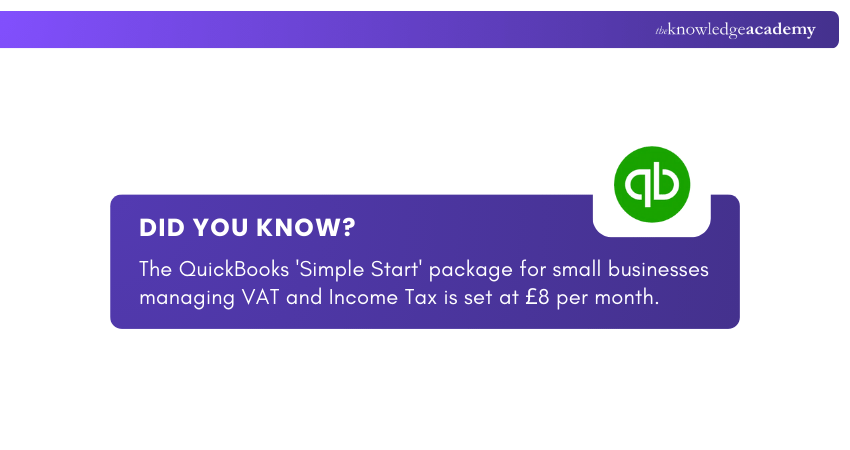
It’s very useful for small businesses, freelancers, and self-employed people who want to save time and avoid mistakes. With QuickBooks, you can handle everything in one easy place, from expenses to VAT and payments.
Conclusion
In essence understanding What is QuickBooks shows how it simplifies Accounting, saves time, and keeps your finances stress-free. It is more than just software; it acts as a smart financial partner for your business. From tracking expenses and sending invoices to managing taxes, QuickBooks Online helps small businesses and freelancers stay organised and focus on growth with confidence.
Understand key features and functionalities of leading software. Join our Accounting Software Training today!
Frequently Asked Questions
Do I Need an Accountant to use QuickBooks?

You do not need an Accountant to use QuickBooks, as it is built for small business owners to manage invoicing, expenses, and reports easily. An Accountant can still be useful for tax filing, compliance, and planning, with secure access provided only when expert support is needed.
Is QuickBooks Easy to Learn?
Learning QuickBooks can be easy or difficult, depending on how much you already know about Accounting and which version you're using. Learning it gets easier with the right training, and it’s worth the effort if it suits your business. Whatever software you pick, choose one that works well with other tools to save time on manual tasks.
What are the Other Resources and Offers Provided by The Knowledge Academy?
The Knowledge Academy takes global learning to new heights, offering over 3,000+ online courses across 490+ locations in 190+ countries. This expansive reach ensures accessibility and convenience for learners worldwide.
Alongside our diverse Online Course Catalogue, encompassing 17 major categories, we go the extra mile by providing a plethora of free educational Online Resources like Blogs, eBooks, Interview Questions and Videos. Tailoring learning experiences further, professionals can unlock greater value through a wide range of special discounts, seasonal deals, and Exclusive Offers.
What is The Knowledge Pass, and How Does it Work?
The Knowledge Academy’s Knowledge Pass, a prepaid voucher, adds another layer of flexibility, allowing course bookings over a 12-month period. Join us on a journey where education knows no bounds.
What are the Related Courses and Blogs Provided by The Knowledge Academy?
The Knowledge Academy offers various Accounting Software Training, including QuickBooks Training, Tally Training, and Wave Accounting Training. These courses cater to different skill levels, providing comprehensive insights into Double-entry Accounting.
Our Accounting and Finance Blogs cover a range of topics related to QuickBooks, offering valuable resources, best practices, and industry insights. Whether you are a beginner or looking to advance your Accounting and Finance skills, The Knowledge Academy's diverse courses and informative blogs have got you covered.

Olivia Taylor


Chartered Accountant and Financial Training Specialist
Olivia Taylor is a qualified chartered accountant with over a decade of experience in financial management, auditing and corporate reporting. Having worked with leading firms in both the public and private sectors, Olivia brings clarity to complex financial topics. Her writing focuses on helping professionals build confidence in key areas of accounting, compliance and financial planning.
View Detail
Upcoming Accounting and Finance Resources Batches & Dates
Date
 Finance for Non Financial Managers
Finance for Non Financial Managers
Fri 10th Jul 2026
Finance for Non Financial Managers
Fri 9th Oct 2026

 If you wish to make any changes to your course, please


