


 Top Rated Course

We may not have the course you’re looking for. If you enquire or give us a call on 44 1344 203 999 and speak to our training experts, we may still be able to help with your training requirements.
Malware vs Virus: Differences and Ways to Stay Safe
The Knowledge Academy 14 March 2026Malware is a harmful software designed to disrupt systems, while a virus is a type of malware that spreads by self-replication through host files. They are two common cyber threats that affect computers and networks. Understanding how they work helps individuals and organisations recognise risks early and take preventive actions.

Training Outcomes Within Your Budget!
We ensure quality, budget-alignment, and timely delivery by our expert instructors.
Table of Contents
Think about the last time your computer behaved strangely. Maybe it slowed down, showed unexpected pop-ups, or installed something you did not recognise. These situations make people assume their device has a virus. However, many different types of harmful software can cause these problems, which is why understanding Malware vs Virus is important.
Understanding Malware vs Virus helps individuals and organisations recognise different types of cyber threats and protect their systems effectively. While both can damage data, disrupt operations, and weaken security, they behave in different ways. In this blog, you will learn about the key differences between malware and viruses, practical ways to stay safe, and more.
Table of Contents
1) What is Malware?
2) What is a Virus?
3) Malware vs Virus: Key Differences
4) Malware and Virus Examples
5) How to Protect Against Malware and Viruses?
6) Conclusion
What is Malware?
Malware refers to any software intentionally created to harm or compromise computer systems, servers, or networks. It comes in various forms, each with its specific purpose and method of attack. These malicious programs are designed to damage devices, steal sensitive information, disrupt operations, or gain unauthorised access to systems.
They enter devices through unsafe downloads, email attachments, or malicious websites. Once inside, it runs silently and performs harmful activities without the user’s knowledge, leading to slow performance, unexpected pop-ups, or unauthorised changes.
Different Types of Malware
There are several Types Of Malware, which has evolved with the advent of newer technologies. Here are some of its common types:
a) Ransomware: This malicious software encrypts files or locks users out of their systems until the ransom is paid. Victims must pay to regain access to their data.
b) Spyware: Spyware operates covertly, monitoring user activity and collecting sensitive information without the user’s knowledge. It can track browsing habits, keystrokes, and more.
c) Adware: Adware bombards users with unwanted advertisements. It often redirects browser searches and can be quite annoying.
d) Trojans: These deceptive programs masquerade as legitimate software but contain hidden malicious code. Once installed, they can compromise system security.
e) Worms: Computer Worms self-replicate and spread across networks without user intervention. They exploit vulnerabilities to infect other devices.
f Rootkits: Rootkits embed themselves deeply within an operating system, making them hard to detect. They hide malicious activities and provide unauthorised access to attackers.
Elevate your forensic career with Digital Forensics Training - sign up now!
What is a Virus?
In the Malware vs Virus comparison, a virus is a type of malware that attaches itself to clean files, replicates, and spreads across systems. Unlike other malware, viruses require user action to spread, such as opening an infected file or email attachment. Once activated, viruses can corrupt files, steal data, or render systems unusable.
It can spread quickly across devices and networks if infected files are shared or downloaded. They may slow down system performance, damage important files, or disrupt normal operations, making them a security risk for both individuals and organisations.
Different Types of Viruses
Similar to Malware, Viruses have constantly reshaped itself into newer versions and types. Below mentioned are some of the common types of Viruses:
a) File Infector Virus: This type of virus attaches itself to executable files (such as .exe files) and spreads when the infected program is run. It modifies the clean file by inserting its own code, which allows it to replicate and infect other files.
b) Macro Virus: Macro viruses specifically target documents created in applications like Microsoft Word or Excel. They exploit macros (small scripts) within these files to execute malicious actions. Opening an infected document triggers the virus.
c) Boot Sector Virus: These viruses infect the master boot record (MBR) of a computer’s hard drive. The MBR is essential for booting the operating system. By corrupting it, boot sector viruses can make it challenging to remove them.
d) Polymorphic Virus: Polymorphic viruses are particularly sneaky. They change their code each time they infect a new file, making detection difficult. Their ability to mutate helps them evade antivirus software.
e) Multipartite Virus: This type of virus combines features of both file infector and boot sector viruses. It attacks both the boot sector and executable files, causing widespread damage across the system.
Malware Vs Virus: Key Differences
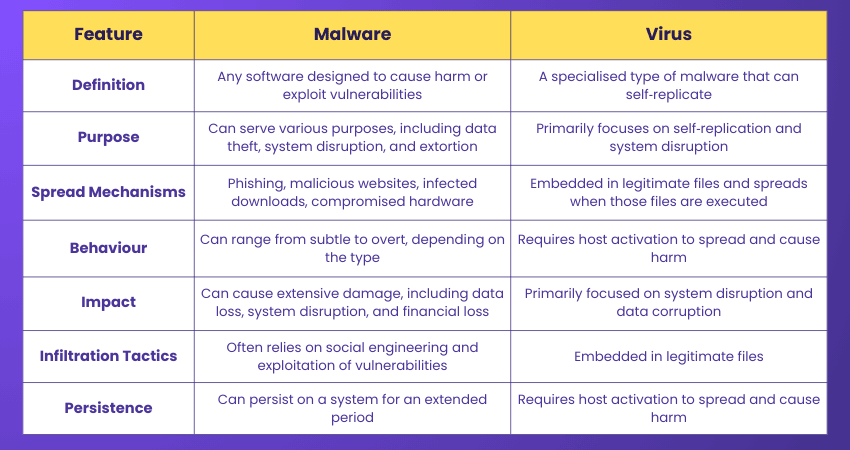
While all viruses are malware, not all malware is viruses. The key difference lies in their behaviour: malware is a broad category of malicious software, while a virus specifically refers to malware that self-replicates by modifying other programs. Malware can be designed to carry out various harmful activities, while viruses focus on spreading through infected files and causing damage to systems.
Become a computer forensics expert with Computer Forensics Foundation Training - register now!
Malware and Virus Examples
Real-world cyber incidents show how dangerous malware and viruses can be for organisations and individuals. These attacks spread quickly, disrupt operations, and cause major financial losses.
Common Malware Examples
Let’s look at some real-world malware examples below:
a) WannaCry: WannaCry was a global ransomware attack that affected over 200,000 systems in more than 150 countries. It exploited an unpatched Microsoft Windows vulnerability and spread rapidly across networks, leading to disrupted hospitals, factories, and organisations.
b) NotPetya: NotPetya appeared to be ransomware but was designed to permanently destroy data. It spread quickly across corporate networks and caused severe operational disruption. One of the most affected companies was Maersk, which reportedly spent millions to recover its systems and restore operations.
Common Computer Virus Examples
Let’s look at some real-world computer virus examples below:
a) ILOVEYOU: The ILOVEYOU virus spread through an email attachment disguised as a love letter. When opened, it replicated through Outlook contacts and overwrote files, such as photos, documents, and music.
b) Stuxnet: Stuxnet was a highly sophisticated virus that targeted industrial control systems. It spread through infected Universal Serial Bus (USB) drives and caused physical damage by destroying around 1,000 centrifuges at Iran’s Natanz nuclear facility.
Strengthen your defence against cyber threats with Cyber Security Courses now!
How to Protect Against Malware and Viruses?
Protecting against malware and viruses goes beyond smarter approaches. It requires a combination of the latest anti-viruses and safe practices. Below we described those methods:
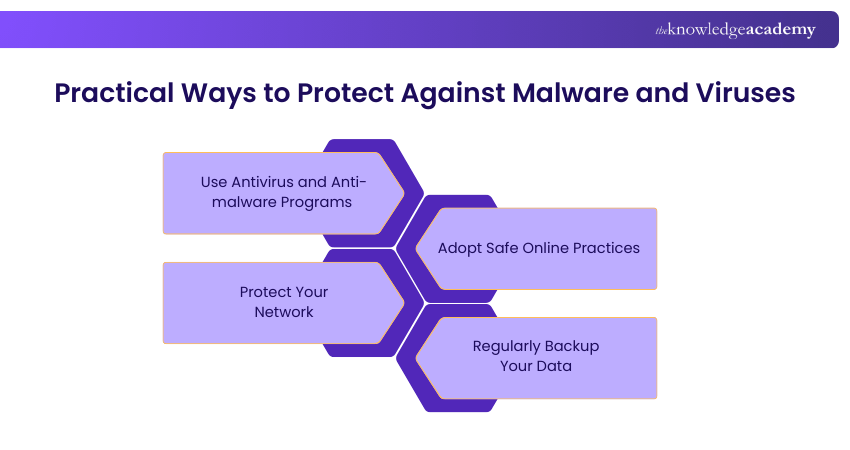
1) Use Antivirus and Anti-malware Programs
Invest in reputable antivirus and anti-malware software to detect, quarantine, and remove malicious software before it can cause harm. Regularly update these programs to protect against new threats.
2) Adopt Safe Online Practices
Be cautious of unsolicited emails, downloads, and websites. Avoid clicking on suspicious links or attachments. Always verify the source before downloading files or software to minimise the risk of infection.
3) Protect Your Network
Secure your home and office networks with strong passwords and encryption. Use a firewall to monitor and control incoming and outgoing network traffic to reduce the risk of malware or virus attacks.
4) Regularly Backup Your Data
Regular backups ensure that your data is protected even if your system is compromised. Use external drives or cloud services to create copies of important files, allowing for quick recovery in case of a malware or virus attack.
Conclusion
Understanding Malware vs Virus helps users recognise different cyber threats and how they affect systems. While a virus is a type of malware, malware includes many harmful programs that can damage devices or steal data. Knowing the difference and following safe security practices can help protect systems from cyberattacks.
Master system security, build a safer network with Introduction to System and Network Security Training!
Frequently Asked Questions
How do I Know if my System has Malware or a Virus?

Sudden slow performance, frequent crashes, unexpected pop-ups, or disabled security tools indicate malware or a virus infection. Advanced security tools spot threats through real-time behaviour scanning and help identify how the attack entered and spread across the system.
Can Antivirus Software Protect Against All Types of Malwares?
Antivirus software is a crucial tool for protecting against many types of malwares, including viruses. However, no single program can catch every threat. It's essential to complement antivirus software with safe browsing habits, regular updates, and additional security measures like firewalls and anti-malware tools.
What are the Other Resources and Offers Provided by The Knowledge Academy?
The Knowledge Academy takes global learning to new heights, offering over 3,000+ online courses across 490+ locations in 190+ countries. This expansive reach ensures accessibility and convenience for learners worldwide.
Alongside our diverse Online Course Catalogue, encompassing 17 major categories, we go the extra mile by providing a plethora of free educational Online Resources like Blogs, eBooks, Interview Questions and Videos. Tailoring learning experiences further, professionals can unlock greater value through a wide range of special discounts, seasonal deals, and Exclusive Offers.
What is The Knowledge Pass, and How Does it Work?
The Knowledge Academy’s Knowledge Pass, a prepaid voucher, adds another layer of flexibility, allowing course bookings over a 12-month period. Join us on a journey where education knows no bounds.
What are the Related Courses and Blogs Provided by The Knowledge Academy?
The Knowledge Academy offers various Cyber Security Training, including the Malware Analysis Training, Digital Forensics Training, and Incident Response Training. These courses cater to different skill levels, providing comprehensive insights into Top 30 Network Security Interview Questions & Answers.
Our IT Security & Data Protection Blogs cover a range of topics related to cybersecurity and data protection, offering valuable resources, best practices, and industry insights. Whether you are a beginner or looking to advance your IT security skills, The Knowledge Academy's diverse courses and informative blogs have got you covered.

The Knowledge Academy


Global Training Provider
The Knowledge Academy is a world-leading provider of professional training courses, offering globally recognised qualifications across a wide range of subjects. With expert trainers, up-to-date course material, and flexible learning options, we aim to empower professionals and organisations to achieve their goals through continuous learning.

Upcoming IT Security & Data Protection Resources Batches & Dates
Date
 Malware Analysis Training
Malware Analysis Training
Fri 14th Aug 2026
Malware Analysis Training
Fri 9th Oct 2026

 If you wish to make any changes to your course, please


