


 Top Rated Course

We may not have the course you’re looking for. If you enquire or give us a call on +61 1-800-150644 and speak to our training experts, we may still be able to help with your training requirements.
How to Delete Phonepe History: 4 Easy Steps
The Knowledge Academy 22 December 2025Curious about How to Delete PhonePe History? Open your PhonePe App, Access History, Select Transactions, Go to Help and Clear All Transactions. Removing your transaction history would enhance privacy. It will help ensure that your financial data remains safe and your app interface uncluttered. Read this blog to learn more!

Training Outcomes Within Your Budget!
We ensure quality, budget-alignment, and timely delivery by our expert instructors.
Table of Contents
If you're wondering, "How to Delete PhonePe History," you're in the right place. PhonePe makes it easy to manage your transaction details and keep your app organised. In this blog, we'll walk you through simple steps to clear your history and maintain your privacy.
It's a quick and easy process that can be done in just a few taps. Whether you're looking to declutter your app or protect your personal information, we've got you covered with easy instructions on How to Delete PhonePe History.
Table of Contents
1) What is PhonePe?
2) Why Clearing PhonePe History is Important?
3) How to Delete Transaction History in PhonePe?
4) Alternative Ways to Remove Transaction History
5) How to Hide PhonePe Transaction History?
6) How to Delete or Deactivate PhonePe Account?
7) Conclusion
What is PhonePe?
PhonePe is a widely used app in India that lets you pay bills, transfer money, recharge your mobile, and much more right from your Android and iOS smartphone. Every transaction you complete is recorded in your transaction history, allowing you to easily review your financial activities.

Why Clearing PhonePe History is Important?
Your transaction history helps with Money Management by allowing you to keep track of your spending, but it can also put your privacy at risk. If someone gets unauthorised access, they might see how much you've spent, who you paid, and what you bought. Deleting your transaction history regularly can help keep your personal and financial details safe.
Gain expertise in cost-effective maintenance with our Facilities Management Training – Register today!
How to Delete Transaction History in PhonePe?
No matter the reason why you are deleting your PhonePe history, here is how to do it:
Step 1. Open the PhonePe App
As the first step, you need to unlock your smartphone. Now, tap on the PhonePe App you have on your phone. If you’re not logged in, you can do it by entering your number, PIN, or password to log in. Now, you will see many options and a PhonePe interface on your screen.
Step 2. View History
Once you’ve opened the PhonePe App on your phone, look for the ‘history’ option at the bottom right corner. Now, tap on history, and you can access the history of all your past transactions to date.
Step 3. Select History

Now select the specific transaction you want to delete and tap the ‘Delete’ option. You may see a trash icon or simply be prompted with two ‘yes’ or ‘no’ options to confirm the deletion. Now, tap on yes if you are confirmed to be deleting that transaction.
Step 4. Go to Help and Clear All Transaction
Now, if you want to delete all your PhonePe transactions, you can do it easily. Select all transactions and tap on the “remove all” or “delete all” option. Again, you may be asked to confirm your deletion. What you need to do is choose between the yes or no option you are displayed on the screen. Remember, once deleted, your transaction history cannot be recovered.
Understand current trends and techniques with our Industry Training Courses – Sign up now!
Alternative Ways to Remove Transaction History
You may also find some alternative options to delete PhonePe History. They are:
Contact PhonePe Support
If you want to delete a specific transaction from your account, you can reach out to PhonePe customer support. While they may not be able to remove the record, they can guide you on how to manage it. Keep in mind that deleting transaction records goes against RBI guidelines.
Clear App Cache and Data
Go to Settings > Apps > PhonePe > Storage > Clear Cache/Data. This will reset the app and log you out, but your transaction history will still be stored in your account.
How to Hide PhonePe Transaction History?
Now, you know how to delete transaction history in PhonePe. However, some people prefer to hide their payment history instead of completely deleting it. So, how can you do that? Let us tell you—it’s just as simple!
Simply go to the ‘History’ section and tap on the ‘Filters’ option in the top right corner. A drop-down menu will appear with options like UPI/Bank Account, PhonePe Wallet, Failed, Pending, and Successful. Select the option you want and tap ‘Apply’. Now, only transactions related to your selected filter will be visible.
Elevate your Logistics Management expertise by joining our Logistics Management Training today!
How to Delete or Deactivate PhonePe Account?
Now, let’s go over how you can delete or temporarily deactivate your PhonePe account.
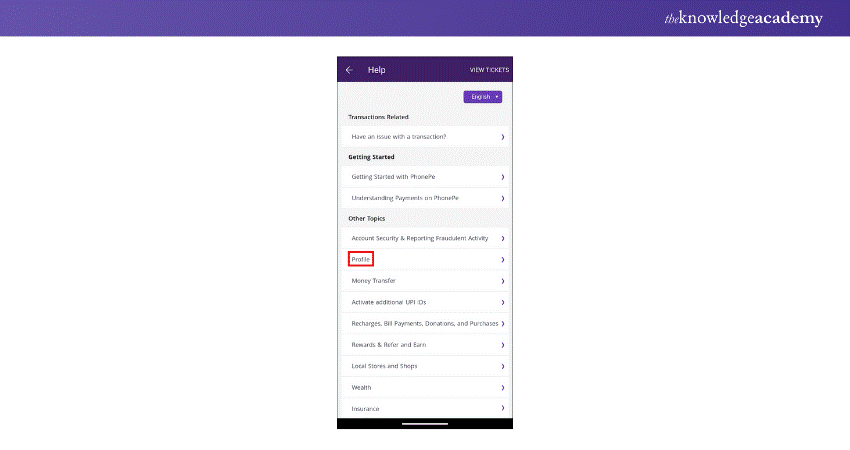
a) Open PhonePe and log in to your account.
b) Transfer any remaining balance from your wallet to your bank account or use it for purchases.
c) Tap on the question mark icon in the top-right corner.
d) Go to ‘Profile’ > ‘My PhonePe Profile’.
e) Tap on ‘My PhonePe Account Details’.
f) Choose between ‘Temporarily Deactivating My PhonePe Account’ or ‘Permanently Deleting My PhonePe Account’.
g) Specify a reason for deactivation or deletion.
h) Confirm your request and follow the on-screen instructions.
i) Your account will now be deactivated or deleted.
Important: Once permanently deleted, your account cannot be recovered. In some cases, deactivation may also be non-reversible.
For any questions or assistance, tap on ‘Contact Support’.
Note: Due to the latest PhonePe update, some users may not see the ‘Delete’ option in their transaction history.
Conclusion
Now you know How to Delete PhonePe History and manage your transaction records for better privacy. Whether you choose to delete or hide transactions, keeping your Personal Finances and financial data secure is essential. If you face any issues, you can always reach out to PhonePe support for assistance. Stay safe and manage your history wisely!
Frequently Asked Questions
How do I Automatically Delete My Activity?

To stop a payment, act fast! If it’s pending, check if your bank or payment app offers a cancel option. For scheduled payments, disable auto-pay. If the payment has already been processed, contact your bank or service provider for a dispute or refund request as soon as possible.
How do I Stop a Payment From Going Through?
To stop a payment, act fast! If it’s pending, check if your bank or payment app offers a cancel option. For scheduled payments, disable auto-pay. If the payment is already processed, contact your bank or service provider for a dispute or refund request as soon as possible.
What are the Other Resources and Offers Provided by The Knowledge Academy?
The Knowledge Academy takes global learning to new heights, offering over 3,000+ online courses across 490+ locations in 190+ countries. This expansive reach ensures accessibility and convenience for learners worldwide.
Alongside our diverse Online Course Catalogue, encompassing 19 major categories, we go the extra mile by providing a plethora of free educational Online Resources like Blogs, eBooks, Interview Questions and Videos. Tailoring learning experiences further, professionals can unlock greater value through a wide range of special discounts, seasonal deals, and Exclusive Offers.
What is The Knowledge Pass, and How Does it Work?
The Knowledge Academy’s Knowledge Pass, a prepaid voucher, adds another layer of flexibility, allowing course bookings over a 12-month period. Join us on a journey where education knows no bounds.
What are the Related Courses and Blogs Provided by The Knowledge Academy?
The Knowledge Academy offers various Industry Training, including Smart Phone Repair Course, Facilitation Skills Training, and Logistics Management Training. These courses cater to different skill levels, providing comprehensive insights into Facilities Management Best Practices.
Our Business Skills Blogs cover a range of topics offering valuable resources, best practices, and industry insights. Whether you are a beginner or looking to advance your business skills, The Knowledge Academy's diverse courses and informative blogs have you covered.

The Knowledge Academy


Global Training Provider
The Knowledge Academy is a world-leading provider of professional training courses, offering globally recognised qualifications across a wide range of subjects. With expert trainers, up-to-date course material, and flexible learning options, we aim to empower professionals and organisations to achieve their goals through continuous learning.

Upcoming Business Skills Resources Batches & Dates
Date
 Smart Phone Repair Course
Smart Phone Repair Course
Fri 14th Aug 2026
Smart Phone Repair Course
Fri 9th Oct 2026

 If you wish to make any changes to your course, please


