Who Should Attend this Figma Course?
The Figma Course is designed for individuals who want to develop practical skills in interface design, User Experience (UX) design, prototyping, and collaborative design using Figma. This course will benefit the following professionals:
- UI/UX Designers
- Web Designers and Developers
- Graphic Designers
- Product Designers
- Visual Designers
- Front-end Developers
- User Experience Professionals
Prerequisites of the Figma Course
There are no formal prerequisites for this Figma Training Course. However, a basic understanding of design principles or digital interfaces may be beneficial.
Figma Course Overview
Figma Training introduces delegates to one of the leading UI and UX design platforms. It covers interface design, collaborative workflows, prototyping, and design systems. Delegates learn to create modern digital experiences efficiently.
Delegates develop skills in Auto Layout, components, variables, Dev Mode, and developer handoff. They also build interactive prototypes and reusable design systems. These capabilities improve design quality and team collaboration.
This 1-Day Figma Course offered by The Knowledge Academy enables delegates to design, prototype, and share digital products with confidence. It develops practical skills for modern UI and UX design workflows. Delegates can apply these techniques to real-world design projects.
Figma Course Objectives
- To understand Figma's interface and core design tools
- To create responsive layouts using Auto Layout and components
- To build reusable design systems and variables
- To develop interactive prototypes for user testing
- To prepare designs for developer handoff using Dev Mode
- To collaborate effectively using Figma's cloud-based workflow
Upon completing this Figma Training in Bangkok, delegates will be able to create user interfaces, build interactive prototypes, and develop reusable design systems using Figma. They will also understand collaborative workflows and developer handoff through Dev Mode.
Roadmap of Learning Figma
This Figma Course follows a structured learning path, guiding delegates from the fundamentals of interface design to collaborative design workflows and developer handoff. Each stage reinforces practical skills, helping delegates apply their knowledge confidently to real-world UI and UX design projects.
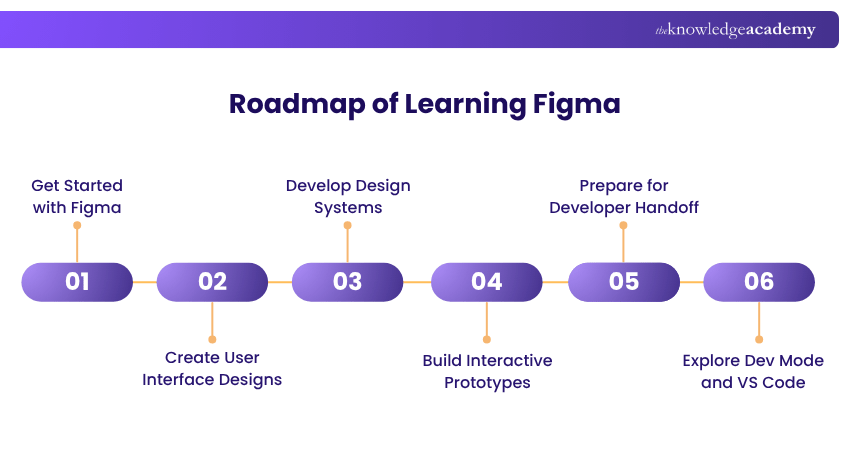
- Get Started with Figma: Jump into the Figma interface, make shapes, craft layouts, sort layers, and share your designs for feedback with a collaboration rhythm.
- Create User Interface Designs: Build responsive screens with grids, Auto Layout, typography, images, colour styles, accessibility features, and vector editing tools.
- Develop Design Systems: Set up a design system with reusable components, variants, styles, and variables. This keeps things consistent, and it boosts overall design efficiency across multiple projects, not just one.
- Build Interactive Prototypes: Map out interactive user journeys. You’ll create prototypes, set up interactions, and share clickable experiences so people can review, test, and iterate.
- Prepare for Developer Handoff: Get your design files in order, manage sharing permissions, inspect the design specs, and export assets so development teams can implement everything smoothly.
- Explore Dev Mode and VS Code: Use Dev Mode to inspect what you designed, check code-ready assets, and link Figma with Visual Studio Code. This support helps keep the designer-developer flow efficient and a bit calmer.





 If you miss out, enquire to get yourself on the waiting list for the next day!













 If you wish to make any changes to your course, please


