


 Top Rated Course

We may not have the course you’re looking for. If you enquire or give us a call on +40 316317743 and speak to our training experts, we may still be able to help with your training requirements.
Top 10 QuickBooks Alternatives for Easy Accounting
Olivia Taylor 03 March 2026Xero, Wave, and Zoho Books are popular QuickBooks alternatives, providing cost-effective, feature-rich accounting tools for small businesses and freelancers. These platforms offer intuitive interfaces, essential features such as expense tracking, and flexible pricing, making everyday accounting simpler and more accessible.

Training Outcomes Within Your Budget!
We ensure quality, budget-alignment, and timely delivery by our expert instructors.
Table of Contents

Managing finances efficiently is essential for any business, but not every organisation finds QuickBooks the right fit. Factors such as pricing, usability, and feature requirements often lead businesses to explore other accounting options.
Fortunately, several alternatives offer flexible, affordable, and user-friendly accounting solutions. In this blog, we will explore the top 10 QuickBooks Alternatives that help businesses and freelancers manage accounts with ease and confidence.
Table of Contents
1) What is QuickBooks?
2) 10 Best QuickBooks Alternatives
3) Is QuickBooks the Best Choice, or are There Better Alternatives?
4) Is There a Better Alternative to QuickBooks?
5) Do Accountants Still Use QuickBooks?
6) Conclusion
What is QuickBooks?
QuickBooks is an easy-to-use accounting software made for small and medium-sized businesses. It helps you keep track of your income and expenses, create invoices, manage bills, pay employees, and prepare for taxes. You can use it on your computer or online, so you can access your accounts anytime, anywhere.
QuickBooks also connects with your bank and other apps to make the task of Money Management a simpler one. It is a great tool for business owners who want to stay organised and save time on their finances without needing to be an expert in Accounting.
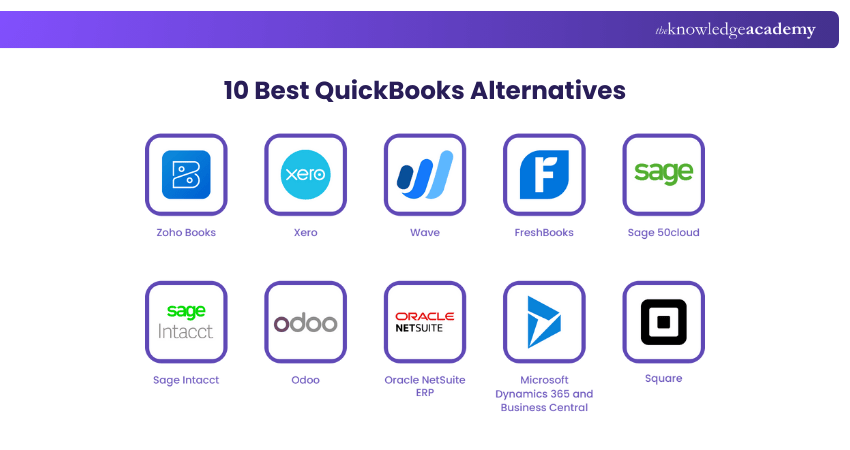
10 Best QuickBooks Alternatives
This section of the blog will highlight the best QuickBooks Alternatives you can use in 2025. These alternatives offer flexible tools and pricing options to suit different needs.
1) Zoho Books
Zoho Books, as a QuickBooks Alternatives, is an easy-to-use, Cloud-based accounting software, especially made for small and medium-sized businesses. It helps you in managing invoices, expenses, taxes, and financial reports. It is an extended part of the Zoho ecosystem and is ideal for those already using other Zoho apps like Zoho CRM, Zoho Inventory, and Zoho Projects, offering a complete ecosystem for Business Management.
Key Features:
1) Create and send professional invoices
2) Generate financial reports and stay tax-compliant
3) Handle project time tracking and billing
4) Integration with Salesforce and other third-party apps
Pros:
1) Simple, clean interface ideal for non-accountants
2) Good automation and custom workflows
3) Seamless integration with other Zoho products
Cons:
1) Payroll feature missing in many countries
2) Some advanced features are only in higher-tier plans
3) Fewer third-party app integrations compared to other alternatives
2) Xero
Xero is a Cloud-based accounting software that has been built for small to medium-sized businesses. It offers tools for managing invoices, bank transactions, payroll, and financial reporting. With a clean interface and strong automation, it simplifies everyday accounting tasks. Xero is widely used across industries and integrates with over 1,000 third-party apps, making it highly flexible.
Key Features:
1) Invoicing, billing, and payment tracking
2) Real-time bank feeds and reconciliation
3) Financial reporting and budgeting
4) Payroll (in selected countries)
Pros:
1) Easy-to-use and well-designed interface
2) Strong integration options with third-party tools
3) Multi-currency support in higher plans
Cons:
1) Limited customer support
2) Payroll only available in a few countries
3) Might get expensive as you upgrade plans
Develop strong skills in automated invoicing and billing with our Xero Training – Join now!
3) Wave Accounting
Wave, being one of the QuickBooks Alternative, is a free, Cloud-based accounting software designed for freelancers, solopreneurs, and small businesses. As a popular choice for freelancer accounting software, it offers invoicing, expense tracking, and reporting on a simple, easy-to-use platform. It is perfectly deal for those with tight Budgets. Wave covers most essential accounting needs without the cost. Moreover, it is rich in its features and efficiency.
Key Features:
1) Double-entry accounting system
2) Basic financial reports (e.g., profit & loss, balance sheet)
3) Receipt scanning via mobile app
4) Payment processing and payroll (paid add-ons)
Pros:
1) 100% free core accounting tools
2) Great for freelancers and small businesses
3) User-friendly and clean interface
Cons:
1) Limited integrations with third-party apps
2) Payroll and payment processing might cost extra
3) Limited customer support in the free version
Attain knowledge of chart of accounts and effective categorisation. Join our Wave Accounting Training now!
4) FreshBooks
FreshBooks is a Cloud-based accounting software designed mainly for freelancers, self-employed professionals, and small businesses. It focuses on simplicity, offering easy invoicing, expense tracking, and Time Management tools. Known for its clean interface and mobile-friendly design, FreshBooks helps you stay on top of your finances with minimal effort. It suits for service-based businesses needing straightforward, client-focused accounting.
Key Features:
1) Online payments via credit cards and PayPal
2) Financial reports and tax summaries
3) Project and Client Management
4) Customised invoicing and automated billing
Pros:
1) Very easy to use, even for beginners
2) Useful for tracking time and billing clients accurately
3) Excellent customer support
Cons:
1) Limited features for product-based or large businesses
2) Lacks inventory management
3) Could be expensive as your client list grows
5) Sage 50cloud
Sage 50cloud, formerly known as Peachtree, is a well-established QuickBooks Alternative with a long-standing desktop-based accounting solution. It is accounting software that runs on your desktop but also includes some Cloud features like backups and remote access. It is built for small to medium-sized businesses that need strong tools for managing accounts, Inventory, payroll, and projects. You get advanced features with plans like Pro, Premium, and Quantum.
Key Features:
1) Connect with bank accounts to track payments and spending
2) Basic financial reports (e.g., profit & loss, balance sheet)
3) Receipt scanning via mobile app
4) Payment processing and payroll (paid add-ons)
Pros:
1) 100% free core accounting tools
2) Great for freelancers and small businesses
3) User-friendly and clean interface
Cons:
1) Limited integrations with third-party apps
2) Payroll and payment processing might cost extra
3) Limited customer support in the free version
Gain knowledge of cash flow management and forecasting techniques. Join our Sage 50 Accounts Training now!
6) Sage Intacct
Sage Intacct is one of the efficient QuickBooks Alternatives with a Cloud-based Financial Management and Accounting Software, designed for medium to large businesses. It helps organisations automate financial processes, improve accuracy, and gain real-time insights into performance. Popular for its strong reporting and scalability, it is especially useful for businesses with complex accounting needs.
Key Features:
1) Real-time dashboards and custom reporting
2) Multi-entity and multi-currency management
3) Automated billing, revenue recognition, and approvals
4) Integration with Salesforce and other third-party apps
Pros:
1) Excellent financial reporting and visibility
2) Scalable for growing or multi-location businesses
3) Automation reduces manual tasks and errors
Cons:
1) Higher learning curve for new users
2) Might be expensive for small businesses
3) Setup and customisation take time and expert help
7) Odoo
Odoo is an open-source software available both in the Cloud and on-premises. It can function as an ERP system, CRM for managing customer relationships, website builder, eCommerce platform, and marketing automation tool by adding different business apps to expand its features. Odoo offers online customer support, but notes that responses to support tickets may sometimes be delayed.
Key Features:
1) Modular all-in-one platform
2) Highly customisable and open-source
3) Strong integration with over 1,000 API connections
4) Comprehensive business tools
Pros:
1) Unified business platform
2) Flexible and scalable
3) Cost-effective
4) Intuitive interface
5) Strong integration ecosystem
Cons:
1) Complex initial setup
2) Pricing complexity
3) Customer support limitations
4) Performance at scale
5) Specialised features require customisation
8) Patriot Accounting
Patriot Accounting is a full-service accounting product that is intended to be used by businesses that are seriously tight-budgeted and yet find no compromise related to product functionality. Its pricing plans begin with a low monthly fee and have a free trial, which entails invoicing, expense monitoring, bank reconciliation, and minimal tax support.
Key Features:
1) 1099 preparation and basic tax support
2) Accounts receivable and ageing tracking
3) Bank reconciliation
4) Billing, invoicing, and invoice customisation
5) Expense tracking and cash management
Pros:
1) Affordable pricing
2) Easy-to-use interface
3) Strong invoicing capabilities
4) Suitable for midsize businesses
5) Online invoice management
Cons:
1) Limited advanced reporting
2) Not ideal for very large enterprises
3) Basic tax assistance only
4) Fewer third-party integrations
5) Payroll features may require add-ons
9) Plooto
Plooto is not a full accounting system; however, it is a dedicated accounts payable and receivable payment management platform. It assists companies to automate payment procedures, collect customer payments, and also pay sellers with ease in the form of online cheques or using pre-authorised debits.
Key Features:
1) Automated accounts payable and receivable workflows
2) International payment support
3) Vendor payments via online check or pre-authorised debit
4) Invoice management and cash flow tracking
5) Integration with QuickBooks, Xero, and NetSuite
Pros:
1) Streamlined payment processes
2) Faster customer and vendor payments
3) Strong automation capabilities
4) Easy integration with accounting software
5) Improves cash flow visibility
Cons:
1) Not a complete accounting solution
2) Limited accounting features on its own
3) Requires integration with other platforms
4) May be costly for very small businesses
5) Focused mainly on payments
10) ZarMoney
ZarMoney is a cloud-based accounting solution offering a broad range of features at an affordable price point. It includes tools for bank reconciliation, billing, invoicing, tax assistance, and ACH payment processing, allowing businesses to synchronise transactions instantly. With built-in tutorials and webinars, ZarMoney is especially suitable for small businesses and new accounting professionals.
Key Features:
1) Bank reconciliation and account management
2) Tax assistance and CPA filing tools
3) ACH payment processing and check writing
4) Billing, invoicing, and cash management
5) Contact and database management
Pros:
1) Cost-effective pricing
2) Free trial availability
3) Comprehensive accounting features
4) Educational resources and tutorials
5) Suitable for small businesses and startups
Cons:
1) Interface may feel dated to some users
2) Limited advanced customisation
3) Fewer integrations than larger platforms
4) Not ideal for complex enterprise needs
5) Learning curve for non-accountants
Develop strong skills in automated invoicing and billing with our Xero Training – Join now!
Is QuickBooks the Best Choice, or are There Better Alternatives?
Picking the right accounting software for your business can feel difficult because there are so many choices. QuickBooks is one of the most well-known tools, but it may not always be the best fit. Other QuickBooks Alternatives can give you similar or even better features, prices, and ease of use.
To decide what works best for your business, think about these questions:
1) Can You Handle These Accounting Functions?
Every business has different needs, but most will need basic accounting functions. These include creating invoices, matching bank records, running payroll, paying bills, and preparing for tax season. Having the right software makes these tasks faster, easier, and less stressful.
a) Creating and Sending Invoices
Invoices are how you get paid. Your software should let you create invoices quickly, send them to customers, and track who has paid and who hasn’t. It should also help you record expenses, so you always know your profits.
b) Bank Reconciliation
This is about comparing your bank account with your software records. If the numbers don’t match, you can find errors or missed payments. Good software makes this process simple with automatic matching.
c) Payroll
If you have Employees, payroll is a must. The right tool will help you calculate salaries, track working hours, and send payments on time. It should also handle deductions like taxes or insurance.
d) Bills
Paying bills is part of daily business. Your software should remind you of due dates, help you record what you owe, and create reports like profit and loss to show your financial health.
e) Tax Time
Taxes can be stressful, but organised records make it easier. Software should keep receipts, expenses, and payments in one place, so you’re ready when tax season comes. This reduces mistakes and saves money.
2) How Often Do You Rely on Software Reports for Business Decisions?
Reports help you see where your money is going and how healthy your business is. Depending on the size of your company, you may check reports daily, weekly, monthly, or yearly. These reports guide important choices, from paying bills to planning future growth.
a) Daily Reports
Daily reports show your bank balance, new payments, expenses, and payroll. They help you stay on top of cash flow and avoid surprises.
b) Weekly Reports
Weekly reports give you a bigger picture. You can review sales, unpaid invoices, and expenses. Managers often use these reports to make short-term business decisions.
c) Monthly Reports
At the end of the month, detailed reports like profit and loss statements, balance sheets, and cash flow summaries help you measure performance and spot trends.
d) Biannual Reports
Every six months, businesses combine monthly data to check growth and set goals for the next two quarters. This is useful for adjusting strategies.
e) Annual Reports
Yearly reports cover taxes, audits, and overall performance. They help with long-term planning, budgeting, and attracting investors.
3) How Do You Picture Your Business Evolving?
Your accounting software should grow with your business. As you expand, you’ll need more advanced features like automation, real-time access, strong security, and AI-powered insights. These tools will save time and improve decision-making.
a) Smarter Automation
Automation can handle tasks like generating invoices, tracking expenses, or sending reminders. This reduces manual work and lowers the chance of mistakes.
b) Real-time Data Access
Cloud-based tools let you check reports, invoices, and bank data anytime, anywhere. This means you can make business decisions quickly, even when you’re not in the office.
c) Seamless Integrations
Good software should connect with payroll, banks, eCommerce platforms, and CRMs. This keeps all your business data in one place, so you don’t need to switch between apps.
d) Enhanced Security
Security is key for financial data. Strong accounting tools use encryption, two-step logins, and data protection standards to keep your business safe.
e) AI Powered Insights
AI goes beyond reports. It can spot risks early, suggest ways to save money, predict future cash flow, and even recommend smarter budgets.
Attain knowledge of chart of accounts and effective categorisation. Join our Wave Accounting Training now!
Is There a Better Alternative to QuickBooks?
QuickBooks is a powerful accounting and invoicing option, however, it is not the only option. There are alternatives to QuickBooks for small business and large ones, especially where cost is considered a priority.
An example of this is that when entering contracts with businesses interested in paying less on transaction processing fees, it might be best to use Xero because you can choose the payment processing service of your preference instead of using QuickBooks Payments.
Do Accountants Still Use QuickBooks?
QuickBooks is still popular among many accountants, particularly among small and medium-sized businesses. It is highly reputable, simple to work with, and boasts a massive ecosystem of interconnections. Yet, alternative options, such as Xero and Zoho Books, are gaining use by accountants. The selection will be determined by what the clients need, features, and cost.
Conclusion
Choosing the right accounting software is essential for managing finances efficiently and supporting business growth. While it remains a popular option, many QuickBooks Alternatives offer better pricing, simpler workflows, or features tailored to specific needs. Tools like Xero, Zoho Books, and others provide flexible, user-friendly solutions for businesses and freelancers. By comparing features and costs, you can select an accounting platform that truly fits your requirements.
Learn to efficiently manage financial transactions and reporting with our Accounting Software Training – Join now!
Frequently Asked Questions
Is QuickBooks Easy to Learn?

Yes, QuickBooks is relatively easy to learn, especially for individuals with basic accounting knowledge. Its user-friendly interface, comprehensive tutorials, and extensive online resources make it accessible for users to grasp the fundamentals and navigate the software effectively
Is There a Google Alternative to QuickBooks?
Google doesn’t have its own full accounting software like QuickBooks. But you can make a simple system with Google Sheets, Forms, and Drive, or use third-party apps from the Google Workspace Marketplace for stronger accounting features.
What are the Other Resources and Offers Provided by The Knowledge Academy?
The Knowledge Academy takes global learning to new heights, offering over 3,000+ online courses across 490+ locations in 190+ countries. This expansive reach ensures accessibility and convenience for learners worldwide.
Alongside our diverse Online Course Catalogue, encompassing 17 major categories, we go the extra mile by providing a plethora of free educational Online Resources like Blogs, eBooks, Interview Questions and Videos. Tailoring learning experiences further, professionals can unlock greater value through a wide range of special discounts, seasonal deals, and Exclusive Offers.
What is The Knowledge Pass, and How Does it Work?
The Knowledge Academy’s Knowledge Pass, a prepaid voucher, adds another layer of flexibility, allowing course bookings over a 12-month period. Join us on a journey where education knows no bounds.
What are the Related Courses and Blogs Provided by The Knowledge Academy?
The Knowledge Academy offers various Accounting Software Training, including QuickBooks Training, Wave Accounting Training, and Xero Training. These courses cater to different skill levels, providing comprehensive insights into Double-entry Accounting.
Our Accounting and Finance Blogs cover a range of topics related to alternatives to QuickBooks, offering valuable resources, best practices, and industry insights. Whether you are a beginner or looking to advance your Accounting and Finance skills, The Knowledge Academy's diverse courses and informative blogs have got you covered.

Olivia Taylor


Chartered Accountant and Financial Training Specialist
Olivia Taylor is a qualified chartered accountant with over a decade of experience in financial management, auditing and corporate reporting. Having worked with leading firms in both the public and private sectors, Olivia brings clarity to complex financial topics. Her writing focuses on helping professionals build confidence in key areas of accounting, compliance and financial planning.
View Detail
Upcoming Accounting and Finance Resources Batches & Dates
Date
 Finance for Non Financial Managers
Finance for Non Financial Managers
Fri 10th Jul 2026
Finance for Non Financial Managers
Fri 9th Oct 2026

 If you wish to make any changes to your course, please


