


 Top Rated Course

We may not have the course you’re looking for. If you enquire or give us a call on +48 221041849 and speak to our training experts, we may still be able to help with your training requirements.
Understanding SQL Databases: A Complete Overview
Richard Harris 14 July 2026A SQL Database is a relational system that stores data in structured tables, using SQL to manage, query, and organise information across different applications. It organises data into rows and columns, making information easy to store and retrieve. It is widely used in websites, enterprise systems, and data-driven platforms.

Training Outcomes Within Your Budget!
We ensure quality, budget-alignment, and timely delivery by our expert instructors.
Table of Contents
Click. Your food is ordered. Click. Your profile has been updated. Click. Your payment goes through. What makes all of that possible? Meet SQL Databases, the quiet heroes behind nearly every digital move you make. They know how to keep things running smoothly no matter how much data is behind the scenes.
But how do they actually work? What makes them so popular? In this blog, we’ll explore SQL Databases in a fun and easy way. Whether you're new to tech or just looking to understand the basics, this is for you. Let's make data your new best friend.
Table of Contents
1) What is an SQL Database?
2) How are SQL Databases Used?
3) How Does a SQL Database Work?
4) Benefits of SQL Database
5) Key Features of SQL Database
6) What are Some Examples of SQL Database Technology?
7) SQL vs NoSQL Databases
8) Conclusion
What is an SQL Database?
An SQL Database is a type of database that uses Structured Query Language (SQL) to store, manage, and access data. It organises information into tables made of rows and columns, much like a spreadsheet. SQL Databases are used in many applications, from websites and mobile apps to banking systems and business software. They make it easy to:
1) Insert new data
2) Read existing data
3) Update information
4) Delete unwanted records

How are SQL Databases Used?
SQL Databases are at the core of most modern digital systems. They are used to store, organise, and retrieve structured data efficiently, allowing businesses, organisations, and Developers to manage vast amounts of information reliably and securely. Here are some of the areas where SQL Database is used more often:
1) Websites and Apps: SQL Databases are usedto store dynamic content like user data, login details, form submissions, product listings, and more. Each time a user interacts with a website while registering, searching or shopping, SQL queries are triggered to fetch or store data.For Example, when you log into Amazon, SQL can check your login credentials, pulls up your saved addresses and shows your past orders, all in seconds.
For example, when you log into Amazon, SQL can check your login credentials, pull up your saved addresses and show your past orders, all in seconds.
2) Business Operations: SQL Database is used to manage day-to-day tasks like Employee Management, supply chain tracking, invoicing, project planning, and reporting. Businesses create multiple tables like employees, salaries, departments and link them using SQL relationships.
For example, a company can track when an employee clocks in and automatically calculate work hours and monthly salary using SQL queries.
3) Banking and Finance: SQL Database helps ensure accurate transaction processing, secure financial records, account history tracking, and fraud detection. The transactions are logged in real-time, and SQL commands update the balances, flag any suspicious activities, and record the payments securely.
For example, after making an online transfer, SQL can update your balance and log the transaction for both sender and receiver accounts.
4) Healthcare Systems: A SQL Database can be used to manage sensitive patient information, medical reports, treatment history, and doctor-patient interactions. SQL Databases ensure proper access control and logging, maintaining strict data privacy often under the Health Insurance Portability and Accountability Act (HIPPA) or the General Data Protection Regulation (GDPR).For example, a doctor can access a patient’s entire medical history, diagnoses, test results, and prescriptions from an SQL-based hospital system before treatment.
For example, a doctor can access a patient’s entire medical history, diagnoses, test results, and prescriptions from an SQL-based hospital system before treatment.
5) Education and E-learning: These are used in education to manage and organise key academic information such as student enrolments, records, course materials, grades, and schedules. Each student, class and subject is stored in a separate table, and SQL links these tables together. This allows for easy tracking, accurate reporting, and smooth management of data across schools, colleges, and universities.
For example, online platforms can use SQL to show your progress in a course, quiz results and issue your certificate.
6) Government and Public Administration: SQL Databases help governments organise and manage large amounts of national and local data in a secure and efficient way. They are used to store identity (ID) records, census data, tax information, public service requests, and licensing details. By handling millions of citizen records, SQL ensures that different departments can access and process information quickly, accurately, and safely for better public services.
For example, when you apply for a passport online, your information is stored in an SQL system that tracks your application status and history.
7) Retail and Inventory Management: These databases help businesses manage everything related to their products in an organised and efficient way. They are used to track product availability, pricing, supplier information, customer orders, and shipping details. With SQL queries, businesses can quickly check stock levels, get restocking alerts, view order history, and search for specific products. This ensures smooth operations and better customer service.
For example, when you order shoes online, the SQL Database checks the stock, places the order, reduces inventory count, and updates your order status.
8) Customer Relationship Management (CRM): It plays a key role in managing customer relationships by keeping all important information in one place. They help businesses handle leads, sales pipelines, support tickets, contact details, and client interactions. Tools like Salesforce use SQL to track every call, email, or purchase a customer makes. This helps sales and support teams stay organised, follow up on time, and build stronger relationships with customers.
For example, a sales rep uses a CRM to view a client’s purchase history and follow-up reminders, all fetched from an SQL Database.
9) Data Analytics and Reporting: SQL helps businesses make smart decisions by handling large sets of data in a clear and organised way. It allows users to extract, filter, and summarise information to understand what is happening in the business. This helps teams spot trends, fix problems, and plan better for the future, all by running simple or advanced queries on their data.
For example, a Data Analyst runs an SQL query to find which marketing channel brings the most leads, then shares a report with the team.
Command data infrastructure effectively with our PostgreSQL Administration Training - Register now!
How Does a SQL Database Work?
A SQL Database works by organising data into structured tables and using queries to store, retrieve, and manage information efficiently. It follows a relational model where different tables can be connected using keys and relationships. Now that we know what is SQL, here are the components and mechanisms that make this process possible:
1) Schema
A schema defines the overall structure of a SQL Database. It specifies how data is organised, including tables, columns, relationships, constraints, and data types. The schema acts like a blueprint that ensures data is stored in a consistent and organised way.
2) SQL Language
Structured Query Language (SQL) is used to communicate with the database. It allows users and applications to perform operations such as inserting new data, updating existing records, retrieving information, and deleting data. Common SQL commands include SELECT, INSERT, UPDATE, and DELETE.
3) Other Mechanisms
SQL Databases also use additional mechanisms such as indexing, transactions, and constraints to maintain performance and data integrity. Indexes improve search speed, transactions ensure reliable data processing, and constraints help enforce rules to keep data accurate and consistent.
Benefits of SQL Database
SQL Databases are widely used because they offer a combination of structure, reliability, and ease of use. Here are some of the advantages:
1) Easy to Maintain
One of the biggest strengths of SQL Databases is that they are simple to manage, even as your data grows.
1) Data is organised in clear tables with rows and columns, making it easy to understand.
2) Maintenance tasks like data updates, backups, and performance tuning are straightforward.
3) SQL syntax is standardised and widely documented, making it easy for professionals to learn and use.
4) Built-in tools in most database systems help automate tasks such as scheduling backups or monitoring usage.
5) Database Administrators can quickly fix errors, restructure tables, or add new data fields without affecting the system.
2) Increased Efficiency
SQL Databases help perform data tasks faster and with fewer resources.
1) SQL queries allow you to search, update, and filter data quickly saving time.
2) You can retrieve exactly the data you need with precise conditions, reducing manual work.
3) Operations such as adding hundreds of records or changing multiple entries can be done in one query.
4) Automation through stored procedures and triggers improves daily efficiency.
5) Real-time access to data supports faster decision-making and reporting.

3) Increased Flexibility
SQL Databases are highly adaptable and work well with different systems and requirements.
1) You can modify the database structure by adding tables, columns, or relations without disrupting existing data.
2) SQL supports different data types (text, numbers, dates, etc.), allowing for a wide range of uses.
3) SQL Databases work across various platforms, Windows, Linux, Cloud services, and mobile apps.
4) You can write custom queries to pull specific data sets, join data from multiple tables, or create reports.
5) They can be used in both small-scale projects (like a student database) or large enterprise systems.
4) Better Performance
They are designed to deliver quick, accurate, and consistent results even with large datasets.
1) Indexing and query optimisation techniques ensure data is retrieved quickly.
2) Supports multiple users accessing the database simultaneously without slowing down.
3) SQL engines are built to manage millions of records and complex queries smoothly.
4) Performance monitoring tools help track and improve speed or detect slow queries.
5) Can be scaled vertically (more resources) or horizontally (more servers) as your data grows.
5) Improved Consistency
One of the major benefits is to ensure that your data remains clean, accurate, and reliable.
1) Based on Atomicity, Consistency, Isolation, and Durability (ACID) compliance, which ensures transactions are processed reliably.
2) Data relationships (using primary and foreign keys) prevent inconsistencies and duplication.
3) Validation rules and constraints can be set, so incorrect or incomplete data is not accepted.
4) Every update or change follows a strict process, maintaining data integrity across tables.
5) All users accessing the database see the most up-to-date and correct version of the data.
Ready to power up your SQL reporting game and excel at real-time Business Intelligence? Sign up for our SQL Server Reporting Services (SSRS) Training now!
Key Features of SQL Database
In this section, you will learn about the key features of SQL Database that makes it the powerhouse of Data Management:

Structured Query Language
SQL is the standard language employed to interact with relational databases. It provides a simple yet powerful way to manage data, making it accessible even for beginners.
1) Use SQL commands to insert, update, delete, or view data.
2) Supports filtering, sorting, joining, and grouping data.
3) Works consistently across most database platforms.
ACID Properties
SQL Databases follow the ACID model to ensure reliable and error-free transactions. These properties protect data accuracy even during failures or power outages.
1) Makes sure all parts of a transaction are completed or none at all.
2) Keeps the database valid before and after transactions.
3) Keep transactions separate even if they run at the same time.
4) Saves data permanently once a transaction is complete.
Schema-based
SQL Databases are built on a fixed schema, which defines the structure of tables, columns, and data types. This ensures that data is organised, consistent, and easy to maintain.
1) Every table follows a defined format and layout.
2) Makes linking and validating data across tables more efficient.
3) Changes to the structure are made with control and planning.
Data Consistency and Integrity
Maintaining clean, accurate, and reliable data is crucial in any system. SQL Databases use rules and constraints to ensure that only valid and consistent data is stored.
1) Primary and foreign keys maintain table relationships.
2) Constraints prevent duplicate or incorrect entries.
3) Keep your database error-free and trustworthy.
Scalability and Performance
As data grows, SQL Databases scale to meet demand while maintaining speed and stability. They perform well with both small and large datasets.
1) The use of indexing improves search and query times.
2) Handles multiple users and large workloads simultaneously.
3) Works in both local servers and Cloud-based environments.
Support for Complex Queries
SQL is not limited to basic commands, it supports detailed and powerful queries for in-depth Data Analysis. This makes it ideal for generating business insights.
1) Perform joins across multiple tables.
2) Use nested queries, Data Aggregations, and conditions.
3) Helps with reporting, Trend Analysis, and custom data views.
Security
Security is vital when handling sensitive or personal data. SQL Databases offer strong built-in protection features to control who can access or change information.
1) Role-based permissions restrict access to the user level.
2) Data encryption and authentication features ensure safety.
3) Helps organisations comply with data privacy laws like GDPR.
Transaction Control
SQL allows Developers to group multiple operations into one transaction. This ensures either all changes happen or none, avoiding partial updates or errors.
1) Commands like BEGIN, COMMIT, and ROLLBACK manage transaction flow.
2) Keeps your database consistent and reliable during updates.
3) Especially useful in systems like banking and order processing.
Begin your journey into the world of Database Management with our Introduction to MySQL Course – Sign up today!
What are Some Examples of SQL Database Technology?
Several SQL Database technologies are widely used to manage and store structured data across different applications and industries. Some of the most commonly used SQL Database technologies are explained below.
1) MySQL
MySQL is one of the most popular open-source SQL Database systems. It is widely used in web applications and is known for its reliability, speed, and ease of use. Many platforms, including content management systems and e-commerce websites, rely on MySQL to manage their data efficiently.
2) PostgreSQL
PostgreSQL is a powerful open-source relational database known for its advanced features and strong data integrity. It supports complex queries, large datasets, and custom data types, making it suitable for enterprise systems, analytics platforms, and large-scale applications.
3) MariaDB
MariaDB is an open-source Relational Database Management System (RDBMS) that was developed from the MySQL codebase. It offers improved performance, additional storage engines, and enhanced security features. Many organisations use MariaDB as a drop-in replacement for MySQL.
4) Microsoft SQL Server
Microsoft SQL Server is an RDBMS developed by Microsoft. It is widely used by businesses and enterprises for managing large amounts of data. The platform offers strong security, analytics tools, and integration with other Microsoft products.
5) Oracle Database
Oracle Database is an enterprise-level RDBMS developed by Oracle Corporation. It is known for its scalability, high performance, and advanced security features. Large organisations often use Oracle Database for complex and mission-critical systems.
6) IBM Db2
IBM Db2 is a powerful relational database developed by IBM. It is designed to handle large-scale data processing and advanced analytics. Many enterprises use Db2 for business applications that require high reliability, performance, and data management capabilities.
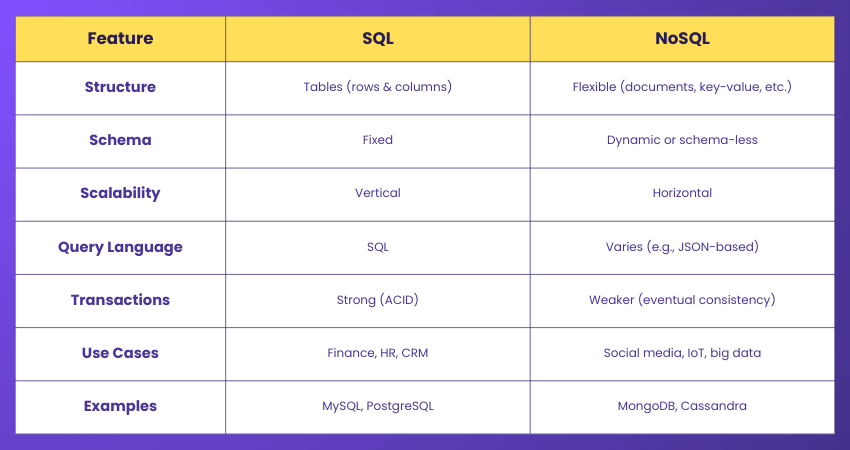
SQL vs NoSQL Databases
SQL and NoSQL Databases are both used to store and manage data, but they work in different ways. SQL Databases store data in structured tables with predefined schemas, making them ideal for applications that need consistency, such as finance or HR systems.
NoSQL Databases, on the other hand, are more flexible. They store data in various formats like documents, key-value pairs, or graphs, which makes them better for handling large, changing, or unstructured data. The choice between the two depends on your project’s needs for structure, speed, scalability, and data type.
Conclusion
SQL Databases are an essential part of modern Data Management. They support a wide range of applications, from websites and business systems to banking, healthcare, and government services. By understanding how they work and the technologies behind them, organisations can manage data more effectively. As digital systems continue to grow, they will remain a reliable foundation for handling and analysing large volumes of information.
Command data like a pro with Advanced SQL. Sign up for our Advanced SQL Course and level up your queries!
Frequently Asked Questions
What are the Top Three SQL Databases?

The top three SQL Databases are MySQL, PostgreSQL, and Microsoft SQL Server. They are widely used for web applications, enterprise systems, and analytics due to their reliability, scalability, and strong performance.
What is the 80 20 Rule in SQL?
The 80/20 rule of the Pareto Principle in SQL suggests that 80% of database queries typically access only 20% of the stored data. Optimising these heavy queries significantly improves performance, efficiency, and overall database responsiveness.

Richard Harris


Senior Full Stack Developer and Technology Educator
Richard Harris is a highly experienced full-stack developer with deep expertise in both frontend and backend technologies. Over his 12-year career, he has built scalable web applications for startups, enterprises and government organisations. Richard’s writing combines technical depth with clear explanations, ideal for developers looking to grow in modern frameworks and tools.


 If you wish to make any changes to your course, please


