


 Top Rated Course

We may not have the course you’re looking for. If you enquire or give us a call on +64 98874342 and speak to our training experts, we may still be able to help with your training requirements.
Steps to Reset your Instagram Password
The Knowledge Academy 27 March 2026Rest your Instagram password via profile, Accounts Center, Password and Security, Change Password or use the reset link with email or phone. Whether you forgot your login or think someone’s been snooping, the process is simple. We’ll guide you through the steps, help you fix, and make sure your account stays protected from future risks.

Training Outcomes Within Your Budget!
We ensure quality, budget-alignment, and timely delivery by our expert instructors.
Table of Contents
Ever tried logging into Instagram only to realise you’ve completely forgotten your password? Or maybe you think someone else might have accessed your account without permission. Either way, knowing how to reset your Instagram password is essential for keeping your profile secure.
It’s a quick and simple process that doesn’t require any technical know-how. With just a few taps, you can recover your access and protect your account from future issues. Whether it’s a forgotten login or a security concern, this blog will help you take control and get back to enjoying your Instagram experience without the stress.
Table of Contents
1) Steps to Reset Your Instagram Password
a) On Mobile Devices (iOS and Android)
b) On Desktop
c) Change your Instagram Password
2) What Is the Best Password for Instagram?
3) Why Am I Being Asked to Reset My Instagram Password?
4) Conclusion
Steps to Reset Your Instagram Password
Changing your Instagram password is important for keeping your account secure. This section will show you how to change your password on both mobile devices and desktop computers. Follow these steps to update your password.
1) On Mobile Devices (iOS and Android)
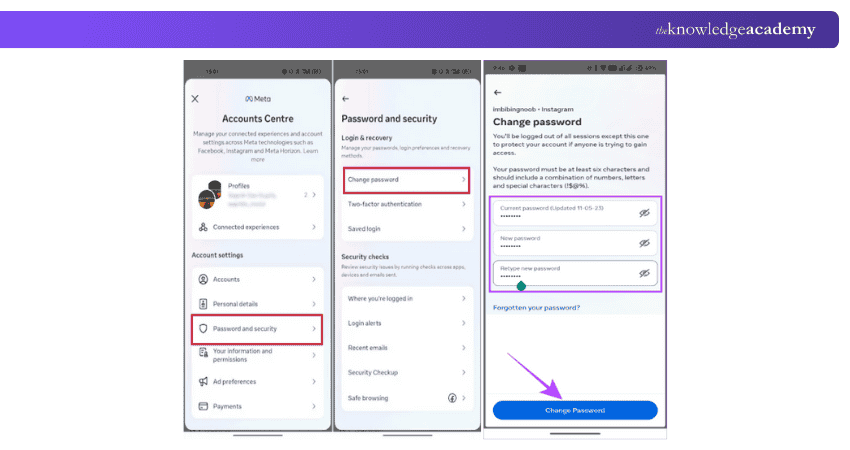
a) Open the Instagram app and tap your profile picture at the bottom right.
b) Tap the three horizontal lines at the top right and select Settings and Privacy.
c) Scroll down and tap Accounts Centre under the Meta section.
d) Select Password and Security, then tap Change Password.
e) Enter your current password, set a new one, confirm it, and tap Change Password to save.
2) On Desktop
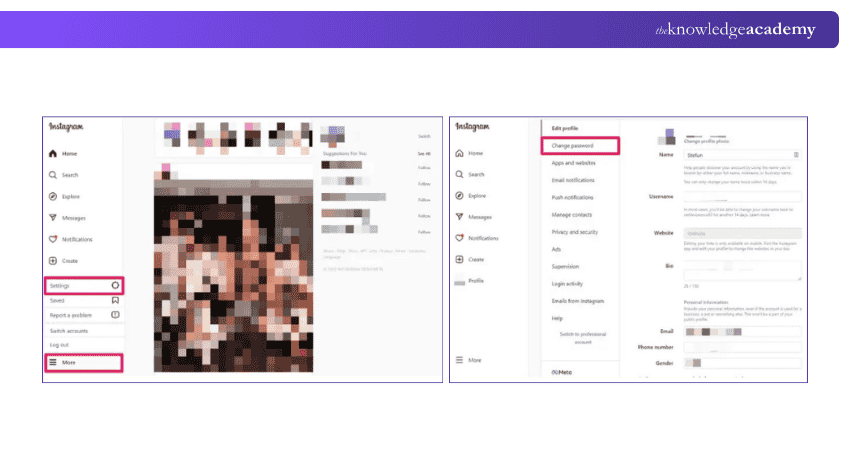
a) Go to www.instagram.com and log in to your account.
b) Click your profile picture at the top right and select Settings.
c) In the left menu, click Accounts Centre > Password and security > Change password.
Enter your current password, new password, confirm it, and click Change password to save.Unlock the Best time to post on Instagram and grow your audience faster.
Change your Instagram Password
a) Open the Instagram app or log on to the Instagram website
b) On the login screen, tap "Forgot password?" or "Trouble logging in?"
c) Enter your email ID, username, or phone number to receive a password reset link
d) Open the link sent to your email or SMS and enter a new password.
e) Confirm the new password and log in with your new credentials
Learn skills for effective YouTube content creation with our YouTube Marketing Course – join today!
What Is the Best Password for Instagram?
The best Instagram password is long, unique, and hard to guess. Use a mix of uppercase, lowercase, numbers, and special characters. Avoid common words or personal info. A password manager can help generate and store strong passwords.
Why Am I Being Asked to Reset My Instagram Password?
Instagram may ask you to reset your password if there's unusual login activity, a security breach, or suspicious behavior on your account. This is a safety measure to protect your personal information and prevent unauthorized access.
Conclusion
Changing your Instagram password is essential to keep your account safe from hackers. By following these steps on mobile devices and desktops, you can easily update your credentials. Always create a strong and secure password by avoiding common phrases and personal information. Learning “How to Change Your Instagram Password?” lets you confirm that your account remains secure and your personal information stays protected
Start learning to Design and Create Engaging Content for Social Media Training – Create and Grow Online!
Frequently Asked Questions
What Should I Do if I Suspect Someone Has Hacked My Instagram Account?

Change your password and enable two-factor authentication. Check your account activity and remove any unfamiliar devices or logins.
How Can I Change My Instagram Password If I Can’t Access My Email or Phone Number?
If you can’t access your email or phone number, try logging in with your Facebook account if it’s linked. If that doesn't work, contact Instagram support for further assistance.
What are the Other Resources and Offers Provided by The Knowledge Academy?
The Knowledge Academy takes global learning to new heights, offering over 3,000+ online courses across 490+ locations in 190+ countries. This expansive reach ensures accessibility and convenience for learners worldwide.
Alongside our diverse Online Course Catalogue, encompassing 17 major categories, we go the extra mile by providing a plethora of free educational Online Resources like Blogs, eBooks, Interview Questions and Videos. Tailoring learning experiences further, professionals can unlock greater value through a wide range of special discounts, seasonal deals, and Exclusive Offers.
What is the Knowledge Pass, and How Does it Work?
The Knowledge Academy’s Knowledge Pass, a prepaid voucher, adds another layer of flexibility, allowing course bookings over a 12-month period. Join us on a journey where education knows no bounds.
What are Related Courses and Blogs Provided by The Knowledge Academy?
The Knowledge Academy offers various Digital Marketing Training, including Social Media Marketing Course, Instagram Marketing Course and Direct Marketing Training. These courses cater to different skill levels, providing comprehensive insights into Importance of a Marketing Budget.
Our Digital Marketing Blogs cover a range of topics related to digital marketing, offering valuable resources, best practices, and industry insights. Whether you are a beginner or looking to advance your marketing skills, The Knowledge Academy's diverse courses and informative blogs have got you covered.

The Knowledge Academy


Global Training Provider
The Knowledge Academy is a world-leading provider of professional training courses, offering globally recognised qualifications across a wide range of subjects. With expert trainers, up-to-date course material, and flexible learning options, we aim to empower professionals and organisations to achieve their goals through continuous learning.

Upcoming Digital Marketing Resources Batches & Dates
Date
 Digital Marketing Course
Digital Marketing Course
Fri 11th Sep 2026
Digital Marketing Course
Fri 30th Oct 2026

 If you wish to make any changes to your course, please


