


 Top Rated Course

We may not have the course you’re looking for. If you enquire or give us a call on +31 208081674 and speak to our training experts, we may still be able to help with your training requirements.
What is a Trojan Horse? Types, Detection & Prevention
John Davies 15 July 2026The Trojan Horse was a deceptive wooden structure used by the Greeks to infiltrate Troy, marking one of history’s most iconic war strategies. Symbolising trickery and infiltration, it now represents hidden threats in modern contexts like Cyber Security and cultural references across literature and media. Read ahead to know more!

Training Outcomes Within Your Budget!
We ensure quality, budget-alignment, and timely delivery by our expert instructors.
Table of Contents

Have you ever downloaded a “free” app, clicked on an email attachment, or noticed strange behaviour on your computer? Chances are, you may have fallen victim to a Trojan Horse Malware. True to the Greek mythology Trojan Horse, this malware masquerades as legitimate software to sneakily access your device and cause chaos.
In this blog, we’ll discuss What is a Trojan Horse Malware, how it operates, common types to look out for, and how you can protect your data and device from this deceptive cyber malware.
Table of Contents
1) What is a Trojan Horse Malware?
2) History of the Trojan Horse
3) How Does a Trojan Horse Work?
4) Common Types of Trojan Horses
5) Examples of Trojan Horse Attacks
6) How to Identify Trojan Horse?
7) How to Remove a Trojan Horse?
8) How to Safeguard Against Trojan Malware?
9) Conclusion
What is a Trojan Horse Malware?
What is a Trojan? A Trojan or Trojan Horse is a sneaky form of malware. It looks like safe software, but it causes harm after installation. Trojans do not copy themselves like viruses, they use Social Engineering to trick users.
Trojans steal your personal information, watch what you do, or control your computer from far away. They do this by pretending to be fake emails or updates. To get rid of this bad software, don’t download anything if you are not sure what it is. Always keep your Antivirus updated, and use strong passwords, too.

History of the Trojan Horse
The term “Trojan Horse” comes from ancient Greek mythology, where Greek soldiers hid inside a wooden horse to secretly enter the city of Troy. The people of Troy believed it was a harmless gift, but it led to the city’s downfall once the hidden soldiers emerged.
In cybersecurity, Trojan malware follows a similar idea. It disguises itself as legitimate or useful software to trick users into installing it. Once inside a system, it can carry out harmful actions such as stealing data, monitoring activity, or allowing attackers to gain unauthorised access.
How Does a Trojan Horse Work?
Trojan Horses Virus is a malware that looks like a normal app or file. When you open or install it, it quietly starts damaging your computer, like stealing personal information or slowing down the system.
This virus mostly comes through fake emails, pop-up messages, or free downloads. People think that the file is safe, but there is malware hidden in it. When it gets installed, the hacker can get access to your device.
Trojan works secretly in the background. Even Antivirus software cannot catch it. It can leak your data, change security settings, or weaken your system. To avoid this, always download from trusted sources and keep your system updated.
Become a Certified Cyber Security Professional with our Certified Cyber Security Professional (CCS-PRO) Course. Sign up now!
Common Types of Trojan Horses
Like there are different Types of Computer Viruses, there are types of Trojan Horses Virus too. There are many forms, and each type has its own unique impact. Understanding the common types below will help you make better Cyber Security decisions.
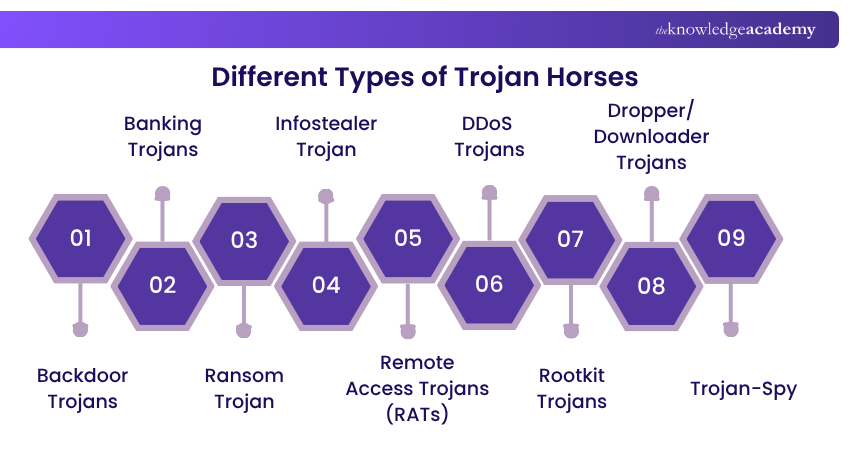
1) Backdoor Trojans
The Backdoor Trojan Virus secretly creates a path inside your system. Through this, the attacker can take remote access, make your system a part of a botnet, or download malware. All this happens secretly without the user knowing.
2) Banking Trojans
The Banking Trojan Virus targets online banking users. It steals bank account credentials through fake login pages or phishing emails. Its goal is to commit financial fraud or unauthorised transactions.
3) Ransom Trojan
This Trojan encrypts your system files or locks the device. Then, it demands ransom from you to give them back access. Mostly, it is used in ransomware attacks and causes financial loss.
4) Infostealer Trojan
Trojan-IM steals user data from instant messaging apps such as WhatsApp, Telegram, Skype, and Facebook Messenger. It steals sensitive information such as personal data and login credentials.
5) Remote Access Trojans (RATs)
Remote Access Trojans (RATs) allow attackers to gain remote control of an infected system without the user’s knowledge by creating a backdoor. They can monitor user activity, steal sensitive data, and install additional malware, making them highly dangerous and difficult to detect.
6) DDoS Trojans
DDoS Trojans give the attacker control to create a botnet that sends requests to a server at the same time. This can crash the website or network. The Trojan Virus remains mostly unnoticed until the attack starts.
7) Rootkit Trojans
Rootkits hide inside the system and prevent other malware from being detected. They bypass system processes, logs, and Antivirus. Their main goal is to keep malicious activity hidden for a long time.
8) Dropper/Downloader Trojans
Dropper Trojans already come with a malware package, while downloader Trojans bring additional malware from the network. After entering the system, these Trojans also install viruses like ransomware or spyware.
9) Trojan-Spy
Trojan-Spy silently monitors your system activity. Like keylogging (what you are typing), taking screenshots, or stealing login details. It can give attackers full access to your private data.
Develop advanced fraud detection strategies with our Fraud Analytics Course- Sign up today!
Examples of Trojan Horse Attacks
Trojan Horse Malware has been present for a long time, and Trojans were used in some of the most well-known cyber attacks. Here are some prominent examples:
1) Rakhni Trojan
Rakhni Trojan is a dangerous malware that installs ransomware or cryptocurrency mining tools on the device. This Trojan slows down the user's system and secretly mines crypto.
2) Tiny Banker
Tiny Banker, also known as Tinba, is used to steal financial data. This Trojan was first discovered when it hacked the data of customers of 20+ U.S. banks.
3) Zeus or Zbot
Zeus Trojan is a malware toolkit that allows hackers to create their own custom Trojan. It logs keystrokes and extracts sensitive information from login forms, especially banking details.
4) CryptoLocker
CryptoLocker was a ransomware Trojan that demanded ransom by encrypting users' files. It locked thousands of systems and did not allow access to files until the ransom was paid.
5) Dyre/Dyreza
The Dyre or Dyreza Trojan was designed to steal banking credentials. It spread through fake emails and targeted financial institutions, mostly Windows systems.
Advance your skills in cyber defence and protection with our Cyber Security Training – Sign up now!
How to Identify Trojan Horse?
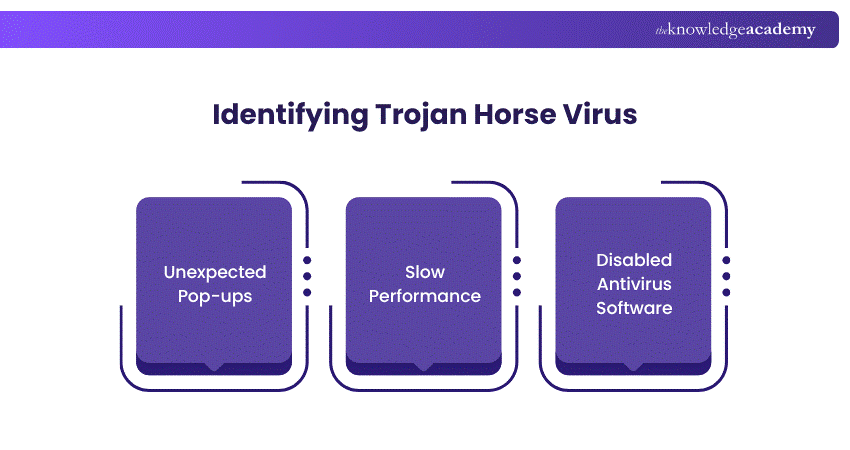
Before identifying a Trojan Horse, it is important to understand the difference between malware and viruses. If a Trojan is present in your system, you may notice the following signs:
1) Slow system performance or frequent crashes
2) Unexpected pop-ups or unusual error messages
3) Security software or antivirus getting disabled without reason
4) Unauthorised apps or programs installed automatically
5) Changes in system settings without user permission
6) Unusual network activity or unknown processes running in the background
How to Remove a Trojan Horse?
Removing a Trojan Horse requires a careful approach to stop its activity and protect your system from further damage. Below are the key steps you can follow to remove it effectively:
1) Update your antivirus software to detect the latest threats
2) Disconnect from the internet to prevent data theft or further damage
3) Restart the system in Safe Mode to stop malicious processes
4) Delete temporary files to improve scanning and remove hidden components
5) Run a full antivirus scan to detect, quarantine, and remove the Trojan
How to Safeguard Against Trojan Malware?
Protecting your system from Trojan malware involves following safe browsing and security practices. Below are key steps to reduce the risk:
1) Download software and files only from trusted and verified sources
2) Avoid clicking on suspicious links or opening spam emails
3) Use reliable antivirus or security software and keep it updated
4) Regularly update your system and applications to fix security vulnerabilities
Be cautious when installing unknown programs or attachments
Conclusion
Trojan Horse Malware can be tricky because it seems safe at first. But once it gets into your computer, it can do a lot of damage. The best way to stop a Trojan Horse is with awareness and caution. Always check before you click or download anything on your computer. Even people who know a lot about computers can be fooled by these viruses, but smart people know how to protect themselves.
Protect your organisation from cyber attacks with our Cyber Security Awareness Course – Join today!
Frequently Asked Questions
What was the First Trojan Horse Attack?

The first known Trojan Horse attack was the "Animal" program in the early 1970s, created by John Walker. It disguised itself as a game that guessed animals but secretly copied itself onto other systems without the user's knowledge. This marked the beginning of using deception in software to breach security.
How to Check if Trojan is Installed?
To check if a Trojan virus is installed, look for signs like slow computer performance, unexpected pop-ups, or unauthorised changes to settings. Use antivirus or antimalware software to run a full system scan. Reviewing active processes in the Task Manager or Activity Monitor can also help identify suspicious activities.

John Davies


Cyber Security Governance & Assurance Specialist
John Davies is a cybersecurity expert specialising in governance, risk management, and compliance. With over 15 years in the field, he has led enterprise-wide security programmes across finance, healthcare and public sector organisations. His content provides practical guidance on building secure environments, managing risk and aligning with regulatory frameworks.


 If you wish to make any changes to your course, please


