


 Top Rated Course

We may not have the course you’re looking for. If you enquire or give us a call on +31 208081674 and speak to our training experts, we may still be able to help with your training requirements.
What is Domain Name System? Working and Functions
Lily Turner 22 April 2026The Domain Name System (DNS) translates human-readable domain names into IP addresses, allowing users to access websites using easy-to-remember names. It connects users to websites efficiently while improving web performance. It plays a vital role in enabling seamless online communication between users and servers with overall stability.

Training Outcomes Within Your Budget!
We ensure quality, budget-alignment, and timely delivery by our expert instructors.
Table of Contents
You click, and a website appears almost instantly. But what happens in those milliseconds between your click and the page loading? That invisible process is powered by the Domain Name System (DNS). It ensures that every online request, from opening a webpage to sending an email, finds the right destination in seconds.
Without it, browsing the web would mean memorising long strings of numbers just to reach the required sites. DNS is what keeps the internet organised, fast, and accessible. In this blog, we’ll break down what DNS is, how it works, and how you can keep it secure and efficient. Let's dive in!
Table of Contents
1) What is Domain Name System (DNS)?
2) How Does DNS Work?
3) Structure of Domain Name System (DNS)
4) Types of DNS Queries
5) What is a Domain Name System (DNS) Server?
6) DNS Lookup Explained
7) Common DNS Records
8) How Does DNS Increase Web Performance?
9) 5 Ways to Enhance DNS Security
10) Best Practices for DNS Configuration and Security
11) Conclusion
What is Domain Name System (DNS)?
The Domain Name System (DNS) is the Internet’s naming system that translates easy-to-remember domain names into numerical IP addresses that computers use to find websites. For example, when you type example.com, the DNS maps it to an address like 203.0.113.72.
Each IP address has four number sets (octets) separated by periods. This system makes browsing simple, as users don’t need to remember complex numbers.
1) The first part identifies the network ID of the device or service
2) The second part indicates the subnet of that network
3) The third set points to the host ID, identifying the specific site or device
4) The last octet(s) define the exact host used for communication with the requester

How Does DNS Work?
The DNS works like a phonebook for the Internet. Instead of one massive server holding every website address, DNS spreads this information across millions of servers into smaller sections called DNS zones. Here is how exactly it works:
1) User Request: You type a website name into your browser and press Enter.
2) Cache Check: Your device checks the local DNS cache to see if it already knows the IP address.
3) DNS Resolver Contact: If it’s not stored locally, the request goes to a DNS resolver, usually operated by your Internet Service Provider (ISP).
4) Root Nameserver Query: The resolver asks a root nameserver where it can find information for the domain’s Top-level Domain (TLD), such as “.com” or “.org.”
5) TLD Nameserver Response: The root server points the resolver to the relevant TLD nameserver, which holds records for that TLD.
6) Authoritative Nameserver Query: The resolver then asks the authoritative nameserver for the specific domain (e.g., example.com), which returns the IP address associated with that website.
7) Browser Connection: The resolver sends that IP address back to your device. Your browser then uses it to send an HTTP request to the web server, loading the site’s content on your screen.
Structure of Domain Name System (DNS)
The structure of DNS is hierarchical and distributed. There isn’t one big database; instead, different servers each manage their own part of the domain space and work together. Here’s the basic structure:
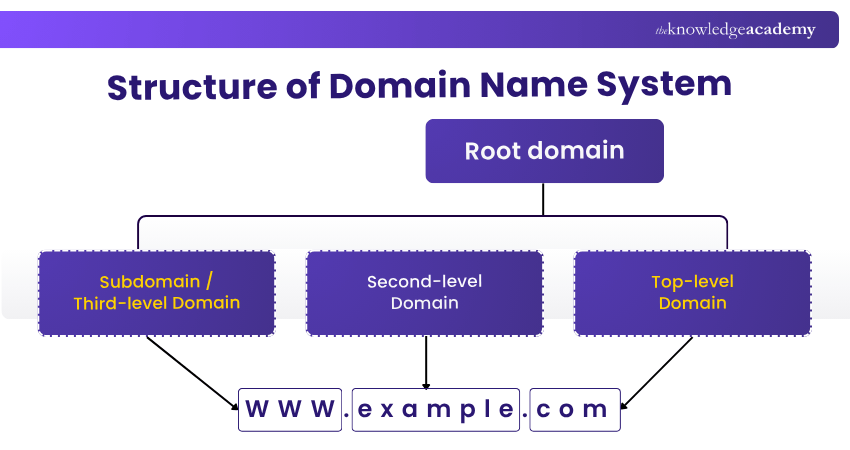
1) Root DNS Servers: The root DNS servers act as the backbone of the entire system. It is represented by “.” (dot). The root nameservers respond with TLD nameserver referrals.
2) Top Level Domains (TLDs): These servers manage information for specific domain extensions like “.com”, “.org”, “.net”, country-codes like “.uk”, “.in”, etc. Each TLD has designated nameservers. It helps locate the correct authoritative DNS server for the domain.
3) Second-level Domains: For example, in “example.com”, “example” is the second-level domain under the TLD “.com”.
4) Subdomains: Additional subdivisions such as “blog.example.com” or “shop.example.com”.
5) Zones: A zone is like a section of the internet's address book that a specific server manages. It may cover a domain and its sub-domains, depending on how it is set up.
Types of DNS Queries
When your computer looks for a website, it sends a request known as a DNS query. There are three types of DNS queries that happen during this process:
1) Recursive Query
In this type, the DNS resolver takes full responsibility for finding the website’s IP address. If it doesn’t have the information, it keeps asking other DNS servers until it finds the right answer or returns an error if the site doesn’t exist.
2) Iterative Query
In an iterative query, the DNS resolver does not complete the search itself. Instead, it provides the best information it currently has and directs your computer to another DNS server that might have a more accurate answer. This continues step by step until the correct IP address is located.
3) Non-recursive Query
This is the fastest type of query. It happens when the DNS server already knows the answer because the information is stored in its cache. No extra lookups are needed, so the website loads almost instantly.
Learn how domains, servers and hosting work with our Introduction to Domain Names and Web Hosting Training – Register today!
What is a Domain Name System (DNS) Server?
A DNS server converts human-friendly website names into IP addresses, so users can reach the correct sites. Four main types of DNS servers work together to complete this process. Those are:
1) DNS Resolver: Takes your website request and starts looking for its IP address.
2) Root Nameserver: Points to the section where the address might be found.
3) TLD Nameserver: Handles specific domain extensions like .com or .org and directs the query to the right authoritative server.
4) Authoritative Nameserver: Holds the actual record with the IP address and gives it to the resolver.
DNS Lookup Explained
DNS Lookup, also known as DNS Resolution, is the process of translating a website’s name (like example.com) into its numerical IP address, which computers use to locate and connect to web servers. Here’s how it works:
1) DNS Resolver: Starts the process by receiving your website request from the computer.
2) Recursive Query: Keeps asking other DNS servers until the correct IP address is found.
3) Iterative Query: Requests the possible information from each server until it reaches the right one.
4) Non-recursive Query: Returns the IP address instantly if it is already stored in the cache.
Common DNS Records
DNS records are essential instructions stored in a DNS database that help the Internet understand how to route traffic for a domain. Here are some of the most commonly used DNS record types:
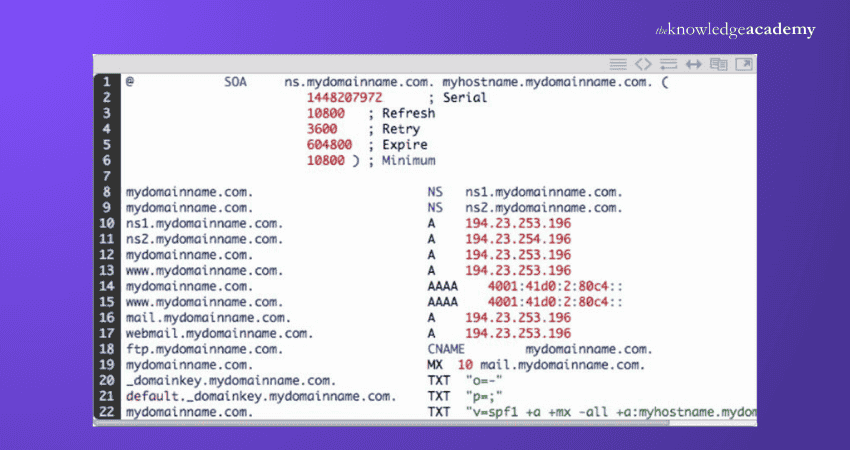
1) A Record (Address Record): Maps a domain or subdomain to an IPv4 address.
2) AAAA Record: Maps a domain or subdomain to an IPv6 address.
3) CNAME (Canonical Name) Record: Creates an alias where one domain points to another domain name.
4) MX (Mail Exchange) Record: Indicates mail servers responsible for accepting email messages for a domain.
5) NS (Name Server) Record: Indicates which servers are authoritative for the domain/zone.
6) PTR (Pointer) Record: Used for reverse DNS lookup, mapping an IP address to a hostname.
Develop the essential Networking skills with our Introduction to Networking Training – Join now!
How Does DNS Increase Web Performance?
The Domain Name System helps websites load faster through a process called caching. When a DNS server finds the IP address of a website, it temporarily stores that result. So, if another user requests the same site soon after, the server can respond instantly without repeating the full lookup process.
Each saved result has a Time to Live (TTL). You can set TTL to be longer or shorter. A longer TTL lowers server load because answers are reused more. A shorter TTL keeps information fresher when changes happen. Overall, caching speeds up pages, cuts traffic and makes browsing smoother.
5 Ways to Enhance DNS Security
Keeping your DNS secure is essential for protecting data, preventing cyberattacks, and maintaining user trust. Here are five effective ways to strengthen DNS security:
1) Use Isolated DNS Servers
Operate separate DNS servers to maintain full control over your data and reduce exposure to external threats. This setup also makes it easier to monitor DNS activity and detect unusual behaviour early.
2) Update DNS Servers
Always update your DNS software to fix bugs and block new security threats. Regular updates make your system stronger and reduce the risk of attacks.
3) Implement Dynamic DNS (DDNS) Securely
Dynamic DNS allows automatic updates of DNS records safely to avoid hackers changing your records. Use strong passwords and access controls to protect updates.
4) Limit DNS Zone Transfers
Only allow trusted servers to copy DNS data, so attackers can’t see your network structure. This keeps your internal DNS information private and secure.
5) Set DNS Access Controls
Give DNS access only to approved users and block unwanted connections with firewalls. Review permissions regularly to remove outdated or risky access.
Install and configure Ubuntu servers with our Ubuntu Linux Server Administration Training – Sign up soon!
Best Practices for DNS Configuration and Security
Here are the best practices to follow for DNS configuration and security:
1) Restrict Access: Limit who can manage DNS settings and use role-based access to prevent unauthorised changes.
2) Keep Systems Updated: Regularly update DNS software and servers to fix vulnerabilities and strengthen protection.
3) Use Multi-factor Authentication (MFA): Add an extra layer of security for DNS management accounts to stop hackers from gaining control.
4) Back up Configuration Files: Keep secure backups of DNS records and configurations to recover quickly from attacks or errors.
Conclusion
The Domain Name System (DNS) is one of the unsung heroes of the internet, quietly ensuring that users can reach websites quickly and securely. From converting domain names into IP addresses to improving web performance, it keeps the online world running smoothly behind the scenes. A secure and well-managed DNS not only makes websites faster, but it also makes the entire internet reliable for everyone.
Manage real-world IT challenges effectively with our IT Support and Solution Training – Explore now!
Frequently Asked Questions
How Do I Find My DNS Server?

You can find your DNS server by checking your device’s network settings. Or run ipconfig /all (Windows), networksetup -getdnsservers (Mac), or check /etc/resolv.conf / run systemd-resolve --status (Linux) in the terminal.
What DNS is Best?
Popular fast and secure DNS options include Google DNS (8.8.8.8), Cloudflare (1.1.1.1) and OpenDNS. The best depends on speed, privacy and your location.
What are the Other Resources and Offers Provided by The Knowledge Academy?
The Knowledge Academy takes global learning to new heights, offering over 3,000+ online courses across 490+ locations in 190+ countries. This expansive reach ensures accessibility and convenience for learners worldwide.
Alongside our diverse Online Course Catalogue, encompassing 17 major categories, we go the extra mile by providing a plethora of free educational Online Resources like Blogs, eBooks, Interview Questions and Videos. Tailoring learning experiences further, professionals can unlock greater value through a wide range of special discounts, seasonal deals, and Exclusive Offers.
What is The Knowledge Pass, and How Does it Work?
The Knowledge Academy’s Knowledge Pass, a prepaid voucher, adds another layer of flexibility, allowing course bookings over a 12-month period. Join us on a journey where education knows no bounds.
What are the Related Courses and Blogs Provided by The Knowledge Academy?
The Knowledge Academy offers various IT Support and Solution Training, including BIND DNS Administration Training, Introduction to Networking Course and CloudFlare Training. These courses cater to different skill levels, providing comprehensive insights into the Address Resolution Protocol.
Our IT Infrastructure & Networking Blogs cover a range of topics related to Domain Name System, offering valuable resources, best practices, and industry insights. Whether you are a beginner or looking to advance your IT Infrastructure & Networking skills, The Knowledge Academy's diverse courses and informative blogs have got you covered.

Lily Turner


Senior AI/ML Engineer and Data Science Author
Lily Turner is a data science professional with over 10 years of experience in artificial intelligence, machine learning, and big data analytics. Her work bridges academic research and industry innovation, with a focus on solving real-world problems using data-driven approaches. Lily’s content empowers aspiring data scientists to build practical, scalable models using the latest tools and techniques.
View Detail
Upcoming IT Infrastructure & Networking Resources Batches & Dates
Date
 BIND DNS Administration Training
BIND DNS Administration Training
Fri 9th Oct 2026
BIND DNS Administration Training
Fri 11th Dec 2026

 If you wish to make any changes to your course, please


