


 Top Rated Course

We may not have the course you’re looking for. If you enquire or give us a call on +44 1344 203 999 and speak to our training experts, we may still be able to help with your training requirements.
PHP Array Explained: Types, Syntax, and Functions
Richard Harris 14 July 2026PHP Array is a data structure that stores multiple values of any type, accessed using integer indexes or string keys in associative arrays. Arrays can hold mixed data types, support dynamic resizing, and are used for storing lists, maps, or complex datasets, making them highly versatile in PHP programming.

Training Outcomes Within Your Budget!
We ensure quality, budget-alignment, and timely delivery by our expert instructors.
Table of Contents
Ever paused mid-code and wished one container could juggle every value you throw at it? That craving for organised chaos finds its answer in the PHP Array, a shape-shifting vault that stores anything from integers to objects without breaking stride. Picture it as a magic suitcase expanding on demand, keeping lists, maps, and complex datasets neatly folded for instant retrieval. In this blog, let us explore What is a PHP Array and learn the different types, understand the syntax, try each function, then start coding and watch your apps speed up.
Table of Contents
1) What is an Array in PHP?
2) Types of PHP Arrays
3) Common Array Functions in PHP
4) Best practices for working with PHP Arrays
5) What are the Common Pitfalls with Arrays in PHP?
6) Conclusion
What is an Array in PHP?
A PHP Array is a fundamental data structure used in programming to store and organise multiple values under a single variable. It provides a convenient way to manage and manipulate collections of data, making it an essential concept in PHP development.
In simple terms, What is a PHP Array can be explained as a container that holds multiple elements.
Arrays in PHP are versatile and offer flexibility in representing complex data structures. Regardless of whether you are dealing with a list of names, a collection of user details, or even a multidimensional database result, arrays can handle these scenarios effectively.
Basic Syntax of PHP Array
Before diving further into PHP Arrays, let's explore the basic syntax used to work with them. In PHP, you can declare an array using the following syntax: “$myArray = array(value1, value2, value3, ...);” Here, $myArray is the variable name assigned to the array, and value1, value2, value3, and so on represent the elements you want to store within the array.
To access specific elements of the array, you use their corresponding index. In PHP, array indexes start from 0, so the first element of an array would have an index of 0, the second element would have an index of 1, and so on. For example: “echo $myArray[0]; //” Outputs the first element of the array. Using the aforementioned code snippet, you can retrieve and display the value of the first element stored in the $myArray variable.
Types of PHP Arrays
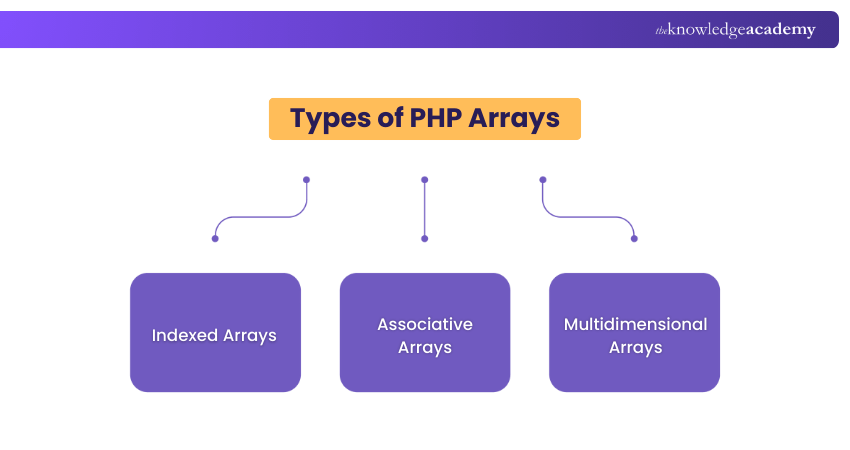
PHP Arrays come in different types, each suited for specific use cases. Understanding these array types will help you leverage their unique features and capabilities effectively. Let's explore the three main types of PHP Arrays:
Indexed Arrays
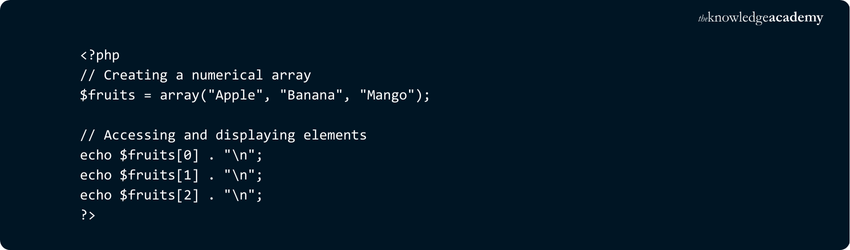
Indexed arrays or Numerical arrays is a type of PHP Arrays where each element is automatically assigned a numeric index starting from 0. These arrays store multiple values in a single variable and are accessed using their index number. They’re ideal for storing ordered data like lists, allowing easy retrieval and iteration in loops.
Here is the sample code,
Here is the output,

This code defines a numerical array named $fruits with three elements. Each value is automatically assigned an index starting from 0. The echo statements print the values using their corresponding index positions.
Associative Arrays
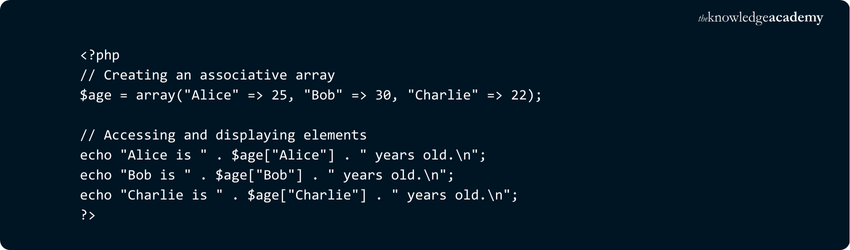
Associative arrays in PHP Arrays use named keys instead of numeric indexes to store values. Each key is a string that maps to a specific value, making the data easier to understand and access. They're ideal for storing related data, like names with ages or product IDs with prices.
Here is the sample code,
Here is the output,

In this code, the associative array $age maps names (keys) to ages (values). Each key is a string, and we access the values using those string keys instead of numeric indexes. This makes the data more readable and meaningful.
Multidimensional Arrays
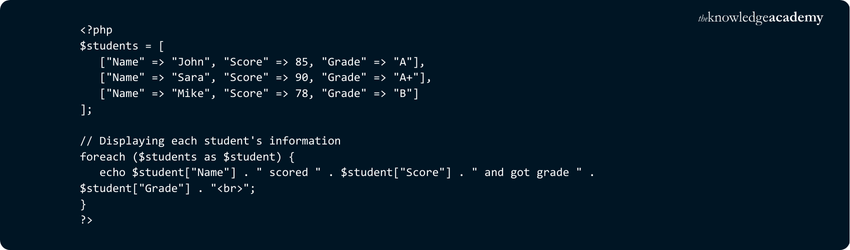
Multidimensional arrays in PHP are arrays that contain other arrays, enabling structured data storage. They're ideal for representing grids or tables, like student records or product lists. Each element is accessed using multiple indices, allowing for efficient handling of complex, related information.
Here is the sample code,
Here is the output,

This PHP Array script defines a multidimensional array where each sub-array represents a student with their name, score, and grade. A foreach loop is used to access and display the values. This structure is useful for storing and handling tabular data.
Want to master PHP Programming and build dynamic websites? Join our PHP Course now!
Common Array Functions in PHP
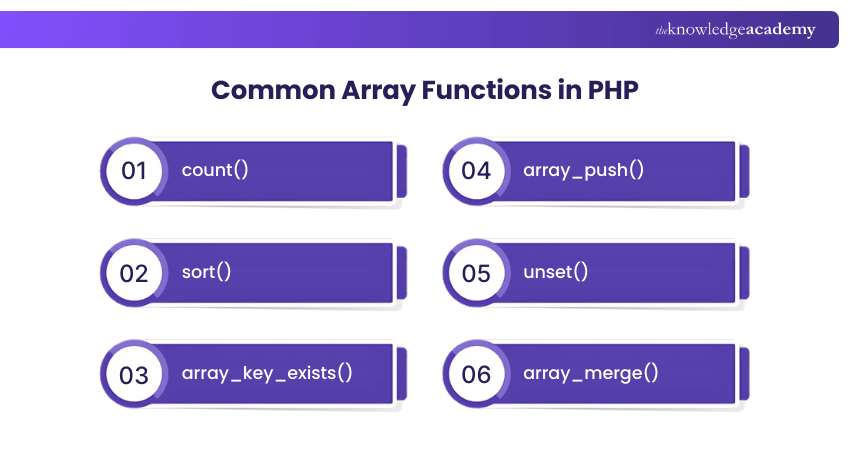
PHP provides a variety of built-in array functions that enable you to manipulate and operate on arrays efficiently. These functions simplify common tasks and allow you to process data using PHP Arrays more effectively. Let's explore some of the
Most commonly used array functions in PHP:
1) count(): The count() function is used to return the number of elements present in an array. It is particularly useful when you need to determine the size or length of an array. For example:

In the above example, the count() function is used to determine the number of elements in the $numbers array, which is 5.
2) sort(): The sort() function is used to sort an array in ascending order. It rearranges the elements based on their values. For example:

After executing the sort() function, the $fruits array will be sorted alphabetically, resulting in ["Apple", "Banana", "Orange"].
3) array_key_exists(): The array_key_exists() function checks if a specified key or index exists in an array. It returns true if the key is found and false otherwise. For example:
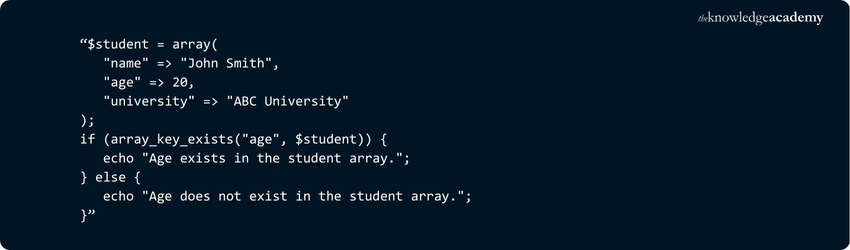
In the above example, the array_key_exists() function is used to check if the key "age" exists in the $student array. Since the key is present, the output will be "Age exists in the student array."
4) array_push(): The array_push() function allows you to add one or more elements to the end of an array. It modifies the original array by appending the new elements. For example:

After executing the array_push() function, the $numbers array will contain the additional elements [1, 2, 3, 4, 5].
5) unset(): The unset() function removes a specific element from an array. It takes the array and the index or key of the element to be removed as parameters. For example:

After executing the unset() function, the element at index 1 (in this case, "Banana") will be removed from the $fruits array.
6) array_merge(): The array_merge() function in PHP is used to merge one or more arrays into a single array. It appends the elements of one array to the end of another and returns the resulting array.

The array_merge() function combines both arrays. Since both arrays have the key "b", the value from $array2 ("blueberry") overwrites the value from $array1. The merged array contains all keys, with duplicates replaced by the latest value.
Level up your skills with Swift Training today!
Best Practices for Working with PHP Arrays
When working with PHP Arrays, follow these best practices:
1) Use descriptive variables and key names.
2) Avoid global and pass arrays as function arguments.
3) Validate array access to avoid errors.
4) Prefer foreach() loops for iteration.
5) Avoid unnecessary functions for performance.
6) Utilise built-in functions for concise code.
7) Document complex structures for clarity.
8) Optimise memory usage for large arrays.
9) Implement proper error handling.
10) Regularly review and refactor code.
What are the Common Pitfalls with Arrays in PHP?
While PHP Arrays are powerful and versatile, they can lead to subtle bugs and performance issues if not used carefully. Here are some common pitfalls to watch out for:
a) Copy-on-write behaviour: Arrays aren’t copied on assignment until modified, leading to unexpected results.
b) Closures don’t affect originals: Using use in closures creates a copy; changes won’t persist unless passed by reference.
c) Overuse as multi-purpose structures: Arrays are used for lists, maps, and objects, often without clear structure or intent.
d) High memory usage: Modifying large arrays after assignment can cause memory exhaustion due to implicit copying.
e) Loose typing issues: PHP’s dynamic typing and vague array type hints can make code fragile and error prone.
f) Lack of structure: Deeply nested or mixed-type arrays become hard to manage and debug over time.
g) Array anti-pattern: Relying on arrays instead of proper data models or objects leads to poor maintainability.
Conclusion
Facing datasets that change shape daily, you discovered what is a PHP Array and how it flexes to hold numbers, strings, and entire maps without complaint. Your goal now is mastery that cuts clutter and boosts speed. Declare each array type, test key functions, and clean legacy loops. Soon scripts will shrink, pages will fly, and future maintenance will feel effortless, leaving you free to craft bigger, bolder features.
Enhance your skills with our comprehensive R Programming Course - join now!
Frequently Asked Questions
Can I store different data types in a PHP Array?

Yes, PHP Arrays are heterogeneous, meaning you can store different data types such as strings, integers, floats, booleans, objects, and even other arrays in a single array. This flexibility is powerful but requires careful handling to avoid type-related bugs.
What’s new in PHP 8+ for arrays?
PHP 8+ introduced improvements like str_starts_with(), str_ends_with(), and better type safety. While no major changes were made specifically to arrays, features like union types and the mixed type help clarify array content expectations and enhance code reliability.

Richard Harris


Senior Full Stack Developer and Technology Educator
Richard Harris is a highly experienced full-stack developer with deep expertise in both frontend and backend technologies. Over his 12-year career, he has built scalable web applications for startups, enterprises and government organisations. Richard’s writing combines technical depth with clear explanations, ideal for developers looking to grow in modern frameworks and tools.


 If you wish to make any changes to your course, please


