


 Top Rated Course

We may not have the course you’re looking for. If you enquire or give us a call on +60 1800812339 and speak to our training experts, we may still be able to help with your training requirements.
What is Continuous Integration/Continuous Delivery (CI/CD) Pipeline?
Richard Harris 22 April 2026CI/CD Pipelines automate the entire software delivery workflow, from building and testing to deploying code efficiently and reliably. They improve development speed, ensure consistent quality and reduce manual errors. Popular CI/CD tools include Azure Pipelines and MLOps platforms that support continuous integration and delivery.
Home
 Resources
Programming & DevOps
What is Continuous Integration/Continuous Delivery (CI/CD) Pipeline?
Resources
Programming & DevOps
What is Continuous Integration/Continuous Delivery (CI/CD) Pipeline?
Resources
Programming & DevOps
What is Continuous Integration/Continuous Delivery (CI/CD) Pipeline?

Training Outcomes Within Your Budget!
We ensure quality, budget-alignment, and timely delivery by our expert instructors.
Table of Contents
Speed and reliability shape today’s Software Development landscape, and that’s exactly where CI/CD Pipelines make a difference. Continuous Integration and Continuous Delivery (CI/CD) act as the backbone of modern DevOps, automating everything from code creation to deployment. Think of it as a digital assembly line where ideas turn into features and bugs are caught long before they reach production.
Whether you’re a Developer or a Tester, understanding CI/CD Pipelines is your gateway to building faster, safer and smarter software. If you’re seeking deeper insights, this blog will guide you. Read on and master the trifecta of innovation, agility and reliability in the digital age!
Table of Contents
1) What is the CI/CD Pipeline?
2) How CI/CD Pipelines Work?
3) Different Types of CI/CD Pipelines
4) Implementing a CI/CD Pipeline
5) Advantages of CI/CD Pipelines
6) CI/CD Pipeline Best Practices
7) Ensuring CI/CD Security
8) Popular CI/CD Tools
9) Conclusion
What is the CI/CD Pipeline?
The CI/CD Pipeline is an automated DevOps process for simplifying and accelerating software delivery. Automation ensures consistent code quality by validating each change as it moves through the pipeline. As updates move through each stage, automated tests detect dependencies, identify issues early on, deploy code across environments, and deliver final builds to production.
This automation ensures quality control by assessing performance, API usage and security. It confirms that every change is properly integrated and functioning as intended. By automating these phases, development teams can boost their efficiency and achieve faster, higher-quality software releases.

How CI/CD Pipelines Work?
Here’s a detailed explanation of each stage in the CI/CD Pipeline, showing how code moves from initial development to final deployment through automated and structured processes.
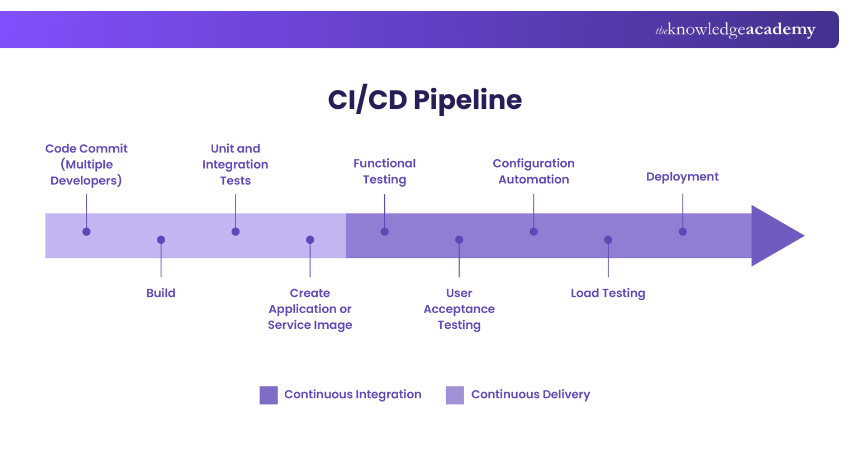
Step 1: Code Commit (Multiple Developers)
The pipeline begins when multiple Developers push new code to a shared repository. Each commit triggers automated checks, ensuring that every update is reviewed immediately. This prevents integration issues and keeps the codebase stable and up to date.
Step 2: Build
In the build stage, the source code is compiled, dependencies are installed and an executable version of the application is generated. This step ensures that the code is ready for further testing and can run as expected across environments.
Step 3: Unit and Integration Tests
Automated unit tests verify that individual functions work correctly, while integration tests check how different components interact. This stage catches errors early and prevents broken code from progressing through the pipeline.
Step 4: Create Application or Service Image
After testing, the CI system creates a packaged version of the application—often as a container image. This ensures consistency across environments and prepares the build for deployment.
Step 5: Functional Testing
Functional testing validates whether the application behaves according to requirements. It checks features, user interactions, workflow logic and essential functionalities to ensure everything works as intended.
Step 6: User Acceptance Testing (UAT)
In UAT, the application is reviewed in a staging environment to confirm it meets user and business expectations. This is the final check before the software moves closer to production.
Step 7: Configuration Automation
Automation tools configure the required infrastructure, environments and dependencies. This ensures deployments are repeatable, consistent and aligned with the system’s specifications.
Step 8: Load Testing
Load testing assesses the application's performance under different levels of traffic. It reveals bottlenecks, stress points and scalability limitations before the software reaches production users.
Step 9: Deployment
Once all tests and validations are complete, the application is deployed to the production environment. This final stage delivers a stable, reliable release ready for real-world use.
Master Container Management with our Kubernetes Training and scale your apps with confidence. Sign up now!
Different Types of CI/CD Pipelines
Here are the major types of CI/CD Pipelines you can consider:
1) Cloud-native CI/CD Pipelines
Cloud-native CI/CD pipelines run entirely on cloud infrastructure, offering flexibility, scalability and reduced maintenance. They automatically provision resources, support distributed builds and integrate smoothly with cloud services for storage, monitoring and security. This enables faster deployments, cost efficiency and on-demand scaling.
2) Kubernetes-native Pipelines
Kubernetes-native pipelines are designed to run inside Kubernetes clusters using tools such as Tekton, Argo Workflows or Jenkins X. Each pipeline stage is treated as a Kubernetes resource, ensuring strong portability, container-based execution, easy scaling and seamless integration with GitOps workflows.
3) CI/CD Pipeline for a Monorepo
A CI/CD pipeline for a monorepo supports multiple services or projects stored within a single repository. It uses selective builds, intelligent triggers and dependency-aware testing to ensure only affected components are processed. This approach simplifies collaboration, improves dependency management and keeps complex codebases efficient and maintainable.
Secure your pipeline and power up your code. Register for our DevSecOps Practitioner Certification now!
Implementing a CI/CD Pipeline
There isn’t a single method for setting up a CI/CD Pipeline. Each implementation varies depending on the chosen tools, technologies, business requirements, etc. However, most pipelines follow these key steps:
1) Define Objectives:
a) Identify goals: faster deployments, automated testing, improved collaboration
b) Decide on CI/CD type (cloud-native, Kubernetes-native, monorepo, etc.)
2) Choose Tools:
a) Version Control: GitHub, GitLab, Bitbucket
b) CI/CD Platforms: Jenkins, GitHub Actions, GitLab CI, CircleCI
c) Containerisation: Docker
d) Orchestration: Kubernetes (if needed)
3) Set Up Continuous Integration:
a) Configure repository triggers (e.g., on pull request or commit)
b) Implement build automation using scripts or pipeline configuration
c) Add unit and integration tests for early defect detection
4) Configure Continuous Delivery:
a) Package application (e.g., Docker image)
b) Automate deployment to staging environments
c) Include functional testing and user acceptance testing
5) Add Continuous Deployment (Optional):
a) Automate production deployment after successful tests
b) Use approval gates for critical environments
6) Integrate Monitoring & Security:
a) Add security scans (SAST, DAST)
b) Implement observability tools (Prometheus, Grafana)
7) Optimise & Scale:
a) Enable parallel builds and caching for speed.
b) Use infrastructure as code for reproducibility.
Advantages of CI/CD Pipelines
Beyond automating the entire release cycle, from testing to deployment, it offers several advantages that improve speed, quality and team efficiency:
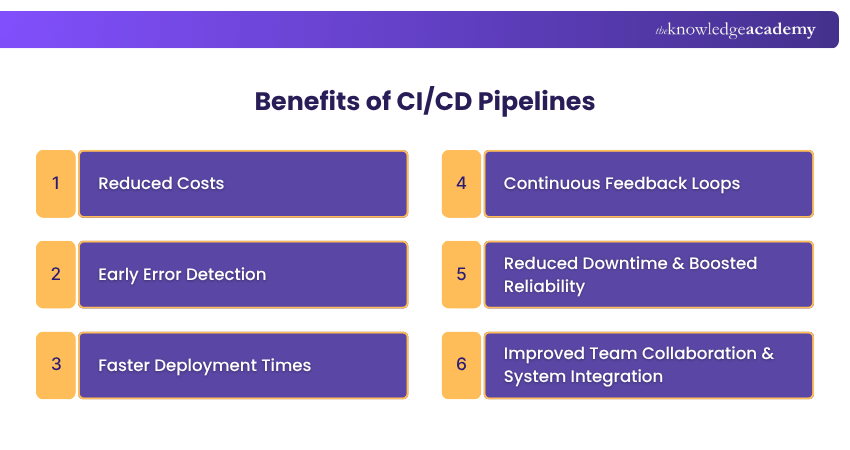
1) Cost Reduction
Quicker development, testing and release cycles reduce manual effort and the overall development expenses compared to traditional workflows. Automation also cuts rework costs by preventing late-stage defects.
2) Early Error Detection
Automated testing in CI/CD Pipelines identifies bugs and integration issues early in the process. Fixing errors at this stage is faster, cheaper and prevents issues from reaching production.
3) Faster Deployment Times
Automation speeds up development by streamlining testing and delivery. Continuous deployment ensures that the updates and fixes can go live within minutes of being approved.
4) Continuous Feedback Loops
The build-test-deploy cycle creates constant feedback for Developers. This enables them to make quick, informed improvements and maintain steady progress across iterations.
5) Reduced Downtime and Boosted Reliability
Automated rollback mechanisms allow quick recovery from deployment issues. This helps maintain the system stability, uptime and a more reliable release process overall.
6) Collaboration and System Integration
With shared visibility into the code changes, teams can coordinate efficiently. They can respond rapidly to feedback and maintain consistent integration across systems.
Lay the groundwork for software greatness. Start your journey into Agile software delivery with our DevOps Foundation Certification - Sign up now!
CI/CD Pipeline Best Practices
To streamline your software delivery, consider incorporating these proven best practices into your development lifecycle:
1) Build Once
1) Compile the code once to create build artefacts and promote them through the pipeline.
2) This ensures consistency across stages, eliminating variations that can arise from multiple builds.
2) Demand Visibility
1) Provide the Developers access to the latest builds, change histories and repository activity.
2) Strong version control practices ensure clear handoffs and awareness of the most current versions.
3) Deploy Frequently
1) Smaller, more frequent deployments can simplify troubleshooting. It can also speed up feedback and make rollbacks safer and faster.
2) Regular updates also shorten the time required to deliver value to users.
4) Use Clone-testing Environments
1) Test in environments identical to production rather than in live systems.
2) This approach ensures that bugs missed in earlier stages are detected under realistic conditions.
5) Test Early and Often
1) Embed automated tests early in the pipeline. Start with unit tests post-build, then move to integration and end-to-end tests.
2) Configure test scripts to fail the build automatically if issues are detected.
6) Automate Build Process
1) Automate the conversion of source code into deployable artefacts to reduce errors and speed up development.
2) Comprehensive build scripts should handle everything with a single command. This includes everything from web server files and database scripts to packaged applications.
7) Optimise Feedback Loop
1) Configure the pipeline to deliver fast, actionable feedback whenever a build fails or tests break.
2) Immediate notifications allow the Developers to resolve issues quickly and maintain flow.
8) Single Source Repository
1) Maintain a unified Source Code Management (SCM) system that stores all essential files and scripts. This can include source code, libraries, configurations, and test scripts.
2) A single repository encourages collaboration, consistency and easier version control. This can also reduce conflicts and simplify change tracking.
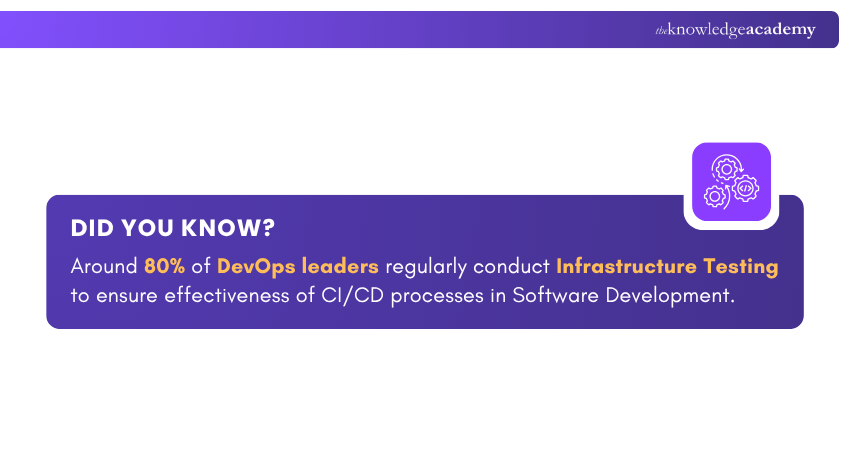
9) Enforce CI/CD Deployment
1) You must prohibit manual production deployments.
2) Every change should go through the CI/CD Pipeline to guarantee testing and uniform deployment standards.
10) Prioritise Automation Efforts
1) Automate integration, testing, deployment, and infrastructure provisioning.
2) Once the code is pushed to the repository, automated builds and tests run instantly. This saves time while improving reliability.
Ensuring CI/CD Security
CI/CD security encompasses the strategies and technologies used to embed and manage security and compliance throughout the CI/CD Pipeline. Here are the main points to consider:
1) Traditionally, security was implemented at the end of the development cycle. This caused bottlenecks as Cloud platforms, microservices, and containers became more widespread.
2) The rise of agile and DevOps practices made this late-stage approach ineffective. This led to the development of Development, Security, and Operations (DevSecOps).
3) DevSecOps integrates automated security tools directly into CI/CD workflows. It uses two main testing approaches:
a) Shift-left Testing: It incorporates security and quality checks early in the Software Development Lifecycle (SDLC).
b) Shift-right Testing: It focuses on security validation, monitoring, and testing in production environments.
4) These complementary methods spread the testing responsibilities throughout the SDLC, which promotes ongoing security.
Sign up for our Jenkins Training for Continuous Integration and take your CI game to the next level - Join today!
Popular CI/CD Tools
Now let’s explore the main categories and prominent examples of CI/CD tools:
1) Continuous Integration Tools
1 Bitbucket Pipelines: It's an integrated CI/CD service within Bitbucket that automates building, testing and deploying code via configuration files. It offers strong integration with Bitbucket and other Atlassian tools.
2) Jenkins: It's a leading open-source automation server that helps Developers build, test and deploy software reliably. It offers extensive plugin support and distributed build capabilities.
3) CircleCI: CircleCI is a modern CI/CD platform focused on simplicity, automation and speed. It offers features like intelligent caching, parallel execution, and workflow orchestration.
4) Bamboo: Bamboo, developed by Atlassian, offers integrated CI/CD functionality with built-in Git and JIRA connectivity.
5) GitLab CI: GitLab CI is an integrated CI/CD tool within GitLab that supports the entire DevOps lifecycle. It offers deep integration with GitLab’s source control and issue-tracking tools.
2) Continuous Delivery and Deployment Tools
1) Codefresh: Codefresh supports continuous delivery with strong Kubernetes integration. It has features like environment isolation and Helm chart support.
2) Argo CD: This is a declarative GitOps tool for Kubernetes that uses Git repositories as the single source of truth. It automatically synchronises applications when changes occur in the repository.
3) GoCD: It's an open-source tool for modelling and visualising complex continuous delivery workflows. Its value stream mapping feature provides a clear view of the entire process.
4) AWS CodePipeline: It's a fully managed continuous delivery service that automates release pipelines for quick, reliable updates. It integrates seamlessly with other AWS services.
5) Azure Pipelines: This is part of Azure DevOps and delivers Cloud-based CI/CD for any language or platform. It also provides generous build minutes for open-source projects.
6) Spinnaker: Originally developed by Netflix, this is a multiCloud delivery platform with powerful deployment strategies such as blue/green and canary releases.
3) Machine Learning CI/CD Applications
1) MLOps: MLOps combines machine learning and DevOps to automate and standardise model development and deployment.
2) AIOps Platforms: AIOps integrates Artificial Intelligence (AI) and Machine Learning (ML) into IT operations. Within CI/CD environments, AIOps automates key functions such as anomaly detection, event correlation, and root cause analysis.
Conclusion
CI/CD Pipelines essentially form the philosophy of continuous improvement. By integrating automation, collaboration and innovation, it empowers teams to deliver better software, faster and safer. In a world fuelled by digital transformation, embracing CI/CD is the key to building resilient systems and staying ahead of the curve.
Join the elite who build, test, and deploy with confidence. Sign up for our DevOps Certification now!
Frequently Asked Questions
Is Kubernetes a CI/CD Tool?

No, Kubernetes is not a CI/CD tool. It’s a container orchestration platform designed for automating deployment, scaling and management of containerised applications. However, it does work closely with CI/CD tools, serving as the environment where applications are deployed and managed after integration.
What Two Types of Pipelines Can You Create in Azure DevOps?
In Azure DevOps, you can create two main types of pipelines:
1) Build Pipelines (CI): This is used to compile code, run tests and produce build artefacts.
2) Release Pipelines (CD): This is used to deploy applications across different environments and manage releases automatically.
What are the Other Resources and Offers Provided by The Knowledge Academy?
The Knowledge Academy takes global learning to new heights, offering over 3,000+ online courses across 490+ locations in 190+ countries. This expansive reach ensures accessibility and convenience for learners worldwide.
Alongside our diverse Online Course Catalogue, encompassing 17 major categories, we go the extra mile by providing a plethora of free educational Online Resources like Blogs, eBooks, Interview Questions and Videos. Tailoring learning experiences further, professionals can unlock greater value through a wide range of special discounts, seasonal deals, and Exclusive Offers.
What is The Knowledge Pass, and How Does it Work?
The Knowledge Academy’s Knowledge Pass, a prepaid voucher, adds another layer of flexibility, allowing course bookings over a 12-month period. Join us on a journey where education knows no bounds.
What are the Related Courses and Blogs Provided by The Knowledge Academy?
The Knowledge Academy offers various DevOps Certifications, including the DevOps Engineering Foundation Course, Site Reliability Engineering Foundation Training and the DevSecOps Practitioner Certification. These courses cater to different skill levels, providing comprehensive insights into Kubernetes Tools for Management & Optimisation.
Our Programming & DevOps Blogs cover a range of topics related to CI/CD Pipelines, offering valuable resources, best practices, and industry insights. Whether you are a beginner or looking to advance your Programming and DevOps skills, The Knowledge Academy's diverse courses and informative blogs have got you covered.

Richard Harris


Senior Full Stack Developer and Technology Educator
Richard Harris is a highly experienced full-stack developer with deep expertise in both frontend and backend technologies. Over his 12-year career, he has built scalable web applications for startups, enterprises and government organisations. Richard’s writing combines technical depth with clear explanations, ideal for developers looking to grow in modern frameworks and tools.

Upcoming Programming & DevOps Resources Batches & Dates
Date
 DevOps Engineering Foundation Course
DevOps Engineering Foundation Course
Thu 20th Aug 2026
DevOps Engineering Foundation Course
Thu 22nd Oct 2026

 If you wish to make any changes to your course, please


