


 Top Rated Course

We may not have the course you’re looking for. If you enquire or give us a call on +60 1800812339 and speak to our training experts, we may still be able to help with your training requirements.
How to Become a Power Bi Developer? A Complete Guide
The Knowledge Academy 09 April 2026A Power BI Developer is a professional who designs, develops, and maintains business intelligence solutions using Microsoft Power BI tools. They enable data-driven decision-making with insightful visualisations. In this blog we have covered how to become a Power BI Developer and help organisations turn raw data into useful insights.

Training Outcomes Within Your Budget!
We ensure quality, budget-alignment, and timely delivery by our expert instructors.
Table of Contents
Related Courses
- Quick Powerful Graphics with Power View, PowerPivot, Power Query, Power Map and Power BI M55164
- Microsoft Power BI for End Users 55400AC
- Retired : Designing and Implementing Enterprise-Scale Analytics Solutions Using Microsoft Azure and Microsoft Power BI DP500
- Microsoft Power BI Data Analyst PL300
- Microsoft BI Training

experts are the ones who process unrefined data and deliver valuable insights. Let us take a look at how to become a Power BI Developer and the essential stages that one has to go through.
Table of Contents
1) What is Business Intelligence?
2) What is Power BI?
3) Who is a Power BI Developer?
4) Benefits of Power BI
5) What Tools do Power BI Developers use?
6) Power BI Developer Roles and Responsibilities
7) How to Become a Power BI Developer?
8) Conclusion
What is Business Intelligence?
Business intelligence (BI) entails the method of changing unprocessed data into significant knowledge that supports quick, assured decisions. Through gathering data from different departments of the organisation, for instance, finance, operations, sales, and customer service, BI systems give a combined perspective to monitor results and find out movements.
In the present day’s quickly changing setting, the power to get insights instantly is a must for being competitive and Agile. Modern BI tools combine a range of features such as analytics, automation and AI to allow businesses to predict the outcomes and select more intelligent, data-driven alternatives.

What is Power BI?
Power BI is the analytics platform developed by Microsoft for business that helps companies transform different types of data sources into insights that are easy to act upon. The platform consists of a range of software services, applications, and connectors. These work in synergy to provide access to data exploration, modelling, and visualisation for both tech-savvy and layperson users.
Power BI on your desktop or cloud means you are getting the most out of the tool since it is now possible to have interactive dashboards, real-time updates, and sharing on a large scale, which can help to make decisions that are based on the data.
Who is a Power BI Developer?
A Power BI Developer is a professional who takes unprocessed data and creates interactive dashboards and reports with the help of the Microsoft Power BI platform. They work with business teams to define needs, create visualisations, and align data models with strategic goals. They use technical skills like DAX, Power Query and SQL alongside business communication to bring about insights that govern the company’s decisions.
Benefits of Power BI
Power BI provides many advantages to the people or organisations whose main concern is to utilise data as a means to better decision making. undefined
a) Power BI is user friendly and intuitive. You can construct stunning visualisations and dashboards by performing simple drag-and-drop actions and can personalise them according to your taste and needs.
a) Power BI can not only draw data from a single source but can also integrate the data from multiple sources both on-premises and cloud-based. In addition, you can make the process run automatically and hence have the most credible and up-to-date data.
d) Power BI has built-in advanced analytics and AI capabilities that make it possible, for instance, forecasting, anomaly detection, sentiment analysis, and so on.
e) Power BI is affordable and scalable. You can start with the free version of Power BI Desktop and upgrade to the paid versions of Power BI Pro or Power BI Premium as your needs grow. You can also take advantage of the cloud-based Power BI service, which offers high availability, security, and reliability.
f) Power BI is cost-efficient and scalable. Start with the free Power BI Desktop version and scale up to either Power BI Pro or Power BI Premium as your needs grow. Additionally, you can access the cloud-based Power BI service, which offers built-in security, high availability, and reliability. When considering alternatives like MicroStrategy vs Power BI, these features make Power BI a competitive choice for businesses looking for flexibility and robust performance. For those preparing for a job in this field, understanding Microstrategy Interview Questions can help gauge what expertise is needed for roles involving these tools.
What Tools do Power BI Developers use?
Power BI developers make use of all available tools while designing, developing, and final deployment of innovative BI solutions.
a) Power BI Desktop: This component of Power BI will visualisedata to create reports and dashboards. It simplifies model building, data visualisation , design, and reporting.
b) Power BI Service: This is the Cloud-based platform where Power BI reports and dashboards are uploaded, shared, and accessed. It enables developers to collaborate with stakeholders, coordinate data refreshes, and ensure security settings, offering a more interactive and real-time solution compared to traditional reporting tools like Crystal Reports vs Power BI.
c) Power Query Editor: This gadget is installed into Power BI Desktop and is utilised for data cleansing, transformation, as well as combining multiple data sources.
d) DAX Studio: This is an external tool the Power BI developers use for complex data analysis and debugging. It offers DAX query writing and testing abilities in a Data Analysis Expression (DAX) environment.
e) SQL Server Management Studio (SSMS): Power BI developers are keen users of SQL servers and perform tasks of data base management like querying data, creating views and managing security through SSMS
f) Visual Studio Code: For more detailed tasks such as writing custom visuals, or using scripts in Power BI to enhance its functionality, developers may go for Visual Studio Code, a lightweight and versatile code editor.
Unlock Data Insights with the Microsoft Power BI Course today!
Power BI Developer Roles and Responsibilities
A Power BI Developer is bound to work on data given the nature of their job. However, analysing data and converting meaningful visuals have many steps and processes. They focus on understanding the necessities of their organisation and work to gather relevant information based on the business requirements.
Understanding the needs of an organisation extends to tasks such as discovering the Key Performance Indicators (KPIs) within the organisation and analysing the current set of data existing in the company. Technically, they are expected to run DAX-based queries and work with Simple Language Queries (SQL).
As a Power BI professional, you will be expected to monitor Power BI tools, ensuring they work as intended. You will have to work closely with the development process, which includes coding, testing, debugging and documenting programs necessary for the development process. Specifying which programs are to be written based on the need of the tool is one of such prominent responsibilities for a Power BI Developer.
Power BI Developers are expected to use all technologies at their disposal to extract, import and transform data across various sources. They often integrate the Power BI services across different platforms, such as a company’s website, portal or application. The other platforms Power BI Developers work on can be categorised into three core types: Power BI Mobile, Power BI Service and Power BI Desktop.
Power BI Desktop models often require Developers to write DAX formulas. Some other tasks BI Developers need to perform are creating a data-driven story, completing visual reports of data, workspace management etc.
Each platform a BI professional works on requires a database and dashboard. They are expected to maintain row-level data security, thus having a basic understanding of the application layer security model. This knowledge is essential to Create a Strong Power BI Resume, showcasing your ability to secure data and leverage the robust tools Power BI offers. Some services provided by Power BI tools, which Power BI Developers use, are as follows:
1) SQL Server Integration Service (SSIS): A service frequently used by Power BI Developers to integrate databases across various sources. It allows them to manage their data, change its location and generate better insight from the different data fragments.
2) SQL Server Reporting Service (SSRS): Power BI Developer has access to SSRS features that allows them to create beautiful imagery with reports. These reports are gathered and presented across various platforms, such as mobile and web portals. SSRS makes the decision-making process much more efficient.
3) SQL Server Analysis Service (SSAS): SSAS allows a Power BI Developer to analyse the data significantly fast, with features like data mining, multidimensional models and Online Analytical Processing (OLAP). Once the data is transformed into a presentable state, it is visualised using tools like Power BI and Excel.
4) Azure Analysis Services: Microsoft Azure is an online cloud-based platform for computing services such as data storage and processing. This allows a Power BI Developer to combine data into a single location by gathering data fragments across different platforms. This is powered by analytical services by Azure.
5) Real-Time Streaming Pipelines: BI Developers can display real-time updates to the data on a dashboard. This allows an organisation to be updated in all circumstances, especially with time-sensitive data. As a result, an organisation can generate greater profitability. Additionally, specific platforms RabbitMQ and Apache Kafka aid the creation of real-time streaming pipelines for Power BI. Applications created by these means become a central hub for all the data.
Average Salary of a Power BI Developer
According to Glassdoor, on average, a Power BI Developer makes around £42,181 in the United Kingdom. When considering a Power BI Developer Salary, it's important to factor in additional compensation, which can vary from £1,069 to £7,450. The average salary for a Power BI professional across different nations is as follows:

You would notice that a Power BI Developer's average salary varies from nation to nation. The average annual salary for the profession can vary based on various factors, including job location, business requirements, work experience, educational background, etc.
However, as Data Analytics is becoming more prevalent across organisations, the demand for Power BI Professionals is increasing. This promises a relatively good earning prospect for anyone pursuing Power BI Developer as a career.
How to Become a Power BI Developer?
Below are the steps to take on the role of a Power BI Developer:
a) Learn the Fundamentals of Power BI: The beginner who dives into Power BI is fundamentally taught about the primary components that are data connections, dashboards, and report building; Power BI is fully understood once these components are fully grasped.
b) Gain Strong Data Modelling Skills: You must learn how to efficiently organise, relate, and structure the data to get meaningful insights with tools like Power Query and DAX.
c) Command DAX and Power Query: Acquire DAX & Power Query experience and learn to execute complex math and data alterations.
d) Build Real-World Projects: Demonstrate your analytical skills by creating dashboards and reports using real or simulated datasets that will test your real potential.
e) Learn Data Visualisation Best Practices: Acquire design techniques to create powerful soft skills and a design context that enriches the effectiveness of decision-makers in groups.
f) Stay Updated and Earn Certifications: Continue following Power BI changes, digging into advanced analytics, and going for certifications such as Microsoft Certified: Data Analyst Associate to boost your credibility.
Create your project in Power BI web service with Microsoft Power BI For End Users 55400AC Course today!
Prerequisite for being a Power BI Developer
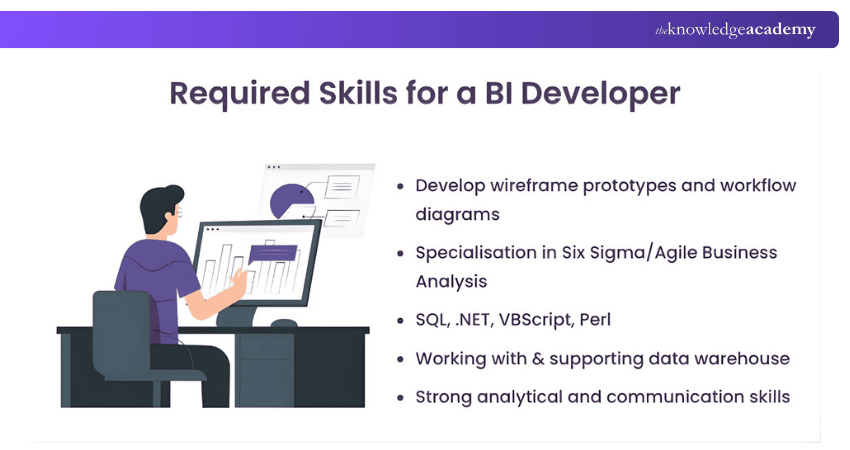
Here are some criteria you must meet to pursue a career as a Power BI Developer. These include interpersonal skills necessary to work on the role, educational background, and hard skills, such as technical knowledge for Data Analytics.
1) Education: Working as a Power BI Developer requires an undergraduate or postgraduate degree specialising in mathematics, engineering, computer science or information system. This will bring you ease of understanding concepts while working with SQL and DAX queries.
A strong mathematical and computer science background can act as the foundation to develop analytical skills. This will allow you to mine data, recognise patterns and report any potential for growth in future.
2) Database proficiency: Working with databases, especially developing cross-platform databases, is a common practice as a Power BI Developer in an analytical role. Having experience with SQL, SQL Server, SSRS, SSAS, and SSIS will aid you in future tasks. Additionally, the knowledge of DAX will help you with data model creation and transformation processes.
The job of a BI Developer requires you to process details of Data Analysis. Additionally, pursuing knowledge of relation datasets, statistics, scripting, and datasets will be convenient. This would include understanding data maintenance and its integration across different platforms.
3) Technology proficiency: The job of a Power BI Developer continues beyond Data Analysis. Your knowledge of software development can play a massive part in integrating data visuals across different platforms, such as an organisation's application software.
Certain technologies like coding experience in Python, TSQL, and R language will help you with Data Analysis and software integration. Additionally, knowledge of Agile and Redshift will give you a more extensive skill set to rely on.
4) Interpersonal Skills: As a Power BI Developer, you must work with different people, including organisational stakeholders. It would help if you could express your ideas, have a keen eye for details and solve problems. In lack such skills, you will find yourself in a position where you have all the necessary knowledge but no way to convey them properly.
Steps to Being a Power BI Developer
Microsoft allows you to get certified as Power BI professional by taking their examinations. These examinations cover the general principles a Power BI specialist will abide by. You can apply for the Microsoft Power BI Data Analyst Exam (PL-300), consisting of data preparation and modelling subjects. You will need the knowledge to visualise and analyse data and learn asset maintenance.
Before applying for this examination, to prove your mettle, be sure you are prepared. You must be confident in your ability to analyse data and visualise information using Power BI, and exploring various Power BI Project Ideas can help you build the practical skills needed. One of the great methods to do so is taking a course that allows you to shadow a Power BI Developer and gain real-time experience. This also allows you to take hold of best practices in Power BI Development, allowing for an easy transition between the learning process to a fully-fledged career.
Successfully clearing the exam will give you the title and certification of a Power BI Data Analyst Associate. To prepare effectively, reviewing Power BI Interview Questions can help you understand key concepts and improve your readiness for both the exam and job interviews. The examination for this certificate can be daunting for newcomers. While it is possible to take this exam on a self-paced study, you can apply for a course focused on the PL-300 exam.
Conclusion
Learning how to become a Power BI Developer will give you the opportunity to enjoy a data-driven career that is very rewarding indeed. By combining the necessary technical proficiency with the ability to tell stories through visuals, you will be able not only to analyse but also to interpret data and provide valuable insight. So, gain expertise now to impact business decisions positively by means of data.
Advance Your Analytics Career with Microsoft Power BI Data Analyst Training – Register now!
Frequently Asked Questions
Is Coding Required for Power BI Developers?

Coding is not strictly required for Power BI Developers, as the tool offers a user-friendly interface for data modelling, visualisation design, and report creation. However, knowledge of basic scripting languages like DAX and M is beneficial for advanced data manipulation and analysis.
How do I Start as a Power BI Developer?
To start as a Power BI Developer, familiarise yourself with Power BI Desktop and its features. Learn about data modelling, visualisation design, and DAX querying. Practice by working on sample datasets and tutorials and gradually tackling real-world projects to gain hands-on experience.
What are the Other Resources and Offers Provided by The Knowledge Academy?
The Knowledge Academy takes global learning to new heights, offering over 3,000+ online courses across 490+ locations in 190+ countries. This expansive reach ensures accessibility and convenience for learners worldwide.
Alongside our diverse Online Course Catalogue, encompassing 17 major categories, we go the extra mile by providing a plethora of free educational Online Resources like Blogs, eBooks, Interview Questions and Videos. Tailoring learning experiences further, professionals can unlock greater value through a wide range of special discounts, seasonal deals, and Exclusive Offers.
What is The Knowledge Pass, and How Does it Work?
The Knowledge Academy’s Knowledge Pass, a prepaid voucher, adds another layer of flexibility, allowing course bookings over a 12-month period. Join us on a journey where education knows no bounds.
What are the Related Courses and Blogs Provided by The Knowledge Academy?
The Knowledge Academy offers various Business Intelligence Reporting Courses, including the Pentaho BI Training, Cognos BI Training, and Microsoft BI Training. These courses cater to different skill levels, providing comprehensive insights into Power BI Alternatives.
Our Office Applications Blogs cover a range of topics related to Power BI Developer, offering valuable resources, best practices, and industry insights. Whether you are a beginner or looking to advance your Office Applications skills, The Knowledge Academy's diverse courses and informative blogs have got you covered.

The Knowledge Academy


Global Training Provider
The Knowledge Academy is a world-leading provider of professional training courses, offering globally recognised qualifications across a wide range of subjects. With expert trainers, up-to-date course material, and flexible learning options, we aim to empower professionals and organisations to achieve their goals through continuous learning.

Upcoming Microsoft Technical Resources Batches & Dates
Date
 Microsoft Power BI Training
Microsoft Power BI Training
Fri 24th Jul 2026
Microsoft Power BI Training
Fri 20th Nov 2026

 If you wish to make any changes to your course, please


