


 Top Rated Course

We may not have the course you’re looking for. If you enquire or give us a call on +91-181-5047001 and speak to our training experts, we may still be able to help with your training requirements.
What is a Learning Management System (LMS)? Features and Types
The Knowledge Academy 06 May 2026A Learning Management System (LMS) is software to plan, deliver, and track training. It centralises learning, materials access, assessments, and progress tracking. An LMS helps plan, deliver, and track engaging, flexible training by centralising learning, assessments, resources, and learner progress efficiently.

Training Outcomes Within Your Budget!
We ensure quality, budget-alignment, and timely delivery by our expert instructors.
Table of Contents
The future of learning is virtual, and nothing exemplifies this groundbreaking development like a Learning Management System (LMS). Thanks to LMS, you can imagine a virtual classroom where learning materials are just a click away, progress is tracked without hiccups, and knowledge is shared seamlessly. From immersive courses to real-time feedback, an LMS turns education into an engaging journey, and this blog explains how. So read on and learn how LMS transforms training into an interactive experience for everyone involved.
Table of Contents
1) What Is a Learning Management System (LMS)?
2) Features of a Learning Management System (LMS)
3) Types of LMS
4) What is an LMS used for?
5) How Does an LMS Work?
6) Benefits of using LMS
7) Best Practices for Implementing LMS
8) LCMS vs LMS
9) How do I choose the best LMS for my organisation?
10) Conclusion
What Is a Learning Management System (LMS)?
A Learning Management System (LMS) is a software that helps organise and manage the process of online learning. It’s a place where students can access learning materials and assessments while Trainers can track their progress. An LMS makes onboarding easier for businesses, ensures consistent training, and helps measure success. The right LMS can improve learning and support employee growth and company development.
Features of a Learning Management System (LMS)
From User Management and content creation to progress tracking and mobile learning, there are several features that an LMS can offer. Let’s explore these features in detail:

User Management
a) You can easily add and edit users and create personalised accounts for each learner or Instructor.
b) LMS allows you to assign user roles such as administrator, tutor, or student.
c) You can organise learners into groups or organisations for a more streamlined Course Management and communication process.
d) You can set up user permissions to ensure only authorised individuals can access specific content or features.
Course Management
a) You can easily organise and present training materials using intuitive tools that support a wide range of formats, including video, audio, documents, and presentations.
b) The LMS allows you to assign user roles such as administrator, tutor, or student, enabling efficient control over course access and responsibilities.
c) You can group learners into categories or organisations to streamline course management, communication, and progress tracking across multiple teams.
d) You can customise permissions to ensure only authorised users can access specific courses, materials, or features, maintaining control and security.
Progress Tracking
a) The LMS provides real-time performance assessment. This allows Instructors to monitor the progress instantly.
b) It generates detailed reports on the achievements of learners and areas of improvement.
c) It tracks completion rates for courses, assignments and assessments. This helps both the learners and Instructors to stay on track.
d) It offers insights into individual and group performance.
Social Learning
a) You can cultivate better collaboration by creating student groups for class projects.
b) You can use discussion boards and forums for open communication. This helps students ask questions and share insights.
c) LMS helps you conduct webinars and live Q&A sessions.
d) LMS encourages peer-to-peer feedback where learners can review each other's work.
Gamification
a) You can set training milestones and offer points as rewards for completing activities, keeping learners engaged and motivated throughout the course.
b) You can award badges to recognise learner achievements and milestones, which are displayed on their profiles to celebrate progress.
c) LMS allows you to introduce leaderboards that display rankings and performance, encouraging healthy competition among learners.
d) You can use game levels, storylines, and reward marketplaces to turn learning into an interactive journey and let users redeem points for real rewards.
Integration
a) You can enhance scalability by integrating your LMS with systems like CRM, HRM, and ERP, enabling a seamless flow of training data.
b) You can automate tasks such as learner enrolment and progress tracking by syncing the LMS with your HRM system.
c) LMS allows you to create personalised learning paths and consolidate analytics for better training insights and decision-making.
d) LMS integration supports future growth by using APIs and cloud-based solutions, ensuring accessibility, flexibility, and long-term system reliability.
Mobile Learning
a) Some LMS platforms offer mobile apps that provide easy access to courses on the go.
b) The offline access allows learners to continue studying without an internet connection.
c) Mobile apps are great for learners to engage in micro-learning by accessing bite-sized content anywhere.
d) These apps support notifications to update learners on new courses, deadlines, or announcements.
Sign up for our Certified Training and Development Manager Course to spotlight your leadership expertise now!
Types of LMS
Learning Management Systems (LMS) come in different types to suit various organisational needs. From open-source platforms to cloud-based solutions, each type offers unique benefits depending on factors like technical expertise, budget, and scalability.

Open-source LMS
An open-source LMS offers free access to its source code, allowing organisations to customise the system based on their specific training needs. While it provides flexibility and control, it often requires in-house technical skills for setup, hosting, and ongoing maintenance. Ideal for organisations seeking a tailored solution and who have the resources to support it.
Commercial LMS
A commercial LMS, also known as proprietary software, is developed and maintained by a vendor who provides ongoing support, updates, and feature enhancements. It’s typically ready to use, user-friendly, and includes professional customer service. This option suits businesses looking for a reliable, polished platform without needing internal technical support.
Deployed LMS
A deployed LMS is installed on the organisation’s own servers and infrastructure, giving full control over security, data management, and system configuration. While offering high customisability and security, it demands significant IT involvement for hosting, updates, and troubleshooting. It’s a good fit for companies with strict compliance or data control requirements.
Hosted (SaaS) LMS
A Hosted or Software-as-a-Service (SaaS) LMS operates in the cloud and is managed by the vendor. This model requires no installation or technical management from the client’s side. It offers automatic updates, scalability, and ease of access from anywhere. SaaS LMS is ideal for businesses seeking a cost-effective, hassle-free solution that can grow with their learning needs.
What is an LMS used for?
LMS are versatile tools that can help you organise and manage various types of training programs. Here are the most common uses:
a) Onboarding: An LMS helps with online onboarding and lets new hires train at their own pace. This reduces training time and prepares them for a smooth start.
b) Employee Training: An LMS allows you to Build courses, upload materials, assess progress, and track employee performance.
c) Customer Training: Pre-made online courses save costs by allowing you to onboard new customers, educate prospects, and showcase products.
d) Compliance Training: LMS helps you automate compliance training and store policies. This allows employees to refresh their knowledge anytime.
e) Sales Training: LMS helps improv sales performance by keeping reps updated on products and tracking progress.
Boost workforce Performance with our Training Needs Analysis Course, Sign-up Now!
How Does an LMS Work?
As mentioned above, an LMS streamlines the learning process by managing course creation, delivery, and tracking. Here’s how it works:

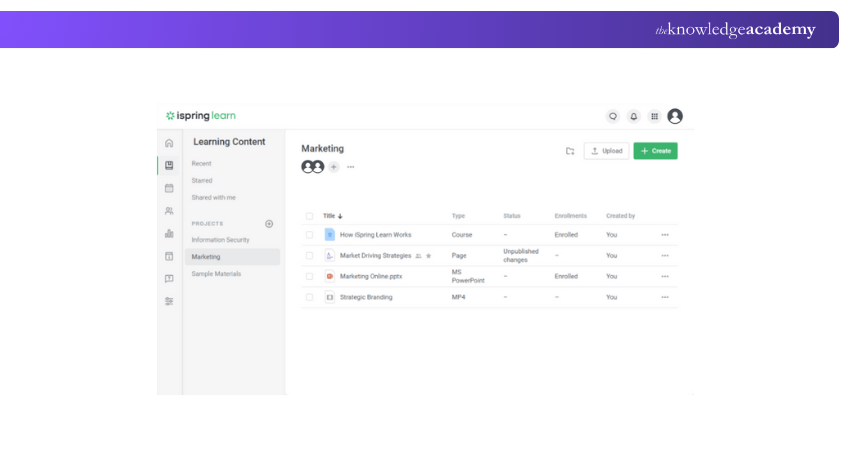
Upload Courses
a) Instructors or admins upload course materials, such as videos, documents, quizzes, and other learning resources.
b) The LMS organises these materials into modules for easy navigation.
c) The content can be updated, edited or reorganised within the platform.
Add Users
a) Admins create and manage the user accounts by adding learners and Instructors.
b) The user roles can be customised (e.g., student, Trainer, or Admin). This defines what content they can access.
c) The learners are assigned relevant courses based on their role, skill level, or training needs.
Deliver Knowledge
a) Once the users are registered, the LMS delivers the course content via an intuitive interface.
b) The learners can access these materials anytime and anywhere. This helps with self-paced learning.
c) Some LMS platforms offer interactive features like forums, webinars, and live classes.
Evaluate the Results
a) The LMS tracks learner progress in real-time, offering instant insights into course completion and grades.
b) Automated assessments such as quizzes and tests help you measure learners’ understanding.
c) Reports and analytics allow Instructors and admins to review individual or group performance and identify areas for improvement.
Are you an HR professional seeking to ride and steer the wave of digital transformation? Our Digital Transformation in HR Training will help you achieve that - Register now!
Benefits of Using LMS
A Learning Management System (LMS) offers a wide range of benefits for both organisations and learners. It helps streamline training delivery, reduce administrative workload, and improve access to learning across various locations. Below are some key advantages of using an LMS:

Saving time and money
An LMS reduces the need for physical classrooms, printed materials, and travel expenses. Automated features such as enrolment, tracking, and assessments save valuable time and significantly cut operational costs.
Efficient management
Centralised control allows administrators to manage users, courses, and content all in one place. Tasks like assigning roles, scheduling training, and monitoring progress become quicker and more efficient.
Easy access to information
Learners can access training materials at any time, from any location with an internet connection. This on-demand access ensures consistent learning experiences regardless of geography or working hours.
Advanced reporting
LMS platforms offer comprehensive reporting tools that track learner progress, course completions, and engagement. These insights enable organisations to measure training effectiveness and support continuous improvement.
Improved communication
Integrated tools such as chat, forums, and notifications help facilitate real-time communication between learners and instructors. This encourages collaboration, enhances engagement, and ensures prompt support when needed.
Transform Your Passion into a certified profession with our Certified Training Professional Course, Sign-up Now!
Best Practices for Implementing LMS
Implementing an LMS effectively requires clear planning, user focus, and alignment with business goals. Here are the key best practices to ensure success:
1) Set Clear Objectives: Define specific learning goals, such as onboarding, compliance, or upskilling, to guide your implementation.
2) Involve Stakeholders Early: Engage HR, IT, L&D, and learners in the selection and rollout process to ensure system compatibility and usability.
3) Choose a Scalable Solution: Opt for a cloud-based LMS that integrates with existing tools and grows with your organisation’s needs.
4) Prioritise User Experience: Select an intuitive platform that’s easy for both learners and administrators to navigate, encouraging higher engagement.
5) Provide Training and Support: Equip users with tutorials, documentation, and onboarding sessions to boost confidence and minimise resistance.
6) Leverage Data and Reporting: Use analytics to track progress, improve content, and measure training impact on business performance.
7) Build Internal Support: Promote LMS benefits to encourage buy-in, emphasising time savings, flexibility, and personalised learning opportunities.
By following these practices, your LMS can deliver long-term value and support a culture of continuous learning.
LCMS vs LMS
Here are the key differences between Learning Content Management System and Learning Management System:

How do I choose the best LMS for my organisation?
Choosing the best Learning Management System (LMS) for your organisation begins with identifying your training goals and aligning them with user needs. Consider features such as ease of use, scalability, mobile compatibility, integration with existing systems, and robust reporting capabilities. It’s also essential to involve key stakeholders during the selection process and ensure the platform offers customisation, content flexibility, and strong vendor support.
Additionally, test the LMS through demos or trial versions to assess usability and learner experience. Opt for a solution that not only meets your current requirements but can also grow with your business. Prioritising long-term value, user engagement, and technical reliability will help ensure successful adoption and measurable results.
Conclusion
A Learning Management System makes creating, managing, and tracking training or courses easier. It helps learners stay engaged and allows Teachers or companies to teach more efficiently. As outlined in this blog, understanding What is LMS includes its features, benefits, and implementation process which will help you improve learning for your organisation.
Embrace innovation and turbocharge your teaching methods and tools in our Learning and Development Courses - Sign up now!
Frequently Asked Questions
What is customisable in an LMS?

An LMS can be customised with branding, user roles, course structures, languages, reporting tools, and certification features to match organisational needs and deliver a tailored learning experience across different departments or teams.
Can an LMS handle global learning programs?
Yes, an LMS can support global learning by offering multi-language support, time zone settings, regional compliance tracking, and scalable user access. It enables consistent training across countries while accommodating local learning needs.
What are the Other Resources and Offers Provided by The Knowledge Academy?
The Knowledge Academy takes global learning to new heights, offering over 3,000+ online courses across 490+ locations in 190+ countries. This expansive reach ensures accessibility and convenience for learners worldwide.
Alongside our diverse Online Course Catalogue, encompassing 17 major categories, we go the extra mile by providing a plethora of free educational Online Resources like Blogs, eBooks, Interview Questions and Videos. Tailoring learning experiences further, professionals can unlock greater value through a wide range of special discounts, seasonal deals, and Exclusive Offers.
What is The Knowledge Pass, and How Does it Work?
The Knowledge Academy’s Knowledge Pass, a prepaid voucher, adds another layer of flexibility, allowing course bookings over a 12-month period. Join us on a journey where education knows no bounds.
What are the Related Courses and Blogs Provided by The Knowledge Academy?
The Knowledge Academy offers various Learning and Development Courses, including Certified Training & Development Manager Course and the Digital Transformation in HR Training. These courses cater to different skill levels, providing comprehensive insights into HR Analytics Tools.
Our HR Blogs cover a range of topics related to Learning Management Systems, offering valuable resources, best practices, and industry insights. Whether you are a beginner or looking to advance your Learning Management skills, The Knowledge Academy's diverse courses and informative blogs have got you covered.

The Knowledge Academy


Global Training Provider
The Knowledge Academy is a world-leading provider of professional training courses, offering globally recognised qualifications across a wide range of subjects. With expert trainers, up-to-date course material, and flexible learning options, we aim to empower professionals and organisations to achieve their goals through continuous learning.

Upcoming HR Resources – Learn about Human Resources Batches & Dates
Date
 Digital Transformation in HR Training
Digital Transformation in HR Training
Fri 31st Jul 2026
Digital Transformation in HR Training
Fri 30th Oct 2026

 If you wish to make any changes to your course, please


