


 Top Rated Course

We may not have the course you’re looking for. If you enquire or give us a call on +800 312616 and speak to our training experts, we may still be able to help with your training requirements.
What is a Git Repository? Everything a New Developer Needs
Richard Harris 24 April 2026What is a Git Repository? It stores project files and history, enabling developers to track changes, collaborate, and manage code versions effortlessly. With Git, you can experiment freely, fix mistakes easily, and stay organised without stress. It’s your go-to tool for making coding easier and more efficient. Read now!

Training Outcomes Within Your Budget!
We ensure quality, budget-alignment, and timely delivery by our expert instructors.
Table of Contents

What is a Git Repository? If you’re diving into coding or collaborating on projects, Git repositories are about to become your best friend. A Git Repository is like a digital workspace where all your code lives, evolves, and gets managed. It helps you keep track of every change you make, so you never lose progress or revert from any accidental code glitches.
Git makes collaboration seamless by enabling everyone to work on the same project without conflicts. It allows you to experiment with new ideas, revert mistakes, and maintain full control over a team's entire project history. In the midst of this, mastering Drupal Interview Questions can further enhance your expertise. Let’s dive into the world of Git Repositories!
Table of Contents
1) What is a Git Repository?
2) Key Features of Git
3) Types of Git Repositories
4) Configuring Git Repositories
5) Overview of Git Repository Operations
6) Conclusion
What is a Git Repository?
Git Repositories are storage systems that track projects’ files, changes, and history using Git. They enable version management, collaboration, and workflow organization. Compared to other version control systems like Perforce vs Git, Git provides a structured approach with designated areas for working, staging, and committing changes, ensuring efficient and secure code management for any project.

Key Features of Git
If you are looking to make coding easy and organised, Git is your answer. It lets you track every change in your project, collaborate effortlessly with others, and work offline. You can create branches to test ideas without affecting the main code and easily merge them later. Plus, it’s fast, secure, and helps you manage projects like a pro.
1) Git Performance
Git is designed for speed and efficiency. It handles large projects effortlessly; processes commits and merges quickly and works offline without relying on a central server. Its lightweight structure ensures your workflow stays smooth, even with complex branching and extensive history tracking, keeping performance top-notch.
2) Git Security
Git prioritises security by using cryptographic Hashing (SHA-1) to track changes, ensuring data integrity and preventing tampering. Every commit is uniquely identified, making your project’s history reliable and secure. With its distributed structure, your code remains safe across multiple locations, reducing risks of data loss or corruption.
3) Git Flexibility
With unmatched flexibility, Git offers branching and merging capabilities, letting you experiment without affecting the main code. It supports various workflows, adapts to teams of any size, and works seamlessly with different platforms. Whether you’re managing solo projects or complex collaborations, Git adjusts to fit your needs effortlessly.
Want to launch your first mobile application? Join our Mobile App Development Course today!
Types of Git Repository
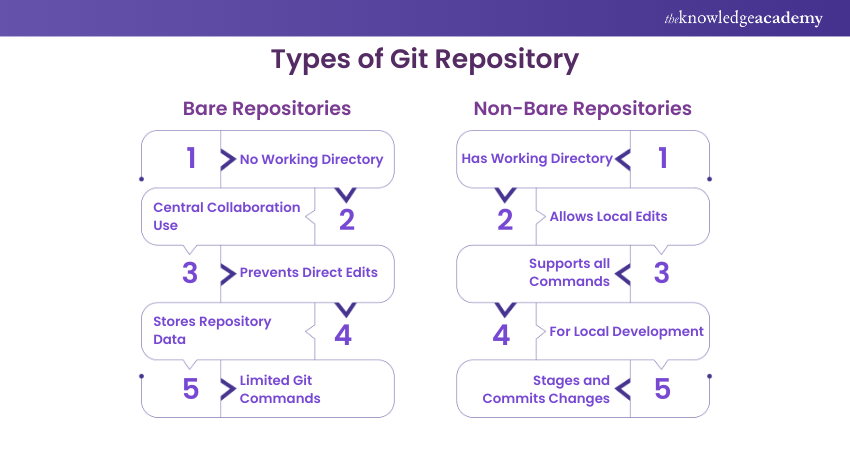
Git Repositories come in two types: Bare and Non-bare. Bare Repositories are like central hubs, storing only version control data without a working directory, perfect for team collaboration. Non-bare Repositories include a working directory, allowing you to edit and manage files directly, making them ideal for personal development and local work.
Bare Repositories
A Bare Repository stores only the Git version control data, without a working directory for direct file editing. It’s designed as a central repository for collaboration, where team members push and pull changes. When comparing SVN Vs Git, Bare Repositories in Git play a crucial role in managing shared projects and ensuring smooth teamwork, offering flexibility and control that some other version control systems may not provide.
Non-Bare Repositories
A Non-bare Repository includes both Git’s version control data and a working directory, where you can edit files directly. It’s perfect for local development, allowing you to make changes, commit updates, and test your code before sharing it with others via a central bare repository.
Advance your database solutions skills with our MongoDB Certification Course!
Configuring Git Repositories
Configuring a Git Repository involves setting up essential details like your username and email using git config. You can also customise preferences, such as default branches and aliases. Configuration ensures proper version tracking, smooth collaboration, and personalised workflows, giving you full control over your Git environment. Additionally, knowing how to delete a branch in git is important for maintaining a clean repository and avoiding clutter.
Setting Username and Email
Setting your username and email in Git is crucial for identifying your contributions. Use the following code on to get started:
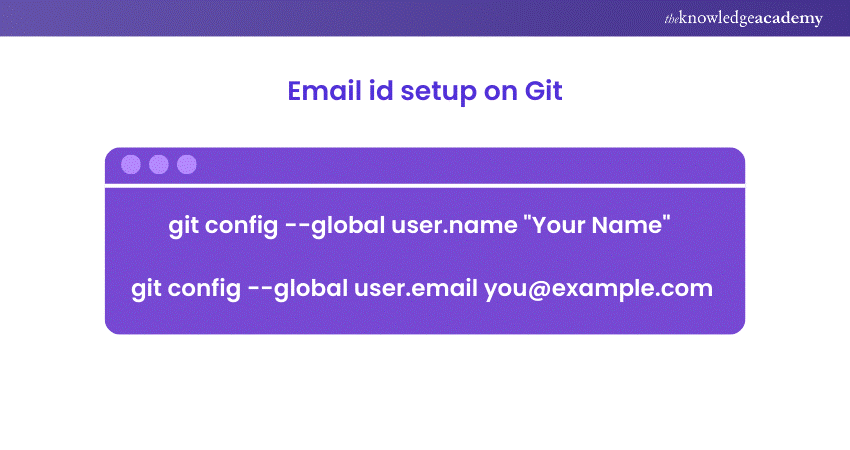
This ensures all your commits are properly attributed, making collaboration and tracking changes seamless across projects.
Ignoring Files
In Git, you can exclude unnecessary files from being tracked by creating a .gitignore file. List file names, extensions, or patterns to ignore, like temporary or sensitive files. This keeps your repository clean, organised, and free from clutter while focusing on essential code and assets.
Saving Changes
In Git, saving changes involves staging updates with git add and committing them with git commit. Staging lets you organise specific changes for tracking, while committing records them in the repository’s history. This process ensures a clear, structured log of your project’s progress and modifications.
Enabling Collaboration
Git enables collaboration by using remote repositories hosted on platforms like GitHub or GitLab. Team members can Git Push, Git Pull, and Git merge changes, ensuring everyone works on the latest version. With Git Branching Strategy and conflict resolution tools, Git simplifies teamwork and keeps projects organised and efficient.
Key Git Repository
A key Git Repository serves as the primary, central hub for a project, often a bare repository. It facilitates collaboration by storing the main version of the code. Developers push their updates and pull the latest changes, ensuring consistency and teamwork across the project.
Learn to design your very own website with our Wix Course!
Overview of Git Repository Operations
A key Git Repository acts as the main repository for a project, often set up as a Bare Repository to support collaboration. It stores the centralised version of the code, allowing multiple developers to push their changes and pull the latest updates.
This repository ensures consistency, tracks the project’s complete history, and serves as a reliable backup. It plays a crucial role in maintaining organisation, synchronisation, and efficiency throughout the Git Life Cycle, especially in collaborative or large-scale projects.
Git Repository Areas (Working Area, Staging Area, and Commit Area)
A Git Repository is divided into three key areas:
a) Working Area where you modify files
b) Staging Area, where you prepare changes for a commit using git add
c) Commit Area, which stores changes permanently in the repository history with git commit.
Each of these areas ensures an organised and independent version control.
Moving Files from Working Area to Staging Area
To move files from the Working Area to the Staging Area in Git, use the git add command. This action prepares specific changes for the next commit without directly modifying the repository’s history. By staging files, you can review and organise updates before committing them, ensuring a clear and structured project workflow.
Moving Files from Staging Area to Commit Area
To move files from the Staging Area to the Commit Area in Git, use the git commit command. This records the staged changes in the repository's history, creating a permanent snapshot of your project at that point. Adding a meaningful commit message ensures clear tracking of updates for future reference.
Understand the nuances of web and application design in the Tailwind CSS Course!
Conclusion
Understanding What is a Git Repository is essential for managing projects, tracking changes, and fostering collaboration. Whether working solo or in a team, they provide a structured workflow that ensures your code remains organised and secure. As you work with repositories, understanding the process of Resolving Git Merge Conflict becomes crucial for smooth collaboration, ensuring your codebase remains error-free. By mastering Git’s features, from staging to committing and collaboration tools, you can streamline your development process, maintain project integrity, and confidently handle any coding challenge. Start exploring Git today and enhance your development journey!
Frequently Asked Questions
How to Create a Git Repository?

To create a Git Repository, use git init in your project directory to initialise a new local repository. This creates a .git folder for tracking changes. For remote repositories, create one on platforms like GitHub, then link it to your local repository using git remote add origin.
Do I Need Both Git and GitHub?
Git and GitHub serve different purposes. Git is a version control tool for managing code locally, while GitHub is a platform for hosting and sharing repositories remotely. You can use Git without GitHub, but GitHub simplifies collaboration, backup, and remote access, making it highly beneficial for teamwork and distributed workflows.
How to Convert a Folder to Git Repo?
To convert a folder into a Git Repository, navigate to the folder using your terminal or command prompt and run git init. This initialises a Git Repository by creating a .git directory to track changes. You can then add files with git add and commit them using git commit.
What are the Other Resources and Offers Provided by The Knowledge Academy?
The Knowledge Academy takes global learning to new heights, offering over 3,000 online courses across 490+ locations in 190+ countries. This expansive reach ensures accessibility and convenience for learners worldwide.
Alongside our diverse Online Course Catalogue, encompassing 17 major categories, we go the extra mile by providing a plethora of free educational Online Resources like Blogs, eBooks, Interview Questions and Videos. Tailoring learning experiences further, professionals can unlock greater value through a wide range of special discounts, seasonal deals, and Exclusive Offers.
What is The Knowledge Pass, and How Does it Work?
The Knowledge Academy’s Knowledge Pass, a prepaid voucher, adds another layer of flexibility, allowing course bookings over a 12-month period. Join us on a journey where education knows no bounds.
What are the Related Courses and Blogs Provided by The Knowledge Academy?
The Knowledge Academy offers various App and Web Development Training, including the MongoDB Certification Course, Node.JS Course and AngularJS Course. These courses cater to different skill levels, providing comprehensive insights into SVN Vs Git.
Our Programming and DevOps Blogs also cover a range of topics related to Programming Languages, offering valuable resources, best practices, and industry insights. Whether you are a beginner or looking to advance your App & Web Development skills, The Knowledge Academy's diverse courses and informative blogs have got you covered.

Richard Harris


Senior Full Stack Developer and Technology Educator
Richard Harris is a highly experienced full-stack developer with deep expertise in both frontend and backend technologies. Over his 12-year career, he has built scalable web applications for startups, enterprises and government organisations. Richard’s writing combines technical depth with clear explanations, ideal for developers looking to grow in modern frameworks and tools.

Upcoming Programming & DevOps Resources Batches & Dates
Date
 Git & GitHub Fundamentals
Git & GitHub Fundamentals
Fri 11th Sep 2026
Git & GitHub Fundamentals
Fri 11th Dec 2026

 If you wish to make any changes to your course, please


