


 Top Rated Course

We may not have the course you’re looking for. If you enquire or give us a call on 01344 203999 and speak to our training experts, we may still be able to help with your training requirements.
What Is Malware? Definition and Types
The Knowledge Academy 01 May 2026Malware is harmful software created to disrupt systems, steal data, or gain unauthorised access, posing significant risks to digital security and privacy. It can spread through email attachments, infected websites, or removable media. Staying vigilant and using updated security software is essential to protect against these threats.

Training Outcomes Within Your Budget!
We ensure quality, budget-alignment, and timely delivery by our expert instructors.
Table of Contents
A suspicious email, a slow system, or an unexpected pop-up that seems harmless can turn into a serious digital threat. Such threats steal data, damage systems, or disrupt daily operations. To understand these risks clearly, it is essential to understand What is Malware and how it affects devices, networks, and everyday online activities.
In today’s online world, cyber threats are becoming advanced and widespread, affecting organisations and individuals alike. This is why understanding What is Malware helps you recognise warning signs early and take the right steps to protect your data, privacy, and systems. In this blog, you will explore malwares, how it works, its types, and more!
Table of Contents
1) Malware Definition
2) How Does Malware Work?
3) Types of Malware
4) How to Protect Against Malware?
5) How to Detect and Remove Malware?
6) What are the Benefits of Advanced Malware Protection?
7) Conclusion
Malware Definition
Malware, short for malicious software, is harmful software created by hackers to steal data, lock devices for ransom, or disrupt systems. It affects all operating systems, including Windows, Mac, iOS, and Android. With businesses and individuals at constant risk from billions of threats each year, protecting sensitive data has never been more important
How Does Malware Work?
Malware uses trickery to disrupt normal use of a device. Attackers may gain entry through phishing emails, infected files, software flaws, infected USBs, or harmful websites. Once inside, they launch more attacks, steal data, sell resources, or demand money.
Anyone can fall victim to malware. Cybercriminals keep updating their methods to bypass defences. The effects depend on the malware type. For example, rootkits stay hidden for long periods, making victims unaware of the attack. This constant evolution makes malware hard to detect and stop.
Become a Certified Cyber Security Professional to safeguard digital environments with our Certified Cyber Security Professional (CCS-PRO) Course. Sign up now!
Types of Malware
Malware comes in different forms. They have unique ways to attack systems. Here are some common Types of Malware and what they do:
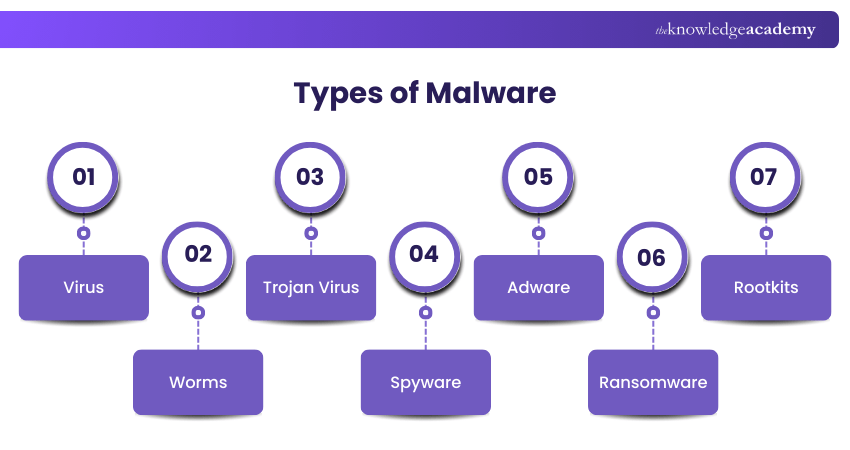
1) Virus: It is a malicious code that attaches itself to legitimate files or software and spreads when the infected file is opened. It damages systems, deletes data, or steals information.
2) Worms: These are independent malware that replicate and spread across networks without any user interaction. They exploit security gaps, slow systems, consume bandwidth, and carry harmful payloads.
3) Trojan Virus: Trojan disguises itself as safe to track users into installing it on their devices. It can steal data, enable remote access, or install additional malware without detection.
4) Spyware: Spyware runs silently in the background and monitors user activities, such as browsing habits and system usage. It collects personal information, such as passwords and financial details.
5) Adware: It displays unwanted advertisements and pop-ups with free software. It can slow devices, disrupt user experience, and redirect users to harmful websites.
6) Ransomware: Ransomware encrypts and demands payment to restore access to the affected data. It can cause severe disruption and financial loss with no assurance that files will be recovered.
7) Rootkits: These hide deep within systems to avoid detection by security software and monitoring tools. They enable cyber attackers to maintain long-term control over devices.
Develop advanced fraud detection strategies with our Fraud Analytics Course and start building a secure future today!
How to Protect Against Malware?
Even though there are various types of malwares, following simple security practices can significantly reduce the risk of malware attacks. Below are some effective ways to protect from malware.
1) Protect Your Devices
Keeping your devices secure is the foundation of malware protection. Strong device security reduces vulnerabilities that cybercriminals often exploit.
Key Practices to Consider:
1) Keep your operating systems and applications updated to fix security gaps.
2) Avoid clicking on pop-up links, close them and leave the site immediately.
3) Install only necessary apps and remove unused applications regularly.
4) Use reliable security software on computers and mobile devices.
5) Do not lend your phone or leave devices unattended; check settings and apps frequently.
2) Be Careful online
Safe online habits help to prevent malware from entering your system through malicious links, emails, or websites.
Key Practices to Consider:
1) Avoid clicking unknown links in emails, messages, or social media posts.
2) Visit only trusted and reputable websites whenever possible.
3) Be cautious with emails asking for personal or financial information,
4) Avoid risky websites offering free downloads or pirated content.
3) Pay Attention to Downloads and Software
Many malware infections occur due to unsafe downloads and unverified software. Being selective about what you install is crucial.
Key Practices to Consider:
1) Download software only from reputable companies and official websites.
2) Use official app stores instead of third-party platforms.
3) Check app reviews and ratings before installing any application.
4) Avoid opening email attachments unless you are sure about their content and source.
4) Perform Regular Security Checks
Regular monitoring helps to detect malware proactively and prevents serious damage to your system and personal information, such as financial details.
Key Practices to Consider:
1) Run a regular scan using your installed security software.
2) Monitor device performance for unusual behaviour or slowdowns.
3) Check bank accounts and credit reports frequently for suspicious activity.
Learn to identify, assess, and manage online risks with Cyber Security Risk Management Course now!
How to Detect and Remove Malware?
Worried your device might be infected? Don’t stress; spotting and getting rid of malware is easier when you know what to look for and how to act quickly.
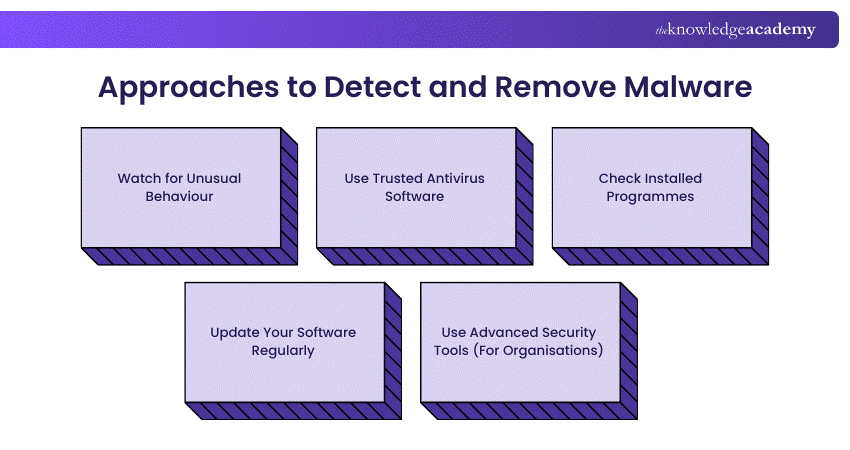
1) Learn about malware to spot threats early.
2) Beware of warning signs such as pop-ups, slow devices, or unusual account activity.
3) Ensure that you have trustworthy anti-virus software (e.g., Windows Defender) that can scan for and remove these threats.
4) Keep your anti-virus programs up to date to defend against new types of malware.
5) Remember a virus is just one malware type. Other types include ransomware, spyware, and worms.
6) For advanced threats, consider using business-level tools like Microsoft Sentinel and Microsoft Defender XDR.
These tools can monitor email, devices and apps to detect and respond to sophisticated attacks.
What are the Benefits of Advanced Malware Protection?
Advanced malware protection provides superior detection and prevention for advanced threats that antivirus software doesn't protect against. It reduces the chances of a data breach and service interruption by continuously monitoring for anomalous activity. It also supports organisations' ability to respond quickly to attacks by reducing impact and downtime.
Conclusion
In today’s digital world, cyber threats are constantly evolving, but arming yourself with knowledge is the first line of defence. By understanding What Is Malware and recognising how it operates, you empower yourself to protect your data and devices effectively. Staying alert, informed, and proactive transforms you from a potential target into a strong defender of your digital life. Keep learning and stay one step ahead of cyber threats.
Stay ahead of cyber threats today with our Cyber Security Courses. Sign up now!
Frequently Asked Questions
How Does Malware Collect Data?

Malware steals data by spying on users, tracking activity, and hacking accounts. Spyware and keyloggers record keystrokes, monitor emails and take screenshots. Some malware steals passwords, banking details, or personal files, while others hack networks to steal company data. Hackers use this stolen information for fraud or sell it online.
How Does Malware Get on Your Device?
Malware can infect your device in different ways. It can come from suspicious email links, fake software downloads, or infected websites. Clicking on pop-up ads or plugging in unknown USB drives can also spread malware. Even opening files from untrusted sources can put your system at risk. Stay cautious and avoid unknown links or downloads!
What are the Other Resources and Offers Provided by The Knowledge Academy?
The Knowledge Academy takes global learning to new heights, offering over 3,000+ online courses across 490+ locations in 190+ countries. This expansive reach ensures accessibility and convenience for learners worldwide.
Alongside our diverse Online Course Catalogue, encompassing 17 major categories, we go the extra mile by providing a plethora of free educational Online Resources like Blogs, eBooks, Interview Questions and Videos. Tailoring learning experiences further, professionals can unlock greater value through a wide range of special discounts, seasonal deals, and Exclusive Offers.
What is The Knowledge Pass, and How Does it Work?
The Knowledge Academy’s Knowledge Pass, a prepaid voucher, adds another layer of flexibility, allowing course bookings over a 12-month period. Join us on a journey where education knows no bounds.
What are the Related Courses and Blogs Provided by The Knowledge Academy?
The Knowledge Academy offers various Cyber Security Training, including the Malware Analysis Training, Cyber Security Risk Management Training, and Fraud Analytics Training Course. These courses cater to different skill levels, providing comprehensive insights into Types of Computer Viruses.
Our IT Security & Data Protection Blogs cover a range of topics related to Malware, offering valuable resources, best practices, and industry insights. Whether you are a beginner or looking to advance your IT Security & Data Protection skills, The Knowledge Academy's diverse courses and informative blogs have got you covered.

The Knowledge Academy


Global Training Provider
The Knowledge Academy is a world-leading provider of professional training courses, offering globally recognised qualifications across a wide range of subjects. With expert trainers, up-to-date course material, and flexible learning options, we aim to empower professionals and organisations to achieve their goals through continuous learning.

Upcoming IT Security & Data Protection Resources Batches & Dates
Date
 Malware Analysis Training
Malware Analysis Training
Fri 14th Aug 2026
Malware Analysis Training
Fri 9th Oct 2026

 If you wish to make any changes to your course, please


