


 Top Rated Course

We may not have the course you’re looking for. If you enquire or give us a call on + 1-866 272 8822 and speak to our training experts, we may still be able to help with your training requirements.
What is Ethernet and How Does It Work?
Lily Turner 22 April 2026Ethernet is a widely used technology for connecting devices within local area networks. Discover how it functions and the various cable types it uses. Ethernet is known for its reliability, scalability and relatively low cost. It supports various speeds, from 10 Mbps (Ethernet) to 100 Gbps and beyond (Gigabit and Terabit Ethernet)

Training Outcomes Within Your Budget!
We ensure quality, budget-alignment, and timely delivery by our expert instructors.
Table of Contents
From homes to high-tech offices, Ethernet is at work quietly powering the backbone of modern networking. It's the invisible driver of modern connectivity linking computers, servers and devices within a local network. Acting as the fuel behind office systems and home networks alike, Ethernet eliminates signal drops, improves speed and maintains security.
In this blog, we’ll explore What is Ethernet, how it functions and why it remains a cornerstone of connectivity in an increasingly wireless world. So read on and understand the tech that keeps your internet fast, stable and engaging!
Table of Contents
1) What is Ethernet?
2) Key Features of Ethernet
3) How Does Ethernet Work?
4) Different Types of Ethernets
5) Key Benefits of Ethernet
6) Disadvantages of Ethernet
7) Ethernet vs Wi-Fi: A Comparison
8) Conclusion
What is Ethernet?
Ethernet is a family of wired networking technologies used to connect devices within a Local Area Network (LAN). Though mainly designed for LANs, it can also support Metropolitan and Wide Area Networks (WAN) in specific setups. Renowned for its reliability and speed, Ethernet remains one of the most trusted networking standards worldwide.
It facilitates efficient data transmission between connected devices. Over the years, Ethernet has evolved into faster versions such as Fast Ethernet, Gigabit Ethernet, and 10-Gigabit Ethernet, ensuring it continues to meet modern connectivity and performance needs.

Key Features of Ethernet
Here are the key features of Ethernet:
1) Speed: Ethernet supports a wide range of data transfer rates, from 10 Mbps to 400 Gbps.
2) Reliability: It includes built-in error detection mechanisms to ensure data is transmitted accurately across connected devices.
3) Cost-effectiveness: Ethernet technology is affordable, easy to implement and widely accessible.
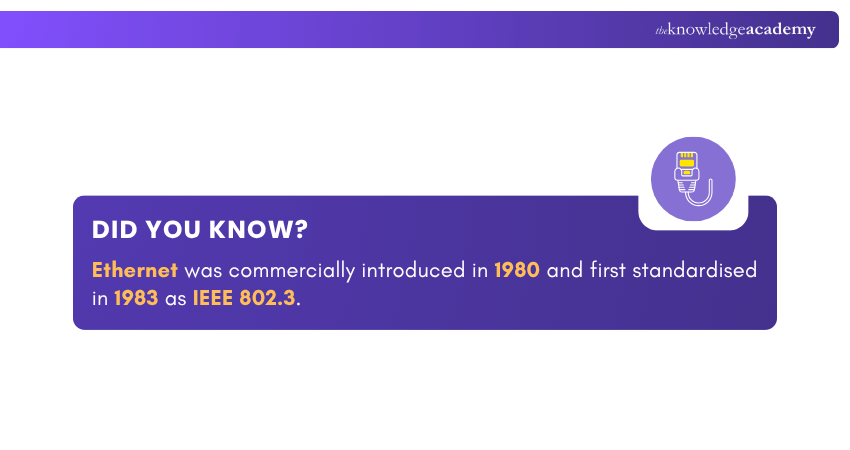
4) Interoperability: Standardised under the IEEE 802.3 framework, Ethernet ensures seamless compatibility between different devices and network hardware.
5) Security: It supports encryption and authentication features that protect data integrity and prevent unauthorised access within the network.
6) Scalability: Ethernet networks can easily expand, allowing additional devices or systems to be integrated without major reconfiguration.
7) Broad Compatibility: It works smoothly with widely used communication protocols like TCP/IP, HTTP and FTP, ensuring efficient data exchange and connectivity.
How Does Ethernet Work?
Ethernet enables multiple devices to communicate efficiently within a network. The process involves the following key stages that ensure reliable data exchange:
1) Formation of Data Packets
Before transmission, data is divided into smaller, manageable units known as packets. These packets make it easier to send information and ensure accurate delivery across the network.
2) MAC Address Identification
Every device connected to the network has a unique Media Access Control (MAC) address. This identifier helps the network determine the exact destination of data packets, ensuring they reach the correct device.
3) Data Transmission
The data packets are enclosed in frames that include details like the sender’s address and error-checking codes. These frames travel through Ethernet cables to their intended destination.
4) Collision Detection
When multiple devices simultaneously attempt to transmit data, collisions may occur. Ethernet uses the Carrier Sense Multiple Access with Collision Detection (CSMA/CD) protocol to detect and manage such collisions. It allows the devices to pause and retransmit data efficiently.
5) Receiving Data
A device accepts data packets only when it recognises its MAC address within the frame. Once received, it interprets the data according to the relevant network protocols, while ignoring packets not meant for it.
Transform your passion for networking tech into a recognised skillset with our CCNA Certification - Sign up now!
Different Types of Ethernet
Ethernet technology comes in various forms, each designed to suit specific networking needs. Below are the main types of Ethernet connectivity:
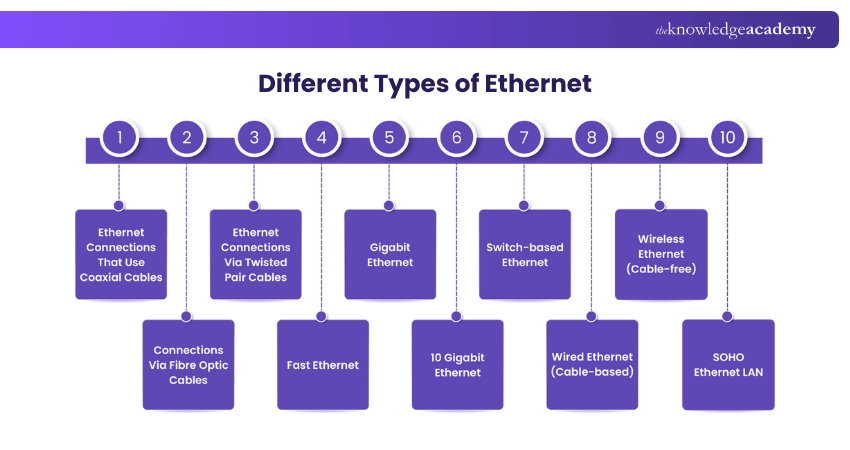
1) Ethernet Connections That Use Coaxial Cables
Coaxial cables transmit electrical signals at high frequencies with minimal loss. The cable consists of a copper conductor surrounded by a dielectric insulator (often PVC or Teflon), a metallic shield to reduce interference and an outer protective sheath. The maximum transmission speed is 10 Mbps. Its variants include:
1) Tri-axial: Features an additional copper shield for enhanced bandwidth and interference resistance; commonly used in broadcasting and cable television.
2) RG-6: Offers improved signal quality with a thicker insulator, suitable for broadband and cable TV.
3) Hardline: Designed for strong signal transmission, used in telephone and internet networks.
2) Connections Via Fibre Optic Cables
Fibre optic Ethernet uses glass-core cables wrapped in layers of cladding material. It transmits data as light pulses, eliminates interference and supports long-distance communication. Variants such as 10BaseF, 100BaseFX and 1000BaseSX offer high-speed transmission. Its subtypes include:
1) Single-mode Fibre (SMF): It uses a single light beam, ideal for long-distance communication.
2) Multi-mode Fibre (MMF): It uses multiple light beams, offering a cost-effective short-distance solution.
3) Ethernet Connections Via Twisted Pair Cables
This type uses two insulated copper wires twisted to reduce interference. Common standards include 10BASE-T and 100BASE-T, which utilise RJ-45 connectors. Its variants include:
1) Shielded Twisted Pair (STP): It provides extra protection against interference, suitable for long-distance, high-speed connections.
2) Unshielded Twisted Pair (UTP): It's most widely used in computer networks, offering flexibility and cost efficiency.
4) Fast Ethernet
Fast Ethernet offers 100 Mbps transmission using twisted pair or fibre optic cables. Devices like cameras and computers typically use 10/100 interfaces that support both standard and Fast Ethernet. Cat-5 cables are commonly used for this connection.
5) Gigabit Ethernet
Gigabit Ethernet can clock speeds of up to 1 Gbps using either twisted pair or fibre optic cables. It is now the standard for most modern networks. Cat-5e or higher cables are highly recommended, and many devices support 10/100/1000 interfaces for compatibility.
6) 10 Gigabit Ethernet
This version offers excellent speeds of up to 10 Gbps (10,000 Mbps) using high-quality twisted pair or fibre optic cables. Standards such as 10GBASE-LX4 and 10GBASE-SR enables data transmission up to 10 kilometres. It is ideal for backbone networks and high-performance environments.
7) Switch-based Ethernet
This setup uses a switch or hub at its centre to manage the data flow between connected devices. The switch transfers data directly from one device to another, thus improving efficiency and reducing interference. It typically follows a star topology structure.
8) Wired Ethernet (Cable-based)
This common form of LAN/WAN communication connects devices through Ethernet cables linked to a modem or switch. It provides a stable, high-speed connection that's ideal for small businesses or home offices. It supports up to 15 devices across a 10 km range.
9) Wireless Ethernet (Cable-free)
Wireless Ethernet, also known as Wi-Fi, utilises high-frequency radio signals, in place of cables, to transmit data. It allows devices to connect within a certain range of the router or modem. A Cat5 or Cat6 cable is typically used between the modem and router.
10) SOHO Ethernet LAN
Small Office/Home Office (SOHO) Ethernet is designed for small setups. It uses an Ethernet LAN switch with multiple ports to connect devices via Ethernet cables. Modern switches often include built-in routers or wireless access points, providing both wireless and wired connectivity.
Key Benefits of Ethernet
Ethernet has become an almost universal networking technology in today’s digital era. Here are its key uses:

1) Enhances Internet Performance
Many households use Ethernet to improve internet speed and reliability when Wi-Fi performance falls short. It's commonly employed to connect multiple devices within LANs and WANs.
2) Delivers High Bandwidth Connectivity
Ethernet supports impressive data transfer rates, ranging from 10 Mbps to 400 Gbps. It allows users to experience fast and consistent connections suitable for everything from browsing to high-demand enterprise systems.
3) Offers Speed Options to Suit Different Needs
Depending on requirements and budgets, users can choose between various Ethernet standards: Standard Ethernet (10 Mbps), Fast Ethernet (100 Mbps), Gigabit Ethernet (1 Gbps), and 10 Gigabit Ethernet (10 Gbps).
4) Balances Cost and Performance
Ethernet remains popular due to its affordability, compatibility and dependable performance. Since its early days, Ethernet speeds have increased from 10 Mbps to over 400 Gbps, making it a preferred choice across industries like education, healthcare and gaming.
5) Strengthens Wi-Fi Capabilities
While Wi-Fi provides mobility, it can struggle in areas with signal drops or multiple connected devices. Ethernet stabilises connections, reduces latency, and ensures coverage in spaces where Wi-Fi signals are weak, especially in older buildings or large offices.
6) Ensures Enhanced Security
Ethernet offers stronger data security than wireless networks. Unlike Wi-Fi, which transmits signals that can be intercepted, Ethernet confines data access to the local network. This makes it less susceptible to hacking or unauthorised access.
7) Supports Power over Ethernet (PoE)
Ethernet also facilitates the transmission of direct current (DC) power through the same cable used for data transfer. This Power over Ethernet feature enables devices like CCTV cameras and wireless access points to operate without separate power sources, simplifying installations in remote or hard-to-reach locations.
Design and troubleshoot networks like a pro with our Interconnecting Cisco Networking Devices Part 2 Course - Sign up now!
Disadvantages of Ethernet
While Ethernet remains a reliable networking option, it has certain drawbacks that make it less suitable for some modern applications. Here are the key limitations:
1) Limited Mobility
Ethernet connections depend on physical cables which restricts device movement and flexibility. Unlike Wi-Fi, it does not allow users to stay connected while moving around freely within a networked area.
2) Installation Complexity
Setting up Ethernet networks often requires professional installation, especially for large buildings or offices. Laying cables through walls or ceilings can be time-consuming and costly.
3) Higher Initial Setup Cost
Although Ethernet provides excellent long-term value, the upfront costs for cables, switches and installation tools can be higher compared to its wireless alternatives.
4) Limited Scalability in Large Areas
Expanding a wired Ethernet network across large premises or multiple locations can be challenging because it demands additional cabling and hardware.
5) Cable Management Issues
Multiple Ethernet connections can result in tangled cables and clutter. This makes maintenance more difficult and increases the chances of connection errors or physical damage.
6) Not Ideal for Temporary Setups
For temporary networks such as events or mobile workstations, Ethernet is impractical since it requires fixed cabling and equipment placement.
7) Difficult Troubleshooting
Identifying issues in large Ethernet networks, such as faulty cables or damaged ports, can be time-consuming without specialised tools or Network Management systems.
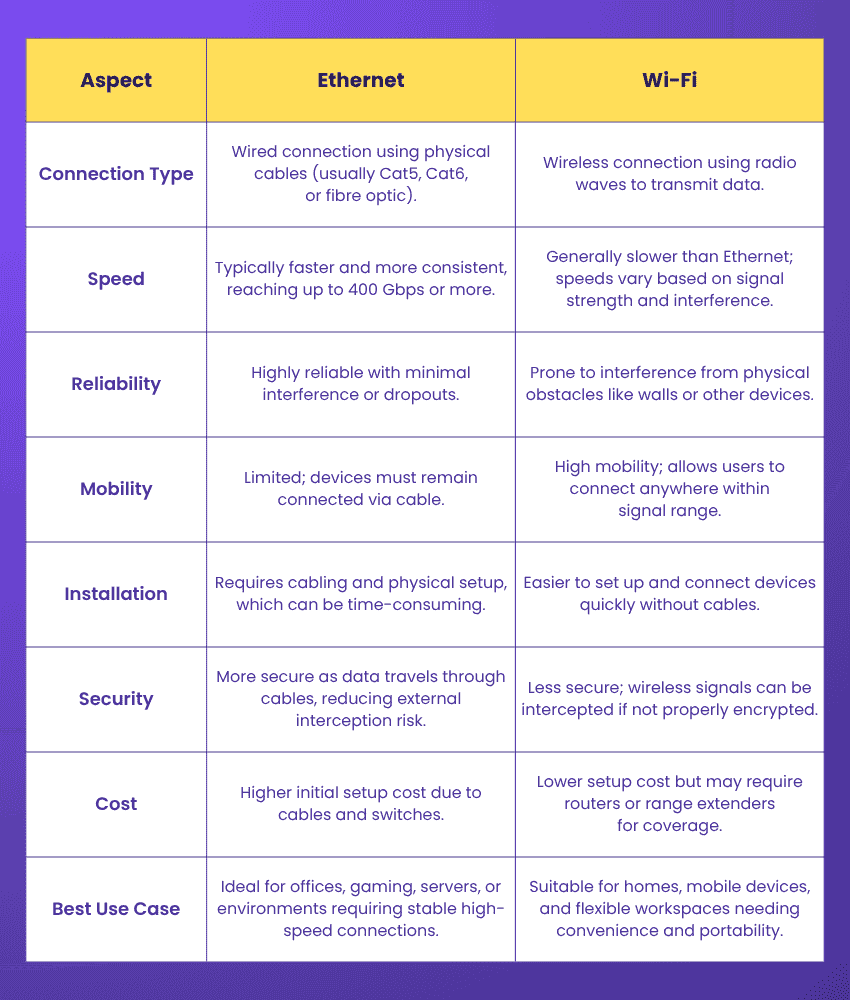
Ethernet vs Wi-Fi: A Comparison
Here are the key distinctions between Ethernet and wi-fi:
Conclusion
Understanding What is Ethernet is vital because it remains the heartbeat of modern networking, thanks to its speed, stability and security. From homes to enterprises, it ensures that data flows seamlessly, powering everything from streaming on a computer to large-scale industrial operations. Its blend of reliability and scalability keeps it relevant even in a wireless age, proving that strong connections can still begin with strong cables.
Dive into the world of routers, switches and protocols with our comprehensive range of CCNA Courses - Register now!
Frequently Asked Questions
What is Difference Between Ethernet and Internet?

Ethernet is a wired networking technology used to connect devices within a local network like computers or routers. On the other hand, the internet is a global network that connects millions of such local networks together. The internet enables worldwide communication and data exchange.
Why Do New Laptops Not Have Ethernet Ports?
Modern laptops are designed to be thinner and lighter. That leaves little space for bulky Ethernet ports. With the rise of high-speed Wi-Fi and USB-to-Ethernet adapters, manufacturers are prioritising portability and wireless connectivity over built-in Ethernet ports.
What are the Other Resources and Offers Provided by The Knowledge Academy?
The Knowledge Academy takes global learning to new heights, offering over 3,000+ online courses across 490+ locations in 190+ countries. This expansive reach ensures accessibility and convenience for learners worldwide.
Alongside our diverse Online Course Catalogue, encompassing 17 major categories, we go the extra mile by providing a plethora of free educational Online Resources like Blogs, eBooks, Interview Questions and Videos. Tailoring learning experiences further, professionals can unlock greater value through a wide range of special discounts, seasonal deals, and Exclusive Offers.
What is The Knowledge Pass, and How Does it Work?
The Knowledge Academy’s Knowledge Pass, a prepaid voucher, adds another layer of flexibility, allowing course bookings over a 12-month period. Join us on a journey where education knows no bounds.
What are the Related Courses and Blogs Provided by The Knowledge Academy?
The Knowledge Academy offers various CCNA Courses, including the CCNA Certification, Interconnecting Cisco Networking Devices Part 1 Course and the Interconnecting Cisco Networking Devices Part 2 Course. These courses cater to different skill levels, providing comprehensive insights into Network Layer.
Our IT Infrastructure & Networking Blogs cover a range of topics related to Ethernet, offering valuable resources, best practices, and industry insights. Whether you are a beginner or looking to advance your IT Networking skills, The Knowledge Academy's diverse courses and informative blogs have got you covered.

Lily Turner


Senior AI/ML Engineer and Data Science Author
Lily Turner is a data science professional with over 10 years of experience in artificial intelligence, machine learning, and big data analytics. Her work bridges academic research and industry innovation, with a focus on solving real-world problems using data-driven approaches. Lily’s content empowers aspiring data scientists to build practical, scalable models using the latest tools and techniques.
View Detail
Upcoming IT Infrastructure & Networking Resources Batches & Dates
Date
 Interconnecting Cisco Networking Devices Part 1
Interconnecting Cisco Networking Devices Part 1
Mon 3rd Aug 2026
Interconnecting Cisco Networking Devices Part 1
Mon 2nd Nov 2026

 If you wish to make any changes to your course, please


