


 Top Rated Course

We may not have the course you’re looking for. If you enquire or give us a call on +44 1344 203 999 and speak to our training experts, we may still be able to help with your training requirements.
What is Bandwidth: A Complete Overview and Guide
John Davies 16 July 2026A Bandwidth is the maximum amount of data transmitted over an internet connection in a given time, usually measured in Megabits per Second (Mbps) rate. Higher Bandwidth allows more data to flow at once, reducing buffering and delays. Limited Bandwidth can cause slow loads, poor video quality, and dropped connections.

Training Outcomes Within Your Budget!
We ensure quality, budget-alignment, and timely delivery by our expert instructors.
Table of Contents
Have you ever tried streaming a movie while someone else was on a video call, and suddenly everything starts buffering? Slow Internet at the worst time is frustrating, and it often comes down to one thing: Bandwidth. With global Internet capacity now exceeding 7,000 terabits per second and online activity growing rapidly, understanding What is Bandwidth is key to enjoying a smoother and more reliable online experience.
In this blog, you will learn What is Bandwidth, how it differs from internet speed, and simple ways to measure and improve it. You will also discover how much Bandwidth you need and whether more Bandwidth truly means a faster, smoother connection. So, read on!
Table of Contents
1) What is Bandwidth?
2) Bandwidth vs Internet Speed: What's the Difference?
3) How to Test Bandwidth Limits and Speed?
4) How to Optimise Your Bandwidth Usage?
5) Network Bandwidth vs Signal Bandwidth
6) How Much Bandwidth Should You Have?
7) What are the Four types of Bandwidths?
8) Conclusion
What is Bandwidth?
Bandwidth is the maximum amount of data that can be transmitted over a network in a given time. It is measured in bits per second, such as Mbps or Gbps, and shows how much data an internet connection can handle at once. Higher Bandwidth supports smoother streaming, faster downloads, and better overall performance.
Bandwidth is often confused with internet speed, but it refers to capacity rather than speed. Understanding What is Bandwidth is especially important when multiple devices share a connection. Enough Bandwidth keeps video calls and online work running smoothly, while low Bandwidth can cause buffering and slow performance.

Bandwidth vs Internet Speed: What's the Difference?
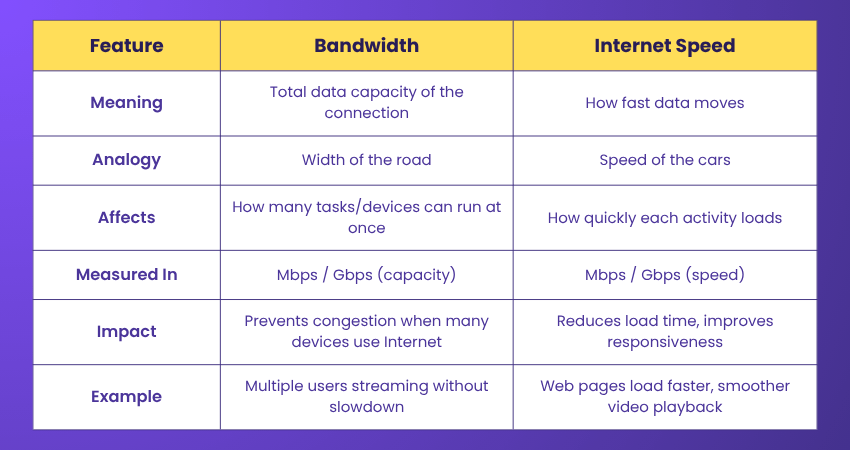
Bandwidth is the amount of data your network can handle at once, while Internet speed is how fast that data travels. Bandwidth affects how many online tasks can run smoothly together, whereas speed affects how quickly each task loads. Both work together to deliver a smooth online experience.
How to Test Bandwidth Limits and Speed?
There are quite a few tools out there that can help you test your bandwidth, and they range from basic to more advanced depending on how accurate you want the results to be. To check your internet speed, all you really need to do is go to one of the many testing websites and run the test. It only takes a few moments, and you’ll quickly see your upload and download speeds.
To make sense of those results, it helps to understand how bandwidth is measured. There are a few standard units used so you can easily compare speeds. The most common ones are:
1) Bits per Second (Bps): This is the smallest unit and shows how quickly data is being sent or received at a detailed level.
2) Kilobits per Second (Kbps): A step up, this tells you how many thousands of bits are transferred per second. It’s often used for slower connections.
3) Megabits per Second (Mbps): This is the one you’ll see most often. One megabit equals 1,000,000 bits, and it’s what most home internet speeds are measured in.
4) Gigabits per Second (Gbps): This measures extremely fast connections (1 billion bits per second) and is usually used for high-speed networks like fibre or enterprise setups.
Once you understand these numbers, it becomes much easier to see how much bandwidth you’re actually using and whether it’s enough for things like streaming, gaming, or browsing. Here’s how they convert:
1) 1 Kbps = 1,000 bits
2) 1 Mbps = 1,000 Kbps
3) 1 Gbps = 1,000 Mbps
Acquire the cutting-edge skills to design, configure, and troubleshoot network topologies with our Cisco Packet Tracer Course – Register today!
How to Optimise Your Bandwidth Usage?
If you feel like you’re not getting enough bandwidth, there are a few simple things you can try to improve it at home. Even making a couple of these changes can help your internet run more smoothly. Here’s how to improve bandwidth:
1) Limit the Number of Connected Devices: All the devices on your WiFi uses a portion of your bandwidth. Try disconnecting gadgets you’re not actively using. Many devices also have companion apps that let you control or turn off their internet access remotely, which can help free things up.
2) Switch to an Ethernet Connection: If possible, plug your device into the router directly using an ethernet cable. It’s not always convenient, but it gives you a more stable, direct connection and avoids interference from other Wi-Fi networks.
3) Turn off Automatic Backups: Automatic backups are useful, but they can quietly eat up a lot of bandwidth in the background. A better approach is to turn them off and schedule them during times when you’re not using the internet as much. That way, they won’t affect your browsing or streaming.
4) Lower Your Video Streaming Quality (if Needed): If your connection is really struggling, try watching videos at a lower resolution. It uses less bandwidth and can reduce buffering. That said, this should just be a temporary workaround; not something you have to stick with long term.
Making these small adjustments can help you get a smoother online experience without needing to upgrade right away.
Build practical expertise to design, manage, and secure enterprise network systems. with our Interconnecting Cisco Networking Devices Part 1 Training- Join now!
Network Bandwidth vs Signal Bandwidth
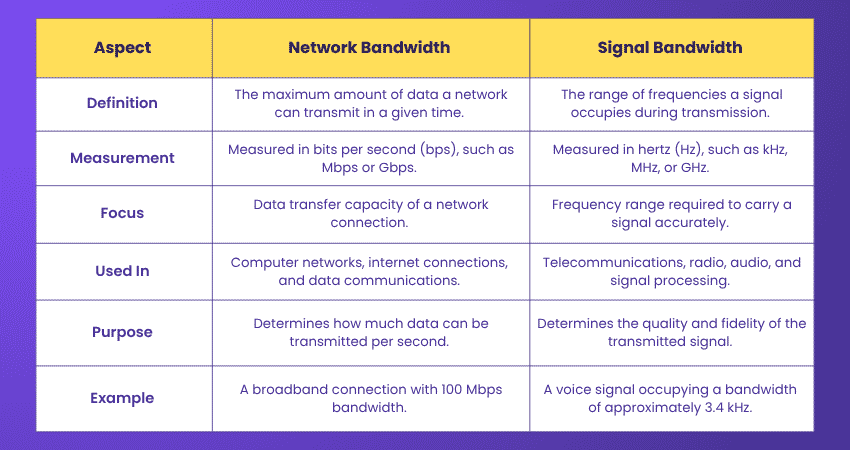
Here are the key distinctions between Network Bandwidth and Signal Bandwidth:
How Much Bandwidth Should You Have?
The Bandwidth you need depends on your household usage and the number of devices. For simple tasks like browsing and email, 10 to 25 Mbps is usually enough. If you stream HD or 4K videos, play online games, or work remotely, aim for 50 to 100 Mbps to keep your connection smooth.
Homes with many devices and heavier usage, such as multiple people streaming or downloading large files, should consider 150 to 200 Mbps or more. Choosing a plan that matches your device count and Internet habits ensures faster and more reliable performance.
What are the Four Types of Bandwidths?
The four types of Bandwidths are:
1) Analogue Bandwidth: This refers to the range of frequencies that an analogue signal occupies or that a communication channel can carry. This category of bandwidth is measured in Hertz (Hz). For example, an FM radio station typically uses about 200 kHz of bandwidth.
2) Digital Bandwidth: Digital bandwidth is all about how much data can be transmitted over a network in a given amount of time. For example, if you have a 100 Mbps connection, it means your network can handle up to 100 million bits of data every second.
3) Baseband Bandwidth: Baseband bandwidth describes the frequency range of a signal before it gets modified for transmission, such as through modulation. A common example is Ethernet networks, which use baseband transmission to send data directly over the cable.
4) Passband Bandwidth: Passband bandwidth comes into play after a signal has been modulated, which is typically done for Radio Frequency (RF) transmission. For example, a television channel might use a passband bandwidth of around 6 MHz to carry audio and video signals.
Conclusion
Understanding What is Bandwidth helps you choose the right Internet plan and enjoy smooth browsing, streaming, and online work. With the right Bandwidth, your home can support multiple devices without lag or buffering. Remember to check your usage, number of devices, and online habits to find the best fit. The right Bandwidth turns frustratingly slow connections into a fast and stress-free online experience.
Gain practical experience with Cisco tools used in real-world IT environments. Join our CCNA Training now!
Frequently Asked Questions
Does More Bandwidth Mean Faster Internet?

That’s not always the case. More bandwidth increases your internet's capacity, but it does not automatically make everything feel faster. Other factors such as latency, network congestion, Wi-Fi quality and server performance also affect your browsing experience.
What is Bandwidth in Terms of Communication?
In communication, Bandwidth refers to the maximum capacity of a channel to transfer data within a specific timeframe, measured in Bits per Second (BPS). Higher Bandwidth enables faster data transmission and better communication performance.

John Davies


Cyber Security Governance & Assurance Specialist
John Davies is a cybersecurity expert specialising in governance, risk management, and compliance. With over 15 years in the field, he has led enterprise-wide security programmes across finance, healthcare and public sector organisations. His content provides practical guidance on building secure environments, managing risk and aligning with regulatory frameworks.


 If you wish to make any changes to your course, please


