


 Top Rated Course

We may not have the course you’re looking for. If you enquire or give us a call on + 1-866 272 8822 and speak to our training experts, we may still be able to help with your training requirements.
Slack vs Teams: Best Choice for Your Business?
The Knowledge Academy 17 February 2026With over 2,400 app integrations, Slack outshines Teams, which has about 700. Both let customers create custom integrations. Explore more in our Slack vs Teams guide. This blog will compare Slack vs Teams for app development and their key features and additions, pricing models, and ease of use.

Training Outcomes Within Your Budget!
We ensure quality, budget-alignment, and timely delivery by our expert instructors.
Table of Contents
Are you wondering which is the right choice for you - Microsoft Teams vs Slack? These are two extremely popular business-based collaboration tools used in the modern workplace. As organisations increasingly rely on remote and distributed working groups, these platforms have become essential for seamless collaboration and efficient information exchange.
In this blog, we will examine the key differences between Microsoft Teams and Slack, their features, functionalities, integration, and more. If you wish to understand each platform's nuances and decide which best suits your needs, this blog is what you need. Read this blog below to gain valuable insights into Slack vs Teams and discover which platform is the perfect fit for your organisation!
Table of Contents
1) What is Slack?
2) What is Microsoft Teams?
3) Key Differences Between Slack vs Microsoft Teams
4) Slack vs. Teams: Mobile and Web Apps
5) Slack's Latest Additions
6) Teams' Latest Additions
7) Microsoft Teams vs Slack: Which one is Better?
8) What is Slack etiquette?
9) Is Slack easier to learn than Teams?
10) Conclusion
What is Slack?
Slack is an online team working application that is popular and is meant to facilitate real-time communication and structured collaboration in a team. It allows users to make specific channels on various matters, projects, or teams and makes it easier to manage conversations and information easier to locate.
The capability to work with a broad variety of work tools can be considered one of the main advantages of Slack. It can assist teams in uniting work, files, and conversations in a single place, as there are thousands of integrations of applications possible. Instant messaging, file sharing, audio or video calls, among other features, enable smooth collaboration of teams working in the office or at home.

What is Microsoft Teams?
Microsoft Teams is a teamwork collaboration software which Microsoft created and implemented that consolidated communication and work management. It allows users to chat, co-create files as well as sharing files in a more organised and efficient manner via chat, calls, and recorded messages.
Being initially designed as a communicative tool, Microsoft Teams has expanded into a wider work management tool. It enables projects or departmental teams to establish specific project or department channels, work on documents in collaboration, screen share, and prioritise tasks with coordinated tools. Its strong integration with Microsoft services like Office 365 and SharePoint allows a seamless flow of operations to entities that use the Microsoft environment and also ensures a secure and organised teamwork.
Take the next step in mastering Microsoft's collaborative platform- sign up today for Microsoft Teams Training!
Key Differences Between Slack vs Teams
The following are the key differences between Microsoft Teams and Slack:
1) User Interface (UI) and User Experience (UX)
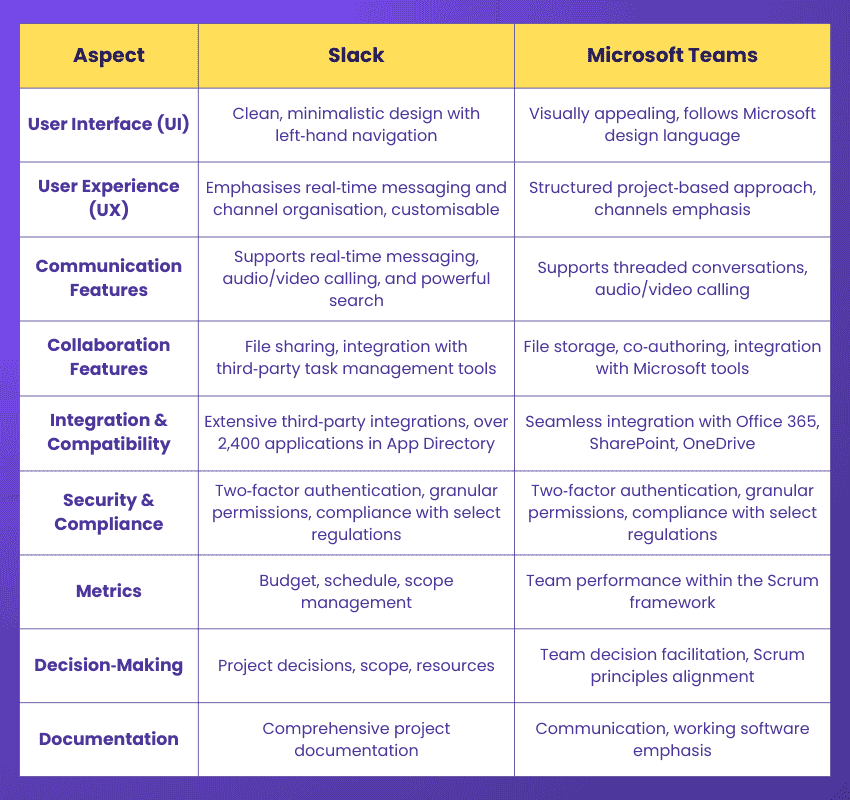
Microsoft Teams presents a visually appealing interface that aligns with the overall Microsoft design language. The UI incorporates a left-hand sidebar navigation that allows easy access to various features, including Chat, Channels, Files, and Calls. It provides a consistent experience across desktop and mobile devices, ensuring that users can seamlessly switch between platforms without feeling lost.
In contrast, Slack focuses on simplicity and ease of use. Its clean, minimal UI features a left sidebar for navigation and a central message feed, prioritising real-time messaging and channel organisation for easy conversation engagement. The platform provides many customisation options, such as custom emoji creation and integration with various third-party apps. In terms of user experience (UX), both Teams & Slack offer intuitive workflows and seamless collaboration.
Teams' UX is designed to align with a structured project-based approach, emphasising channels and document collaboration within groups. It provides a comprehensive feature, which can also result in a steeper learning curve for new users.
Enhance productivity and streamline communication with our Microsoft Teams Training – Sign up today!
2) Communication Features
Microsoft Teams and Slack offer robust communication features to facilitate effective collaboration. Both platforms support text-based messaging, with Teams allowing threaded conversations within channels and Slack promoting real-time messaging with powerful search functionality. Additionally, they provide audio and video calling capabilities, with Teams offering a comprehensive suite of meeting features and Slack enabling both one-on-one and group calls, albeit with potentially fewer options.
Channels play a crucial role in organising discussions, with Teams and Slack adopting a channel-based approach. Teams allows for structured discussions within channels organised by topics or projects, while Slack offers public or private channels for team communication. Direct messaging is also available on both platforms for private conversations, supporting text, file sharing, and multimedia content.
When choosing between Teams and Slack, consider factors such as the importance of threaded conversations, the depth of audio and video calling requirements, and preferences for channel organisation. By evaluating these features in alignment with your team's specific needs and workflows, you can determine which platform best suits your communication requirements for successful collaboration.
Elevate your career with our Microsoft Teams Interview Questions – Register now!
3) Collaboration Features
Collaboration lies at the heart of effective teamwork, and both Microsoft Teams and Slack offer robust features to facilitate seamless collaboration among team members. While there are similarities in their collaboration capabilities, there are also distinct differences worth exploring. Teams allow users to store, access, and share files within the platform, leveraging the integration with Microsoft's cloud storage solution, OneDrive. It also supports co-authoring, enabling multiple team members to work on the same document simultaneously. Also, Teams offers integration with Microsoft Planner, a task management tool that allows groups of people to create, assign, and track tasks.
On the other hand, Slack offers file sharing through its file repository, enabling users to share files with colleagues. However, it does not provide native document editing capabilities, requiring users to open files in external editing applications. Slack integrates with various third-party task management apps like Asana and Trello.
When evaluating collaboration features, consider your team's specific needs and requirements. Factors such as the need for native document editing, task management capabilities, and Project Management integration can influence your choice between Teams & Slack.
Learn how to use SharePoint efficiently with Microsoft SharePoint Course today!
4) Integration and Compatibility
Integration capabilities and compatibility with other tools and services are crucial considerations when choosing a communication and collaboration platform. Microsoft Teams and Slack offer integration options but differ in their respective integrations.

Microsoft Teams' seamless integration makes it an ideal choice for organisations already utilising the ecosystem. It integrates smoothly with Office 365, SharePoint, OneDrive, and other Office productivity tools. This integration enables users to access, share, and collaborate on files directly within its interface.
On the other hand, Slack supports a diverse ecosystem of third-party integrations. With over 2,400 applications in the Slack App Directory, users can connect it with popular tools and services. The wide array of integrations enables people to centralise their workflows and access information from various sources without leaving the Slack platform.Considering the integration options and compatibility features, Teams and Slack provide will help determine which platform aligns better with your organisation's existing software stack and workflow requirements.
Polish Microsoft skills with our Microsoft Office Training today!
5) Security & Compliance
Microsoft Teams offers an essential feature like end-to-end encryption for all messages and calls, which means their data is encrypted at all stages of transmission. Furthermore, it provides data loss prevention, multi-factor authentication, and the option to create retention policies that will automatically archives or remove data after a certain period. Also, Teams adheres with numerous industry requirements, including GDPR.
Slack offers a range of security features, including data encryption, two-factor authentication, and the ability to set up highly specific access controls and permissions. But since it doesn't provide end-to-end encryption, companies handling sensitive data might find this problematic. Slack complies with a limited number of industry regulations, compared to Microsoft Teams.
Learn everything about SharePoint with our Microsoft SharePoint End User Fundamentals Course!
Slack vs. Teams: Mobile and Web Apps
Both Slack and Microsoft Teams offer the same experience on desktop, web, and mobile platforms. Their web applications have much in common with the desktop interface in terms of appearance and functionality, so users do not lose important capabilities when changing gadgets.
The mobile applications are also meant to be similar to the desktop, so that the user does not have to re-learn the functionality of the platforms. Although the interface is customised to smaller screens with touch-based gestures, such as tapping or holding messages, the same is considered to be used in all devices without compromising the overall usability and consistency.
Slack vs. Teams: Plans and Pricing
Slack provides a free package having restricted functionalities and message history. Its paid plans have a Standard one at £9.14 per user per month which opens up searchable message history and unlimited integrations. The Pro plan is priced at £14.48 per user per month and also includes extra security and compliance options, the Enterprise Grid pricing is tailored to large organisations.
The Microsoft Teams can be used as a personal application free of charge and has basic functionality. To the business users, Microsoft 365 Business Basic plan will cost £4.90 per user monthly and will include teams in addition to OneDrive and Exchange. The Business Standard plan is available at £10.30 per user per month and includes more Microsoft applications to use, which is a layered plan to the organisations that already use Microsoft tools.
Slack's Latest Additions
Slack regularly brings in fresh updates and improvements. Here are some key additions:
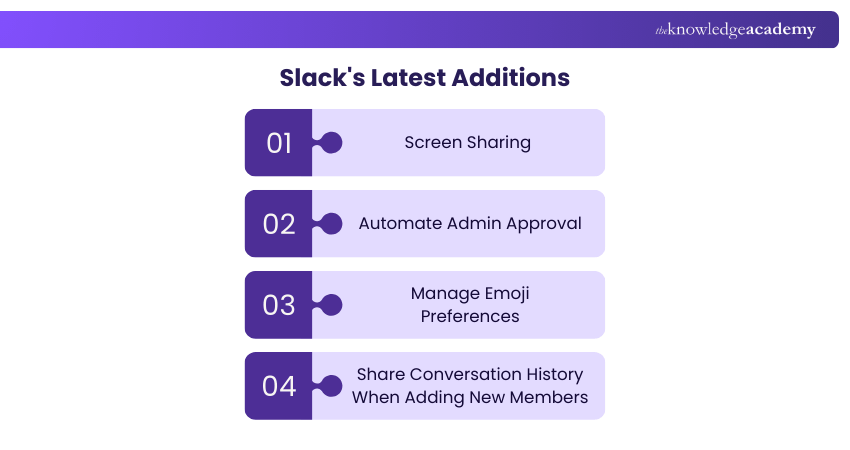
1) Screen Sharing
Individuals are now able to share their screens during team meetings on both computers and smartphones, allowing for immediate collaboration with coworkers. Just paste and share links to enable users to join from any location, like sending an invitation to a calendar or a message to Slack.
2) Automate Admin Approval
Members are now able to install applications without requiring permission from the workspace owner. Nevertheless, owners have the power to either authorise or limit apps on an individual basis. Moreover, you have the option to streamline this procedure by establishing regulations that permit apps to be authorised solely if they satisfy certain standards.
3) Manage Emoji Preferences
Emoticons on Slack enhance tasks with functionality. Individuals have the option to personalise their default skin tone, modify display preferences, and utilise emoji reactions for improved communication with just one click.
4) Share Conversation History When Adding New Members
Slack now permits you to include people in private conversations and still chat seamlessly. When adding new members, they can view messages and files depending on the conversation history you decide to disclose.
Teams' Latest Additions
Besides offering extensive document storage, chat, and online meeting functions, Microsoft Teams consistently improves its range of features. Below are a few of the most recent additions:
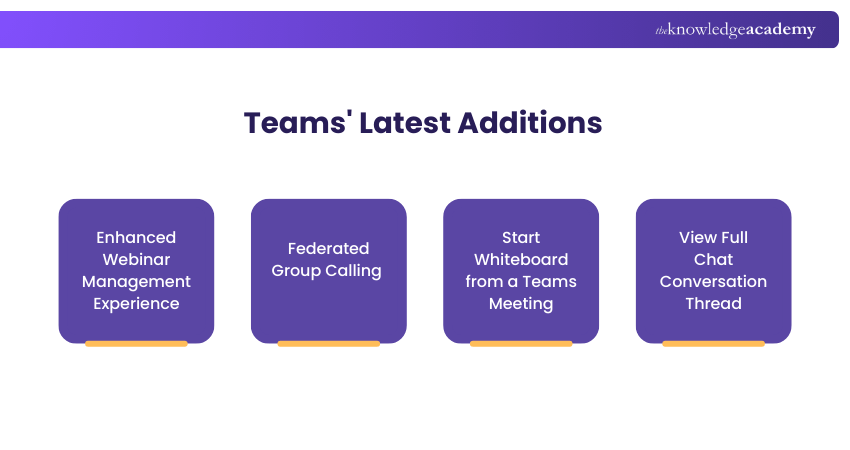
1) Enhanced Webinar Management Experience
Teams have introduced an updated webinar template with fresh layouts and more customisation options for registration details and event settings. You have the option to designate co-organisers to assist in organising and executing your event. Personalise your webinar by including a banner, logo, and colour scheme that match your event theme on registration pages and communications. Establish registration caps for a maximum of 1,000 participants and incorporate personalised inquiries to collect pertinent details, such as a terms and conditions acknowledgement at the time of registration.
2) Federated Group Calling
Effortlessly start group calls with external federated colleagues right from a chat in Teams. This function enables video and screen sharing without any Public Switched Telephone Network (PSTN) charges, all through an Internet connection.
3) Start Whiteboard from a Teams Meeting
Users can now easily start Microsoft Whiteboard during Teams Rooms meetings on Windows using a one-touch sharing feature from the meeting room console. With hybrid work becoming more common, whiteboarding is essential for improving communication between remote and in-person team members.
4) View Full Chat Conversation Thread
Clicking on a search result in Teams will show the full conversation context of the chat message, regardless of how old it is.
Microsoft Teams vs Slack: Which one is Better?
Microsoft Teams and Slack both have their advantages, as well as limitations that organisations should take into account when deciding on the platform.
Microsoft Teams is highly integrated with other Microsoft applications, which makes it a unified experience among teams that already use the Microsoft ecosystem. It combines chat, videoconferencing, and file sharing in a single platform, which makes working in a team easier. But the free version has a limitation in terms of storage and meeting space which might be inadequate to all organisations.
Slack is also famous by its numerous third-party integrations, by which teams can interlink various tools and streamline daily processes. It has a user-friendly interface, which makes it easy to adopt. However, the paid plans at Slack may be costlier than certain other collaboration solutions.
In deciding between Microsoft teams and Slack, it is necessary to evaluate the needs of your team. The final decision should be determined by factors related to interface design, communication features, integrations, compatibility with existing tools, security, and compliance requirements.
Join our Microsoft Office 365 Training to unlock Microsoft's productivity suite and maximise your potential!
What is Slack etiquette?
Slack etiquette should be understood as a type of simple rules that assist teams in communicating in a clear, respectful, and efficient manner using Slack. It also deals with the manner in which messages are composed, when to tag people and the use of channels and threads to ensure conversation is maintained in an orderly manner.
Good Slack etiquette also advises to keep messages short, not to send irrelevant messages, use threads in the discussion that is longer than one, and use the appropriate channel in the topic. The practices will assist in minimising distractions, eliminate misunderstandings, and make the communication within the team more focused and productive.
Is Slack easier to learn than Teams?
Slack is often easier to use than Microsoft Teams particularly when a user is getting into it. Slack has a very user-friendly interface with primary focus on messaging channels and text chats which makes it easy to learn within a very short period of time without necessarily having to undergo any extensive training. Its basic design and easier set up enable the users to begin communicating immediately.
Microsoft Teams, however, provides a more extensive list of functions, such as channels, file collaboration, inbuilt Office tools, meetings, and task management, which might cause an increase in the learning curve. Although Teams is highly potent, the more advanced integrations (with the services of Microsoft 365) may take a little longer to become familiar with the workflows and best practices, especially to the users who do not have prior experience with the Microsoft ecosystem.
In short, Slack is usually simpler to use at first, and Teams can require a little longer to master because of its wide range of collaboration and productivity capabilities.
Conclusion
In conclusion, when choosing between Microsoft Teams vs Slack, it is crucial to consider factors such as familiarity with products, customisation needs, Project Management requirements, and integration preferences. Assessing your organisation's needs will help you make an informed choice that best suits your team's communication and collaboration requirements.
Take your Microsoft Office skills with our Power Apps and Power Automate Training – Sign up now!
Frequently Asked Questions
Why use Slack Instead of Email?

Slack is a great platform for instant communication. Real-time collaboration involves assessing team members' prompt responses in chat for faster decision-making.
What Problems Does Slack Solve?
Slack simplifies team communication by consolidating messages, files, and tools in a single location. It boosts teamwork by facilitating live messaging, sharing files, and integrations, thus cutting down on email overwhelm and enhancing team productivity and structure.
What are the Other Resources and Offers Provided by The Knowledge Academy?
The Knowledge Academy takes global learning to new heights, offering over 3,000+ online courses across 490+ locations in 190+ countries. This expansive reach ensures accessibility and convenience for learners worldwide.
Alongside our diverse Online Course Catalogue, encompassing 19 major categories, we go the extra mile by providing a plethora of free educational Online Resources like Blogs, eBooks, Interview Questions and Videos. Tailoring learning experiences further, professionals can unlock greater value through a wide range of special discounts, seasonal deals, and Exclusive Offers.
What is The Knowledge Pass, and How Does it Work?
The Knowledge Academy’s Knowledge Pass, a prepaid voucher, adds another layer of flexibility, allowing course bookings over a 12-month period. Join us on a journey where education knows no bounds.
What are the Related Courses and Blogs Provided by The Knowledge Academy?
The Knowledge Academy offers various Microsoft Office Training, including Microsoft PowerPoint Training, Microsoft SharePoint Training, Microsoft Office 365 Training and Microsoft Access Training. These courses cater to different skill levels, providing comprehensive insights into What is Microsoft Office.
Our Office Applications Blogs cover a range of topics related to PowerPoint, offering valuable resources, best practices, and industry insights. Whether you are a beginner or looking to advance your Microsoft Office skills, The Knowledge Academy's diverse courses and informative blogs have you covered.

The Knowledge Academy


Global Training Provider
The Knowledge Academy is a world-leading provider of professional training courses, offering globally recognised qualifications across a wide range of subjects. With expert trainers, up-to-date course material, and flexible learning options, we aim to empower professionals and organisations to achieve their goals through continuous learning.

Upcoming Office Applications Resources Batches & Dates
Date
 Microsoft Teams Training
Microsoft Teams Training
Fri 17th Jul 2026
Microsoft Teams Training
Fri 16th Oct 2026

 If you wish to make any changes to your course, please


