


 Top Rated Course

We may not have the course you’re looking for. If you enquire or give us a call on + 1-866 272 8822 and speak to our training experts, we may still be able to help with your training requirements.
Value Stream Mapping: Explianed with Steps, Benefits, and Examples
Scarlett Adams 17 December 2025Value Stream Mapping is a visual tool that helps understand the flow of materials and information in a product or service while identifying waste. It helps teams streamline operations, enhance value delivery, and boost productivity. It empowers organisations to deliver faster, smarter, and more cost-effective solutions.
Home
 Resources
Business Improvement
Value Stream Mapping: Explianed with Steps, Benefits, and Examples
Resources
Business Improvement
Value Stream Mapping: Explianed with Steps, Benefits, and Examples
Resources
Business Improvement
Value Stream Mapping: Explianed with Steps, Benefits, and Examples

Training Outcomes Within Your Budget!
We ensure quality, budget-alignment, and timely delivery by our expert instructors.
Table of Contents

You can’t fix a traffic jam by staring at one car. So why do you want to manage your workflow one step at a time? Most teams look at their processes in parts, trying to solve problems alone. But without seeing the entire journey from start to finish, it is easy to miss where things actually break down.
That’s where Value Stream Mapping (VSM) comes in. It is a tool that shows the full flow of work and tasks to help you identify delays, cut waste, and focus on what truly adds value. Imagine reducing lead times, improving teamwork, and delivering better results just by mapping what you already do. With VSM, you can spot the hidden gaps slowing your process down. Ready to discover how it works and how to apply it? Let’s dive in!
Table of Contents
1) What is Value Stream Mapping?
2) When Should You Use Value Stream Mapping?
3) How Does Value Stream Mapping Work?
4) How to Create a Value Stream Mapping?
5) Benefits of Value Stream Mapping
6) Challenges of Value Stream Mapping
7) Real-world Examples of Value Stream Mapping
8) Conclusion
What is Value Stream Mapping?
Value Stream Mapping is a tool used to analyse, design, and manage the flow of materials and information required to deliver a product or service to a customer. Rooted in Lean methodology, it helps businesses see how value flows through their processes from the start to the end and identify the waste in their processes for eliminating it.
It maps each step as either value-adding or non-value-adding, making it easier to find and eliminate waste. It also highlights the delays, rework, bottlenecks, or unnecessary steps that reduce efficiency or quality.

When Should You Use Value Stream Mapping?
VSM is particularly useful when you want:
1) To improve the full flow of work, rather than just fixing one isolated issue
2) To enhance an end-to-end work process, from request to delivery
3) To identify where inventory, requests, or tasks are piling up in the system
4) To find opportunities for process optimisation and automation
5) To understand the hidden complexities of a workflow
6) To assess which IT systems interact at various points in a process
It is best to use VSM at the beginning of improvement plans, so you can see the full picture before taking any action.
How Does Value Stream Mapping Work?
VSM helps you study your real work process of how it actually works. Let's check how to do it step by step:
1) Identify the Business Problem
Start by clearly identifying the problem or challenge you want to solve. This could be slow delivery times, high production costs, too many customer complaints, or a gap between demand and supply.
Key Points:
1) Focus on a specific customer pain point or delay
2) Define the product or service clearly
3) Align all team members on the goal of the mapping
2) Establish the Scope of the Value Stream
VSM is not only about mapping everything in your company. Instead, it focuses on a specific flow that delivers value to the customer. So, define start and end points for your map. This will help you stop wasting time and energy on unrelated processes.
Key Points:
1) Avoid mapping the entire organisation
2) Set clear start and end points for the process
3) Keep focus on the product’s journey to the customer
3) Conduct a Gemba Walk to Observe Workflows
The word “Gemba” means “the real place.” So, a Gemba Walk means going to the actual place where work happens to observe the process firsthand. You can watch the workflow in action rather than depending on reports and assumptions.

Key Points:
1) Observe work in real time at the source
2) Perform the walk more than once if needed
3) Spot real inefficiencies beyond what reports show
4) Map Each Step Within the Value Stream
The next step is to document all the steps involved in delivering a product or service. This includes manual tasks, automated systems, approvals, handovers, and delays. It is important to show not just what happens but how value moves through each stage.
Key Points:
1) Include every relevant step, even small ones
2) Show information and material flow
3) Highlight delays and handoffs clearly
5) Visualise the Process Flow
Once you’ve listed all the activities, connect them with VSM symbols to show how information and materials flow. Arrows show direction, boxes show tasks, and inventory icons highlight stock points or queues. Make sure it's easy to follow with visual clarity.
Key Points:
1) Use arrows to show movement and direction
2) Clearly mention value-adding vs supporting actions
3) Maintain a logical layout which is easy to read
Learn to deliver what your customers value most with our Advanced Lean Techniques and Understanding Customers Training – Register today!
6) Gather Important Data
Here, you need to collect and gather all the important and necessary details and metrics. It can include cycle time, lead time, number of people involved, inventory levels, downtime or waiting times, demand rates, and more.
Key Points:
1) Collect time, quantity, and resource data
2) Focus on metrics tied to each process step
3) Use the second Gemba walk to gather this info
7) Integrate Data and Build a Timeline
Add the data that you've gathered below each process box on your map. You can also create a timeline at the bottom showing how much time is actually spent adding value versus waiting or reworking. It helps to spot where the delay occurs.
Key Points:
1) Display time and resource data under each step
2) Build a total process timeline below the map
3) Separate value-added vs non-value-added time
8) Spot Inefficiencies and Waste
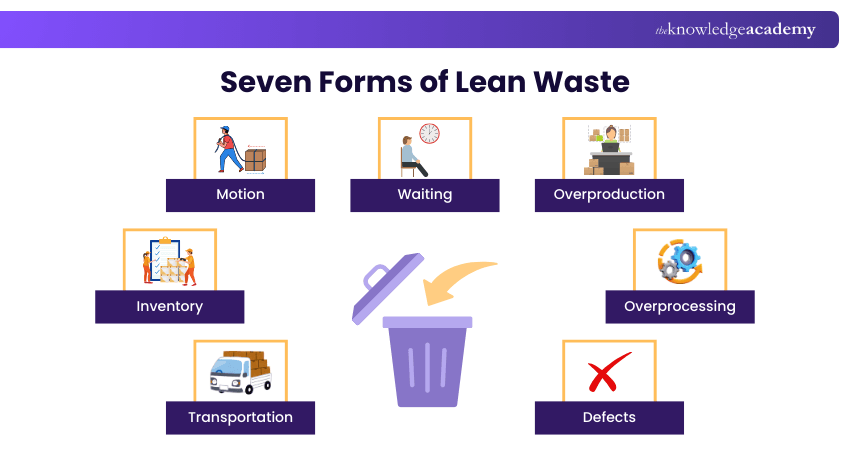
Spotting and classifying waste are the core of VSM. According to Lean methodology, waste is not limited to unused or unwanted items. It can be delays, overproduction, reworks, waiting period, excessive inventory, and so on.
Key Points:
1) Look for all seven categories of Lean waste
2) Focus on recurring patterns, not just isolated events
3) Prioritise waste that impacts the customer experience
9) Analyse and Refine the Value Stream Map
When you are done with your research and documentation, you need to reflect on those details. You can evaluate the current state map with your team. You can also create a future state map that improves flow, reduces waste, and focuses on customer value.
Key Points:
1) Collaboratively review the current state map
2) Create a clear vision of the future state
3) Align the team on improvement targets
10) Set up an Implementation Plan
The map has to take its next step of implementation. Use your future state map to develop an action plan with clear, measurable steps. Assign responsibilities, set timelines, and track progress.
Key Points:
1) Turn insights into specific, measurable actions
2) Assign accountability for each change
3) Track results and iterate where needed
Learn the tools that make Lean and VSM work with our Lean Processes and Tools Training – Join now!
How to Create a Value Stream Mapping?
Now it is time for you to know how to create a Value Stream Mapping. Here is how you can create it with situational examples:

1) Identify the Problem
Start with a clear understanding of what issue you're trying to solve. VSM can be part of regular workflow maintenance or used to address known challenges like excess inventory, slow delivery, or inefficient handovers.
Situation:
Your company has received feedback from clients that support tickets are taking too long to be resolved. Customer satisfaction scores have dropped, and it is assumed that there might be delays and inefficiencies in the ticket triage and resolution process.
Example Insight:
You define the problem as: "Reduce the average resolution time for customer support tickets from 3 days to 1 day."
2) Choose Your Team
Your VSM effort is only as strong as the people behind it. It demands that you build a cross-functional team with representation from all key areas. This team can consist of areas like sales, operations, support, and product, depending on the process you're mapping.
Situation:
To map the Value Stream, you gather a team including:
1) One support agent (who logs and manages tickets)
2) A Software Developer (who fixes the reported bugs)
3) A QA Tester (who validates solutions)
4) A Customer Success Manager
5) An IT Operations Lead
6) The Product Manager
Example Insight:
This team provides a 360° view of how a ticket flows from customer submission to final resolution and follow-up.
3) Define the Project Scope
Without a proper project goal and objective, your mapping may be overwhelming. VSM is effective when you focus on one product, service, or workflow at a time. Decide if you want to work on a project lifecycle, like order to delivery, or just a portion, like development to QA.
Situation:
You decide to focus only on the support ticket handling process, starting from the moment a customer submits a ticket to the point where it is marked as “resolved” and a satisfaction survey is sent.
Example Insight:
You exclude customer follow-up and internal post-resolution reviews from this VSM to keep the scope manageable.
4) Map Your Value Stream
Now it is time for you to draw the current state map. Use standard VSM symbols to illustrate the flow of work, materials, and information. A good flow has three layers such as: information flow layer, product or service flow layer, and lead and cycle time layer.
Situation:
The team maps the current process:
1) Ticket submitted through a web form
2) Ticket assigned manually by a support agent
3) Triage meeting every six hours
4) The developer picks up the ticket
5) Fix implemented
6) Quality Assurance (QA) reviews
7) Fix deployed
8) Customer gets notified
9) Ticket marked as resolved
Example Insight:
You draw the map using VSM symbols, showing the flow of tasks, decision points, and communication handovers across the departments.
5) Add Project Data
Data is what turns your visual into a useful tool. Therefore, you need to add metrics below each process step. This will help you understand timing, capacity, performance, and resource use. For that, you can include inventory details, batch sizes, team members involved, and more.
Situation:
Each step is now tagged with real data:
1) Inventory: 40 open tickets in the queue
2) Cycle Time for Developer Fix: Six hours
3) QA lead time: 12 hours
4) Tickets Released to QA: Four per batch
5) Support Agent Capacity: 30 tickets daily
Example Insight:
You discover that while fixes are fast, tickets often sit in the QA queue for up to 2 days.
6) Create a Timeline
Add a timeline to show how long the entire process takes and how much of that time is actually spent doing useful work. This helps you easily spot delays, repeated steps, and waiting periods, which are usually the best areas to improve.
Situation:
You build a timeline at the bottom of the map showing:
1) Total Lead Time: 72 hours
2) Total Cycle (Value-added) Time: 10 hours
3) Waiting Time: 62 hours
4) Bottleneck: QA queue (high wait time before testing)
Example Insight:
You find that nearly 85% of the total process time is idle time, mainly in triage and QA.
7) Analyse Your Current Map
Once the current state map is done, you can analyse it to uncover waste and areas needing improvement. Even if some problems are clear, take time to dig deeper and validate them with your data. You can even use Kaizen bursts to highlight waste and improvement areas.
Situation:
After reviewing the map, the team identifies several areas of waste:
1) Waiting: QA batch processing gives an unnecessary delay
2) Over-processing: Triage meeting frequency is excessive
3) Motion: Manual ticket reassignment causes confusion
4) Defects: QA often returns fixes due to unclear documentation
Example Insight:
You plan Kaizen bursts to streamline QA, automate triage, and document fix requirements better.
8) Design Your New Map
Now, create your future state Value Stream Map, which represents your improved workflow. It includes everything from your current map, removes the waste, and adds better communication, faster movement, and more efficient handovers.

Situation:
You redesign the map by:
1) Using automation rules to assign tickets instantly based on category
2) Removing the triage meeting (auto-routed by priority)
3) Implementing Kanban for QA to test immediately after development fixes
4) Including a checklist field in the developers’ handover for QA clarity
Example Insight:
This future state map reduces wait times, avoids batching, and improves communication between developers and QA.
9) Implement Your New Map
Here comes the most important part of turning the plan into action. Use your future state map to build a rollout strategy with clear tasks, owners, and timelines. VSM isn’t just about analysis. Instead, it is more about action and continuous improvement.
Situation:
Your new system rolls out in phases:
1) Week 1: Automation rules and ticket routing
2) Week 2: QA Kanban board
3) Week 3: New handover documentation protocol
Key Performance Indicators (KPIs) like ticket resolution time, ticket queue age, and satisfaction scores are monitored weekly.
Example Insight:
After one month, average resolution time drops from three days to 1.4 days, and customer feedback improves significantly.
Boost productivity and eliminate waste with our Lean Awareness Training – Sign up anytime!
Benefits of Value Stream Mapping
Value Stream Mapping has a wide range of benefits, including:
1) Increased Efficiency: By looking at how work flows, businesses can spot and remove extra steps and cut down on delays.
2) Waste Reduction: Helps find and get rid of steps that don’t add value and slow things down.
3) Improves Teamwork: Encourages better communication and collaboration between teams.
4) Focuses on the Customer: Keeps the team focused on what matters most to the customer.
5) Supports Smarter Decisions: Uses real data to lead improvements instead of guesses.
6) Faster Problem Solving: Visualising the flow of value helps to quickly locate and resolve process bottlenecks.
Challenges of Value Stream Mapping
VSM is powerful, but it also comes with a few challenges. Here are some of the challenges you might face:
1) It can be time-consuming to complete
2) Difficult to map complex or cross-functional processes
3) Teams may resist change or improvements
4) Inaccurate or missing data can lead to poor results
5) Focus may stay on short-term fixes instead of long-term gains
Real-world Examples of Value Stream Mapping
Now, let’s get to know how VSM is used in real-world situations:
1) Applying Value Stream Mapping in Healthcare
Value Stream Mapping is used in healthcare to map the full patient journey to reduce wait times and improve care. Hospitals can identify delays in triage, treatment, or discharge and allocate resources more effectively.
2) Financial Sector Use of Value Stream Mapping
Banks use VSM to streamline services, reduce long queues, and automate slow, manual tasks. It helps improve customer experience and internal efficiency.
3) VSM Applications in Manufacturing Environments
In manufacturing factories, VSM helps reduce waste and improve delivery. It helps identify waste in production lines, reduce overproduction, balance workloads, and speed up delivery.
4) Utilising Value Stream Mapping in Office Settings
Even office teams benefit from VSM. It is used to uncover hidden delays in approvals, communication, or supply handling. HR might use it to speed up new employee onboarding, or marketing teams might fix delays in campaign approvals. Overall, it improves workflow and boosts team productivity.
Conclusion
Value Stream Mapping isn’t just a tool. It is a mindset that helps you see your processes clearly, understand where things go wrong, and find smarter ways to work. No matter in which sector or setting you’re in, VSM gives you the power to remove waste, improve flow, and focus on what truly matters. Start small, involve the right people, and keep improving because with VSM, progress is always within reach.
Take the first step toward operational excellence with our Lean Training – Explore to excel!
Frequently Asked Questions
Are there any Software Tools Available for Creating Value Stream Maps?

Yes, the software tools for VSM include:
1) Microsoft Visio
2) Lucidchart
3) SmartDraw
4) IGrafx
5) Miro
What are Some Common Challenges When Implementing Value Stream Mapping?
Common challenges include:
1) Inaccurate or missing data
2) Resistance to change
3) Difficulty defining process boundaries
4) Difficulty in visualising complex workflows
5) Poor follow-through after mapping
What are the Other Resources and Offers Provided by The Knowledge Academy?
The Knowledge Academy takes global learning to new heights, offering over 3,000 online courses across 490+ locations in 190+ countries. This expansive reach ensures accessibility and convenience for learners worldwide.
Alongside our diverse Online Course Catalogue, encompassing 19 major categories, we go the extra mile by providing a plethora of free educational Online Resources like Blogs, eBooks, Interview Questions and Videos. Tailoring learning experiences further, professionals can unlock greater value through a wide range of special discounts, seasonal deals, and Exclusive Offers.
What is The Knowledge Pass, and How Does it Work?
The Knowledge Academy’s Knowledge Pass, a prepaid voucher, adds another layer of flexibility, allowing course bookings over a 12-month period. Join us on a journey where education knows no bounds.
What are the Related Courses and Blogs Provided by The Knowledge Academy?
The Knowledge Academy offers various Lean Training, including Value Stream Mapping Course, Lean Awareness Training, and Lean Processes and Tools Training. These courses cater to different skill levels, providing comprehensive insights into Muda.
Our Business Improvement Blogs cover a range of topics related to Value Stream Mapping, offering valuable resources, best practices, and industry insights. Whether you are a beginner or looking to advance your Lean Management skills, The Knowledge Academy's diverse courses and informative blogs have got you covered.
Upcoming Business Improvement Resources Batches & Dates
Date
 Value Stream Mapping Training
Value Stream Mapping Training
Fri 17th Apr 2026
Value Stream Mapping Training
Fri 5th Jun 2026
Value Stream Mapping Training
Fri 14th Aug 2026
Value Stream Mapping Training
Fri 9th Oct 2026

 If you wish to make any changes to your course, please


