


 Top Rated Course

We may not have the course you’re looking for. If you enquire or give us a call on +353 12338944 and speak to our training experts, we may still be able to help with your training requirements.
How to Reset Apple Watch to Factory Settings? A Quick Guide
Richard Harris 03 February 2026Interested in How to Reset Apple Watch to factory settings? Toggling clears the field no matter if you are analysing the problem or if you are about to sell. This blog provides details on how to efficiently complete the reset process. It also covers essential steps to take beforehand and common mistakes to avoid during the operation.

Training Outcomes Within Your Budget!
We ensure quality, budget-alignment, and timely delivery by our expert instructors.
Table of Contents

Is your Apple Watch having issues, or are you intending to pass it on to someone else? In many cases, understanding How to Reset Apple Watch can help resolve software glitches or prepare the device for a new owner. However, you might find the idea of resetting your Apple Watch daunting. The good news is that it's easier than it seems!
In this easy-to-follow blog, you will learn How to Reset Apple Watch properly while maintaining your privacy and resolving any issues with your device. Let’s explore why and how you can perform a reset without a hitch!
Table of Contents
1) Reasons to Reset Your Apple Watch
2) Things to Consider Before You Reset Your Apple Watch
3) Unpair Your Apple Watch From Your iPhone
4) Reset Directly on Your Apple Watch
5) Complete the Reset Process
6) Re-pair Your Apple Watch with Your iPhone
7) Conclusion
Reasons to reset Your Apple Watch
Resetting your Apple Watch is simple and useful. It helps resolve software issues, removes unwanted data, and allows you to pair the device with a different iOS Devices. This section explains how to reset your Apple Watch securely and without hassle.
Fix Issues
A reset can solve issues like freezing, lagging or any other difficulties that Software has. Some of these may develop from conflicts in the running software or bugs, and resetting can bring the watch to its default settings, eradicating these challenges.
Clear Data
If you decide to sell your Apple Watch, give it to someone as a gift, recycle it, or pass it on in any other way, you need to delete personal information first. A reset helps make certain that none of the activity data, Apple ID, or payment methods you selected stays stored on the device.
Re-pair iPhone
If you are planning to change your iPhone, doing so with the Apple Watch makes the process of disconnecting the device from the old iPhone easier. It also makes it ready to be paired with the newly purchased phone without any IDs or connectivity strings left over.
Things to Consider Before You Reset Your Apple Watch
Before resetting your Apple Watch, it’s crucial to back up all your data to avoid losing important information. This section emphasises important precautions to take before resetting your Apple Watch to avoid data loss or complications:
1) Backup Your Data:
Double check to make sure all information pertaining to your Apple Watch; this includes activity, applications, and basically everything has been backed up. Apple Watch data is normally backed up to your paired iPhone when the watch is synced in general.
2) Sync all Necessary Data:
Before resetting, make sure all important data is transferred from your Apple Watch to your iPhone. This includes your most recent fitness activity, app data, and health records. Data that was not synchronised will be erased permanently when the reset happens.
Stronger the skills database with our MongoDB Certification - Register now!
1) Unpair Your Apple Watch from Your iPhone
Your iPhone must be unpaired from the Apple Watch before a reset in order to guarantee that all your information is backed up and ready for restoration if required. Here's how this step works:
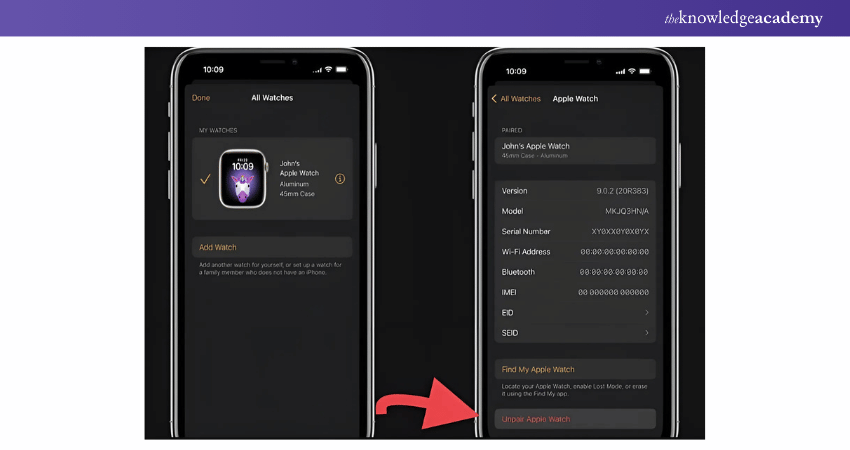
Using the Watch App on Your iPhone
Here the following are the steps to follow to unpair the Apple Watch:
a) First, turn on the iPhone and access the Watch app by tapping on it.
b) To do that, scroll down to the “My Watch” tab and pick your preferred Apple Watch.
c) Tick the “i” icon adjacent to your watch.
d) Select “Unpair Apple Watch” and proceed to delete the option.
2) Reset Directly on Your Apple Watch
Resetting directly on your Apple Watch is an alternative method to perform a factory reset without needing the iPhone. This is particularly useful if you don't have immediate access to your paired iPhone or want a quicker way to clear the device.
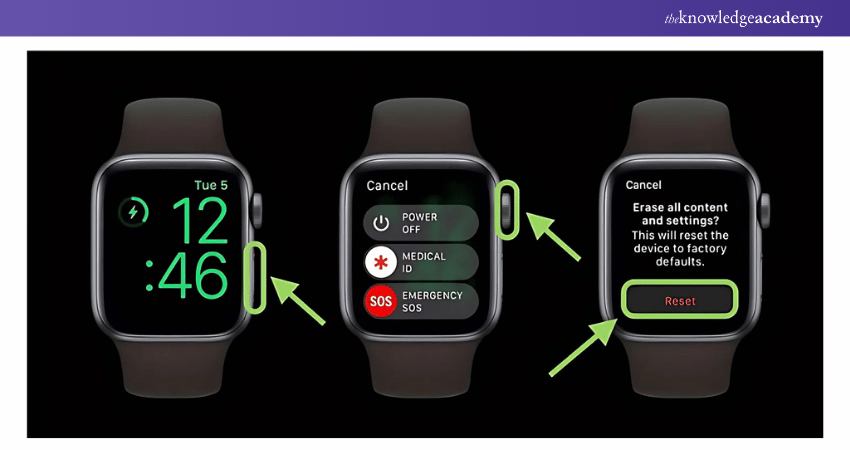
On Your Apple Watch
Here’s an explanation of the direct reset of the Apple Watch:
a) Open the Settings app.
b) Navigate to General > Reset.
c) This will appear in the middle of the window; click it and choose “Erase All Content and Settings”.
d) In the case of a passcode, it will be asked to be entered before confirming the reset’s beginning.
3) Complete the Reset Process
Once the reset process starts, your Apple Watch will begin erasing all data, including apps, settings, and stored information. This step ensures the device is restored to its original factory settings.
What to Expect During the Reset Process?
a) Erasing Data:The reset takes a few minutes, depending on stored data.
b) Reboot & Apple Logo: The watch restarts and displays the Apple logo.
c) Progress Indicator: A loading bar or spinning icon appears.
d) Welcome Screen: Once complete, the "Welcome" screen confirms the reset is done, and the watch is ready for setup.
4) Re-pair Your Apple Watch with Your iPhone
The last set of actions that need to be performed after a factory reset is to reclaim it as your Apple Watch. Thus, this process creates a new connection between these two devices to make your watch work correctly.
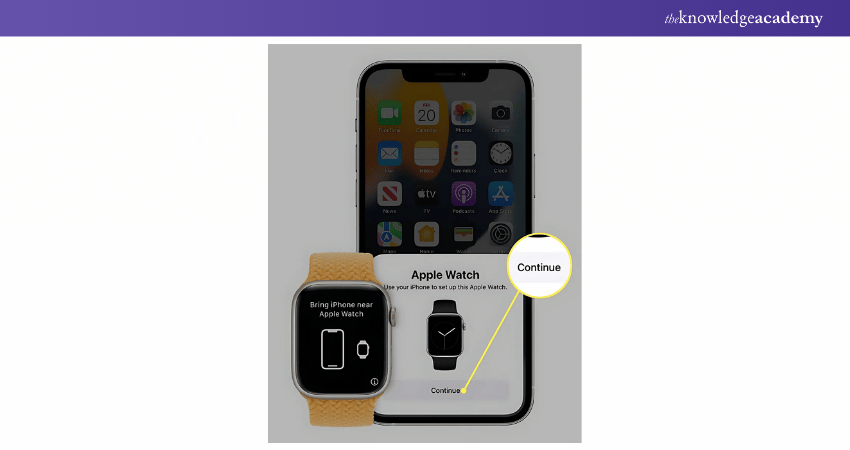
Using the Watch App on Your iPhone
Here the following are the steps to follow:
a) Launch the Watch app, find the option “Start Pairing”, and click on it.
b) It will prompt you on the screen to make the watch face parallel to the camera lens.
c) Finally, you are asked to restore your backup and if you do not have one, you can start with a new profile.
Boost your App and Web Development skills with expert App & Web Development Training – Start now!
Conclusion
As shown above, learning How to Reset Apple Watch does not have to be a complicated process. By following these simple steps, you can easily fix issues, erase personal data, or sync it with a new device in no time. Whether upgrading or passing it on, a proper reset ensures a seamless experience and keeps your device performing at its best. Give your device a clean slate and enjoy a seamless experience!
Transform ideas into excellent applications with our IOS App Development Course - Sign up today!
Frequently Asked Questions
What are the Disadvantages of an Apple Watch?

It requires daily charging, cannot be used as a standalone product and is rather expensive. It also may seem excessive for a user who needs just a simple watch or fitness tracker experience.
Are Apple Watches Waterproof?
Apple Watches are water resistant, holding the ability to survive swimming or being washed by water, but are not completely waterproof. Diving or any other high-pressure activities can reduce their sturdiness. However, it is advisable that you always refer to your model’s water resistance specifications.
What are the Other Resources and Offers Provided by The Knowledge Academy?
The Knowledge Academy takes global learning to new heights, offering over 3,000+ online courses across 490+ locations in 190+ countries. This expansive reach ensures accessibility and convenience for learners worldwide.
Alongside our diverse Online Course Catalogue, encompassing 19 major categories, we go the extra mile by providing a plethora of free educational Online Resources like Blogs, eBooks, Interview Questions and Videos. Tailoring learning experiences further, professionals can unlock greater value through a wide range of special discounts, seasonal deals, and Exclusive Offers.
What is The Knowledge Pass, and How Does it Work?
The Knowledge Academy’s Knowledge Pass, a prepaid voucher, adds another layer of flexibility, allowing course bookings over a 12-month period. Join us on a journey where education knows no bounds.
What are the Related Courses and Blogs Provided by The Knowledge Academy?
The Knowledge Academy offers various App & Web Development Training, including the HTML and CSS Course, UI UX Design Course and the Mobile App Development Course. These courses cater to different skill levels, providing comprehensive insights into Clear Cache on iPhone.
Our Programming & DevOps Blogs cover a range of topics related to Development, offering valuable resources, best practices, and industry insights. Whether you are a beginner or looking to advance your App Development Skills, The Knowledge Academy's diverse courses and informative blogs have got you covered.

Richard Harris


Senior Full Stack Developer and Technology Educator
Richard Harris is a highly experienced full-stack developer with deep expertise in both frontend and backend technologies. Over his 12-year career, he has built scalable web applications for startups, enterprises and government organisations. Richard’s writing combines technical depth with clear explanations, ideal for developers looking to grow in modern frameworks and tools.

Upcoming Programming & DevOps Resources Batches & Dates
Date
 iOS App Development Course
iOS App Development Course
Thu 10th Sep 2026
iOS App Development Course
Thu 10th Dec 2026

 If you wish to make any changes to your course, please


