


 Top Rated Course

We may not have the course you’re looking for. If you enquire or give us a call on +36 18508731 and speak to our training experts, we may still be able to help with your training requirements.
What is 3D Modelling and How Does it Work?
The Knowledge Academy 21 April 20263D Modelling is the creation of digital 3D representations of objects using software, forming the basis for games, films, 3D printing, design, and simulations. This technique involves breaking down objects into smaller polygons and then assembling these polygons to form a 3D image. Its applications range from music videos to Architecture.

Training Outcomes Within Your Budget!
We ensure quality, budget-alignment, and timely delivery by our expert instructors.
Table of Contents
Ever stopped to wonder how your favourite movie characters, game worlds, or product prototypes come to life before they even exist in the real world? Yes, that’s the magic of 3D Modelling. But What is 3D Modelling, really?
Imagine shaping digital clay into anything you can dream up, a spaceship, a sneaker, even a lifelike human face. It’s where creativity meets Digital Technology, and the results are seriously cool. In this blog, we’re diving into What is 3D Modelling, how it works, where it’s used (spoiler: pretty much everywhere). So let’s get Modelling!
Table of Contents
1) What is 3D Modelling?
2) Types of 3D Modelling
3) The 3D Modelling Process
4) Uses of 3D Modelling
5) Tips for 3D Modelling
6) Most Popular 3D Modelling Software
7) What is the Difference Between 3D Modelling and 3D Animation?
8) What is the Future Scope of 3D Modelling?
9) Conclusion
What is 3D Modelling?
3D Modelling is the process of creating a three-dimensional digital representation of any object or surface using specialised software. Unlike 2D images that appear flat, 3D models have depth, height, and width. These models can be viewed from any angle, rotated, animated, and even 3D printed.
It’s a powerful visualisation tool used across industries, including architecture, gaming, animation, manufacturing, and more. Whether it’s a futuristic spaceship, a realistic human character, or a prototype of a new product, 3D Modelling gives shape and structure to ideas before they become real.

How Does 3D Modelling Work?
3D Modelling involves manipulating points in a digital space. These points form a mesh made up of vertices, edges, and faces. Think of it like sculpting with digital clay. Designers either start from scratch or use a base model and then tweak the geometry to shape the desired form.
Textures, lighting, and shadows are added later to enhance realism. Modern software allows real-time rendering, enabling creators to instantly see how changes affect the model. Some tools even allow models to be rigged and animated for movement.
Types of 3D Modelling
Now that we’ve explored What is 3D Modelling and its basic working, let’s explore the various types of 3D Modelling that breathe new life to digital characters and environments:
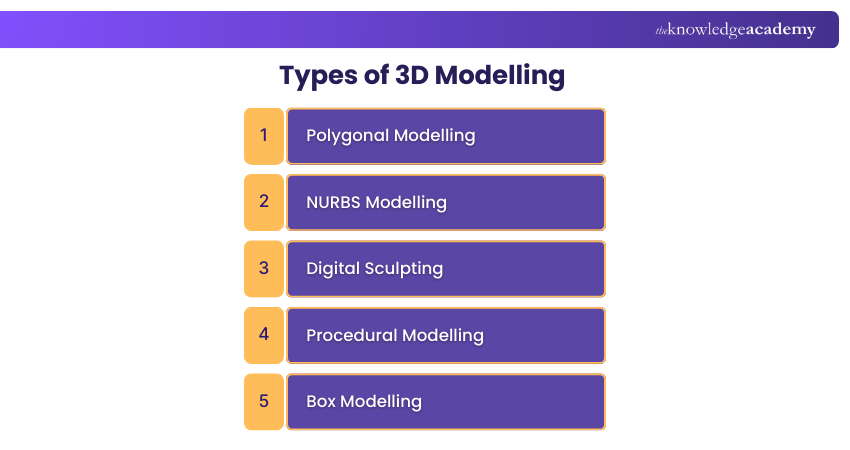
1) Polygonal Modelling
1) Polygonal modelling is a widely used 3D Modelling technique. It's built using vertices, edges, and faces to create detailed meshes.
2) It is especially popular in video games and real-time rendering where speed and interactivity are essential.
3) This method helps Creators design a wide range of objects, from characters to environments and mechanical structures.
4) A major benefit is the high level of control artists have over the model’s shape. It enables precise adjustments to individual components.
5) It works well for both organic forms and hard-surface models.
6) Optimisation is important because using too many polygons can impact performance, especially in real-time projects.
2) NURBS Modelling
1) NURBS modelling uses mathematical curves to create highly precise 3D surfaces rather than relying on flat polygons.
2) The surfaces remain perfectly smooth even when zoomed in. It's ideal for accuracy-focused industries.
3) It is widely used in Automotive Design, Engineering and product manufacturing where precision is key.
4) NURBS relies on control points and weights to shape curves. This gives Designers detailed control over surface flow and transitions.
5) It excels at creating complex and flowing surfaces such as car bodies or precision-machined components.
6) Since it is mathematically driven, NURBS supports both visual quality and real-world manufacturability.
7) The method is a favourite for high-end product development.
3) Digital Sculpting
1) Digital sculpting replicates the feel of traditional clay modelling using brush-based tools in a digital environment.
2) It's ideal for creating organic shapes such as characters, creatures and natural elements where expressive details are essential.
3) Artists typically begin with a basic shape and gradually add layers of detail to refine the model.
4) This method allows for sculpting intricate textures, which improves realism.
5) Highly detailed sculpts often require retopology to optimise the mesh for the use in games and animation.
6) Digital sculpting is widely used in film, TV and high-end visuals to produce lifelike characters and immersive environments.
4) Procedural Modelling
1) Procedural modelling uses algorithms to generate large 3D environments automatically. This reduces the need for manual placement.
2) It's ideal for creating expansive worlds such as cities, forests and landscapes with significant time savings.
3) Artists can adjust parameters to quickly refine or alter results.
4) The technique excels at producing complex patterns and detailed elements without manual effort.
5) Algorithms generate natural variation, such as unique rocks or trees, while maintaining the overall style.
6) It is widely used in games and films to build immersive, large-scale digital worlds.
7) Beyond entertainment, it benefits architecture and scientific visualisation due to its dynamic nature.
5) Box Modelling
1) Box modelling begins with simple geometric shapes like cubes or spheres to form the base of a 3D model.
2) Artists refine these basic forms by adding subdivisions and shaping them into more detailed structures.
3) It is ideal for quickly blocking out characters, props or environments during early design stages.
4) The technique is highly flexible. It allows for easy adjustments and reshaping throughout the process.
5) Its simplicity makes it perfect for rapid prototyping. It helps Designers test concepts and receive quick visual feedback.
Turn your imagination into visual stories. Bring your ideas to life with our Animation and Design Training - Sign up now!
The 3D Modelling Process
Creating a high-quality 3D model is not a one-step affair. It involves a series of structured stages that ensure precision and artistic expression. Here’s a closer look at each phase of the process that’ll help you gain a better understanding of What is 3D Modelling:
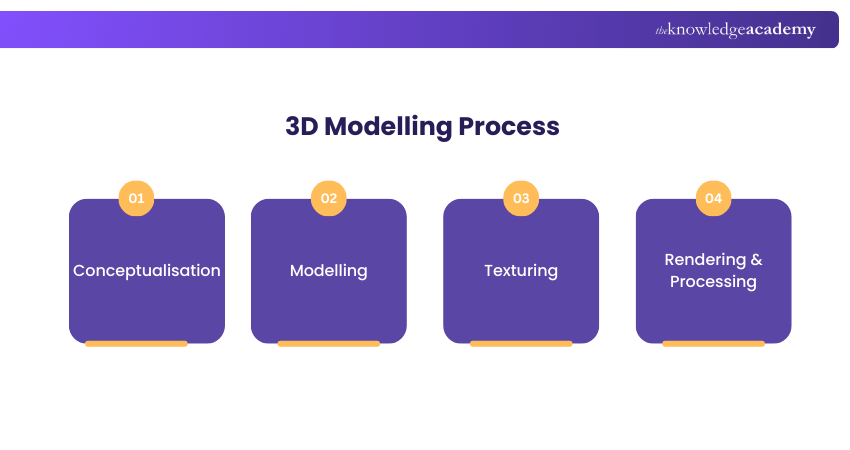
1) Conceptualisation
Before jumping into any software, everything begins with a concept. Artists sketch out their ideas, gather references, and decide on the purpose of the model. This stage may involve mood boards, storyboards, or rough pencil drawings. A clear vision saves time and aligns the final output with the original goal.
2) Modelling
This is where the magic starts. Artists use software to create the mesh structure of the object. Various techniques are used here, including box modelling, sculpting, and spline modelling. Whether it’s a mechanical part or a human figure, precision is key. The modeller refines the shape, topology, and structure, constantly checking for proportion and symmetry.
3) Texturing
Once the shape is final, textures and materials are applied. This is where colour, surface detail, and realism come in. Artists may use photos, painted textures, or procedural materials to define how the surface of the model looks. Wrinkles on skin, wood grain on a table, or shiny metal reflections are all achieved in this phase.
4) Rendering & Processing
The final stage is rendering. The software simulates light and camera effects to produce a realistic (or stylised) image or animation of the model. This output can then be exported as images, video, or interactive content. Post-processing, including lighting corrections and background enhancements, often adds the finishing touch.
Learn how to design a Logo like a professional with our Logo Design Course. Join now!
Uses of 3D Modelling
3D Modelling isn’t just a tool for Artists. It’s transforming how industries design, train, build, and communicate. Let’s explore its top use cases.
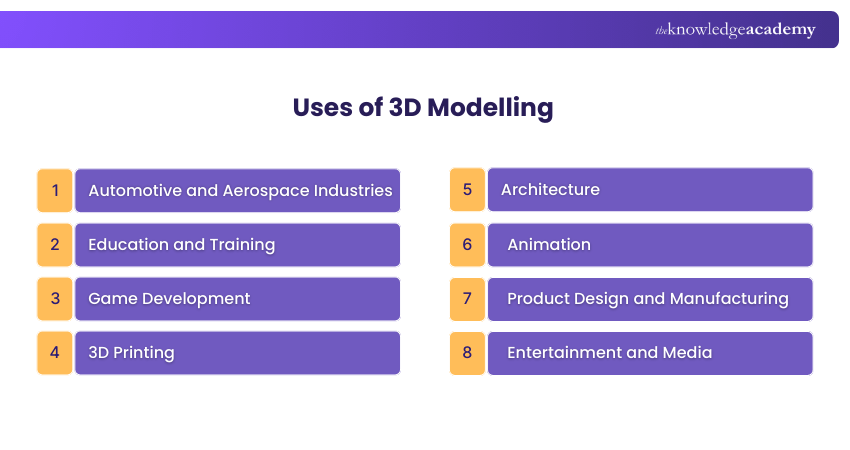
1) Automotive and Aerospace Industries
Car and aircraft manufacturers use 3D Modelling for prototyping and design. It helps engineers simulate performance, analyse aerodynamics, and reduce physical prototype costs. Every curve and component can be virtually tested before a single part is manufactured.
2) Education and Training
Interactive 3D models are becoming vital in education. Medical students, for instance, can explore anatomy in 3D. Training simulations for pilots, surgeons, and engineers offer hands-on experience in a risk-free environment, making learning immersive and safe.
3) Game Development
Games today boast stunning visuals thanks to 3D Modelling. Characters, environments, weapons, and even facial expressions are modelled in 3D. It allows developers to build rich, believable worlds that engage players on every level.
4) 3D Printing
One of the most practical uses of 3D models is in printing. Designers create digital models that can be directly sent to 3D printers to manufacture real-world objects. From medical implants to custom tools, this technology is revolutionising production.
5) Architecture
Architects use 3D models to design buildings, interiors, and urban landscapes. These models help clients visualise space, lighting, and materials. Virtual walkthroughs and photorealistic renders replace traditional blueprints.
6) Animation
In both film and television, 3D models are animated to tell stories. Characters come alive with facial expressions, movement, and dialogue. Entire worlds are built in 3D and brought to life with storytelling and motion.
7) Product Design and Manufacturing
Companies use 3D Modelling to develop new products. Every detail, from a smartphone’s curves to a kitchen appliance’s buttons, is designed digitally. It accelerates the design process and improves testing before mass production.
8) Entertainment and Media
Beyond film and gaming, 3D models are used in advertisements, virtual concerts, music videos, and even social media filters. They create eye-catching visuals that hold audience attention and boost engagement.
Tips for 3D Modelling
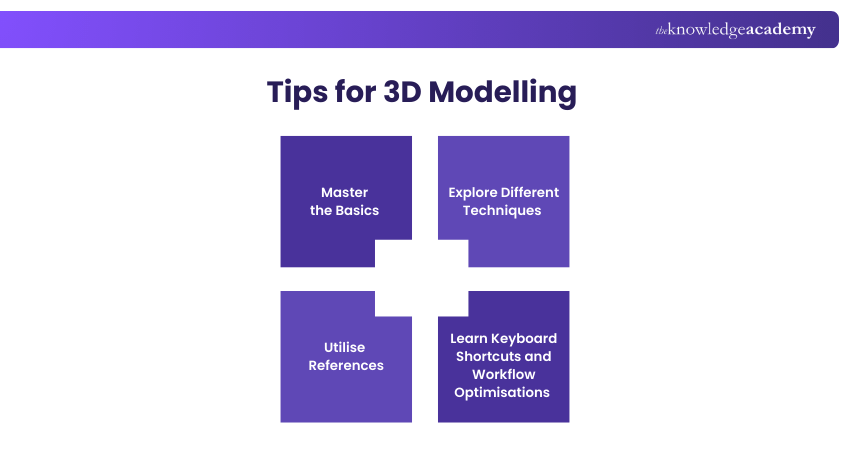
Getting started with 3D Modelling can be exciting but also a bit overwhelming. Here are some tips that can help you build a strong foundation and speed up your learning.
1) Master the Basics
Start simple. Learn about vertices, edges, and faces. Understand how geometry works. Most complex models are built from these core elements, so a solid grasp of the basics goes a long way.
2) Explore Different Techniques
Don’t stick to one method. Experiment with box modelling, sculpting, and procedural modelling. Each technique offers different strengths and combining them can help you achieve better results.
3) Utilise References
Professional modellers rely heavily on reference images. Whether you’re modelling a human or a toaster, having real-world visuals keeps proportions accurate and improves realism.
4) Learn Keyboard Shortcuts and Workflow Optimisations
Every 3D software has a learning curve, but mastering shortcuts can save hours. Customise your interface, use layers wisely, and learn to organise your files. Efficient workflow equals better productivity.
Enhance your knowledge of the VLSI environment with our Essentials of Professional VLSI Digital Design Training!
Most Popular 3D Modelling Software
There’s no one-size-fits-all software for 3D Modelling. Each tool has its strengths depending on your goals, skill level and budget. Here are some of the most widely used options.
1) Blender
Blender is a free, open-source powerhouse used for modelling, sculpting, animation, and more. Despite being free, it offers professional grade tools and has a massive online community for support.
2) AutoCAD
Primarily used in architecture and engineering, AutoCAD is known for its precision. It’s ideal for creating 2D and 3D designs of buildings, machinery, and other technical drawings.
3) Autodesk Maya
A favourite in film and animation studios, Maya is known for its robust features in animation, rigging, and visual effects. It’s used to create some of the most iconic animated characters and environments.
4) SketchUp
SketchUp is perfect for beginners, especially those in architecture and interior design. It’s easy to learn and great for creating quick 3D models of spaces and furniture.
5) Cinema 4D
Cinema 4D stands out for motion graphics and visual effects. It’s popular among Designers working in advertising, media, and animation due to its smooth interface and powerful rendering tools.
What is the Difference Between 3D Modelling and 3D Animation?
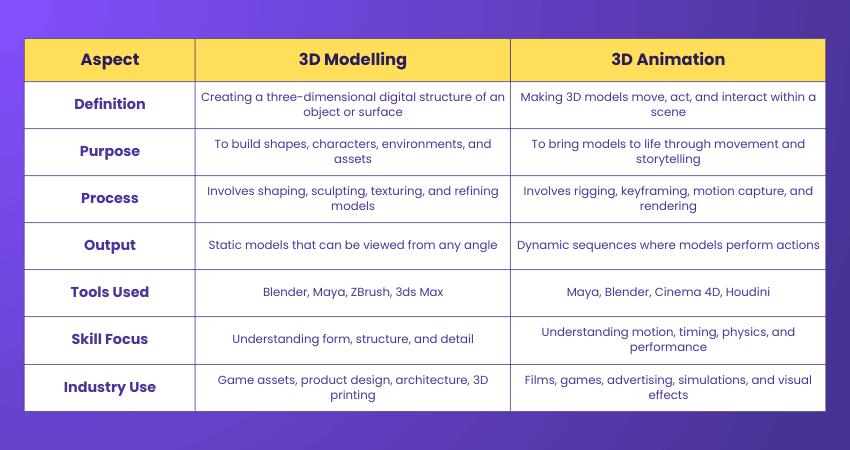
3D Modelling builds a three-dimensional digital representation of an object or surface, while 3D animation brings those models to life by adding movement, actions and interactions within a scene. Here are the key differences:
What is the Future Scope of 3D Modelling?
The future of 3D Modelling is exciting as illustrated by the following points:
1) AI is Reshaping 3D Modelling: Artificial Intelligence is a game-changer in 3D Modelling. It can create designs by automating complex tasks. AI is making it easier to generate realistic models from minimal input. This helps reduce production time and improve productivity in design processes.
2) Growing Role of Advanced Technologies: Beyond AI, Cloud-based collaboration, real-time rendering and immersive tools like AR and VR are expanding possibilities.
3) Democratising 3D Creation: AI-powered tools allow users with different skill levels, including non-experts, to generate complex 3D models easily.
4) Integration Across Industries: These technologies are being adopted in areas like Gaming, Product Design, Architecture and Education.
5) Innovation Trends to Watch: Text-to-3D generation, AI-assisted design optimisation and collaborative Cloud workflows are among the major trends expected to define 3D Modelling.
6) Market Momentum: With wider adoption of AI tools, the 3D Modelling market is poised for significant growth. This will enable more scalable model creation in the years ahead.
Conclusion
3D Modelling has evolved into one of the most versatile and powerful tools in the digital world. From shaping fantasy worlds to building real-world products, its impact spans across industries and continues to grow. Whether you’re a budding Designer, a curious student, or a seasoned professional, understanding What is 3D Modelling opens a world of possibilities.
Acquire an extensive knowledge of Motions Graphics with our Motion Graphics Course – Sign up now!
Frequently Asked Questions
What is Topology in 3D Modelling?

Topology in 3D Modelling refers to how a model’s surface is built using vertices, edges and faces. It's the structural foundation that ensures the mesh can be shaped or animated without distortion. Good topology features clean edge flow, evenly distributed polygons and smooth, natural surface transitions.
What is Photogrammetry in 3D Modelling?
3D Photogrammetry involves capturing a real-world object and converting it into a precise digital 3D model. It can be used for subjects of any scale, from people and artefacts to buildings. Its applications span manufacturing, engineering, design, entertainment and healthcare.
What are the Other Resources and Offers Provided by The Knowledge Academy?
The Knowledge Academy takes global learning to new heights, offering over 3,000+ online courses across 490+ locations in 190+ countries. This expansive reach ensures accessibility and convenience for learners worldwide.
Alongside our diverse Online Course Catalogue, encompassing 17 major categories, we go the extra mile by providing a plethora of free educational Online Resources like Blogs, eBooks, Interview Questions and Videos. Tailoring learning experiences further, professionals can unlock greater value through a wide range of special discounts, seasonal deals, and Exclusive Offers.
What is The Knowledge Pass, and How Does it Work?
The Knowledge Academy’s Knowledge Pass, a prepaid voucher, adds another layer of flexibility, allowing course bookings over a 12-month period. Join us on a journey where education knows no bounds.
What are the Related Courses and Blogs Provided by The Knowledge Academy?
The Knowledge Academy offers Animation and Design Training, including the Blender 3D Modelling for Unity Training and the 3D Printing Course. These courses cater to different skill levels, providing comprehensive insights into SketchUp Tools for 3D Design.
Our Office Applications Blogs cover a range of topics related to 3D Printing, offering valuable resources, best practices, and industry insights. Whether you are a beginner or looking to advance your 3D and Modelling skills, The Knowledge Academy's diverse courses and informative blogs have got you covered.

The Knowledge Academy


Global Training Provider
The Knowledge Academy is a world-leading provider of professional training courses, offering globally recognised qualifications across a wide range of subjects. With expert trainers, up-to-date course material, and flexible learning options, we aim to empower professionals and organisations to achieve their goals through continuous learning.

Upcoming Office Applications Resources Batches & Dates
Date
 Blender 3D Modeling for Unity Course
Blender 3D Modeling for Unity Course
Fri 31st Jul 2026
Blender 3D Modeling for Unity Course
Fri 30th Oct 2026

 If you wish to make any changes to your course, please


